This is topic Automating JSX1000 to switch to digital with DA20 in forum Film Handlers' Forum at Film-Tech Forum ARCHIVE.
To visit this topic, use this URL:
https://ft-forum.com/ft/cgi-bin/ubb/ultimatebb.cgi?ubb=get_topic;f=1;t=007889
Posted by Aaron Garman (Member # 1653) on 03-28-2006, 01:24 PM:
So we have a problem with two of our Ultra Stereo units wanting to switch to the digital/ext with our DA20s. No matter what, the green digital light on the DA20 will not engage unless we manually press the digital/ext button on the Ultra Stereo. I've looked at the wiring on our 3rd DA20, but it uses an actual board, whereas the two that don't work have multicolor wires with spade connectors connecting to the Ultra Stereo. If it helps, this is how the connections are connected:
Auditorium 1:
Purple into Non Sync
Nothing on Mono and Aux
Red on Stereo
Nothing on SR
Black on E
Gray on Digital
Auditorium 11 (has SR card):
Brown on Nonsync
Red on Mono
Nothing on Aux
Yellow on Stereo
Green on SR
Black on E
Blue on Digital
All I want is for these units to switch to digital when it picks up an SRD signal. It's frustrating just because not everyone on the staff remembers to switch it manually, except a few of us. Thanks!
AJG
Posted by Brad Miller (Member # 2) on 03-28-2006, 03:50 PM:
You have to have an "A" series board in the DA20 for it to "auto-switch" when it sees digital. (I can't remember the actual cat number.)
This really isn't worth your time or expense to upgrade the card. Just move the automation wire that is connected to SR or whatever format your automation starts the show in to the digital terminal. That way when the automation switches out of non-sync, it will go right into digital. Problem solved.
Posted by Darryl Spicer (Member # 711) on 03-28-2006, 06:35 PM:
Just remember that you must have digital information on the first trailer otherwise you have to switch it to stereo. On the one we have I have it set up like Brad suggests and it works great. Sometimes if the first trailer is not digital. wich in our case it's ads, the unit will switch to stereo but not all the time.
Posted by Aaron Garman (Member # 1653) on 03-28-2006, 10:10 PM:
I'll give it all a try, but was wondering if the fact that our NCM ads run on the stereo input make a difference. I say this because they added a wire from the stereo automation input to another input that keeps it locked into stereo until the motor starts. Thus, we don't even use nonsync anymore. I was wondering if this has something to do with it? All our DTS houses and one of our dolby house are fine, except these two.
I also forgot to mention that at one point, house 11, was setup so that the full dim cue also pulsed the processor into digital so that trailers played in stereo only. This was before the NCM was installed, and ever since it has been goofy because we don't use the spare cue anymore.
Also, if I move the SR or Stereo wire to the digital input, will the unit revert back to stereo if the digital drops out since nothing will now be connected to the stereo/SR input?
Thanks guys.
AJG
Posted by Darryl Spicer (Member # 711) on 03-28-2006, 11:07 PM:
There should be one wire coming from the DA20 automation control hooked to the stereo or sr automation point on the Ultra stereo processor to pulse it to stereo when digital drops out. By the way are you using CFS consoles? Thats what we have and what I did was put the wire that used to go to the Mono point and moved it to the Stereo point and removed the stereo automation wire to avoid it pulsing to stereo while reading a digital signal. Note the ones you need to switch are the wires coming from your projection automation not the DA20. Do they have the NCM wired into the projector #2 pre amp inputs? They probably do and it is wired to think it is running a second machine so when you push the start button it switches over just like a change over thus staying in stereo. Unless there is another way around it you may have to thread early so that the dowser opens before the digital track enters the reader so that it pulses to digital. Maybe someone else has the answer on that one. We get the NCM stuff in a few weeks so the info will be good to know.
Posted by Aaron Garman (Member # 1653) on 03-28-2006, 11:59 PM:
Darryl, we do have CFS consoles and the NCM is wired in as a second projector. I'm still wondering why using nonsync wasn't good enough. Anyhow, do you mean I need to switch some wires inside the console itself? I looked in there and it just looks like a big mess, but with direction I may be able to understand what to do.
Thanks for all the help.
AJG
Posted by Darryl Spicer (Member # 711) on 03-29-2006, 12:20 AM:
No no need to switch anything in the console. The wires are on the Ultra Stereo. Does the ultra stereo ever go into Non-Sync? Check the Switch on the automation panel that says stereo and SR or Mono on it. Make sure it is in the right setting. I am just not sure about the wiring and what they have done when they installed the NCM stuff. It sounds to me like it's just wired to pulse to stereo as if it was a changeover. The wire pulsing the stereo from the main automation needs to be moved from the stereo or sr point on the automation inputs to the Digital point so when the relay pulses the projector dowser to open it will pulse the processor to digital.
Posted by Aaron Garman (Member # 1653) on 03-29-2006, 12:40 AM:
Let me outline what exactly is going on again.
We have CFS consoles, the Ultra Stereo JSX-1000 and the DA20.
We also have NCM running in between shows. Now, the audio information for the NCM ads are setup as a 2nd projector, and thus wired into input 2 on the Ultra Stereo.
When one hits the start button, the lamp will light, motor moves, and the douser opens. The sound itself was already in stereo, and thus just stays there, with no pulse being sent to the DA20 to tell it to go digital. The only way to get the green LED on the DA20 to light up digital, one must manually press the DIGITAL/EXT button on the Ultra Stereo.
I'm starting to think that the automation pulses NOTHING when you hit start now as far as sound goes. I switched the wire for Stereo from the DA20 automation from the stereo automation input on the Ultra Stereo to the Digital input, and I still have the same problem. In fact, nothing happens at all. I can't even manually put the unit in digital.
So what exactly am I missing? Garrrr, frustration to the max! Makes me wish we had a DTS 6 in there, because those work fine throughout the complex, even with NCM.
Thanks a bunch Darryl and I'll keep trying stuff!
AJG
Posted by Darryl Spicer (Member # 711) on 03-29-2006, 02:28 AM:
Hmmmm on the DA20 we have the green led to indicate digital only comes on when digital information is being processed. There is no pulse to the DA20 from the automation. It goes into digital processing only when information is being read and pulses the ultra stereo into digital extension. There must be some wires that come from the automation connected to the automation on the ultra stereo. Basically how many wires do you have going to the stereo automation terminal. You should have two wires going to the Digital/Ext on the Ultra Stereo. One for the DA20 to pulse to digital if it were to drop out and the other for the main automation to pulse the ultra stereo processor on dowser open. Essentially it was the wire used to pulse the Ultra Stereo to stereo at start up. Why is the spare cue no longer used? In our case it is needed to pulse the lights from half to full dim. Otherwise with it out of spare cue the lights don't dim and the center cue at the credits is no longer functional. I still think either a switch is in the wrong place or a wire needs to be moved. Can you take a couple of photos and post them so we can look at the back of your units.
Posted by Aaron Garman (Member # 1653) on 03-29-2006, 08:33 AM:
I'll grab some photos this morning. Also, the spare cue switch is still on spare cue, but we only use 3 cues now since the NCM ads run on full light. When we hit start, the lights automatically go to half now.
AJG
Posted by Jason Miller (Member # 2341) on 03-29-2006, 11:28 AM:
Does the processor switch to Projector 2 when the changeover closes or when the motor stops?
Posted by Aaron Garman (Member # 1653) on 03-29-2006, 12:07 PM:
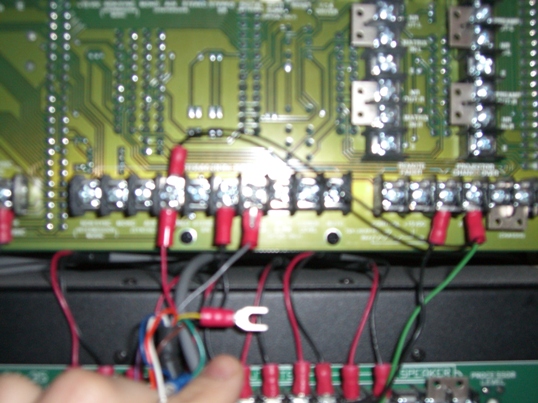
Hello all. Here are the two images I was able to capture of the backplane of the Ultra Stereo and the console
itself. Forgive the blurry image, but the camera I used didn't work too well and the lighting situation was even
worse. Looking at the backplane, there are two wires coming up from the DA20 on the left there. The red one is
wired into the stereo automation input, the black one as a ground (I think), and the gray one wired into digital.
That extra black one on the stereo input is part of the NCM system and locks the processor into stereo until the
motor runs. On the right side, there are the black and green wires. The black is a ground I'd imagine, and the
green is the changeover from the NCM system. If this is disconnected, there will be no sound for NCM.
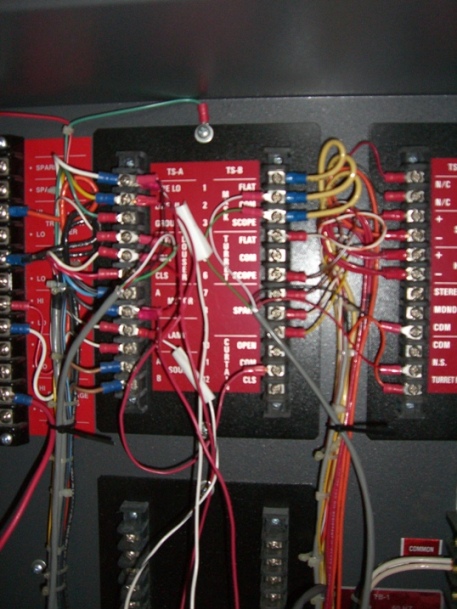
Here is the image of the console. I don't understand much of what is going on there, but it is here for anyone who
is curious.
To answer Jason's question, the processor switches when the motor stops.
Thanks for all the help.
AJG
EDIT: I don't know if I mentioned it clearly, but when everything starts running, the DA20 is reading all the information as it should be, but the green LED for DIGITAL will not light up. The orange analog LED also will not light. So somewhere in there, something isn't kicking it into thinking it's in digital.
Posted by Jason Miller (Member # 2341) on 03-29-2006, 01:05 PM:
When the DA20 starts up it thinks it is in a non-analog format (like non-sync). You have to send a ground pulse across the same lines it uses to switch with (it monitors those lines as well as uses them to switch the processor).
Since the NCM stuff was installed, someone removed the wire that was originally sent from the automation to switch it out of non-sync into Stereo. you will need to hook this wore back up so that the DA20 knows it has been switched to an analog format.
now.. a possible problem that might be happening at the end of the show, is that when the changeover closes, does the processor stay in projector 1 and Stereo and blast the tail out through the sound system until the motor stops and the P2 card takes over?
Posted by Aaron Garman (Member # 1653) on 03-29-2006, 02:35 PM:
So, would this ground wire be one of the extra ones just hanging there from the console automation bundle (pictured on the right)? If so, where would I connect that one? To the digital automation input?
Yeah, at the end of the show, we hear a bunch of junk until the motor stops. It's REALLY annoying and tacky if anyone is left in the auditorium. Basically, when the show ends, the last cue brings up the house light and closes the douser. When it actually drops, motor stops, projector 2 (aka NCM) audio changes over, and the masking sets itself to flat.
AJG
Posted by Jason Miller (Member # 2341) on 03-29-2006, 03:30 PM:
a better picture of the termination panel in the console would help.. but...
it looks like a red wire is connected to NS (non-sync). and nothing is connected to STEREO. you need those 2 connections and a ground common. is there a spare wire in the console that runs back to the processor that you can hook up to STEREO?
and if there is a wire connected to NS, is it connected to the processor on the back? I cant tell from the blur.
Posted by Aaron Garman (Member # 1653) on 03-29-2006, 04:29 PM:
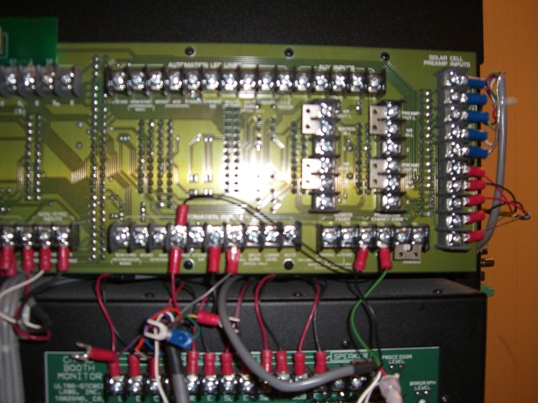
Again, blurry but maybe a little more helpful. See the green and black on the right side? The green is the changeover for the NCM and the black is a ground. On the left, RED connects to STEREO, BLACK to E, and GRAY to DIGITAL. There is a PURLPLE wire hanging there on the left that was in NONSYNC. Would that help, even though we no longer use the nonsync for sound?
AJG
Posted by Jason Miller (Member # 2341) on 03-29-2006, 05:42 PM:
Is there a P2 card attached to this or just a relay across the motor to select Projector 2 on the processor.
Is the other side of that gray wire hooked to the DA20?
The reason I asked about non-sync, is that the changeover close should select non-sync (hopefully by automation already, otherwise with a relay). Then when the motor runs out, if there is a P2 card, the processor will switch to projector 2 and STEREO.
the reason to select NS would be to keep the tailout from going through the system and damaging (possibly) speakers.
if there isnt a P2 card this gets more difficult. but regardless of being able to fix the endshow problem, the startshow problem can be resolved by finding a wire that connects STEREO on the automation to the the STEREO on the processor. when the automation sends that pulse on changeover open, the DA20 (which is ALSO hooked up to STEREO as well as DIGITAL) will sense an analog format has been selected and will autoswitch to digital if data is OK.
You said there was a cable going from the automation output on the DA20 that ended in spade connectors on the Processor right?
Posted by Aaron Garman (Member # 1653) on 03-29-2006, 06:29 PM:
Not sure about the relay.
The other side of the gray wire is hooked into the DA20.
Currently, in the picture of the backplane of the Ultra Stereo, there are TWO wires connected to the STEREO automation input. The RED one, from the DA20 and a BLACK one, that connects to the CHANGEOVER (this prevents switching on the format card when NCM is running). Also connected to the automation inputs are a BLACK wire on E (which is a ground?) and a GRAY wire which is CONNECTED to DIGITAL/EXT. Those two wires, along with the RED one go right back to the DA20. The only other wire, the GREEN one, is what allows the NCM or PROJECTOR 2 to have sound.
So if I run another wire for this ground, what connects to what? Do I need to get into the console?
I wish I had a better camera, sorry all. But thanks for bearing with me.
AJG
EDIT:
Maybe this will help in locating things
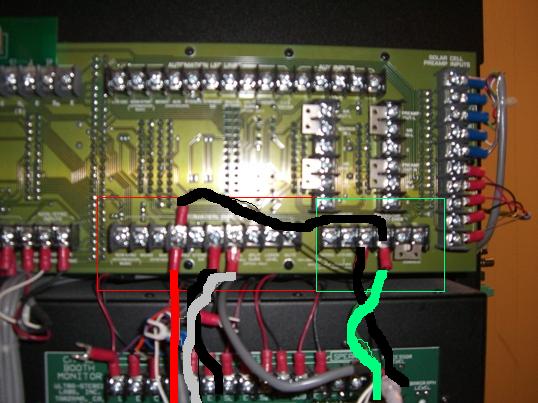
The red box are the automation inputs.
The green box is where the changeover wire runs to, and controls for a remote fader.
The wires were highlighted to the best of my ability. Forgive me for not knowing photoshop!
Posted by Darryl Spicer (Member # 711) on 03-29-2006, 07:33 PM:
Aaron,
Take a look at the other processors in the building. Do any of them have a wire that goes to the Non-sync on the automation terminal. The system may need that wire briefly. They may have that thing wired up so that when the film tails out of the failsafe it switches to projector number 2 on the preamp. What I am thinking is that the wire for Non-sync being hooked up it will pulse Ultra stereo processor to cover up the noise associated with tail out and then when the failsafe drops the system switches to projector #2 and back into stereo. One of those loose wires that are hanging should be hooked to the digital/ext so when the Projector pulses at dowser open it puts the processor in digital mode. Thus also sending the signal needed for the DA20 to activate.
Posted by Aaron Garman (Member # 1653) on 03-29-2006, 09:25 PM:
A loose wire from the DA20 or a loose wire from the other bundle?
AJG
Posted by Jason Miller (Member # 2341) on 03-29-2006, 09:50 PM:
what is at the other end of the wires connected to projector 2 optical inputs? do they go to some sort of circuit board?
Posted by Aaron Garman (Member # 1653) on 03-30-2006, 07:57 AM:
Yes, there is a circuit board that connects to those optical inputs.
AJG
Posted by Jason Miller (Member # 2341) on 03-30-2006, 10:08 AM:
Ok. then you have what is called a P2 card.
the P2 card was developed to take a 120 volt signal (from accessory cicuit or slide projector) and pulse projector 2 and STEREO on power up. when the P2 card powers down, it is supposed to release to projector 1 and pulse noin-sync. that is depending completely on how it was wired up of course.
what you need to do, is find the wires from your automation that go back to your processor. hook up a wire to STEREO and a wire to NS (nonsync). then the automation will switch the processor on changeover open to STEREO if it already isnt (more on that later). and will switch the processor to non-sync on changeover close. switching to nonsync will eliminate the tailout noise and make sure the DA20 switches back out of detect.
without being able to trace wires in your theatre, I couldnt promise the purple in one place was the purple in another. you will have to actually make sure they are the same wire.
the DA20 needs to have wires hooked up to STEREO, nonsync, and DIGITAL on the processor (and ground.. and yes E on the processor is ground). the DA20 uses these wires to switch formats as well as monitor if any other equipment does as well.
the P2 card most likely changes to projector 1 when the motor starts right? if it does, if you hook up the "R" output on the P2 card to nonsync, then the processor will switch to NS when the P2 card powers down. when the changeover opens, it will switch back to STEREO. if you notice the sound system playing the heading garbage at the start of the movie then you have the same problem as the tailout. the P2 cards should also have a wire from "P" to STEREO. this wire will switch the processor to STEREO when the card powers up. if the automation has nonsync hooked back up, then when the changeover closes the processor will switch to NS until the motor stops. the P2 card will switch it back to STEREO in projector 2.
have I lost you yet?
you asked earlier why there was a P2 card instead of just using non-sync. There was a decision made to get the intermission content to play in matrix instead of just 2 channel. I wont get into the politics of that or express opinions. this thread is to help you get your sound automation to work correctly.
Posted by Aaron Garman (Member # 1653) on 03-30-2006, 11:51 AM:
quote: Jason Miller
have I lost you yet?
Kind of, but not really. There are two boards I know of that are new in the system. One is on the side of the sound rack, and it has 2 RCA phono plugs coming from the PC running the NCM. That card then sends 4 wires (2 for left channel and 2 for right channel) to the optical inputs on the Ultra Stereo processor. The other card is inside the console, but I have not taken a good look at it. I think there may be a new relay in there too, but not exactly sure. I go in tonight, so I'll take a look at things, maybe try some stuff, and report back. Thanks for all the help everyone.
I also hope this helps Darryl, as you said you all are getting NCM soon. It is so nice not to have to change rolling stock all the time. I LOVE THAT!
AJG
Posted by Jason Miller (Member # 2341) on 03-30-2006, 12:46 PM:
That card witht he 2 RCA jacks and wires going to proj2 optical, as well as some wires going to your processor changeover and format is the P2 card.
We still need to check on wires going from automation to processor. make sure the purple you see down there is the purple you see behind the processor.
I have had a lot of experience hooking up those cards to USL and Dolby prcoessors. I hope I can help.
Posted by Aaron Garman (Member # 1653) on 03-31-2006, 12:46 AM:
Ok, here's the deal.
The P2 card, the one that takes the RCA plugs and then sending audio to the optical in on the Ultra Stereo, has NONE of the automation connections, well, connected. In addition, there is no POWER going to the board. Further more, the CHANGEOVER and GROUND
(green and black from above) are connected to a relay inside the console. Off of that, it was hard to follow the other wires connected to it, as it was a jungle inside that console. Only reason I know those green and blacks go to the relay is because I looked inside another console and they had decided to use a handy dandy yellow jacket on that bundle of wire.
So, to say it bluntly, I'm stumped!
AJG
Posted by Jason Miller (Member # 2341) on 03-31-2006, 11:18 AM:
ah... wow... maybe there was some issue with using the automation parts of the P2 card.
is there a way you can post a picture of the P2 card to make sure we have the right card?
the problem with just using a relay across the motor, is that all it does is toggle between proj1 and proj2. without having some other control to the format functions, it was wired to stay in STEREO all the time. which, as you can hear, makes starting and ending the movies all that more entertaining. I guess if the tailout and heading noise isnt too much a deal, you should be able to get away with just getting a wire from STEREO on the automation to pulse STEREO on the processor. that will alert the DA20 to a status and it will autoswitch from there (still assuming you have the right cards in the DA20 and it is set on auto-digital CP55 or CP65).
if you have the P2 card, we can try the normal wiring for it to see how the automation reacts. lets see what it looks like.
Posted by Aaron Garman (Member # 1653) on 03-31-2006, 12:18 PM:
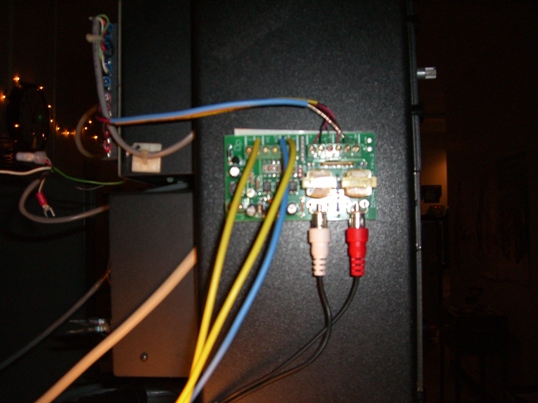
The wires coming from the automation outputs on the left I just added and tried hooking up to the ultra stereo automation inputs. It didn't work, and the DA20 still wasn't acting as it should. So minus those wires, that is what the board looks like on all our installs.
Also, what controls do I have on the DA20 for autodigital? All I know of is the processor selector on the front of the unit, and we have it set on 1 (CP55) on this auditorium. The two other Dolby houses are set for a CP65 (2) on that dial, but one only one has a problem switching to digital. In fact, the Dolby house that does work has an actual board connected to the automation inputs and has no extra wires compared to the other installs and it works just fine.
AJG
Posted by Jason Miller (Member # 2341) on 03-31-2006, 08:18 PM:
Ok. That IS a P2 card. but it looks as if there is no power going to it. it was being used mainly as a converter from RCA to "balanced" line using the on-board isolation transformers.
the automation parts of it arent working becasue it has no power. there should have been a power plug that came with it. 12 VDC I believe and I will have to see what the current rating is. that power plug, if switched on and off with motor power using a 120V relay, will cause the automation to change like I described before.
since I am guessing you dont have the plug (whoever isnatlled this took a shortcut I guess), we have to try and work around it. we wont be able to switch to non-sync at the end of the show unless we found a way to switch it back to STEREO after proj2 was selected. if we can get the P2 card powered.. we can do that.
the select switch you have on the front is correct. if you take a wire on the back and momentarily touch ground to STEREO during a movie, does the DA20 light up the orange "analog" led? and if data is available, does it switch to digital?
I also just went back and saw the wire that goes from XO (changeover) to STEREO. if you select anything after the changeover closes, but before the motor stops, it is wired to select STEREO with proj2. holding a format select to ground is bad on some processors.. I dont know if this is true for USL. maybe Clint Koch would know that.
if it is okay to do that, then we can actually hook up a wire from automation NONSYNC to processor NONSYNC. and when changeover closes non-sync should be selected.
see what happens with that momentary wire from ground to STEREO during film run.
EDIT: you said in a previous post there wasnt power going to that P2 card. sorry.. I should have picked up on that.
Posted by Jason Miller (Member # 2341) on 04-03-2006, 01:47 AM:
Aaron... did any of that wiring work?
Posted by Jerry Corgnati (Member # 3703) on 04-03-2006, 06:16 AM:
Aaron It sounds like you have a poorly wired automation. I would suggest paying someone to come in and make it work correctly. Maybe Jon Vickers at the university will have someone there that could help.
Posted by Aaron Garman (Member # 1653) on 04-03-2006, 01:24 PM:
Sorry guys, but we had a busy weekend and I was managing, so I wasn't able to test the system. I have my shift in booth tonight so I should get back with you sometime later tonight.
As for rewiring our automation, somehow I don't think my company will hire someone else to do it. Heck, I don't even know if they'd like me messing with it, thinking I'd blow something up. ![[Roll Eyes]](rolleyes.gif)
AJG
UPDATE:
So I went ahead and disconnected anything NCM related that is plugged into the Ultra Stereo, and ran the ground from it to the ground on the automation inputs. SUCCESS! We had automated digital sound. So I decided to hook the NCM (projector 2) back up to the XO input and NO AUTO DIGITAL!!??? Well, at least we're on to something.
AJG
[ 04-04-2006, 01:13 AM: Message edited by: Aaron Garman ]
Posted by Jason Miller (Member # 2341) on 05-04-2006, 02:57 PM:
I actually ended up having to do this exact hookup last night myself.
DA20 on a USL JS200 WITH P2 card installed. Autodigital works, as well as P2 card.
send me an email if you still want to work this problem out. it involved some creative cabling.
Powered by Infopop Corporation
UBB.classicTM
6.3.1.2