This is topic scratches (in middle?) in forum Film Handlers' Forum at Film-Tech Forum ARCHIVE.
To visit this topic, use this URL:
https://ft-forum.com/ft/cgi-bin/ubb/ultimatebb.cgi?ubb=get_topic;f=1;t=008218
Posted by Chad Smith (Member # 2130) on 08-26-2006, 02:55 AM:
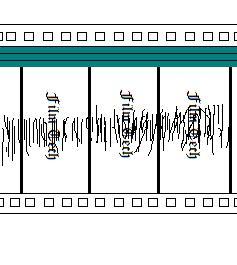
NOTE: I believe that the scratches set closer to the soundtrack. I will have an actual picture of the film up sometime later today. I just drew this to hopefully assist in the understanding of my situation for the time being.
Christie P35GPS, potts platters, flim sits soundtrack up. Scratches are on the emulsion side.
To describe the scratches in words: marks in the approx. middle of the film that bunch together to form what looks like a very elongated sine wave on the soundtrack side of the scratch and that have a varying length, yet remain in what seems to be the center vicinity of the film. If I recall correctly the scratches taper towards the foot of the frame and curve slighty, which was hard to represent in my mspaint drawing ![[Razz]](tongue.gif) . The frequency is constant throughout the film and tapers near the end of the flim (I will post a picture of the taper later today with the scratch picture). The taper that I speak of trails off downwards (away from the soundtrack) and the marks get smaller and smaller and eventually disappear. This taper happens approx. 15-20 feet before the end of the feature.
. The frequency is constant throughout the film and tapers near the end of the flim (I will post a picture of the taper later today with the scratch picture). The taper that I speak of trails off downwards (away from the soundtrack) and the marks get smaller and smaller and eventually disappear. This taper happens approx. 15-20 feet before the end of the feature.
If you need anymore information just let me know. I'll come back around with ACTUAL PICTURES of the scratches later today ![[beer]](graemlins/beer.gif)
Thanks for being awesome!
Posted by Monte L Fullmer (Member # 2797) on 08-26-2006, 03:46 AM:
Looks like you got a roller that is in contact with the print on the emulsion side - and with some serious film tension going across the roller...are your return rollers on the POTT's showing any hints of pressing on the emulsion side, since this roller is the last roller that there is film contact with before it goes into the main wind on rewind.
Also, if the last few minutes, wonder if your rewind is drastically more tighter than normal, causing the film to actually buckle into the roller itself.
..some ideas to check into ... - Monte
Posted by Louis Bornwasser (Member # 3063) on 08-26-2006, 03:47 PM:
Emulsion side scratches are sometimes due to loose tension around the sound drum, esp in Century projectors; may apply to Christie as well. Same thing for Dolby Digital penthouses, too. In a projector, NOTHING else typically touches the emulsion side.
As always, make a loop of new soft emulsion film, and thread as much of the film path as you can and leave alone for 10 minutes.Then reverse the sides so that the emulsion is on the base side and run again. If no problems then THAT MUCH is OK. Louis
Posted by Bill Enos (Member # 440) on 08-26-2006, 05:46 PM:
Film winding onto the platter deck laying flat and touching the edge of the deck instead of being vertical and touching the film edge only.
Posted by Brad Miller (Member # 2) on 08-26-2006, 11:24 PM:
quote: Louis Bornwasser
Emulsion side scratches are sometimes due to loose tension around the sound drum, esp in Century projectors; may apply to Christie as well. Same thing for Dolby Digital penthouses, too.
Two points here.
#1 So long as the bearings are good in the sounddrum, no this is not possible. Sure it would take noticeably longer for the sounddrum to get up to speed (maybe 20 seconds instead of 5), but the fact remains the sounddrum WOULD spin and not cause any damage.
#2 The scratches depicted in the drawing above are horizontal, which means it couldn't have possibly happened at the sounddrum. Plus it would've most probably affected the entire width of the picture.
What I originally thought happened was the film was dragging severely across a roller flange. The only problem with this theory is that the scratches taper off as the film progresses, meaning this HAD to have happened at the final roller in the takeup on the platter. What vintage Potts platters are these?
Now if the scratches were vertical, but otherwise in roughly the same position, I would blame a lower loop being threaded too large in the Christie projector.
Posted by Dan Lyons (Member # 1454) on 08-27-2006, 03:56 AM:
quote:
Emulsion side scratches are sometimes due to loose tension around the sound drum, esp in Century projectors;
I think you mean BASE side, as that is the side that comes in contact with the sound drum.
![[Wink]](wink.gif)
Simplex's can scratch though, if the bearings in the dirt embedder roller freeze up.
Posted by Bruce Hansen (Member # 281) on 08-27-2006, 09:21 AM:
If the scratches are at a slight angle (as some are in your drawing) they may be caused by a roller being too low, and allowing the film to scrape on the edge of the platter on take-up.
Posted by Louis Bornwasser (Member # 3063) on 08-27-2006, 09:56 AM:
Brad/Dan: I became confuzzled while writing. You are correct. Louis
Posted by Gordon McLeod (Member # 33) on 08-27-2006, 01:05 PM:
When I see horizontal scratchs I look closly to see if they are angled with a curve and the angle changes during the course of a print or is the angle constant
If it is constant then it can't be from rubbing on the edge of the platter since that angle changes as the roll on the platter grows
If it is constant then it is almost always from the film sitting on the flange of a roller from improper threading or caught between a keeper roller and a roller again from careless threading
Posted by Kevin Raisler (Member # 1761) on 08-27-2006, 11:41 PM:
I disagree. scratches like that CAN occur at the sound drum by a roller in the traverse which runs full contact on the emulsion side of the film. (like a 5 star sound head) The idea here is how clean is your booth floor. If there is anything sharp that the tail picks up and then drags into the sound drum next show, which becomes embedded into the roller, then trashes the print in subsequent screenings..
Posted by Brad Miller (Member # 2) on 08-28-2006, 12:06 AM:
Kevin, that's exactly what Dan Lyons just said. However the projector in question is a Christie, and there is no such stupid roller in that projector's design.
Posted by Kevin Raisler (Member # 1761) on 08-28-2006, 12:26 AM:
I'm not firmiliar with christies.. I apologize for the confusion..
Posted by Chad Smith (Member # 2130) on 08-28-2006, 06:27 AM:
Alright, I don't want to rule anything out yet but I do want to provide some more information.
Scratches like these have occured for us four, maybe five times in the past year if I recall correctly, but completely randomly and on different projectors(!). We have never had scratches like these on our dolby houses, only on our DTS houses, which could just be by chance (we have 3 Dolby houses and 5 DTS houses).
I have two examples of the scratches we get that I have collected so far. Sadly, I do not have a photo of the scratch I depicted above yet, but hopefully I can get that today. In the meantime however, here is the only other example I have right now.
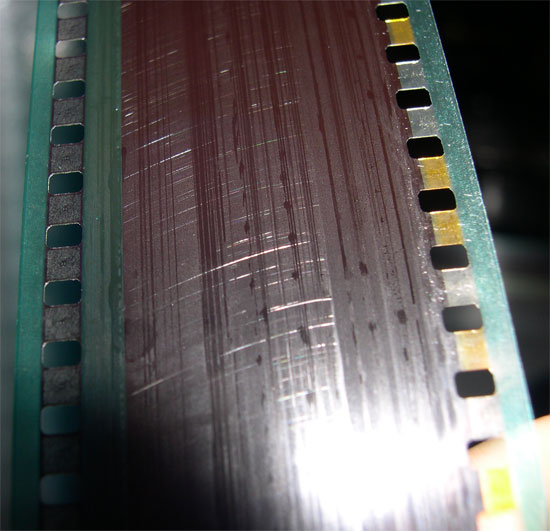
I believe that all of the scratches are related somehow, seeing as how in the three years that I've been there, excluding these scratches, there have only been two prints scratched and they have been due to user error.
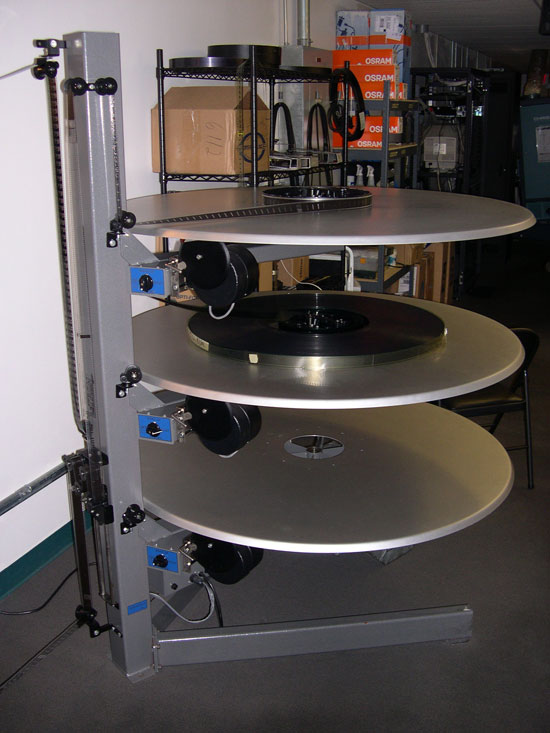
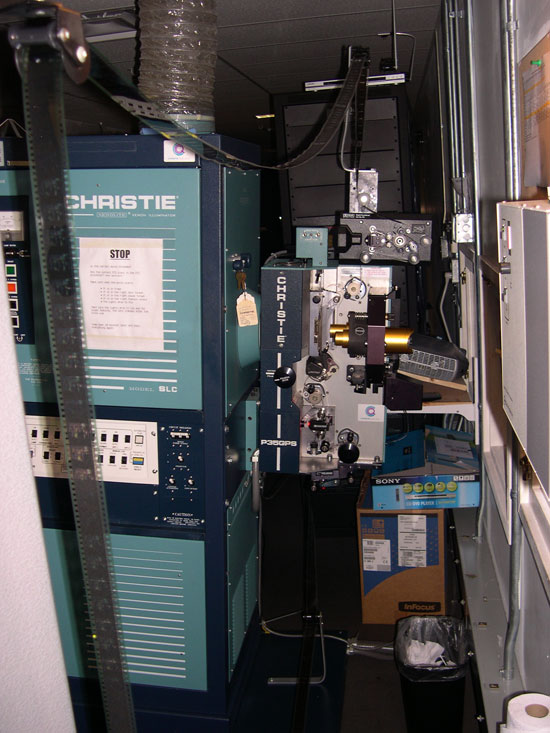
Here are a couple more pictures that can hopefully be helpful (all of our projectors are setup in this manner, the only difference being DTS/Dolby):
Posted by Neil Fish (Member # 698) on 08-28-2006, 04:04 PM:
The first set of scratches illustrated are typically caused by a too-large lower loop on the Chrisite projector. Often, the loop starts out on the large side of correct, but if the operator had to frame down (up on screen), the loop would grow, and slap on the underside of the shutter housing.
The second set is almost certainly from the film loading onto the platter from a too-low angle, either from the makeup table or a mis-adjusted roller.
Posted by Bruce Hansen (Member # 281) on 08-28-2006, 06:46 PM:
quote: Chad Smith
and the marks get smaller and smaller and eventually disappear. This taper happens approx. 15-20 feet before the end of the feature.
If these are platter scratches that could explain there being no scratches on the last 15-20 feet of film. After the tail leaves the last sproket in the projector, the last 15-20 feet of film is no longer under tension as it winds onto the take-up platter, and would not get scratched as easily.
Posted by Gordon McLeod (Member # 33) on 08-28-2006, 10:26 PM:
I disagree with a roller issue as on the strongs they would not adjust that low especially if it is an AP
And if this is post make up first show then that is not an issue
That type of straight line horizontal scratch is almost always a missthreaded keeper roller
Posted by Dave Callaghan (Member # 1544) on 08-28-2006, 10:52 PM:
From your photograph, it looks like that scratched film is not lying flat - i.e. it has a curvature.
While that might be a clue that will solve the mystery, I have to ask if you have PTR rollers installed.
I don't see them in the photograph, but is it possible that someone threaded the print through the cleaner without the PTR's actually being in place?
I also notice you have a guide roller installed above the Dolby digital head. What happens if that guide roller is missed?
These are beyond mistakes, but these scratches are so major, the impossibly ignorant / uninformed should not be overlooked.
Posted by Kevin Raisler (Member # 1761) on 08-29-2006, 02:12 PM:
quote: Chad Smith
We have never had scratches like these on our dolby houses, only on our DTS houses, which could just be by chance (we have 3 Dolby houses and 5 DTS houses).
sounds like you may have someone who does not no how to thread the dts up... those scratches sure look alot like build up damage to me...
Posted by Bruce Hansen (Member # 281) on 08-30-2006, 04:45 PM:
quote: Chad Smith
form what looks like a very elongated sine wave on the soundtrack side of the scratch
This could be caused by a slightly warped platter deck. As the deck rides up and down it would change the amount of contact with the film, changing the length of the scratches. Looking at the picture of the platter,if the film was threaded on the wrong side of the keeper roller on the take-up platter, the film might be in contact with the edge of the platter.
Posted by Monte L Fullmer (Member # 2797) on 08-30-2006, 06:25 PM:
Hmm..good ol STRONG A-3 platters (with no wrap detector mounted on top of the tower arm.) ...
Okey, one thing that did caught my eye was the return roller to the top deck - on the high side so the film isn't laying down on the platter heading to the ring.
Are the other rollers set up this high? Also, how are the roller bearings on this ALPHA platter anywho -the return roller on the bottom of the tower, the yo-yo rollers (shafts have not worked loose) the keeper rollers...
Another thing that I'm concerned is that roller mounted on the toe kick of the console, for I do believe that that roller should be in a larger diameter so to reduce rotation and tension as the platter is pulling the film across. I can see so much tension going underneath that roller being so small of a diameter..
Plus, the soundtrack is going towards the wall and I've always never like this method of threading for the curl of the film is being fought against the flow of the film path. AND, with being soundtrack towards the wall, the emulsion is facing that toe kick roller-where there is the most tension - if the decks in the rewind mode are pulling rather tight.
Being an "driver's side" platter operation, try going soundtrack towards the tower when coming from the brain and going back to the tower - soundtrack facing you (or away from the wall) going to and coming out from the projector ... might make a difference..
good luck - Monte
[ 08-30-2006, 09:45 PM: Message edited by: Monte L Fullmer ]
Powered by Infopop Corporation
UBB.classicTM
6.3.1.2