This is topic Take Your Cues Off!!! in forum Film Handlers' Forum at Film-Tech Forum ARCHIVE.
To visit this topic, use this URL:
https://ft-forum.com/ft/cgi-bin/ubb/ultimatebb.cgi?ubb=get_topic;f=1;t=008346
Posted by Robert E. Allen (Member # 1351) on 11-08-2006, 11:18 PM:
We are a sub-run house and get films about six weeks out. One of the biggest problem I have when building a print is searching for and removing the last guys cues. Because of the different automation systems not all cues cause the same action on all systems. I missed one once that caused my system to change the lens from scope to flat as the credits started rolling. Do most sub-runs have the same problem?
Posted by Monte L Fullmer (Member # 2797) on 11-08-2006, 11:44 PM:
LOL ... do it all the time with me doing a discount, 2 buck house. Just something that I've trained myself to do for a good number of years.. Kinda like rhythm to do now....
..but once in a while, I snooze and do forget one, or one that isn't visible due to that it was place on the base side of the film when I'm making up from the MUT...
I even did it when I was in a first run house and receiving prints that were run for sneaks...automatically hunting for other cinema's cues.
...oh well .... the fun stuff we projectionists have to do at times...
-Monte
Posted by Charles Greenlee (Member # 3856) on 11-09-2006, 03:18 AM:
Crap, I'm sorry. ![[Embarrassed]](redface.gif) I just realised that I haven't been removing them. Since I've been here, I either have not been the one to break down our finished movies, or if I did break it down, it's usually because someone else didn't and I'm then rushed to get it done. There was just long enough of a hiatus between my theare jobs to get slightly out of rhythm, add to the the rushed breakdowns. I'll check for them now.
I just realised that I haven't been removing them. Since I've been here, I either have not been the one to break down our finished movies, or if I did break it down, it's usually because someone else didn't and I'm then rushed to get it done. There was just long enough of a hiatus between my theare jobs to get slightly out of rhythm, add to the the rushed breakdowns. I'll check for them now.
Posted by Anslem Rayburn (Member # 1267) on 11-09-2006, 05:08 AM:
I just realized, I don't remove cues. I guess I assumed (and you know what that leads to...) that every theater had the same cue system we have.
Now that I know, we will make sure to remove them.
Posted by Steve Guttag (Member # 268) on 11-09-2006, 08:08 AM:
Hmmmmm
Me thinks of an idea...obtain a cue detector identical to the ones used in your theatre....mount it on a rewind table or even in the path on a make up table (rewind would be better) and make it a policy to have all prints screened through it. Have ALL of the cue sensors wired to either cause the rewinder to stop or make a buzzer go off so you know, automatically if there is a stray cue that your sensors will pick up. It really shouldn't be too hard to put the sensors in the path somewhere.
Steve
Posted by Ian Woloschin (Member # 3709) on 11-09-2006, 08:29 AM:
Yay running reel-to-reel with no automation...I don't have to worry about those guys who are too lazy to remove their cues ![[Razz]](tongue.gif) .
.
Posted by John Hawkinson (Member # 1135) on 11-09-2006, 09:46 AM:
It's certainly great if people remove their cues on breakdown, but this is really an issue of "defensive projection" (just like defensive driving). Don't rely on the other guy to do the right thing, because you can't count on it happening 100% of the time. Just like you should never trust somebody else's splice without inspecting it.
Even non-automation theatres should remove cues, though, for two reasons: 1) Many cues are visible to the audience. I don't need to see a dark flash on the side of the image right before the credits roll. 2) It's "Film Done Right" -- the next theatre who gets the print after you may well blame you for any cues you leave behind, even if you did not put them there.
So, yes, remove your cues. But don't be surprised at having to remove other people's.
--jhawk
Posted by Blaine Young (Member # 3992) on 11-09-2006, 10:30 AM:
Cues that are visible on screen have long been a pet peve of mine. In automations where a cross cue is used, there really isn't much you can do except put it on the frame line - and then if you've got a scope picture, keep it in a black area to minimize.
The rather crappy automation that my theater uses is a 'stepping' one. Just outboard cues. I've always tried to keep the cues of a size where they are not only not seen, but not heard. Especially on the 'lights up' cue at the start of credits, to hear a dropout in the audio to ME is distracting. Trouble is that the crappy automation that it 'pulses' an audio format to the Dolby processor which effectively punches "Format 11" again and the processor does a quick fade out/in. ![[Mad]](mad.gif)
Posted by Matt Whitney (Member # 2909) on 11-09-2006, 03:17 PM:
It sure would be nice if everyone took off their cues. It certainly isn't the norm though. We've just gotten used to making sure to look for and take off whatever cues the previous theatre had on there. What I hate is when they use that shoe polish, or whatever it is, on the edge of films to mark the splice between reels.
Posted by Louis Bornwasser (Member # 3063) on 11-09-2006, 04:12 PM:
Sadly the folks who need to read this prob don't have enough interest to read Film-Tech. Louis
Posted by Andy Muirhead (Member # 712) on 11-09-2006, 06:41 PM:
It's always my SOP to check prints for cues on building.
One thing I always do when cueing prints is to place cues onto splicing tape, helps so much when removing and I'm always grateful to others doing the same.
Posted by Ron Curran (Member # 3631) on 11-09-2006, 06:58 PM:
I absolutely agree Andy.
Left on cues don't bother me if they lift off easily. Those 2 inch long cemented-on cues cause me to say "Oh bother" or words to that effect.
The suggestion of installing a cue reader on the make-up bench is brilliant and I will do that as soon as we have an income again.
Posted by Monte L Fullmer (Member # 2797) on 11-09-2006, 08:49 PM:
I can handle all of this cue stuff, but what bugs my butt is when those booth clowns snip off the tail lead of the last reel, then just tape it back on with masking tape..
..are they that stupid to realize that the last reel's tail lead doesn't have to come off, or is their cueing system all miffed up, or just to damn lazy to put cues on correctly:?
Posted by Randy Stankey (Member # 64) on 11-09-2006, 10:56 PM:
When my automation was installed I specifically requested that the cues be set so that the "End-of-show" cue is the center one. That way nothing shows on the screen until the movie is over.
The inboard and outboard cues are the ones that turn the lights up or down. If you place those cues carefully there are no blips in the sound nor are there any visible traces on screen.
I know that a lot of you guys don't like SpliceMark tape but it does come in handy for marking cue locations. I often get asked how much film is left before the credits. Having that piece of tape makes it easy to see where the credits start.
PLUS it reminds the person breaking the print that she should stop and check for cues.
Posted by Steve Scott (Member # 630) on 11-10-2006, 09:25 AM:
quote: Monte L Fullmer
what bugs my butt is when those booth clowns snip off the tail lead of the last reel, then just tape it back on with masking tape..
Have worked for first run theaters that practiced this, sadly. Cut the tail & wrote the title with a dreaded wax pencil. This was an ELF theater too, strangely enough.
Currently, we use edge cues, inboard & outboard only with co-operators. The move-over prints we get typically have cross foil cues if from Landmark/Regal, or the dreaded opticues from Crown's Big Sky systems. Neither interfere with our system.
Posted by Jack Ondracek (Member # 1466) on 11-10-2006, 11:06 AM:
quote:
...obtain a cue detector identical to the ones used in your theatre... Have ALL of the cue sensors wired to either cause the rewinder to stop or make a buzzer go off so you know, automatically if there is a stray cue...
That's a great idea... but I'd guess you'd have to run your rewinder pretty slow to give proximity and reflector-type detectors time to catch a cue. That's the main reason we never tried it here.
Thankfully, there are far fewer theatres doing 6,000 foot changeovers these days, so cues on reel 3 are rare.
I wish I could remember what kind of cue tape I have here. It pulls off easily with little-to-no goo. Some of the stuff we get from "the chains" are a real challenge to get off the film... pretty thick, too.
Naturally, now that I have proximity detectors here, I hate seeing those 4" strips that some theatres think they need!! When we had our contact-type pickoffs & Co-Operators, we only needed a couple of frames worth.
Posted by Scott Norwood (Member # 30) on 11-10-2006, 12:13 PM:
The problem with removing cue tape on breakdown is that it requires slowing down and stopping the MUT to find and remove the usual "lights mid" cue that most people put at the start of the end credits. This results in a poorly wound final reel and potential edge damage in shipment. I'd gladly take a properly wound print with cue tape still affixed to the film at the usual places (start of credits and somewhere within the last 20' of the film) over one with edge damage to the last reel.
I do agree that venues that run automated changeovers should remove any cue tape on reels other than thhe last. I guess that I just don't see having to remove two pieces of cue tape as being terribly annoying, compared with the other forms of print damage that usually occur.
Posted by Stephen Furley (Member # 1277) on 11-10-2006, 01:29 PM:
quote:
Yay running reel-to-reel with no automation...I don't have to worry about those guys who are too lazy to remove their cues [Razz] .
Also running totally manual system, but I had a different problem recently; a sharp edge on a hand-cut cue overhanging the edge of the film cut into my finger as I was inspecting the print.
Posted by John Walsh (Member # 168) on 11-10-2006, 03:48 PM:
For cues that were placed for booths with changeovers, I guess you could rig up a timer. The down side is you would have to set it for each feature length to time out after the last reel started.
Steve's idea of placing a cue sensor on a rewind table is pretty cool. I'll try our detectors and see how quickly they can register.
Posted by Jesse Skeen (Member # 586) on 11-12-2006, 03:48 PM:
[quote] Especially on the 'lights up' cue at the start of credits, to hear a dropout in the audio to ME is distracting. Trouble is that the crappy automation that it 'pulses' an audio format to the Dolby processor which effectively punches "Format 11" again and the processor does a quick fade out/in. [Mad] {/quote]
Hey Blaine! A place I worked had the same problem and I found a way around it- whenever you don't really need the sound to go to another format, have the automation 'punch' a format that isn't there- in my case, I had it go to "AUX" which wasn't hooked up to anything, so the sound would just stay where it was. Some screens had Dolby Digital so this would eliminate the sound dropping out for a half-second when it punched the format again, and there were some that had DTS so the sound would go to analog when the lights came up.
Of course, the best solution is to just have the lights stay down all the time and let "survival of the fittest" sort itself out, but I ain't gonna go there today ![[Wink]](wink.gif)
Posted by Monte L Fullmer (Member # 2797) on 11-12-2006, 08:47 PM:
quote: Jack Ondracek
fewer theatres doing 6,000 foot changeovers these days, so cues on reel 3 are rare.
...and what's also sad on this is how many sub-run booths don't even know anything about this - being that they're not trained in this area to remove the 2nd or 3rd reel cues..
I get a few calls from theatres that wonder why their machines are shutting down in the middle of the performance. I simply ask them if they noticed any cues on these two reels...they would answer back and affirm this - after feeling stupid in not checking..
Posted by Marc Hansen (Member # 705) on 11-12-2006, 10:04 PM:
I can't help but feel that this is another example of a problem that is solved by previewing the movie before showing it to an audience. If you miss something in the build you will see it before a customer does.
Posted by Jon Miller (Member # 163) on 11-12-2006, 10:25 PM:
...or, better yet, do a thorough bench inspection as you build up the print onto 6k reels, then transfer the print to the platter. Bench inspection is the best way to catch rogue cues. I deal with film festival prints with all manner of cues left on and I always peel 'em off, no matter what. Especially beauties like this...
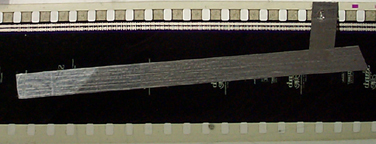
From what I've learned, that's the dreaded Opticue. ![[Eek!]](eek.gif)
Posted by John Walsh (Member # 168) on 11-13-2006, 06:52 AM:
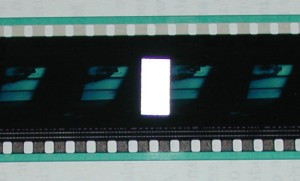
(Quote:) ....From what I've learned, that's the dreaded Opticue.
No, that's a person who doesn't know what the hell they are doing. I can't imagine any manufacturer who requires cues be placed on that way. This is an Opticue....
Posted by Jon Miller (Member # 163) on 11-13-2006, 09:10 AM:
Thanks for the clarification, John! ![[thumbsup]](graemlins/thumbsup.gif)
No matter what they looks like, cues placed over the picture area are the absolute worst.
Posted by Marc Hansen (Member # 705) on 11-13-2006, 10:27 AM:
Jon
I wasn't suggesting it as an alternitive to a bench inspection, just as a final inspection prior to the public seeing it. After all no one is perfect, we all miss something once in a while.
Posted by Mike Blakesley (Member # 26) on 11-13-2006, 11:01 AM:
Sometimes a thorough bench inspection and a preview screening are not possible. We play a lot of movies in week 3 or week 4, thus we get overnight circuits quite frequently. The film will show up at 4:30 in the afternoon on Friday.
Having said that - I don't mind taking other folks' cues off. It's just a matter of getting in the habit of looking for them. I haven't seen a reel-3 cue in years.
Posted by Blaine Young (Member # 3992) on 11-13-2006, 12:26 PM:
I was inspecting a print of "Who Framed Roger Rabbit" this weekend. Interestingly it had no 'credits' cue, but it did have a cue system I've not seen before. The cues were on reels 2 & 4, indicating a showing on 6000' reels with only 2 reels per. I used to do this quite a lot in a 6000' reel change-over house where we would stagger show times by 50-60 mintues and bicycle prints between booths (5 booths for 8 houses).
Anyway, the cues appeared to be outboard for motor start and inboard for change-over. I would have thought that by the time this film ran, most of the booths had timed change-overs. I may be wrong.
Posted by Luci Reeve (Member # 3651) on 12-11-2006, 05:33 PM:
I've never seen a print where the cues had already been taken off....I therefore assumed that you take off the last booth's cues and put yours on. I can't wait to see my first print with cues already taken off.
Posted by John Hawkinson (Member # 1135) on 12-11-2006, 05:40 PM:
Really? So you've never gotten, say, a looks-like-new print that has had the heads and tails cut, but otherwise looks pristine? Or even one without the heads and tails cut, but which a really close inspection shows signs of running?
Are you a festival-only projectionist?
--jhawk
Posted by Jack Ondracek (Member # 1466) on 12-11-2006, 05:57 PM:
Regardless what your experience is, it's only wise to assume as a matter of course that a used print needs closer inspection, including a search for the "other guy's" cues.
There's always going to be someone who doesn't care who gets his print next, and it's unlikely that any of us will change that here.
Besides... I wouldn't use the last guy's cues anyway... even if they were where they needed to be (which isn't likely). I want MY cues and MY tape on there, laid in the way I place them. I have a lot more confindence in the operation that way.
Posted by Monte L Fullmer (Member # 2797) on 12-12-2006, 02:57 AM:
..cuz, yu don't know if those cues are worn out or not. I do the same thing: same place on the film, but don't trust them to work, thus replace them with my own.
Posted by Gilles Elbhar (Member # 3719) on 12-15-2006, 04:10 PM:
I have this probleme.
I work in theatre who get films about six weeks out. There is + - 40 movies. I build 5 movies / week (some time more !). Cues are always in the same area - the end. If I do not find it, I look at the movie during exibition. But cues can be in the middle of the movie, because they come from dual projectors (rock'n'roll) or other system. I have bad surprise.
Posted by Frank Angel (Member # 248) on 12-17-2006, 03:18 PM:
Jack is right....same as packing your own parachute! ![[Smile]](smile.gif)
Posted by Ron Curran (Member # 3631) on 12-20-2006, 05:34 PM:
I just removed several cues from a print. They were edge cues covering all sound track formats.
That can't be a good position.
Posted by Mike Blakesley (Member # 26) on 12-20-2006, 08:48 PM:
Won't matter if it's DTS or Sony....analog or Dolby, yes: Bad.
Posted by Ron Curran (Member # 3631) on 12-20-2006, 10:51 PM:
Yes, Mike. I was thinking that as our print of Charlotte's Web was running in DTS. In the first week, before we received the discs, Dolby Digital would dorp out at a lab join.
Posted by Jeff Logan (Member # 1163) on 12-25-2006, 11:29 AM:
The defensive driving analogy really sums it up. You're responsible for what happens in your own booth.
I appreciate when the previous projectionist removes the cues; but this can cause a more serious and devious problem to find....when you remove your cues, REMOVE THE ADHESIVE RESIDUE THE CUE TAPE LEAVES BEHIND! I've had some show shutdowns and a few nasty brain wraps caused by cue tape adhesive left on the film. This adhesive is hard to see during inspection and unless you're touching that part of the film (you shouldn't be touching where center cues were), you won't find them. The power of the rewind overcomes the adhesive, but the adhesive is strong enough to pull another layer into the brain and cause a shutdown when running.
When I remove cues, I use a solvent (aeresol contact cleaner is handy but expensive) to disolve the adhesive and wipe it off with a soft cloth. The solvent disolves the ahesive but doesn't disturb the emulsion.
When someone leaves their old cues on the film, at least I can easily find them and remove any problem causing adhesive.
Posted by Monte L Fullmer (Member # 2797) on 12-25-2006, 11:13 PM:
quote: Jeff Logan
When I remove cues, I use a solvent (aeresol contact cleaner is handy but expensive) to disolve the adhesive and wipe it off with a soft cloth.
... and a small squirt of Film-Guard on the corner of a rag does very good as well...
Powered by Infopop Corporation
UBB.classicTM
6.3.1.2