This is topic A Print is Shedding: What to Do? in forum Film Handlers' Forum at Film-Tech Forum ARCHIVE.
To visit this topic, use this URL:
https://ft-forum.com/ft/cgi-bin/ubb/ultimatebb.cgi?ubb=get_topic;f=1;t=008383
Posted by Aaron Garman (Member # 1653) on 11-29-2006, 03:25 PM:
For some reason, one of our projectors, a Simplex/Strong, has been causing many prints to just shed. I'm not really sure what to look for, but everything seems to be in order. Our tech is not going to be coming in for a little while and was wondering what I can do in the interim.
Basically, after each show, there is an abundance of pinkish white dust EVERYWHERE. It doesn't seem to collect more in one spot or another, but is just all over the place. It's gotten to the point where it has collected quite a bit on the print, including the Dolby track. It was so dirty, we had to run it in SR because of the failure rate. I've got my Kelmar cleaner on the print now, and tried using C-Lube on the media pads, as we don't have Film Guard. I know there are ways for us here at Cinemark to get it, but not entirely sure how. Either way, is this something good to do in the interim to get the print looking a little better and having the Dolby sound functional? It seems to be working a little, but I'm going to run this test on the next two shows tonight. Also, would it be better to soak the pads in the C-Lube or use the spray bottle I put it in? It just seems as if I'm not saturating the pads good enough. Any advice is greatly appreciated.
AJG
[ 11-29-2006, 06:39 PM: Message edited by: Aaron Garman ]
Posted by Frank Dubrois (Member # 3042) on 11-29-2006, 03:33 PM:
This may sound stupid to suggest, but have you cleaned the dolby reader lens? If the pink dust is everywhere..its prolly there to.
Posted by Aaron Garman (Member # 1653) on 11-29-2006, 03:46 PM:
Yeah, I've been cleaning the whole projector every round. This is going to get daunting tonight, with 4 double starts. Joy for multiplexes!
AJG
Posted by Scott Norwood (Member # 30) on 11-29-2006, 03:48 PM:
Black & white ESTAR-base print?
Posted by Aaron Garman (Member # 1653) on 11-29-2006, 04:05 PM:
Off the top of my head, we've had these prints in there that have been excessivley shedding:
Flushed Away
Flags of Our Fathers
Casino Royale
Flags was horrible, and Casino right now is just absolute ![[bs]](graemlins/bs.gif) .
.
AJG
Posted by Frank Dubrois (Member # 3042) on 11-29-2006, 04:20 PM:
Well, we have some pink dust, but not to the degree that you seem to have. We use filmguard though. Perhaps you have a static problem? Around this time of year, weird things happens. The dust may just be clinging to the print, however, I've never heard of it being so bad that it affects the digital reader.
Posted by Mike Blakesley (Member # 26) on 11-29-2006, 06:37 PM:
quote: Aaron Garman
has been causing many prints to just shred
I think you should change your thread title to reflect the actual problem, which is shedding, not shredding. If your projector is shredding prints then you've got a real problem. ![[Wink]](wink.gif)
Posted by Aaron Garman (Member # 1653) on 11-29-2006, 06:42 PM:
Thanks Mike! Yeah, shredding would be bad, yet interesting to watch. Heck, while we're at it, anyone ever try putting film in the microwave?
Ok, back to the topic. I decided to go ahead and soak the media pads...that didn't work as for some reason, the pads would not go on to the Kelmar. I ended up putting on some dry ones and using the spray bottle again, but they were a pain in the ass to get on there. They usually slide on pretty easy, so I don't know what is going on with my film cleaner. I swear, it never ends! Alright, time to go start the travesty Deck the Halls.
AJG
Posted by Steve Scott (Member # 630) on 11-29-2006, 08:14 PM:
I really wouldn't use C Lube in place of FG.
If only one thing, get as much dust out of the head as possible between shows, in all parts of the head. Don't forget failsafes & platter surfaces. I've never used C Lube on anything besides leaders, as it seemed to leave an unsightly vapor blotch on film.
Posted by Aaron Garman (Member # 1653) on 11-29-2006, 09:24 PM:
I really didn't want to use it, but I figured I might as well try something because if I don't, the print is just going to get worse. I've managed to get most of the dolby track workable now, and the trailers actually looks signifigantly better. The feature, of course, isn't looking too much better, but it's getting there. What I wouldn't do to get some film guard.
AJG
Posted by Steve Scott (Member # 630) on 11-29-2006, 09:49 PM:
If you've got a SImplex machine, you might find a huge improvement by cleaning the head, corner to corner once at the end of the night/start of the first shift. There's a lot of corners for dust to find its way into in those Simplexes. Also, make sure there's no excess oil caked up in these spots that might attract the emulsion dust. But only once a day will show improvement over time.
The area behind the gate bands, around the guides & especially around the pinch roller in the soundhead are the places to get totally cleaned, by priority if needed. I justify this because they're closest to the aperture& will make the edges of your picture look as bad as the image could get if not cleaned.
We have a 1999 Simplex that gets bad shed from some prints, but I would say only six per year. Toothbrush, paper towels & film cleaners will do more to control how much dirt could find its way onto the print.
And those 5 Stars are unforgiving when it comes to contact with film. I've received quite a few move-overs from local houses that showed that uniform stripe of wear down the film.
Posted by Monte L Fullmer (Member # 2797) on 11-29-2006, 09:58 PM:
Something is possibly being misaligned.
The intermittent sprocket could be misaligned with the shoes to where the shoes are nicking the outboard edge of the sprocket teeth to where it's making that tooth edge razor sharp to where it's actually shaving the inside portion of the sprockethole to get your shedding problem.
Or, a possible sharp edge in the gate and trap assembly shaving the edge of the print just minutely. If you got a curved gate assembly, wonder if your trapbands are getting thin, or if you have the flat gate variety, the trap side rails are getting grooved and this will cause edge shedding.
Either way, the tekkie is going to be busy there for a while..
A 6-plex that I service had one PR-1050 with flat trap and gate assembly do the same thing: looked like a 'pink and white snowstorm' in that unit.
The outboard shoe was digging into the sprocket teeth to make the outboard edge of those teeth razor sharp and slicing the one side of the sprocketholes out.
What had happened is that the shoe assembly spring had become somewhat weak and the shoe assembly shifted over to one side causing the 'sharpening of teeth' so to say.
I replaced the sprocket, spring and shoe assembly to quit the 'snowstorm' that machine was creating.
Posted by Charles Greenlee (Member # 3856) on 11-30-2006, 12:47 AM:
quote: Monte L Fullmer
or if you have the flat gate variety
Our number 2 has a flat gate, it actually causes the least shedding/dust. But that's out of our 6, yours may be different. And oh what a clatter every time a splice went though. The rattling of the spring loaded bands.
Posted by Randy Stankey (Member # 64) on 11-30-2006, 01:24 AM:
I'm with Monte.
Check the projector(s) with a fine toothed comb and make sure that everything is aligned properly.
Check your intermittent sprocket/pad shoe.
Check your upper and lower sprocket pad rollers.
Check your pinch roller in your sound head.
Be sure there are no flat spots or burrs on any sprocket, pad roller/shoe or film-bearing part. This includes the platters.
Also check the gate(s) to be sure they are properly aligned and they are at the right tension.
Anything that scuffs the film will take the emulsion off, layer by layer. It will look like the projector is snowing in your booth. Once the print starts shedding, even if you solve the problem that caused it in the first place it will likely shed for the rest of its life.
Constant attention with the film cleaner and FilmGuard is probably the only workable solution you are likely to have at your disposal. I suppose you could have the print ultrasonically cleaned and lubricated but you don't want to pay for that! It'd be cheaper for you to trash the print and buy a new one!
Posted by Monte L Fullmer (Member # 2797) on 11-30-2006, 01:39 AM:
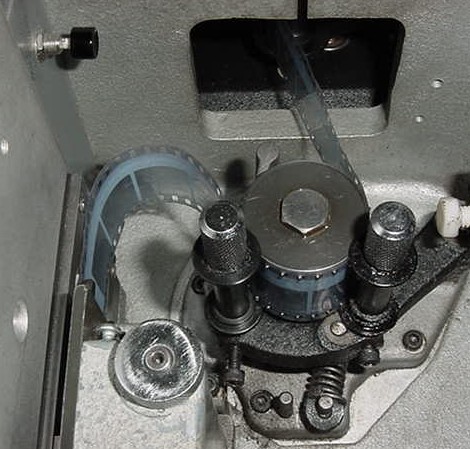
Charles, make your upper loop this tall (this loop is at its lowest-it only raises a quarter inch at the highest, so don't worry on upper loop flop up there) and get the upper loop so that the film is entering at the top of the trap assembly straight in-not at an angle.
The chatter is caused by the loop being too small and not entering in the trap straight,but more on a sight curve. You are prob threading the flat trap as you do the curved trap, which needs the smaller upper loop.
Give this a try...for in a way, flat trap Simplexes are tons quieter than the curve gate variety if the loops are built just right..
Posted by Charles Greenlee (Member # 3856) on 11-30-2006, 11:41 AM:
quote: Monte L Fullmer
You are prob threading the flat trap as you do the curved trap
Good insight Monte. I have been threading it the same as our curved gate projectors. No one has told me otherwise.
Posted by Brad Miller (Member # 2) on 11-30-2006, 01:46 PM:
That isn't causing his shedding problems. Besides if he has a penthouse digital reader, altering the threading of that upper loop from the way the tech set it up could end up in them playing their movies out of sync.
It's a small burr in the trap or intermittent shoe or a pad roller closed too tight. I doubt it is on the platter, as everything the film touches on a platter is supposed to be spinning anyway.
Posted by Aaron Garman (Member # 1653) on 11-30-2006, 02:57 PM:
Since we open something new in this theatre tomorrow, I'm going to give it a nice cleaning and lookover tonight. If it helps to know, we do have a cat. 700 reader on this puppy. Thing is, another projector is starting to do what this one is doing and it has DTS, so I don't think the problems lay within the penthouses. If memory serves, I know awhile back we got new shoes in for those projectors, but I was under the impression they weren't installed yet. If they were, maybe they were installed wrong. What should I look for to make sure it is perfectly aligned? Thanks again.
AJG
Posted by Monte L Fullmer (Member # 2797) on 11-30-2006, 03:22 PM:
quote: Aaron Garman
What should I look for to make sure it is perfectly aligned?
One good area to look at is if the outside flat surface of the outer intermittent sprocket shoe is flush with the outer surface of the intermittent sprocket when a straight edge is place across this area.
Another one is to take a dentist's mirror and see the reflection of shoe to sprocket placement on both sets of teeth to see the relationship of teeth to the shoes for of any metal to metal contact.
Which brings up another question: has the intermittent movement been replaced recently? For everytime a movement is taken out and put back in, the sprocket to shoe alignment is a mandantory procedure to get all of this back in line.
Course, another slight possibility is that there was a horrible film jam or film wrap withing the machine of sorts that could have pulled the sprocket out of align with the shoes..
.or simply, that the lockdown bolt and self locking nut have worked loose on the shaft causing the sprocket to shift out of alignment with the shoes.
....just some more areas to chek into....
--Monte
Posted by Gordon McLeod (Member # 33) on 11-30-2006, 06:54 PM:
I never make the upper loop on a straight gate XL
THe straight gate XL dates to the days of mag sound and with the proper XL penthous the loop at its largest was level with the top of the upper sprocket to have sync
At that time I think the people at simplex new what they were doing
Also check pad roller clearances
Posted by Monte L Fullmer (Member # 2797) on 11-30-2006, 08:51 PM:
..a side topic here then on Gord's comment that I'm curious on: What was the frame delay on 35mm Mag film anywho - from p/b head to aperture, or was it in sprocket count?
thx-Monte
Posted by Scott Norwood (Member # 30) on 12-01-2006, 10:26 AM:
quote: Gordon McLeod
the loop at its largest was level with the top of the upper sprocket
Isn't this also true with the curved-gate X-L/PR-1014? At least that's how I've always threaded them (same for straight-gate and curved-gate versions). (I've not run 35mm mag, though.)
Posted by Jonathan Bodge (Member # 4072) on 12-01-2006, 07:42 PM:
Here's my 2 cents (which is worth about a penny), I look for where it's mostly building up, and look one step before that. I find that different prints are different widths and the lateral guide rollers (with sharp edges) trim it down. Now here's my question: Why is shedding pink?
Posted by Monte L Fullmer (Member # 2797) on 12-02-2006, 02:50 AM:
quote: Jonathan Bodge
I find that different prints are different widths and the lateral guide rollers (with sharp edges) trim it down..
.....which seems that the lateral guide roller assembly(ies) are in DEFINITE need of cleaning - by taken them completely apart to clean and slick up the shaft and sleeves of each side in as well as the return spring (or replacement of the entire assembly) being that the inboard flange isn't spreading apart on situations like this - to allow such variance of film width.
You get a lateral guide assembly with sharp edges..."Wooo..!" wonder how long those have been the machine like that...especially if they weren't turning and have horribly grooved themselves to death..?
(Oh..know how to align an assembly up after cleaning and reinstalling it..?)
Now, you gotta remember, we're dealing with "poly" film now and this stuff is much more coarser than our good ol actate based film friends of long ago...
(and if you got 4 or 5 star Simplex soundheads, chek your impedence drum lateral guide assembly as well..for the inner flange should also float back and forth as the film trap one...)
-Monte
Posted by Jeffry L. Johnson (Member # 453) on 12-06-2006, 03:08 PM:
quote: Monte L Fullmer
What was the frame delay on 35mm Mag film anywho - from p/b head to aperture, or was it in sprocket count?
SMPTE 137: 28 frames +/- 1/2 frame
Posted by John Pytlak (Member # 331) on 12-07-2006, 12:57 PM:
quote: Jonathan Bodge
Now here's my question: Why is shedding pink?
When the shedding is caused by severe abrasion of the emulsion surface by a projector component, it often is "pink" because the top imaging layer in color print film is the magenta dye layer. As the abrasion becomes more severe, it "chews" through the print film emulsion layers in this order: clear (protective gel layer), magenta dye layers, cyan dye layers, yellow dye layers.
Back-side abrasion usually produces a white powder, from the protective polymeric base side coating, or the polyester base itself.
It has long been known that proper print lubrication greatly reduces projector abrasion (SMPTE Recommended Practice RP151). That is why FilmGuard or proper edgewaxing are so effective in reducing abrasion.
Be sure that you clean the film-contacting surfaces in the projector after each showing. Be on the lookout for hardened gelatin deposits on the polished gate surfaces, or a burr or rough spot on the gate rails or intermittent sprocket shoe.
Powered by Infopop Corporation
UBB.classicTM
6.3.1.2