This is topic Scratching....Help! in forum Film Handlers' Forum at Film-Tech Forum ARCHIVE.
To visit this topic, use this URL:
https://ft-forum.com/ft/cgi-bin/ubb/ultimatebb.cgi?ubb=get_topic;f=1;t=008861
Posted by Thomas Moore (Member # 3427) on 08-04-2007, 04:47 PM:
\\
\\
\\
\\
\\
Quiet simply, thats what I get on a consistant basis on the right upper part of picture if youre looking at it on screen. So inboard.
Nothing in film path checked everything, everything. Anything I MIGHT have overlooked? Something you cant see with your naked eye perhaps? And yes it looks just like those slashes I put on the top of this message. Thanks for any input. ![[Mad]](mad.gif)
Posted by Ben Wales (Member # 92) on 08-04-2007, 04:55 PM:
Are you running from a Platter or on Two Projectors and is Base or Emuslion scratches?.
We need more information on the equipment you are using, sounds
that you have cross scratching from either bad rewinding/making-up or film path etc.
Posted by Thomas Moore (Member # 3427) on 08-04-2007, 06:31 PM:
Sorry in my haste at work I forgot to include the basic info...duh!
Simplex 35... 7 years old...5-star soundhead same age...cfs/esp 3 electronic platter sys. All pretty new equipment. I believe it to be on the emulsion side. I will triple check but that seems to be the case.
Also...it is happening on one and the same projector only out of five at this theatre. So the prints in the other four are never affected. I dont think it is an error or oversight in the building of the films.
Posted by Brad Miller (Member # 2) on 08-04-2007, 07:24 PM:
It's the platter or one of the rollers. Either the film is dragging over the edge of a platter deck as it is taking up, or you have a roller fairly severely out of alignment.
Posted by Jeremy Weigel (Member # 4208) on 08-04-2007, 07:39 PM:
Are they black, green, or yellow? If they are black then it it more than likely on the base side. If they are green and/or yellow they are definitely on the emulsion.
Posted by Christopher Meredith (Member # 3767) on 08-04-2007, 07:43 PM:
Check your platter and make sure all the rollers have pad rollers. My experience with these hatch marks has been that they occur when a roller which is on a caster is missing its pad roller, and the film jumps up and rides the flange. I've had it happen with the takeup roller in the middle of the presentation (it started out threaded correctly.)
In my cases, replacing missing pad rollers completely eliminated the problem.
Posted by Gordon McLeod (Member # 33) on 08-04-2007, 08:26 PM:
Often the problem that causes that scratch is the film sitting on the flange of a roller or bent between the keeper and the roller
Posted by Thomas Moore (Member # 3427) on 08-04-2007, 08:41 PM:
Man! Ive checked and looked, at everything. at least to me its all in perfect running order. obviously its not or i woulnt be here asking for help.
by the way, the scratches are on the base...many fine, narrow, black scratches. well im off to inspect again....thanks for help.
Posted by Brad Miller (Member # 2) on 08-04-2007, 09:56 PM:
Take a few pictures of that auditorium's projection equipment from a few different angles and post them here. We can probably find it for you that way.
Posted by Steve Guttag (Member # 268) on 08-04-2007, 10:17 PM:
If you feel it is in the projector...which is possible if it is a repeating and relatively steady scratch....take a loop of film (any loop...use an old preview) and thread it up. Run the projector without letting the loop drag on anything as it leaves and re-enters the projector. Verify that the scratching occurred after running it a few minutes.
Now take a red Marker and fill in the scratches (on the same side of the film as the scratches occurred. Now re run the film for a few minutes....the red powder will point you to the contact point.
In a simplex, you have the intermittent shoe tang (The curved piece that holds the intermittent shoe) this is particularly true of the shoe is on upside down. The tighter radius points must be the lower portion (where the film leaves the intermittent) otherwise the film may be allowed to pull over the tang.
The other point is going into the gate area if the lateral guide roller is no longer springing out to allow the film...instead it will pinch the film and cup it towards the runners which could scratch the film.
Lastly...if you have double flanged pad rollers (the type that have a flange on either side of the perforation)...unless they are LaVezzi SOR4-22 (metal) ditch em for single flange pad rollers (MNR-221). Those inboard flanges are known to scuff film. The metal ones are machined just undersized and don't generally scuff the film but the plastic ones do.
Steve
Posted by Thomas Moore (Member # 3427) on 08-04-2007, 11:21 PM:
Ill get the pics as brad recommende...i did try looping a piece of new trailer through the projector head...i let it run through about 100 times...no exageration there.
no scratching seemed to appear at all.
Posted by Chris Slycord (Member # 4239) on 08-05-2007, 03:09 AM:
If the loop of film was fine then it would point to something outside of the projector itself.
Now it would look to be more likely the platter/platter rollers or any other roller that wasn't tested by the running a loop of film.
Posted by Thomas Moore (Member # 3427) on 08-05-2007, 12:31 PM:
my thoughts exactly. i guess ill get those pics like brad said and see if maybe im overlooking something.
Posted by David Zylstra (Member # 4230) on 08-05-2007, 01:15 PM:
Check all the rollers for wear - we had similar scratching on ORC platters that were due to the edge flanges wearing down which allowed the film to slide side to side on the flat surface that now was wide enough to either rub one side of the picture or across the soundtrack. This took us a long time to figure out . . . . . but I don't think the CFS rollers would be susceptible to this kind of extreme wear, but it's something to check - the simple procedure we used to check was to take a small snippet of film and put it on each roller and see how much the roller allowed the film to slide side to side - if it moves a lot look to be sure the edges where the sprockets ride are not wide enough to reach the picture or soundtrack area.
There may also be something on the feed plate causing the scratching (if memory serves the ESP feed plate puts drag on the film to keep the payout steady).
Posted by Brad Miller (Member # 2) on 08-05-2007, 02:44 PM:
Guys, he has diagonal scratches. It wouldn't matter if those rollers could hold 50mm width film, that's not the cause.
Look at these pictures (and review) of an older model CFS/ORC platter. Intermittent scratches can be had via the first picture due to their retarded brain design. However the following image from that review shows what is probably happening...
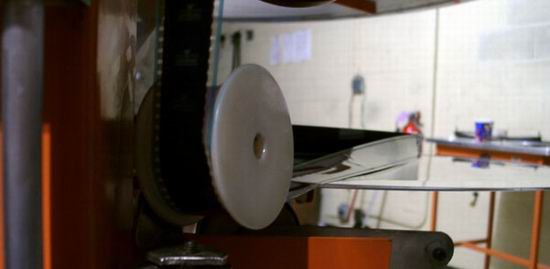
CFS (and Strong) have always had this super paranoia about the film not laying flat on the deck and as such have created their platter designs to drag the edge of the film across the entire width of the platter deck. ![[Roll Eyes]](rolleyes.gif)
If that isn't happening on one of your three decks, then it's got to be a roller that isn't angled properly, such that the film is dragging over the flange of a roller.
Posted by Daryl C. W. O'Shea (Member # 1303) on 08-05-2007, 03:57 PM:
Are the scratches getting worse (more) every time you run the print, or are they staying the same.
If there's no change in the amount of scratching I'd be extremely surprised if it wasn't that someone threaded the print up with the film sitting on one of the roller flanges on the platter tree (with the film running right against the platter tree while riding on top of the roller flange). This will give you the diagonal scratches you describe in the exact location that you describe if you're running with soundtrack away from the platter tree.
Posted by Thomas Moore (Member # 3427) on 08-06-2007, 01:08 PM:
The scratches do get worse first off.
The decks in that particular system are not warped and the roller is high enough to prevent any dragging of the film on take up like Brad suggested. Im going with the aged roller theory. I will quadruple check today, however I didnt really notice any visual or defects upon feeling the damn things.
However I would assume that is really all there is left.
Posted by Jeremy Weigel (Member # 4208) on 08-06-2007, 01:26 PM:
Check all the axle pins on the film guides to see if any of them have come loose and/or bent causing a slight wobble which could allow the film to momentarily ride up on the guide flange. I had this happen a few years back on a Strong platter. I kept getting those hash marks and couldn't see anything wrong until I happened to walk by it doing rounds and actually saw the film ride up on to the guide flange and then slip back in. After tightened the screw that holds axle pin to the swivel I had no more problems.
Posted by David Zylstra (Member # 4230) on 08-06-2007, 07:14 PM:
After you rule out roller alignment . . . .
Take a good look at the feed plate(s) - the CFS ESP feed plates went through a few changes while they were figuring out how to make it work and you want to be sure everything is still working the way it should (the company I used to work for installed some of the first of these units back in 1997 - we regretted the decision for years, great concept for the feed plate but not enough of a product run to work out all the reliability issues).
Try making up a small ring of old unscratched previews - run it a few times using only 1 of the 2 feed plates (if you have 2 operational feed plates for this platter), if no scratches appear use the other feed plate . . . . . if scratches appear right away start over with another ring and the other feed plate . . . . if you only have 1 feed plate for this platter pull one from another unit to test with . . . . . this will at least rule out an issue with the feed plate.
Posted by Thomas Moore (Member # 3427) on 08-07-2007, 12:04 AM:
Man this is becoming a serious headache! Im thinking of running the idea of getting 12 new rollers by the theatre owner. Anyone know off the top of their head how much they cost? wont find the exact culprit but at least Ill have all new rollers and hope that was the problem.
Posted by Jeremy Weigel (Member # 4208) on 08-07-2007, 12:29 AM:
Before doing that take some pics of the entire film path for us to look at like Brad suggested above. We might see something that you're not. The "fresh" eyes approach.
Posted by Troy Hilsman Powell (Member # 4326) on 08-07-2007, 12:52 AM:
I had that happen to me once and finally found it to be a nick on the edge of the platter disk from someone running by with a film splicer in a hurry to fix a break in the middle of a show.Liked to have never found the problem but I just buffed the nick away with some emery cloth,problem solved.
Posted by Christopher Meredith (Member # 3767) on 08-07-2007, 12:34 PM:
If he's taking up sountrack up, then it cannot be platter scratches as they are occurring on the base side. My money's on roller flange.
Posted by Brad Miller (Member # 2) on 08-07-2007, 08:55 PM:
Wrong Christopher. Assuming he is taking up the film soundtrack edge up (as every professional platter projectionist should be), that would put the base side of the film against the platter and cause scratches on the right projected edge of the screen...just like he claimed is happening. People who takeup soundtrack down are putting the emulsion against the platter as well as the brain if there is any startup or slight wrap during the movie, plus aggravating the curl of the film causing the focus to be less stable.
Posted by Christopher Meredith (Member # 3767) on 08-09-2007, 11:26 AM:
Sorry, my mistake. I got things backwards in my head as I was typing. ![[Embarrassed]](redface.gif)
Posted by Thomas Moore (Member # 3427) on 08-09-2007, 08:04 PM:
I should have those pics up by tomorrow afternoon. Thanks for everyones input on this!
Posted by Thomas Moore (Member # 3427) on 08-11-2007, 09:30 PM:
2 things Ive heard conflicting stories on. The pad rollers in the projector head of the simplex 35...are they actually suppose to roll...and is there suppose to be minimal if any horizontal movement, back and forth type movement?
Ive talked to 2 guys locally in St Louis and I got 2 different stories. Thanks and I will have the pics up tomorrow.
Posted by Dominic Espinosa (Member # 2122) on 08-19-2007, 12:52 PM:
Pad rollers don't generally roll, no.
You might find on your lower hold-back sprocket that the film tends to "kick" the first one just slightly when the loop is at it's smallest point. That I find is somewhat normal.
Otherwise the pad rollers should only show movement, and very little at that, when a splice rolls through.
This assumes they are clean and spin freely as well as aligned laterally and not binding on the sprockets when the clearance is about 2 film thicknesses.
Powered by Infopop Corporation
UBB.classicTM
6.3.1.2