This is topic Century HH Focus Problem in forum Film Handlers' Forum at Film-Tech Forum ARCHIVE.
To visit this topic, use this URL:
https://ft-forum.com/ft/cgi-bin/ubb/ultimatebb.cgi?ubb=get_topic;f=1;t=008990
Posted by Jim Cassedy (Member # 4115) on 11-18-2007, 06:00 PM:
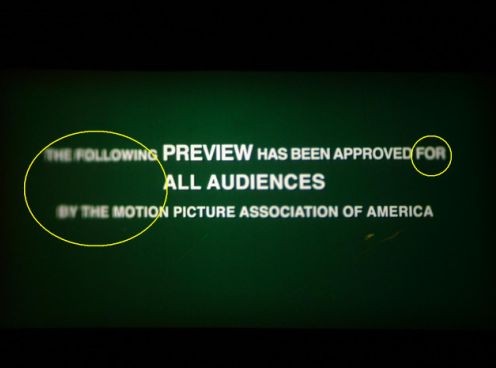
I’m having a focus problem on a Century HH that is used only occasionally for changeover shows. The last couple of times I’ve used it to pre-screen some film reels, I can’t seem to get the entire image in focus. If the edges are in focus, the center is soft, and vice versa. This happens with ALL lenses/aspect ratios. My first guess was that for some reason the film was not running through the gate properly. I’ve completely disassembled and throughly cleaned the trap and gate and still have the problem after re-assembly. Adjusting the film gate tension from one extreme to the other has no affect on the image. I can’t see any evidence of the film being “warped” or otherwise not running though the gate smoothly, yet I can’t seem to find or fix this problem. Unfortunately, my other two projectors are an SA and SAW and the film traps are not interchangeable so I can’t swap them out. Does anybody have any ideas? I don't have another changeover show for a couple of months but I need to figure out and fix this before then. An actual screen shot (WoW!) of the problem can be seen below. Thanks- JimC - Boothmaster, Balboa Theater, San Francisco
Posted by Steve Guttag (Member # 268) on 11-18-2007, 07:42 PM:
Check the studio guides to see if they are pinching the film in the aperture area. The H series is a tough nut in some respects...you have curved runners on hardened curved guides...everything has to be just right...including how you set the gate depth. Since it is left/right focus...I would remove/move outboard the studio guides first (Mark G. will chime in soon and expound on that virtue)...
Since it is all lenses, it is likely the film is warping upon projection due to being pinched or it is even possible that the lamp focus is way off...your image shows a pronounced hot-spot.
Steve
Posted by Jim Cassedy (Member # 4115) on 11-19-2007, 10:04 AM:
I'll double check my lamp focus, but I'm pretty sure the hot spot you see in the photograph is due to the way the autoexposure in my camera reacted to the conditions I photogrpahed the screen under. (House lights were partly up, I was slightly off screen-center axis and for whatever it's worth, that's a silver screen) The hot spot is not visable 'in person' with the naked eye. But I'll double check the lamp focus just the same. FYI: Last night I also dissassembeled, cleaned and re-assembeled the entire lens carriage assembly. Still no change in focus problem when I put everything back. The effort wasn't a total waste of time however, since I got to give the interior of the projector a REALLY good cleaning with all the gate, trap and lens mounting hardware removed.
Posted by Jim Cassedy (Member # 4115) on 11-26-2007, 11:16 AM:
JUST FYI: I seemed to have solved my focus problem. What finally did the trick was to completely disassemble the film trap assembly (again!) and when re-assembling it I swapped the left and right guide rails. (So the one that had been on the left is now on the right and vice versa.) Since doing this I've had no more focus problems. So I guess I can delcare "problem solved".
Powered by Infopop Corporation
UBB.classicTM
6.3.1.2