This is topic Picture not square on screen?! in forum Film Handlers' Forum at Film-Tech Forum ARCHIVE.
To visit this topic, use this URL:
https://ft-forum.com/ft/cgi-bin/ubb/ultimatebb.cgi?ubb=get_topic;f=1;t=009006
Posted by Joseph Muggio (Member # 4013) on 11-26-2007, 09:59 AM:
I first noticed this issue quite a while ago, but never thought to ask about this! As you are probably aware, as per the studio insert in the can of Enchanted, the first 11 minutes (the animation sequences) appear in the 'flat' aspect ratio, then changes to scope. During the 'flat' part of the film, the right side of my picture on screen has an inward slope, from top to bottom and makes the presentation look poor. It looks a little bit like a lopsided keystone, but the left side is straight and the right side isn't. Any ideas what might be causing this and how can I fix it?
Posted by Mitchell Dvoskin (Member # 751) on 11-26-2007, 10:34 AM:
Most likely cause is the projector is not dead center to the screen, and/or you are projecting at a angle. Rotating the entire lens will straighten out the right side, but will probably screw up the top/bottom so the picture keystones off the screen. You are probably better off leaving well enough alone.
Posted by Mike Blakesley (Member # 26) on 11-26-2007, 10:39 AM:
We have this exact same problem and that's correct, it's probably because your projector is off center.
When we plattered the booth and took out one projector, the techs took out the wrong one....the other one was much closer to the center of the screen. (Our booth has 3 ports, one for a slide projector.) I looked into rearranging the booth to put the projector into the middle port, but (as Mark G. would testify) it'd be a huge pain and cost thousands of dollars. I'm saving the money for the digital conversion because the problem is not noticed by 99.9% of the audience anyway.
Posted by Frank Angel (Member # 248) on 11-26-2007, 10:40 AM:
Joe, is your projector located directly in the center of the screen or are you off-center by any amount? Especially if your throw is short, an off-center position will cause keystoning that is not even. The cinemas where a single screen has been twinned and the original booth is used to serve both screens will suffer seriously from this condition.
About the only thing that can fix this would be if you had movable side masks -- you could start the opening "flat" sequence of the film with the mask close in to mask out the keystone edges. Just as the image goes to full width, open the mask to the scope position. If you don't have movable masking (typical of cinemas thrown together from single screens on the cheap), you're going to have to live the glaring reminder that the projector is badly off-center.
But the one good thing this shows: your concern for presentation values -- good show my friend. If only more booths were populated with this kind of projectionist!
Posted by Blaine Young (Member # 3992) on 11-26-2007, 10:48 AM:
Motorized side masking fixes the issue, except whenever you get prints that do this, the studio always 'suggests' that you leave the masking open so as to not block the speakers. One has to wonder why this isn't a concern on flat 1.85 films.
Of course, the entire point is rendered moot at the multiplex where I work. 16 houses and all screens maintain the same width for Flat and Scope, but actually lower the top masking for scope creating a SMALLER image! This practice has always ticked me off.
Posted by Frank Angel (Member # 248) on 11-26-2007, 11:29 AM:
Good point Blaine --our masks are designed so that only the leading edge is constructed of a hard piece of masonite covered by ultra-black (a special, highly light-absorbent rayon plush fabric that makes any amount of light that spills on it almost totally disappear). The rest of the mask is made of black china silk, a material that is very acoustically transparent. The speakers are placed so that the hard edge does is not fall in front of them in any format position.
The china silk is so acoustically transparent that the RTA shows only a negligible change in the very high frequencies when it is in place, so small a change that you can't hear it. Of course both the ultra-black and the china silk are much more expensive than the much cheaper velour that most theatres tend to use, so you generally won't find it used much. Which goes to the question: do the techs eq the house for the mask set in front of the speaker or not? Or do they split the difference?
Posted by Thomas Pitt (Member # 4322) on 11-26-2007, 01:51 PM:
We had a similar discussion with side masking on the beginning of The Simpsons Movie - people were suggesting you leave the side masking set to flat until Homer points at the audience and then move it out. Of course, this would only work with fixed-height screens.
However, there was an insert in the Enchanted can saying that the masking should be set for scope for the entire duration of the movie (even the flat part at the beginning)
In many cinemas, I've seen 'flat in scope format' pictures have a noticeable keystone on both sides of the image, regardless of whether they use horizontal or vertical masking!
I've seen the following kinds of masking in use at cinemas:
Side masking - two blinds moving in from the side
Top masking - single blind moving down from the top
Fixed width - two blinds moving in from the top and bottom
Four-way masking - two vertical AND two horizontal blinds moving!
No masking - flat films leave unprojected areas on the left and right!
Posted by Frank Angel (Member # 248) on 11-26-2007, 02:27 PM:
Yup, we've talked about masking before; in general, fixed height is the golden ideal. The whole concept of Scope is for the picture to get wider, not squat-er. Making it smaller is counter-ideal and should be relegated to theatres that are designed around physical constraints that make fixed height impossible, or for theatres designed by archetechs who've only designed gymnasiums. But if it is impossible to have fixed height, then top AND bottom masking is best of all evils. As for having both top and side masking, that seems over-kill if 70mm isn't involved.
Of course the really sweet thing is to have lenses and a masking stop for 1.37 so that you can go from a square Academy cartoon or short to a full scope width, preferably with a Fox feature and the Fanfare playing. Making THAT switch will give even the most jaded projectionist an erection.
Posted by Brad Miller (Member # 2) on 11-26-2007, 04:35 PM:
What kind of projector do you have, and do you have a lens turret on it? Often you can eliminate this with adjustments to the turret, just like how you can eliminate left to right focus problems.
Non-turret machines can have keystone correction implemented as well, but it's not "free" like a turret.
Posted by Monte L Fullmer (Member # 2797) on 11-26-2007, 09:12 PM:
Find the center of the screen, put a piece of masking tape on the bottom black masking (or a small strip of black tape if have floating screens..) border at dead center, get some PA-35 (RP40)test film, roll it in the projector with apertures out, shoot it through a flat lens and the vertical centerline of the PA-35 should hit the tape marking for machine center.
If not square, you got some machine scooting to do, then recut new apertures to fit both formats.
Now, if you got Centurys, there is that lens adjuster that can be used to center the lens to screen.
And turrets are easy to get things to center. Thing with the scope lens is that you got to do a bit of multiple adjustments to get that lens to center - with azmuth along with vertical and lateral adjustments.
Posted by Robert E. Allen (Member # 1351) on 11-26-2007, 09:35 PM:
Hey Guys:
I've only scanned the responses so I don't know if anyone has addressed the issue but is it possible that his scope lens is not seated properly in his lens mount? I could get the same effect with a B&L in a single lens machine if I did not "rack" the lens in the right direction.
Posted by Monte L Fullmer (Member # 2797) on 11-26-2007, 09:48 PM:
My fault in not reading the initial topic to his condition: Yet, a simple trick to find Scope center:
Roll the FRAME a touch to where the frameline just barely shows up at the bottom of the screen.
One will notice the convex curve of the frameline across the bottom of the screen.
If one side of the curve is higher than the other on each corner of the screen, loosen the lens in the mount to roll the lens to make each end of the curve equal in height at each corner of the screen.
If this is the case, then this should bring that right side to more square in the image. In fact, when the Scope lens to square, both sides should be just slightly angled out due to the keystone effect (trapezoid look) of the downward angle of the throw.
Posted by Brad Miller (Member # 2) on 11-27-2007, 12:37 AM:
Sort of Monte, but not quite.
Level the machine first using the flat lens!!! (Just rack a film out of frame if you don't have PA35 test film, but rack it from the bottom a foot, level the machine, then rack it a foot from the top and verify the leveling is still equal...if not split the difference.) Then and ONLY then rotate the scope in the lens holder if it is not level. That may be close enough to solve your problem, although don't be surprised if the apertures then are suddenly lousy. (There is more to it than this, but that is the basic procedure in trivialized form.)
Also if your machine is indeed off center, that old fashioned trick of putting tape in the center of the screen is useless...unless you like cropping part of your image! Think about it. If your machine is off center to the left by a few feet and you have that white tape dead centered left to right on the physical screen, you will have more width on the right side of the projected picture than the left. As such if you go by that tape, you will end up cutting off a bit of information on the right side of the picture.
I've never understood why everyone is so damn set on using that silly tape method, especially 2 projector changeover setups! ![[Mad]](mad.gif)
![[Roll Eyes]](rolleyes.gif) Just use the markings on the projected PA35 and compare the left edge to the right edge. It is far more accurate.
Just use the markings on the projected PA35 and compare the left edge to the right edge. It is far more accurate.
Anyway Joseph, can you possibly take a digital picture of your screen during that first 11 minutes? Alternatively if you are afraid the feds will knock on your door for posting an image shot off of the screen while you are trying to improve that movie's presentation, find yourself one of those scope trailers that have black matting on the left and right sides and make a loop out of the green band and photograph that. Being able to see how much it is off will help diagnose better.
Also take a picture of your projector so we can see what you are running so the help will be more specific to your equipment.
If you have a turret you are so in luck, because in a nutshell (again I am trivializing here), you can square off the projector to the booth wall (trivializing here people) and adjust the lens so the image is moved left to right or up and down to minimize or totally eliminate that keystoning. I ALWAYS go through this when setting up a new installation and then fine tune things with a fresh piece of PA35 and a set of binoculars to tweek all 4 corners to resolve the same lines. (Scope astigmatism should also be done through the lens and via binoculars to minimize chromatic aberration).
Posted by Frank Dubrois (Member # 3042) on 11-27-2007, 11:16 AM:
Why do they even do this?? Didn't they do something like this with Galaxy Quest too?? Personally I think it looks bad having exposed screen. We even have ushers that close the masking because they don't know any better. In my opinion, it's simply not worth the effort for studios to be doing this.
Posted by Blaine Young (Member # 3992) on 11-27-2007, 01:07 PM:
"Galaxy Quest" and I think the entire first reel of "The Horse Whisperer" and all of the 'non-brain scan' sequences of "Brainstorm". The Widescreen LaserDisc of that one is a trip, bouncing back and forth the entire film.
Posted by Monte L Fullmer (Member # 2797) on 11-27-2007, 01:25 PM:
quote: Frank Dubrois
In my opinion, it's simply not worth the effort for studios to be doing this.
...but, in that story, having that effect had its purpose with the first reel being hard matted like that..
Try us, back in 1998, running the New Line IB Technicolor re-release of "Gone With the Wind", which was presented in full-frame 1.33/1, but the image was squeezed to do this full-frame presentation.
(Sadly, it was a great release, but poorly put together since the original nitrate 3-strip negatives had shrunk a bit in some reels causing color bleed and blur.)
-Monte
Posted by Martin McCaffery (Member # 37) on 11-27-2007, 02:05 PM:
quote: Monte L Fullmer
(Sadly, it was a great release, but poorly put together since the original nitrate 3-strip negatives had shrunk a bit in some reels causing color bleed and blur.)
And for those of us with fixed width, the projected image looked like a postage stamp on the screen.
Posted by Ross Oba (Member # 3433) on 11-27-2007, 02:07 PM:
What they should do is add some extra graphics on the sides similar to what some HD channels do (like ESPN). Sort of like a border. But I guess that would be too difficult for the people at Disney to add more manhours of animation time.
Posted by Monte L Fullmer (Member # 2797) on 11-28-2007, 12:34 AM:
..That's what I hated about those damnable "floating screens" where owners would put very dim lights around the border of the screen to give it a "moonglow" effect like if you're watching a drive-in screen.
Very annoying....and thx for those machine leveling tips that you presented there, Brad.
- Monte
Posted by Thomas Pitt (Member # 4322) on 11-28-2007, 01:12 AM:
I don't know what you mean by the 'moonglow' effect, but I have seen something annoying at a couple of cinemas. There are blue strip lights around the screen (sometimes at the top only, other times at the sides as well) that light up during intermission. They're also on, but dimmer, during the commercials. When the movie starts however, the lights go out.
There was a theatrical Disney cartoon (Mickey, Donald and Goofy in Boat Builders) on the beginning of Meet The Robinsons. The cartoon was presented in its original Academy aspect ratio, by hard-matting the picture so it only filled the centre of the flat-ratio screen. Essentially, they'd zoomed out the picture so it used only half of the film it ought to have used!
Posted by Monte L Fullmer (Member # 2797) on 11-28-2007, 02:12 AM:
...gotta present a film the correct way. For if that was shown through a 1.85/1 projector aperture,there'd be serious chopping of the subject's heads and losing a lot of detail below - sorta like a 'pan and scan' full frame presentation of a scope movie in reverse.
Also in 1999, WarnerBros re-released "Wizard of Oz" in this flat,hard matted format. Yes, it was a bit smallish on the screen, but to see it presented in the original 1.37/1 academy ratio of this original 1939 release was the right way to do this.
Disney did the same with the 1990, 50th Anniv release of "Fantasia", but went further with theatres having add side maskings to get a 1.37/1 look in the auditorium, switch out present flat lenses with longer throw varieties and cut new flat apertures for this film's required 1.37/1 presented ratio since the release prints were done in full frame. Yet, Disney also did strike a few hard matt 1.85/1 with the 1.37/1 reduction image prints.
Posted by Martin McCaffery (Member # 37) on 11-28-2007, 09:21 AM:
quote: Ross Oba
What they should do is add some extra graphics on the sides similar to what some HD channels do (like ESPN).
Some companies used to print curtains on the sides of silent film re-releases. This may have been 16mm only. For something like The Simpsons it would have been a perfect solution since it is sooooo cheesy. ![[Wink]](wink.gif)
Posted by Richard P. May (Member # 3598) on 11-28-2007, 12:49 PM:
I saw ENCHANTED last night at the AMC Century City in L.A.
I'll bet if you asked anybody in the audience if there was any difference in the picture format, they'd all have said "What?"
I can see the thought behind doing it, from the creative standpoint, but it's really irrelevant to the enjoyment of the movie.
This theater also has a slight keystone during this sequence, due to the projector having a mild downward tilt to the screen.
RPM
Posted by Thomas Pitt (Member # 4322) on 11-28-2007, 04:40 PM:
If you have stadium seating, you're almost always forced to have the projector angled downwards at the screen. Therefore, keystoning can be an important issue.
You don't usually notice it if the entire screen is covered in picture, though sometimes you can see vertical lines get skewed. I know it's most pronounced on scope films, but does it occur on flat films as well?
IIRC Meet The Robinsons was a flat film, and I didn't notice much of a keystone in the Disney short before the movie. Then again, it was Academy ratio and not 1.85 widescreen.
I've also noticed that 1.85 flat films are usually released on DVD with the entire NTSC (or PAL) picture area filled; anamorphic widescreen - the TV will stretch it. Scope films, on the other hand, are also released in anamorphic widescreen - except they have a small black border at the top and bottom to keep the aspect ratio as scope. Some TVs have an option to zoom in the picture slightly so you lose the black borders. Then, you get an entire screen filled with picture, but are losing a little of the left and right edges.
(perhaps discussion about DVD and TV aspect ratios could continue in the Afterlife forum)
Posted by Chris Slycord (Member # 4239) on 11-29-2007, 02:32 AM:
quote: Thomas Pitt
I've also noticed that 1.85 flat films are usually released on DVD with the entire NTSC (or PAL) picture area filled; anamorphic widescreen - the TV will stretch it. Scope films, on the other hand, are also released in anamorphic widescreen - except they have a small black border at the top and bottom to keep the aspect ratio as scope. Some TVs have an option to zoom in the picture slightly so you lose the black borders. Then, you get an entire screen filled with picture, but are losing a little of the left and right edges.
It's not that surprising that a 1.85:1 image would be stretched to fill the 16:9 screen since 16:9 (1.78:1) is quite close the 1.85:1 dimensions.
And of course, you'd get the letterboxing with a 2.39:1 image since it's quite a bit larger than 16:9.
Posted by Frank Angel (Member # 248) on 11-29-2007, 02:34 AM:
Yes, masking and plate cuting can MASK keystoning, but it doesn't actually correct it, just gives the illusion that the image is square....but then again, everything on the screen is illusion! The sides might be straight but the image, as Thomas notes, remains skewed. In actuality tho, the human brain/eye system is very efficient in "normalizing" such distortions. In fact, unless you are sitting dead center of the screen, any angle off-center will distort the picture; but look at that distortion for even a short length of time, and your brain says, "ah, so this is the steady-state distortion, so this is what we'll assume is correct" Pretty soon you stop noticing the distortion; your mind knows it's there if you think about it, but it stops intruding in your consciousness.
Some years ago when we were transfering anamorphic scope 35mm to video, we did it by video taping the compressed anamorphic film image directly from the film frame, i.e., with no stretch correction. Although one would assume that watching an entire movie compressed this way would be unbareable, surprisingly you soon forgot the distortion was present....well, yah you still saw it, but it became irrelevant. UNTIL, we reduced the horizontal drive on the monitor so there was the correct amount of vertical squeeze to compensate, and we discovered that no matter how precise we adjusted the vertical compression (by the factor of 2x) everything was still looked fat and distorted. Of course it wasn't, it was just that it took time to "readjust" to the normal, undistorted image.
So given that we can correct for very severe distortion by kind of "filtering" it out, a little keystoning on vertical lines is really a walk in the park.
Hey you want to see how well our brains can compensate for odd situations -- just ask any cinematographer how he looks thru a camera viewfinder. You would think he would have to close the eye not looking thru the camera viewfinder so he wouldn't see two totally different images -- one thru the camera and the other outside the camera. Oh contrare. He is able to keep both eyes opened and, amazingly enough, the brain simply "turns off" the image he is not concentrating on...it's as if the eye not looking thru the camera is closed. It takes a bit of concentrating to make this happen, but it does work. And good thing too, otherwise either you would get terrible eye muscle pain from squeezing shut the one eye all the time, or you would have to wear an uncomfortable eye patch.
Posted by Bernard Tonks (Member # 809) on 11-29-2007, 06:43 AM:
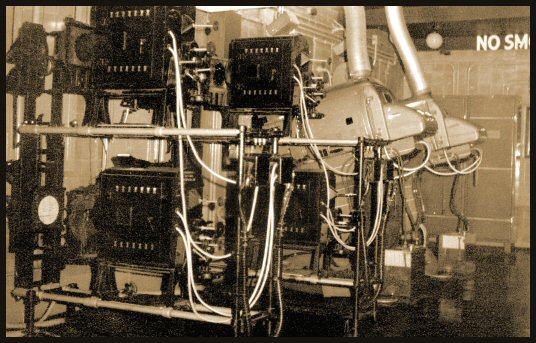
Projection room picture taken during the 1960’s of the Gaumont State Theatre, Kilburn in North-West London opened in 1937 as a 4,004 capacity cine-variety venue.
Strangely, centre screen-axis preference was given to the pair of Brenograph’s. The projectors were Gaumont-Kalee 21’s with Mole Richardson 150 amp water cooled carbon arc lamps. On the left side out of shot, was a Stelmar follow spot and the duel slide projector.
Above the projection suite was a spotlight room with three Stelmar follow spots.
web page
Posted by Stephen Furley (Member # 1277) on 11-29-2007, 07:41 AM:
Of course, a theatre like the State had a much longer throw than a typical modern cinema, so it was less of a problem.
Two Brenographs was not common; I think the Gaumont Palace, later Odeon, and now a road, in Lewisham had two.
Somebody told me recently that the Bingo at the State has recently closed; do you know if this is true? When I travel back to London on the train from Birmingham I pass through Kilburn, and I must admit that the last couple of times I don't remember seeing the neon 'STATE' sign on the tower, which normally stands out.
Posted by Bernard Tonks (Member # 809) on 12-02-2007, 06:14 AM:
Yes, the State is now closed.
The Kilburn State is under threat from developers!
When it opened in 1937, The Kilburn State -- a Grade II* listed building -- was the biggest auditorium in Europe, with seating for 4,004 people. Since then, The State has played host to a galaxy of stars -- The Beatles, The Rolling Stones, Marilyn Monroe, David Bowie, Louis Armstrong, Sarah Vaughan, George Formby, Deep Purple, and many many more. And for the past 20 years, The State has been run by Mecca Bingo.
But now Mecca is selling up. The State is closing, and its future is in the balance.
An application to turn The State into a live music venue has hit a snag... and property developers have pounced. There's a danger that these developers will deliberately allow the The State decay, and then, when it is beyond repair, tear it down to build flats.
We the undersigned call on our elected representatives to make sure that the Kilburn State is returned to its former glory as a vibrant cultural centre in the heart of London.
Petition: web page
Posted by Caleb Johnstone-Cowan (Member # 3710) on 12-11-2007, 05:52 PM:
Why is the animation in 'enchanted' not in scope? I appreciate that the amount of animation would increase however changing ratio during the film is off-putting. We aren't showing it but there's nothing we could do anyway, no masking!
I've always wanted to go inside the Kilburn State. It's massive from the outside, there's even a seperate entrance for the stalls that is as big as a normal cinema of the time. Could easily have a cinema and a gig venue in there.
Posted by Chris Slycord (Member # 4239) on 12-11-2007, 06:14 PM:
quote:
Why is the animation in 'enchanted' not in scope? I appreciate that the amount of animation would increase however changing ratio during the film is off-putting. We aren't showing it but there's nothing we could do anyway, no masking!
For the effect of making the "real world" seem really grand/amazing.
Powered by Infopop Corporation
UBB.classicTM
6.3.1.2