This is topic 70mm reel changes vs. 35mm in forum Film Handlers' Forum at Film-Tech Forum ARCHIVE.
To visit this topic, use this URL:
https://ft-forum.com/ft/cgi-bin/ubb/ultimatebb.cgi?ubb=get_topic;f=1;t=009395
Posted by Jonathan Goeldner (Member # 4854) on 07-08-2008, 10:54 AM:
I've been seeing some 70mm films at the AFI Silver for awhile now and I've noticed that the reel changes don't have the annoying reel change cigarette burns that 35mm prints have, why is there such a difference between the two? With Digital projection being the obvious cleaner option, why aren't studios making cigarette burns less obvious, or is there no way to change this?
Lastly what is the occasional white line blip on 35mm prints - what causes this imperfection to randomly appear?
Posted by John Hawkinson (Member # 1135) on 07-08-2008, 11:14 AM:
Hello, Jonathan.
Please don't refer to changeover cues as "cigarette burns." Many of us find the term offensive (do a search to see why in detail; suffice it to say that it is not a standard term used by professionals in this industry).
With respect your actual questions:
The 70mm prints I've seen do indeed carry changeover cues, but I don't have a lot of 70mm experience. But special prints (such as one-offs) are more likely to not have lab-printed changeover cues, and 70mm prints are generally not produced en masse. If a particular print without cues was never run changeover, cues would never be added.
Most of us don't consider 35mm changeover cues to be particularly annoying. This is obviously a personal preference, but there's not a lot of incentive to remove them.
Some labs do omit changeover cues from 35mm prints, particularly Eclair lab in France. This can lead to significant frustration for those who run prints changeover. It also leads to projectionists incorrectly adding changeover cues with improper tools or in the wrong position, producing a result much more noticable than standard lab changeover cues.
Changeover cues are often valuable indicators of where the actual end of a reel is, either because the reel ends in a fade to black, or because the reel has been abused and frames have been cut off.
It's not clear what you mean by the "white line blip," please be more descriptive. One phenomenon that might match that description is a "negative splice," which can appear as a white line between frames. These splices, on the camera negative or some intermediate element, are required to be outside the visible frame area, and if you see them, it is most likely a framing error on the part of the projectionist. There have been a handful of cases (like The Passion of Christ) where a lab error has resulted in negative splices being visible, but those are extremely rare. I cannot recall one in the past four years.
--jhawk
Posted by Bryan M. Montgomery (Member # 4412) on 07-08-2008, 11:16 AM:
You've obviously seen "Fight Club."
Cue marks, not "cigarette burns," only Ed Norton calls them that.
Posted by Steve Guttag (Member # 268) on 07-08-2008, 11:38 AM:
Note too...that 70mm cues are at the same diameter, on the film, as the 35mm cues and they are often a bit on the inside. As a result, they are smaller, when projected and are rock-steady...they tend to be less noticable.
The white line flashes, if that is what you are describing, if on "scope" films are most likely negative splice flash. Most of the time, they can be hidden by proper framing. If you are seeing them (would occur on each change in perspective or scene change), a complaint to the booth should bring about immediate correction. If happening at the AFI/Silver...some embarrassment should also come about. Those guys are normally pretty good about getting such things right. Now some films have the flash too far into the picture and while you can frame for dead center...every once in a while a flash will creep through but this is very rare.
Steve
Posted by John Hawkinson (Member # 1135) on 07-08-2008, 11:39 AM:
Steve, does the AFI/Silver run 70mm changeover or plattered?
--jhawk
Posted by Chris Slycord (Member # 4239) on 07-08-2008, 11:53 AM:
I bet he's not referring to negative splices in his "white line blip" but is referring to a chemical splice.
Posted by Jonathan Goeldner (Member # 4854) on 07-08-2008, 12:04 PM:
quote: John Hawkinson
Please don't refer to changeover cues as "cigarette burns." Many of us find the term offensive (do a search to see why in detail; suffice it to say that it is not a standard term used by professionals in this industry).
I'm truly sorry.
the white line glitch I am referring to doesn't seem like something that can be solved by reframing - it's a white line that extends from side to side that just randomly pops up and not just at the AFI Silver - this print imperfection seems inherent to 35mm. I've been noticing this more and more with new 35mm prints.
Posted by Darryl Spicer (Member # 711) on 07-08-2008, 12:31 PM:
That is where a chemical splice or lab splice has been made. It is a process of connecting raw stock together during a processing run and the splice has a one in four chance of hitting the frame line. Do a search you will find information on here about that too. A professional would either reject the reel and get another or in most cases cut the frame out if the splice runs across the picture. You leave it in if it is on the frame line. It is less distracting if one frame is missing then having that splice flash on the screen.
Posted by John Hawkinson (Member # 1135) on 07-08-2008, 12:34 PM:
(Hmm, I was mostly through typing this when Darryl posted, sorry for any duplicate information).
Can you describe this white line in more detail? Does it look like this:

in which case, it's what Chris referred to as a "chemical splice" above, though actually they are ultrasonic splices done in the labs under darkroom conditions, and are usually referred to as "lab splices."
They happen because raw stock comes on 6,000 foot rolls and release printers spit out individual reels (around 1,800 feet each) continuously, so the raw stock has to be spliced together before it goes into the printer, and thus before there is any idea of the frameline. As a result, about one in every three reels has one of these defects.
There are some differing schools of thought on what to do. Some people splice the frame out (which gives a momentarily but perceptable glitch in both the audio and picture continuity), and others thing the lab splice itself is less distracting than they side effects of such mitigation. (Do a search for "lab splice" to see these past discussions.)
--jhawk
Posted by Jonathan Goeldner (Member # 4854) on 07-08-2008, 01:04 PM:
quote: John Hawkinson
(Do a search for "lab splice" to see these past discussions.)
thanks, will do.
as to the original question - the reason I ask is that a few movies I've seen recently on the large Uptown theatre screen here in the District, a very washed out print of 'Iron Man' produced some of the worst very visible reel change marks I've ever seen. 'Jumper' another film that looked nearly devoid of color on Uptown's screen looked terrible as well. Other's I've talked to have said that it's a projector bulb issue and not print flaws, but when you have everything going against it, a flawed 35mm print projected on a very large curved screen makes them even more pronounced - the cinematic appeal loses out. I think I was jaded by the seeing and experiencing '2001' in 70mm at the Silver Theatre.
Posted by Louis Bornwasser (Member # 3063) on 07-08-2008, 01:21 PM:
The Uptown, while a once-grand cinema, has fallen on hard times. 35mm has never looked right there, even before. This is a house that screams out for 70mm; it can look/sound magnificant there.
The screen is 60+ feet wide and the throw is only a little bit more. 35mm shows all of its faults clearly. Ask Steve. Louis
Posted by Jonathan Goeldner (Member # 4854) on 07-08-2008, 01:37 PM:
quote: Louis Bornwasser
35mm has never looked right there, even before.
the only two, recent, 35mm films I saw there that really impressed me where 'Dreamgirls' and 'V for the Vendetta' (oddly, at the end of it's run)
Posted by Steve Guttag (Member # 268) on 07-08-2008, 07:19 PM:
Run 70mm on a platter? At the AFI/Silver? (where is Tim's laughing guy graemlin when I need it?).
While there IS a platter within the AFI/Silver facility...it is used as a back up to theatres #2 and #3 as they only have two film projectors, each. The other idea for it was if they were to have an extended run but with few shows on any given week. I think it has achieved less than 100 hours in 5-years.
In the Historic theatre at the AFI/Silver...there are 4 film projectors and no platter. All 70mm runs on reels and the reels are not built up...they run them as they were originally balanced.
It is odd that Jon used "2001" as his Uptown comparison since 2001 was World Premiered at the Uptown! I've personally shown 2001 at the Uptown in 70mm and it was, by far, the best venue to see it in.
35mm at the Uptown is indeed tough...especially "scope" As most know, I left the Uptown in 2005 when, in my belief, it was systematically downgraded in its presentation standards...it also happened to be that my regular job would have required many leave-of-absences from the theatre. As such, I left.
The projection quality there can be no better than the people that are showing the movie, the equipment in use and, to a greater extent, the company/management that sets the quality level. The equipment has fallen into dissrepair, the personel are not projectionists (including one that has made a career of it.) and the current management does not know how to run a presentation house such as the Uptown.
You have the other situation in that there is not a long term lease on the theatre. As such, nobody is going to invest heavily in it with only a few months of potential return.
Mark my words, the Uptown could, relatively easily, be returned to her former glory and, in my opinion, be one of the best venues to see a motion picture in the world, not just the Mid-Atlantic area.
And Louis is right...70mm is a must for a screen such as the Uptown's...it is over 70-feet around the arc, that is 16-feet deep and the projection throw is only 84-feet. You ARE immersed into the image with all its glory or flaws. 2K DIs will always SUCK here. Super-35 also shows every bit of grain.
I'm glad you liked the AFI's presenation of "2001." Do everyone a favor and request more 70mm shows (of as many titles as possible).
Steve
Posted by Stephen Furley (Member # 1277) on 07-09-2008, 07:32 AM:
quote: Steve Guttag
Note too...that 70mm cues are at the same diameter, on the film, as the 35mm cues and they are often a bit on the inside. As a result, they are smaller, when projected and are rock-steady...they tend to be less noticable.
I haven't seen any 70mm for some years now except for '2001' at Bradford in March. From memory, I think the cues on most of the 70mm prints have been scribed directly on the print, rather than being printed from the interneg as most 35mm ones are. The scribed cues generally seem to be quite small, whereas many of the printed ones seem to be growing in recent years, and some are absolutely huge, and ugly, now. Of course, it's even worse on a 'scope print. Some of the printed cues I've seen have been well over 3mm in diameter. I don't know the reason for this, maybe it's a Disability Discrimination Act thing; you still have to be able to see to do a changeover even if you're almost totally blind. ![[Confused]](confused.gif) It looks really bad on screen.
It looks really bad on screen.
Posted by Leo Enticknap (Member # 534) on 07-09-2008, 09:07 AM:
It is possible to do changeovers without any visible cues. There are a number of ways, but the most reliable I used to use was 'click strips'. This involved using a footage and frame counter to identify the two sets of four frames where the cue marks should be, and then applying one layer of splicing tape over one of those four complete frames (not with the edge of the tape across the middle of a frame, for obvious reaons). The audible 'click' as the tape goes through the projector gate acts as an alternative to the visible cues. After the show you can peel away the splicing tape with no visible evidence remaining, assuming you've used good quality tape in the first place.
When I used to get showprints, archive prints, otherwise valuable elements or ordinary prints without cues and I didn't have a scriber, I always used to use this method rather than deface the film with DIY chinagraph slashes or whatever. With some types of projector it's easier to hear the click than with others, but if you run a loop with the tape strips on so that you know what you're listening out for before the show, you shouldn't have any problem hearing them unless the ambient noise in the booth is really loud.
So it may be that the print Jonathan saw was cued using a method that did not involve on-screen cues.
Posted by Paul H. Rayton (Member # 1817) on 07-09-2008, 01:11 PM:
Hi, Leo -- a couple of issues on the use of the "click" strips. What do you do if you have a **REAL** projector, like a DP-70, where you don't hear splices go through? And what about a really old print, which may have numerous splices, especially at reel heads and tails? It's an old print (and ergo "archival" -- but how does one differentiate between the clicks when, by necessity, you are standing some distance away from the outgoing machine? With all the various noises in the booth, I don't think it would be very reliable.
FWIW, the surpassingly protective George Eastman House's recommended system is chinagraph/grease pencil marks -- on the base side only, not emulsion. (You know that already, of course, but I thought I'd mention it here for the benefit of some newer readers, who may soon be finding film prints an increasingly-rare product.)
Posted by Brad Miller (Member # 2) on 07-09-2008, 01:49 PM:
The solution is simple Paul. You simply take your "real" projector and hook it up to a **REAL** automation like the CA21s and let those run the show for you with frame accurate changeovers...far superior than a man-made changeover.
Posted by John Hawkinson (Member # 1135) on 07-09-2008, 02:13 PM:
From a film handling / preservation standpoint, there's nothing wrong with chinagraph marks. They come right off easily and don't damage the film. (Of course, from a presentation perspective,
it's a whole different story.)
I'd be curious, Steve G., what the AFI/Silver normally does, since presumably you're in a position to find out?
--jhawk
Posted by Scott Norwood (Member # 30) on 07-09-2008, 02:26 PM:
On occasion, with previously cut prints that lack the second set of cues but which have motor cues in place, I've figured out the proper threadup point and then used the "click" sound of the splice on the _incoming_ reel as the changeover cue. It works fine (and avoids re-cueing the print) but, as mentioned above, some projectors run splices just fine without making much noise. Straight-gate Centurys seem to be about the loudest.
Another idea for cue-less changeovers that I have considered but not implemented would be a large, visible LED display to show the DTS timecode readout. Determining the proper cue points would be an interesting problem, though, and this method would only work for DTS prints (of course).
Has anyone rigged an automation cue detector to, say, flash a light when the cue tape runs through? This would also work if the cues could be read on the edges of the film between the perfs (the FM35 can do this) where they would not be seen on screen. The operator would then just need to place the foil cues where the visible cues would normally go (plus the cue reader offset) and follow the blinky light instead of looking at the screen.
Posted by Brad Miller (Member # 2) on 07-09-2008, 08:16 PM:
Scott, why wire it up to a light when you can just wire it up to the other projector's motor???
Posted by Brian Guckian (Member # 1678) on 07-09-2008, 08:34 PM:
IMHO the cues should be printed on the film as a matter of course, obviating the need for projectionist intervention via the various methods cited. They should be seen as an integral part of the film "real estate" - just like the soundtrack(s).
quote: Jonathan Goeldner
a very washed out print of 'Iron Man' produced some of the worst very visible reel change marks I've ever seen. 'Jumper' another film that looked nearly devoid of color on Uptown's screen looked terrible as well
quote: Stephen Furley
The scribed cues generally seem to be quite small, whereas many of the printed ones seem to be growing in recent years, and some are absolutely huge, and ugly, now. Of course, it's even worse on a 'scope print. Some of the printed cues I've seen have been well over 3mm in diameter. I don't know the reason for this, maybe it's a Disability Discrimination Act thing; you still have to be able to see to do a changeover even if you're almost totally blind. It looks really bad on screen.
Interesting that this has been brought up as I did research on this a few years back for a submission to a review of one of the relevant standards in this area.
This found that, for 35mm, scribed lab cues (UK sample used) were 1.40 mm / 0.055 ins in diameter whilst published standards such as SMPTE 301 stipulate a cue diameter of 2.39 mm / 0.094 ins.
Cue marks certainly shouldn't be increasing in size, unless standards are no longer being adhered to.
Plus, perceived obtrusiveness of cue marks may be caused by some laboratories inadvertently using older editions of standards that placed cue marks on 'Scope prints further into the frame area.
For example, the above submission found that whilst SMPTE 301 places 35mm cue marks for all ratios 7.14 mm / 0.281 ins in from the non-soundtrack edge of the film, a previous version of the standard placed the cue marks for 'Scope 9.70 mm / 0.382 ins in from the edge, possibly due to greater variance among cinema installations in the past.
It was also found that a print of Windtalkers ('Scope) from 2002 (to cite just one example) was still adhering to this former edition of the standard (apologies as I don't have a reference for same).
As part of the submission it was further proposed that the smaller, laboratory-style scribed cue could be adopted as an optional alternative to the standard cue, with a view to reducing perceived obtrusiveness.
(In hindsight, of course this would only be feasible for small print runs given the work required. Another possibility could be to scribe the internegative with the smaller cue but the question is whether this would be adequately visible on prints).
Regrettably, with all the focus on ![[dlp]](graemlins/dlp.gif) these issues seem to have fallen by the wayside in recent years.
these issues seem to have fallen by the wayside in recent years.
Posted by Scott Norwood (Member # 30) on 07-09-2008, 08:42 PM:
quote: Brad Miller
Scott, why wire it up to a light when you can just wire it up to the other projector's motor???
Easier/cheaper/faster to implement. I guess that with your idea there would be two foil cues, one on each edge of the flim--one to start the second motor and the other for the actual changeover. At that point, though, you might as well just implement a full-blown automation system (which would only need one cue to trigger motor start, then changeover after a programmable delay).
As a side note, it's a real shame that cue reader offsets aren't standardized, so each theatre using this method (assuming that anyone ever did) would need to re-cue the print.
Posted by Steve Guttag (Member # 268) on 07-09-2008, 09:19 PM:
First...the AFI/Silver cues all of their film for automation use. They have EMK-1 automations (CA21's with Kinoton badges). They are a multiplex and all prints that in any way come from an "archive" even if previously plattered...are run on 2K reels...as such, to ensure no missed C/Os...all prints receive foil tabs though all theatres can and have run manually. As such, the AFI/Silver does NOT rescribe or add scribes to any prints that would fall into the above category though they have scribers for 16mm, 35mm and 70mm. Naturally, all foils are removed prior to leaving the complex.
As for lab cues...yes the standard was changed though I think it should not have. I much prefer the placement of the old CScope cue...it was smaller and safe, even on 2:1 screens. But more to the point...In my opinion, it seemed much less visible to be higher and further inside. It always seemed to get lost into the picture better.
As for 70mm in the USA...by and large...all of the prints I've seen have had lab cues...it is a very rare bird to see an un-cued print.
My version of "click tabs" is to use 3 or 4 pieces of tape, skipping a frame between tabs. It is generally audible, even on DP70s.
Note, Kinoton makes a rather nifty and relatively cheap changeover board for their current projectors. Put one in each machine and it will make changeovers back and forth. That is all it does; it is not a full automation.
Steve
Posted by Andy Frodsham (Member # 4061) on 07-10-2008, 06:18 AM:
Less of a problem now, but a real headache about fifteen to 20 years ago, was the sheer number of cues you would get on the tail of some reels. The second set of original cues would get closer and closer to the end of the reel (and finally dissapear altogether) because of careless frame removal by certain operators joining the reels together! Some 'kind' soul would subsequently oblige and add a replacement set of second cues! Now, of course, the distance between the motor cues and the change cues has been reduced, so another helpful individual adds a new set of motor cues! Now you have to sit through new motor cues, old motor cues and finally the new change cues! As the print gets even more 'eroded' away, more cues start to spring forth!
Add to this, the fact that most of these new cue dots were made using all sorts of exotic devices (none of them correct), helps indicate just what a state a lot of reel endings were in! Try doing a changeover with that lot!
Posted by Leo Enticknap (Member # 534) on 07-10-2008, 06:32 AM:
quote: Paul H. Rayton
Hi, Leo -- a couple of issues on the use of the "click" strips. What do you do if you have a **REAL** projector, like a DP-70, where you don't hear splices go through?
I've done click strip COs on a DP once or twice. I seem to remember that you had to open the front cover to hear them, but otherwise no problems. The only situation in which I really struggled was in a booth where the air extraction plant was so loud as to drown out more-or-less every other noise.
quote: Paul H. Rayton
And what about a really old print, which may have numerous splices, especially at reel heads and tails?
I can't remember ever having shown a print like that which didn't also have cue marks on (usually about umpteen sets, applied using a variety of methods, as Andy describes). The prints which tend not to have them are brand new ones, showprints and/or archive viewing copies of obscure titles which have had very little use.
Posted by Robert Throop (Member # 61) on 07-10-2008, 09:33 AM:
Back in the 80's I visited the booth at the Cinerama Dome when they still had DP70's. They had a device called a Cue Meter which was driven by a cable I think was connected to the shutter shaft of the projector.
When the projectionist threaded the machine he would set a dial on the meter to the correct (previously measured) footage mark. About a minute before the C.O. a warning light would flash. Then there would be a flash for the motor cue and another for the C.O. cue.
I have copies of M.P. Projectionist magazine from 1930 with ads for this device. They claimed that a major Hollywood theatre ran a perfect show with the observation ports closed to prove its effectiveness.
Bob
Posted by Bill Gabel (Member # 1105) on 07-10-2008, 11:35 AM:
The former Pacific's Beverly Hills Theatre had the same setup with those cue meter devices from back when Warner operated the theatre.
Posted by Paul H. Rayton (Member # 1817) on 07-11-2008, 03:30 PM:
Ahhhh.... cue meters! Talk about a trip down memory lane. And -- I can provide photos!
These devices were sprinkled around many of the leading movie theatres in L.A., and I seem to recall the story was that it was devised by one of the projectionists in the L.A. theatrical local (Local 150), but I never heard a name. It says "patent pending", so maybe someone who's familiar with patent searches will be inspired from this writeup...
The other recollections are correct, it was mechanically driven, and gave you a descending display of the amount of film remaining on the reel. Here is a "long shot" of the actual device, with the drive cable:
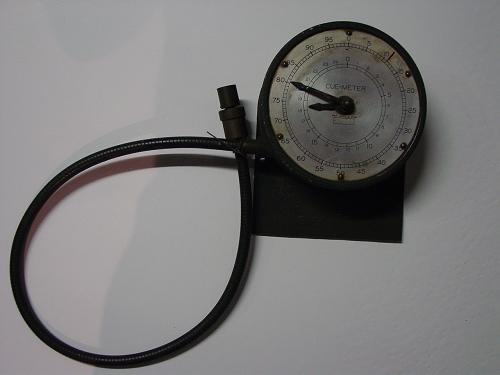
The system wasn't exactly perfect. For one thing, it was dependant on the projectionist remembering to set the footage on the scale at the time of thread-up. Another issue was that it wasn't exactly "frame-accurate". Usually, the preparing projectionist would measure the length of each reel, in whole feet increments, which would then typically be posted on a cue sheet of some sort near each observation port, and usually be also written in tape on the leader of the reel. So, if a hypothetical reel was 1821', it would be set on the meter as shown here:
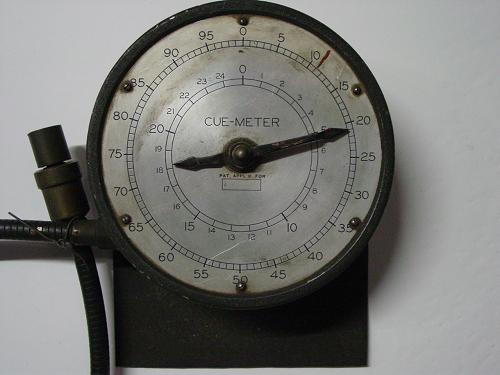
But if the reel was, actually, 1821' and 7 frames -- how did you account for that? You didn't. And, on that analog scale, you really couldn't micro-position the indicator pointer *that* closely.
When the projector started up, the pointers would operate counter-clockwise, giving an ever-descending indication of where you were in the reel. And an electro-mechanical contact inside would cause whatever bells, buzzers, and/or lights you hitched up to go off for you. Typically there would first be a "warning" at 111' and 101', and then, again at 11' and 1' points, which were the time to "do your thing". Here's a look inside, but this one seems to not have the electrical switch on it:
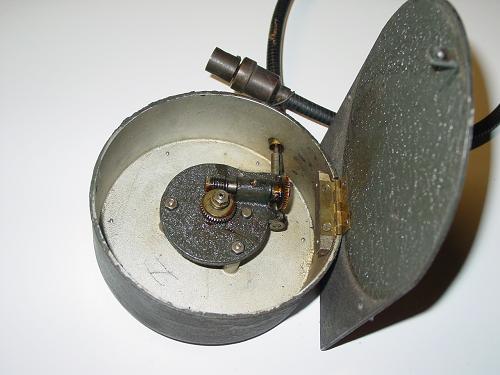
This one was rescued by yours truly from a now-closed venue on Hollywood Blvd., here in L.A., but I was unable to find the companion, so this one remains out of use. Besides which, these were more helpful for long runs, not our daily changes. Takes more time to measure every reel, is more risky for the print(s), and frankly, I'm just as comfortable with just using the optical cues anyway.
Posted by Scott Norwood (Member # 30) on 07-11-2008, 03:45 PM:
Very cool! Nice pictures!
Powered by Infopop Corporation
UBB.classicTM
6.3.1.2