This is topic Kelmer cleaner tutorial in forum Film Handlers' Forum at Film-Tech Forum ARCHIVE.
To visit this topic, use this URL:
https://ft-forum.com/ft/cgi-bin/ubb/ultimatebb.cgi?ubb=get_topic;f=1;t=009399
Posted by Chris Nolan (Member # 4853) on 07-09-2008, 03:33 PM:
Anyone know where I can see a video tutorial for the Kelmer film cleaner?
Each of my projectors have them attached, but none of my fellow projectionists were trained on how to use them, and my superiors don't like them because apparently back when they did use them they caused print damage (likely due to improper training). Until I came to this site, I thought nothing of them, but I seem to get the feeling that they are a regarded highly by you lot. So I did some digging around and I know we have plenty of Media Pads and the Film Guard spray.
Any assistance would be helpful, I asked our Tech, Dave Ayers, and he told how to set it up, but that was before I found the Pads and Guard, and I would much rather see it in action before I end up destroying a print.
Posted by Eric Womack (Member # 4458) on 07-09-2008, 04:23 PM:
Chris,
Google Kelmar's web site. They have a diagram that is excelent on how to thread the cleaners. that is how we learned and I have not had any issues with print damage.
Posted by Mike Blakesley (Member # 26) on 07-09-2008, 06:19 PM:
quote: Eric Womack
Google Kelmar's web site.
Or better yet, post a link. This might already be in the manuals section...if not, here it is.: Kelmar Film Cleaner manual (pdf)
Posted by Brad Miller (Member # 2) on 07-09-2008, 08:17 PM:
Look here.
Posted by Chris Nolan (Member # 4853) on 07-09-2008, 10:21 PM:
This is all very helpful, thank you!
What about the proper way to apply the Film Guard solution? Do I just spray down the Media Pads?
Posted by Brad Miller (Member # 2) on 07-09-2008, 11:37 PM:
There should be instruction sheets enclosed with the FG kits. Just press the tip of the sprayer up against the pads and completely saturate them to get them wet. If you do a search for FilmGuard here, there are tons of discussions on the best ways to use it.
Posted by Chris Nolan (Member # 4853) on 07-10-2008, 01:31 AM:
Yeah, that instruction sheet would be great, but remember I said I had to do some digging just to find the spray bottle (which I actually ended up finding at our sister "art-house" theater), so I'm not gonna hold my breath on the belief that I might be able to find a piece, or a few pieces, of paper. How many sprays would you say is a good average or limit for proper saturation?
Sorry for continuing to harp on this topic, but I take the quality of our prints very seriously as we are a second-run theater. Anyone who's anyone knows we have a stigma for lesser quality everything (but that's what you get when most of your stuff is secondhand), and I'd like to do whatever I can to improve our image.
And I did do a search of other topics, and all I could find were the same phrases you just gave me. I guess through being tired of repeating the same instructions over-and-over.
Any chance that instruction sheet can be found online?
Posted by Joe Redifer (Member # 3) on 07-10-2008, 02:14 AM:
Chris, just keep spraying until the pads are completely saturated. Ideally a drop or two should drip off of the bottom as you do this. No cause for alarm there. (This next part is optional) don't forget the "leader" of the media that isn't on the roll, but already wound over the shafts where the film will contact it. No need to saturate the take up part of the media. You can skip saturating anything that isn't on the roll itself if you have long enough leaders that will motor through and advance the media to where the "wet" stuff starts on the first thing to hit the screen.
Posted by Mike Blakesley (Member # 26) on 07-10-2008, 09:44 AM:
quote: Chris Nolan
How many sprays would you say is a good average or limit for proper saturation?
Spray heads tend to vary. I would say the average is around 25 - 30 squirts per pad. Usually the spray heads will last a while, but they can sometimes leak or wear out mid-bottle, so I always use them as long as possible and keep spares on hand as I can accumulate them.
Posted by Kenneth Wuepper (Member # 1174) on 07-10-2008, 02:24 PM:
If there is damage to prints from the cleaner posts without media when not in use, this can be caused by not having or using a "bypass" threading. If the cleaner is threaded without media present, there is the possibility of damage as the film scrapes over the uncovered posts of the cleaner.
A proper installation provides a path for the film without using any of the cleaning features. Does your booth have this "bypass" capability? Do all operators know how to do the "bypass" threading?
KEN
Posted by Chris Nolan (Member # 4853) on 07-10-2008, 07:30 PM:
Yes, Ken, we do have it set up to easily bypass the cleaner. Until I decided to start using it again, it was almost as if the cleaner wasn't even there.
I have no idea what my GM meant when he refered to prints being damaged.
Here's a fifty dollar follow-up: How crucial is it that the media pads stay taught (even though I'm sure this stays in the range of "the utmost", and is there a need for them to stay as taught when not in use?
Posted by Dominic Espinosa (Member # 2122) on 07-10-2008, 07:50 PM:
Hi Chris. Congratulations on being one of the few that hears something stupid and rightly assumes it's not just "how it is".
A lot of folks get things in their heads, like say "film cleaners scratch prints" and just swear them off entirely.
Anyway. I'm not sure I understand what you're meaning by taught.
If the movement of the film is preventing the take-up of used media something is wrong. Sometimes the rubber shim on the take-up spindle gets shoved into one of the plastic ends or something.
It's normal for the supply-side to be a little bit loose while it's running; the film is pushing in the opposite direction.
And as far as saturating the pads goes, a lot of people tend to get confused -- in fact it's been discussed here before.
A little bit goes a long way. FilmGuard is really efficient!
I've found I get best results, at least on Christie media cleaners, by spraying from the outboard edge of the roll to the inboard edge in one continuous motion such that a little less than 1 pull of the trigger lasts all the way across.
Then I rotate and repeat until the pads are nicely soaked.
Good luck and happy cleaning.
Posted by Chris Nolan (Member # 4853) on 07-10-2008, 09:09 PM:
To be specific, they're just very lose when not being used. They definitely get a bit tighter once the film is running through the cleaner, I was just checking to see if its being this lose when not in use was cause for alarm.
Posted by Alban Birch (Member # 4121) on 07-16-2008, 06:31 AM:
I hope it's ok that I post my question here.
Is the Christie Cleaner a relabeled Kelmar?
Thanks
Posted by Brad Miller (Member # 2) on 07-16-2008, 01:07 PM:
Instruction sheets
Yes, the Christie FC1 is essentially the same as the Kelmar cleaner.
Posted by Chris Nolan (Member # 4853) on 08-13-2008, 02:18 PM:
OK, as an update, the Kelmar cleaners having been working well, and I have even received compliments from kids that come to our Rocky Horror midnight show that the picture has gotten clearer and brighter.
I have noticed on one of our Kelmar units, though, that both media rollers do not move in sync with each other. In one particular case, while playing Indy Jones I notices that one media pad was nearly depleted whereas the other one seemed to only be half-way through. Is this cause for alarm? Can I, myself, adjust it? As a precaution I have not used it since the incident.
And about re-using the pads: I've seen a lot of stuff coming off my prints, especially from our rolling stock (no surprise), is it still OK for me to rewind the media pads and use them again?
Posted by Brad Miller (Member # 2) on 08-13-2008, 07:07 PM:
With the takeup thumbscrew tightened down, can you physically grab the takeup core and turn it? If so, you've got a problem and it is slipping.
Post a picture of the dirty media if you can.
Posted by Chris Nolan (Member # 4853) on 08-13-2008, 10:30 PM:
Yes, I definitely can spin the core when the thumbscrew is tightened.
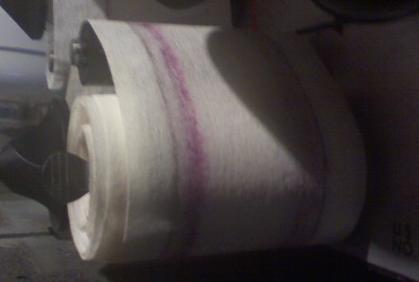
This isn't the worst that we've had, but it's the norm for the first time we run the film through the cleaner.
Posted by Brad Miller (Member # 2) on 08-14-2008, 12:48 AM:
That amount of dirt even on a brand new print s very normal. Most people don't realize how dirty their films actually are until they have seen them totally clean. Anyway you're fine.
quote: Chris Nolan
Yes, I definitely can spin the core when the thumbscrew is tightened.
That's your problem. The takeup core isn't gripping the rubber insert and is physically slipping during a movie. That could lead to scratching, so you need to swap out the takeup core with one where you can tighten down the thumbscrew and grab the core firmly. If that doesn't work, its time to change out the rubber insert on the takeup shaft.
Tip - once you find a pair of takeup cores that work well with a machine, don't remove them! Just yank the old media off when it comes time to change out the cloth.
Posted by Chris Nolan (Member # 4853) on 08-14-2008, 03:00 PM:
Cool, thanks Brad. I'll check to see if we have any spare rubber in my booth, if not I'm sure my tech, Dave Ayers can get some to me.
Yeah, you should've seen how dirty our print on Rocky Horror was, we've had it for five years, and it had never been cleaned. I'm talking clumps were coming off at some points...
Posted by John Wilson (Member # 269) on 08-14-2008, 04:21 PM:
As a short term fix, pull the core off the take-up in question and wrap a small piece of masking tape around the take-up. This should be enough to keep it tight and hold the core in place for the moment and get it back in service.
[ 08-14-2008, 07:33 PM: Message edited by: John Wilson ]
Posted by Martin McCaffery (Member # 37) on 08-14-2008, 07:26 PM:
quote: Chris Nolan
if not I'm sure my tech, Dave Ayers can get some to me.
If that's the same Dave Ayers who used to work the Tyson Twin, tell him his old relief projectionist says hello.
Posted by Mike Baer (Member # 1519) on 10-08-2008, 02:41 AM:
I received my first Kelmar Cleaner yesterday. ![[Smile]](smile.gif)
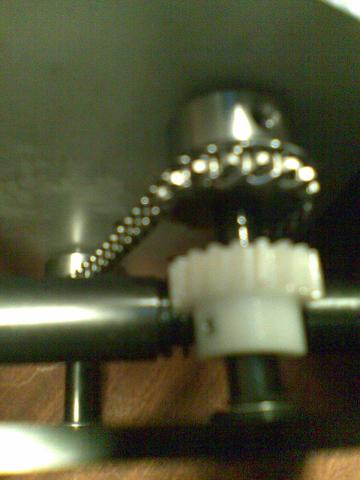
But when i tested it, i noticede that the wind up cores didn't turn. I opened the back and saw that the white plastic "thingey" wont turn. The main drive and the main axis turn normal.
What is the problem,am i making something wrong?
Here's a pic of the thing i mean:
Posted by Robert Minichino (Member # 3495) on 10-08-2008, 12:06 PM:
Are you sure it's not just turning very slowly?
Posted by Phil Ranucci (Member # 3820) on 10-08-2008, 01:47 PM:
It does turn very very slowly. Try it on some scrap trailers and mark the take-up spindles so you can tell if they move. Since you have the machine open, you might want to make sur all the setscrews on the gears are tight.
Posted by Brad Miller (Member # 2) on 10-09-2008, 12:48 AM:
1. Tighten the takeup thumbscrews snug and make sure that once these are tightened that you can NOT spin the takeup core by hand. Assuming you can't...
2. Load up some media like normal.
3. With a pair of scissors make a tiny snip in the edge of the media beside the idler roller (or make a mark on the edge of the media with a Sharpie).
4. Run at least 5 minutes of film through the machine. This can be junk film, or you can sit there and spin the drive wheel a couple of hundred times by hand quickly.
Did the media move? If so, you don't have a problem. If not, we will go to the next step.
Posted by Mike Baer (Member # 1519) on 10-10-2008, 09:55 AM:
Okay i checked it today and it runs fine. I just didn't know that it moves so slow.
Thanks for your infos.
Powered by Infopop Corporation
UBB.classicTM
6.3.1.2