This is topic CP650 Surround Mixdown in forum Film Handlers' Forum at Film-Tech Forum ARCHIVE.
To visit this topic, use this URL:
https://ft-forum.com/ft/cgi-bin/ubb/ultimatebb.cgi?ubb=get_topic;f=1;t=009409
Posted by Joe Redifer (Member # 3) on 07-15-2008, 07:01 PM:
Hi, since I am illiterate, I cannot read the 650 manual so I thought I would pose this question here: Is there a way to internally fold down the split surrounds to a single mono surround in the CP650 for format 10? I ask because we have four of these units and only the left surround is hooked up, the surrounds themselves are not wired in a split fashion. It sounds very odd when right surround information should be heard, but only silence is present instead.
Yes, I realize the ideal solution is to rewire the surrounds, but I'm working with what I've got here.
Posted by Marco Giustini (Member # 4544) on 07-15-2008, 07:09 PM:
Someone will chime here if something can be done inside the 650 to have mono surrounds, but I don't think.
If rewire the surrounds is not easy because you don't have a box in the booth with each single surround speaker coming from the auditorium, what about a small 2ch mixer that mixes the stereo surround of the 650 into only one channel?
Posted by Joe Redifer (Member # 3) on 07-15-2008, 07:12 PM:
I believe the surrounds are all daisy-chained to one another, no box. This theater was created when the first Dolby optical matrixed surround was all the rage (and was the first ALL STEREO multiplex theater in the state, supposedly). I'd rather rewire the surrounds than install a mixer. A mixer costs money, and I don't think I can get any budget for a project like this.
Posted by Brad Miller (Member # 2) on 07-15-2008, 07:20 PM:
A mixer would be cheaper than purchasing more speaker wire if it comes to that.
Posted by Scott Norwood (Member # 30) on 07-15-2008, 07:23 PM:
He doesn't need a mixer. The CP650 has balanced outputs. Just wire the XLR or TRS to the surround amp as ground, LS+, RS- and the surrounds will sum to mono. The surround levels will then need to be checked and (probably) re-set. Of course, this assumes that the amplifier has a balanced input.
Posted by Joe Redifer (Member # 3) on 07-15-2008, 07:29 PM:
Trust me Brad, it won't come to that. It'll be "You're not getting any complaints so why spend money fixing it?"
Scott, I haven't really investigated the amps yet, but I will check for balanced inputs. I'm 100% sure they're fine since they are recent-model QSC. Resetting the levels is not a problem. Now just to make sure we actually have XLR cables.
Posted by John Walsh (Member # 168) on 07-15-2008, 09:44 PM:
Wow - I'm surprised someone would pay for good stuff like a CP650 and QSC, then not want to fix a minor issue like rewiring surrounds.
Posted by Kenneth Wuepper (Member # 1174) on 07-15-2008, 09:59 PM:
Joe,
Unhappy customers don't complain, they just go elsewhere.
KEN ![[Frown]](frown.gif)
Posted by Joe Redifer (Member # 3) on 07-15-2008, 10:56 PM:
John-
We inherited this stuff from another theater that the same company closed down a few months back.
Kenneth-
You and I and most other people here know that. That's why I hate that we'll be playing a super-scratched print of Iron Man for the third week in a row (we received it like that). I complained and tried to get a new print, but I was vetoed. This is also a lesson to be learned; do NOT open prints on July 4, especially when it is a Friday because all depots will be closed for many days.
Posted by Mark Gulbrandsen (Member # 72) on 07-15-2008, 11:39 PM:
Joe, You KNOW the state that equipment was in when you got it. I came to the conclusion that the folks that run that chain don't even bother to take a piss unless its absolutely necessary! You shoulda known after goin through the gear that it would be better to go back to working at Wal-Mart ![[Eek!]](eek.gif)
![[Roll Eyes]](rolleyes.gif) .
.
Mark
Posted by Joe Redifer (Member # 3) on 07-16-2008, 03:08 AM:
Uh, no. I'd rather work for the theater than Wal*Mart any day. I've never worked for Wal*Mart, but I imagine that Wal*Mart pays much less!
Posted by Demetris Thoupis (Member # 833) on 07-18-2008, 10:40 AM:
Perhaps you can try pushing the outputs from the CP650 to one way diodes and from there connect both ends on the amplifier. This way you will not short the CP650 outputs since the signal won't be able to be mixed together! I don't know if it would work but I also believe that a cheap mixer would do the job.
Demetris
Posted by Kenneth Wuepper (Member # 1174) on 07-18-2008, 11:08 AM:
Joe,
Look up the thread with the reference to an article on the subject, "Why Not Wye". It is on the RANE pages. http://www.rane.com/note109.html
I think that you will find this to be a safe and simple way to connect and mix the signals you want.
KEN
PS Resistors are pretty cheap! ![[Wink]](wink.gif)
Posted by Joe Redifer (Member # 3) on 07-20-2008, 01:18 AM:
Alright I looked a little closer at the sound equipment tonight and it is all hooked up digitally. CP650 digital out to a QSC DCM-1 monitor and that feeds digital signals to the amps. The surround amp is a QSC DCA-1222. It has a purple stripe on the front which impresses booth visitors and increases the booth feng-shui. Anyway, would this be as simple as changing the dip switches on the amp from stereo to parallel and resetting the level?
Posted by John Walsh (Member # 168) on 07-20-2008, 09:30 AM:
The signals going to/from the DCM are regular analog, not digital. The DIP switch idea might work, depending on how it's hooked up; I don't think it would hurt anything to try. You should also plug in a laptop and see how the DCM monitor is configured.
Posted by Mark Gulbrandsen (Member # 72) on 07-20-2008, 10:05 AM:
quote: Joe Redifer
CP650 digital out to a QSC DCM-1 monitor and that feeds digital signals to the amps.
Are you absolutely sure you're not an ex Wal-Mart Employee... I am pretty sure that one time I heard a Wal-Mart Employee say that QSC amps only took a digital input signal .
Mark
Posted by Joe Redifer (Member # 3) on 07-20-2008, 05:10 PM:
Well they plaster the word "digital" everywhere so everything MUST be digital! Anyway there are XLR jacks so I think it would take a McDonald's employee to say they only accepted digital.
John, I don't have a Windows laptop or the QSC software.
Posted by John Walsh (Member # 168) on 07-20-2008, 08:13 PM:
The software is easy to get. I know you area Mac guy; can it emulate Windows? If the DCM is new and has the genaric standard settings, then it probably won't effect you. But I was thinking if it was bought used, then it may have been set up for it's previous install - which might be bad for you now.
Posted by Joe Redifer (Member # 3) on 07-20-2008, 09:55 PM:
I don't have a Mac laptop, either. I am not really a fan of laptops, and I'm not going to buy one just to mess around with sound equipment here and there (I have absolutely no other use for a laptop). All I want to do is mix the surrounds, I shouldn't be required to hook up a freakin' computer just for that. That would make the QSC unit entirely non-self-sufficient (next thing you know we'll require laptops to change the channel on our TV). I'll just put it to parallel, run the pink noise and see if I get sound from both LS and RS. That will answer my question.
Anyway I noticed the VGA cables that come from the QSC DCM that go to the amps seemed pretty gimpy, as if they were made by Belkin or something. The cables are pretty thin. I used to have an extremely similar Belkin cable for a VGA monitor and there was lots of ghosting. Using a real (re: phuggin' thick) VGA cable solved the problem. Could there be similar issues when using these same cables for sound as is the case here?
Posted by Brad Miller (Member # 2) on 07-20-2008, 11:41 PM:
The dataport cables are fine. The ones supplied by QSC are tan or black and thin about the size of a cat5 cable. You won't have any problems with them.
Putting the amp in parallel will only take the signal from the left channel input and run it through both sides of the amp.
Your best option at this point is to download (QSC calls it upload in their software if I remember correctly) the settings in the DCM-1. I honestly don't know if there is a setting to sum to mono or not. I would never permit this in one of my installations, so if I saw such an option previously when I had the software open, I quickly erased it from my mind. Unfortunately my laptop is in the car and I am feeling too lazy to go outside and get it to look for myself. Sam Hynds from QSC would know, but I wouldn't hold my breath that such an option exists. (It would be funny if the DCM-1 was configured for the wrong speakers though.) If Sam or somebody doesn't chime in I can look tomorrow evening provided you harass me about it.
Had you considered burning the building down? That might get it fixed quicker. ![[evil]](graemlins/evil.gif)
Posted by Joe Redifer (Member # 3) on 07-20-2008, 11:44 PM:
I think the building would flood before it would ever burn.
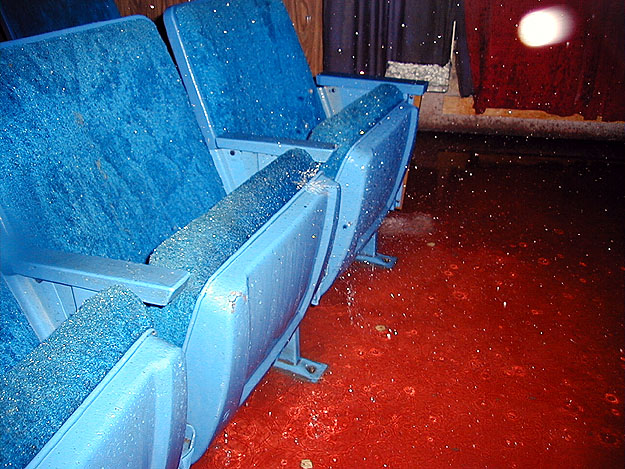
My cables are beige. They are not "dataport" since they send audio in analog form.
Posted by Kenneth Wuepper (Member # 1174) on 07-21-2008, 05:58 AM:
Joe,
Your theater is "really atmospheric".
KEN
Posted by Steve Guttag (Member # 268) on 07-21-2008, 11:46 AM:
The DCM-1 does nothing to the surrounds except monitor them and, if EX is enabled, turn them into unbalanced (grrrrrr).
If you don't want to make a resistor network yourself, you could always buy an RDL STD-10K or STD-600 . They are pre-built (with the price to match) resistor networks (with RF suppression) that will allow you to passively sum balanced outputs to balanced inputs. There are four combination input/outputs.
Steve
Posted by Jon P. Inghram (Member # 4125) on 07-21-2008, 01:07 PM:
quote: Joe Redifer
My cables are beige. They are not "dataport" since they send audio in analog form.
The dataport connections are analog, just like the DB25 output on the CP650.
Posted by Tony Bandiera Jr (Member # 2365) on 07-21-2008, 02:45 PM:
quote: Joe Redifer
My cables are beige. They are not "dataport" since they send audio in analog form.
Dataport is the name QSC gave the cables. When used with A DCM series monitor and DCA and a few other models of QSC amplifiers, the cable carries the audio signals, a power-on signal to the amps (when you power down the monitor the amps go into standby) and the signals for the output of the amps to the monitor.
Supposedly, the audio sends in the QSC cables are shielded separately from the other leads...a good idea since close coupling of the input (or feed) to the amp and the output from the speaker lines can cause serious feedback or oscillation. Which is why QSC cautions people to NOT use a standard VGA cable even though it has the same HD15 connector.
Since the QSC cables are reasonably priced, not a big deal anyway.
Posted by Joe Redifer (Member # 3) on 07-21-2008, 06:42 PM:
quote: Tony Bandito Jr
Dataport is the name QSC gave the cables.
Yes, that's been my point through this whole thing... it's a very misleading name (especially when they are throwing around the word "digital" everywhere as well). Hmmm, maybe I should refer to a Firewire 800 connector as a "patch cable". It would make sense to QSC.
Posted by Demetris Thoupis (Member # 833) on 07-24-2008, 11:11 AM:
Actually most of you are wrong regarding the Dataport as a VGA cable!!
All of you think "What the heck is he talking about".
Well it goes something like this.
VGA Cables usually use Pins 1,2,3 for Hot Red,Green,Blue respectively and pins 6,7,8 for grounds for Red,Green,Blue, 13 and 14 for Horizontal and Vertical sync and pin 10 for common ground for the Horizontal and Vertical. In a VGA Cable this means that on these pins (1,2,3,6,7,8) small coaxial cable is being run through it. Some molded VGA cables even have 6,7,8 shorted together since it is all ground. It is WRONG to use a VGA cable and not a certified Dataport cable or if you are too lazy and can't be bothered to buy one you should see the pinout diagram in the DCM manual to create one and spend countless hours over a magnifying glass to solder all 15 pins. Dataport cable basically carries three balanced cables and data cables all in one form from the monitor to the amplifiers. Anyone who has been using VGA cables bought from the local Radioshack or whatever you call it is simply WRONG!! The only common thing these cables have with the VGA cables is the 15 pin socket they use to connect.
Demetris
Posted by Dave Macaulay (Member # 813) on 07-24-2008, 02:31 PM:
Well, something else that VGA cables have in common with QSC dataport cables is ... they work just fine as dataport cables. There's likely some difference in the way the cables are shielded and probably really cheapo VGA cables may cause problems... but they are not some completely different cable that happens to use the same connector.
Posted by Joe Redifer (Member # 3) on 07-24-2008, 05:01 PM:
So what kind of "data" goes through these dataport cables? I seriously want to slap someone over this name.
Posted by Demetris Thoupis (Member # 833) on 07-25-2008, 06:21 AM:
On the Dataport cable the balanced shielded pairs are
Pin 1 for Channel 1 Minus
Pin 7 for Channel 1 Plus
Pin 6 for Hard Ground
Pin 8 for Channel 2 Plus
Pin 11 for Channel 2 Minus
This means that analog signal is passed from the all Digital DCM monitor down to the amplifiers! From what I realise, there are cable connections for standby control, clip protect e.t.c. I believe (but I could be wrong) that the amplifier simply shorts a pin with the ground to indicate the state of the amplifier if its on/off, clip e.t.c.
Even though a VGA cable might work, it is still wrong to use it instead of the Dataport cable which uses completely different shielded cable combinations.
Demetris
Powered by Infopop Corporation
UBB.classicTM
6.3.1.2