This is topic Aligning Sound Heads in forum Film Handlers' Forum at Film-Tech Forum ARCHIVE.
To visit this topic, use this URL:
https://ft-forum.com/ft/cgi-bin/ubb/ultimatebb.cgi?ubb=get_topic;f=1;t=009506
Posted by Andrew Bangs (Member # 4938) on 09-10-2008, 12:52 AM:
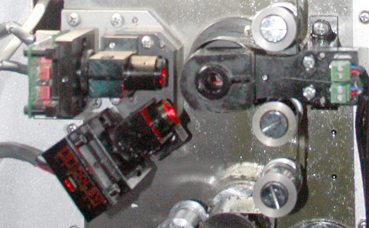
Is their a special tool used for Aligning Sound heads accurately or is it done by eye and ear? I have a Dolby CP650 unit. in a Horizon Projector. Here is a rough picture of what it looks like. the top eye is the standard Analog and the lower one is the Dolby Digital.I can Loosen the light sending unit with an allen wrench then twist and pull it on the shaft but I am doing this by eye. in theory when the alignment is good their should be a green LED on the Dolby Eye. But no matter what I do I can't seem to get it to light up solid. I get it to flash on and off. but never solid. Is their something else I am missing?
Posted by Monte L Fullmer (Member # 2797) on 09-10-2008, 01:21 AM:
Aligning Dolby Dig readers take a loop of new roll of CAT-69 1kz tone film and an "O-scope" to read the actual track on the film and to get it aligned correctly.
One can also use a new, unused trailer with a SR-D track on it as well for a loop.
good luck-Monte
Posted by Demetris Thoupis (Member # 833) on 09-10-2008, 01:40 AM:
With the movement of the LED you will be able to achieve perhaps good ilumination. To see this without an osciloscope you need to set a dip switch on the CP650D (I think is dip switch 6 but I am not sure) to get the Cp650D to setup mode and scroll towards the video level seletion. From there when you move the LED for the digital reader you should see it moving from low volt to maximum 4.1v (if it is higher then you definately need a technician to come in to do alignment). It seems that the leds on these bracket move together but I may be wrong. To do a proper alignment of the soudheads you will need osciloscope and realtime analyzer or the CP650D software. Note that by fliping the Dip switch, should you change anything else you might lead yourself into trouble so if you are not fully aware of the procedure to properly aling a CP650D. I recon that most probably the LED level has faded and there should be a potentiometer adjustment somewhere on the projector to raise the LED level higher. The main issue that you need to achieve 4V of video level. If you have 4V and still have faulbacks to analogue then surely you will need a tech to come and do a proper alignment. Note that the Digital reader is the most complicated to aling unlike the analogue which in most cases its pretty straight forward. Whatever you do, DO NOT move the reader. Hopefully they are set ok from the factory or your technician.
Demetris
Posted by Monte L Fullmer (Member # 2797) on 09-10-2008, 05:27 AM:
You CAN eyeball it in, but close enough really doesn't merit absolute accuracy....and SR-d is critical with error counts if not accurate.
(......why you best need the 'scope' to eyeball that LED to get it dead center with the SR-D track with the film running....)
There is a subsitute program that a lot of us tekkies have and that is WinDRAS 2.0 - a program installed in a laptop and with a serial cable attached to the processor and laptop to "see" what the camera eye is seeing on the film.
This program works as a 2nd best to the actual testing above.
Posted by Louis Bornwasser (Member # 3063) on 09-10-2008, 08:57 AM:
Careful with that program. You are "looking" after delay and error correction. Louis
Posted by Steve Guttag (Member # 268) on 09-10-2008, 09:07 AM:
I'm sorry to say this but stop...you are shooting blind without the proper tools and training. Nothing in the soundhead should be done stictly by eye or ear. You need both calibrated test films as well as the proper tools which include, WinDras, O-scope, test films and RTA. It really is that cut and dried. Anything you do by eye is likely to be as bad as it is good.
Despite what Monte said, WinDras can be a very valuable tool but not for setting the LED position so much...it can be handy for items. If you know how to read the quick histogram, you can use that portion of Dras to set LED/lamp intensity.
I'm not trying to discourage anyone from trying to improve things but the reality is that without the proper materials and training, I would think you have as much chance to make things worse as make them any better and you are not going to get it right, even if you do, by luck, improve things a little.
Steve
Posted by Tim Reed (Member # 137) on 09-10-2008, 10:20 AM:
Steve is absolutely right. This is not for the faint of heart (or inexperienced/untrained). It's quite a bit more involved than setting up A/V equipment.
Posted by Louis Bornwasser (Member # 3063) on 09-10-2008, 11:07 AM:
Whether it helps or not is almost totally dependent upon how badly it was aligned before you started! Louis
Posted by Randy Stankey (Member # 64) on 09-10-2008, 11:11 AM:
I never thought DRAS was meant to align or set up a Dolby Digital system. Only to perform simple checkups on a system that has already been aligned using a scope, test film and an analyzer.
In other words, DRAS would be used by a technician who receives reports of problems with a system. He can quickly hook up his laptop and get a readout on the system's performance without dragging out all his equipment.
If he finds that there is a problem, he can fix it the right way but, if it's only a minor tweak or if he determines that the problem will keep until he has time to make a regular service call he will save himself a lot of work.
I would never use DRAS to do a full alignment.
Posted by Monte L Fullmer (Member # 2797) on 09-10-2008, 12:45 PM:
Some also run DRAS parallel with the full testing, but true - never by itself to get absolute results.
What I'm wondering also is with the Horizon having a basement reader: how's the wow and flutter with these machines?
Posted by Andrew Bangs (Member # 4938) on 09-10-2008, 10:57 PM:
First off thank you all. Frankly you have confirmed my own feelings and now I feel I have the facts to go to my superiors and ask for a tech to come out. I am an adventurous sort and have always learned by doing. but I have always had the Knowledge on just what I was qualified for or not as I could easily do more harm than good. this situation seems like it needs the definite touch of a professional. I think ore trouble began with poor Maintenance. Things became loose in the projector and with addition of unqualified hands jarring around the insides cleaning other components the problems were (no pun intended) Amplified. The other problem I have is that as Monty Eluded to with the digital gone the analog is now playing the audio and yes their is distinct flutter and I cannot get rid of it.
I do realize I may get Booed and Hissed for this but does any one know if their is a sister program to WinDRAS 2.0 for the Mac... ![[Eek!]](eek.gif) yes I said Mac...
yes I said Mac... ![[Confused]](confused.gif) if so please let me know and also if the program has a price I will have to swing that by my boss. If their is no Mac Version I have a lead on a PC that I might be able to use. The thing that is most interesting to me is being able to look through the lens of the reader. I feel that if I could do that I might be better able to cut down on the flutter. Do you know of a way to get the lens feed from the Analog as well as the digital. Will this program do both?
if so please let me know and also if the program has a price I will have to swing that by my boss. If their is no Mac Version I have a lead on a PC that I might be able to use. The thing that is most interesting to me is being able to look through the lens of the reader. I feel that if I could do that I might be better able to cut down on the flutter. Do you know of a way to get the lens feed from the Analog as well as the digital. Will this program do both?
I only ask because the analog and digital on this machine is well out of tech spec and frankly right now we are loosing people to the background noise so something needs to be done immediately till a tech can make it out.
Posted by Monte L Fullmer (Member # 2797) on 09-10-2008, 11:24 PM:
There are some FT members who also have MACs instead of PC's, thus it could be possible that Dolby has a MAC version of DRAS - have to chek the Dolby site for that info.
WinDRAS is only for the digital side of the audio spectrum.
Optical is a whole different animal to align, yet more basic testing alignments techniques than with digital.
Yet one has to do the optical alignments first before the digital alignments for a basement reader.
Posted by Joe Redifer (Member # 3) on 09-10-2008, 11:32 PM:
No. Dolby hates Mac users. If you have a recent Mac laptop, however, it will have an Intel processor. Simply install Windows XP under "Boot Camp" and your laptop will be able to boot into Windows and run your DRAS. However you can bet that DRAS requires some bizarro, outdated PC-only connection from 1975 like a printer port or serial port to work... things that Macs don't have. Asking them to work with technology less than 10 years old like USB is simply asking way too much of Dolby! They'll support USB when it starts disappearing from computers.
Hopefully I'm wrong and someone in the know can correct me, but I bet I'm right.
Posted by Monte L Fullmer (Member # 2797) on 09-10-2008, 11:38 PM:
Yea, the good ol' DB-9 thru serial connection. But, you can get USB to serial adapters (which I had to get for my recent laptop..) which works great.
But, it's also handy to keep an old Pentium 266 laptop running Win98 floating around for the use of WinDRAS for then you definitely got serial ports to use.
Posted by Joe Redifer (Member # 3) on 09-10-2008, 11:39 PM:
Did it work with DRAS?
Posted by Monte L Fullmer (Member # 2797) on 09-10-2008, 11:41 PM:
Works supercalifragilistic!
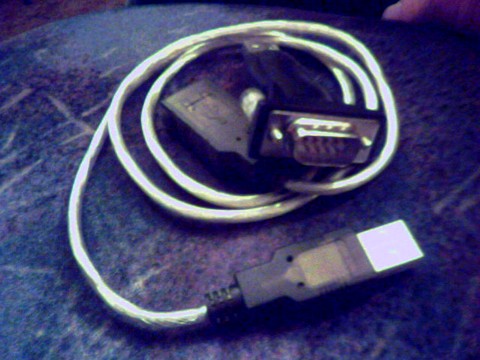
..but don't know if it works with VISTA since I have XP-PRO in my laptop.
On the flutter: see if the film is snagging on the teeth of the lower constant speed sprocket when the film leaves that area and heading down to the davis loop rollers for the scanner drum since those sprockets aren't the best made sprockets like LaVezzi sprockets. Or, it could also be the final pulldown sprocket in the soundhead area, plus the gear side of that assembly if any fibre gear teeth that drives those sprockets aren't dinged.
Posted by Andrew Bangs (Member # 4938) on 09-11-2008, 01:19 AM:
Again Thank you gentlemen. These are all going to be cool tools to play with. (the tips that is).
Posted by Randy Stankey (Member # 64) on 09-11-2008, 02:06 AM:
I had DRAS running on my iBook way back in 2001. I used Virtual PC on OS 9. It worked as well as it did on Windoze.
I asked Lonny J. if there would ever be a Mac version of DRAS. His answer was basically, "You can't do that." He seemed surprised to hear that I had been using it for some time.
Folks at Dolby definitely know there is a demand for it. They just don't seem to be motivated to follow through.
Posted by Andrew Bangs (Member # 4938) on 09-13-2008, 02:01 AM:
That is the big dilemma these days "no fallow through".
Posted by Randy Stankey (Member # 64) on 09-13-2008, 12:00 PM:
Given the expected payoff for developing another piece of software to do what other software already does, I don't blame them. They've got other priorities.
On the other hand, I am often disappointed in the "Can't be done" attitude that people seem to have.
When asked whether they will develop software for 'Platform X', the usual answer is, "I don't want to waste time writing programs for only 10% of the market."
I don't know but I think any smart manager would kill for the chance to increase the potential market for his product by 10%!
I know that's over simplified. I'm not asking them to make cross-platform software development a top priority. I think it's stupid for them to dismiss ideas out of hand like that.
Posted by Scott Norwood (Member # 30) on 09-13-2008, 12:12 PM:
The difference in this case is that Dolby won't sell one more processor if they start supporting MacOS, Linux, BSD, BeOS, VMS, <insert random OS here>, etc., yet their development costs will increase substantially.
As much as I don't like the idea of an all-Intel, all-Windows world, I can understand why Dolby isn't eager to start taking on the expenses of development, testing, bugfixes, etc. for another platform. And, even if they did, technicians would still need Windows to run the setup sofware for SDDS, Ultra-Stereo, etc.
Posted by Louis Bornwasser (Member # 3063) on 09-13-2008, 01:16 PM:
Well, Scott, SDDS is as good as gone. In addition, there are STILL so many that try to set up DolbyDig with no scope. I agree, however, at least they used a platform that most people have, instead of some strange, unknown one. (Not that Macs are unusual.) Louis
Posted by Randy Stankey (Member # 64) on 09-13-2008, 02:40 PM:
Instead of saying, "You can't do that." I believe a better answer would be, "Maybe some day."
I would never expect a company to drop what they are doing and start a new project like that. On the other hand, I do expect others to consider alternatives.
It's not so much about actions but the attitude.
Posted by Steve Guttag (Member # 268) on 09-13-2008, 08:53 PM:
Randy, I'd much rather hear that someone has no plans to do something than have the "maybe someday" carrot dangled.
Steve
Posted by Joe Redifer (Member # 3) on 09-13-2008, 11:29 PM:
Apple has already dealt with the people who develop for, love and want to marry the Windows platform. Just as long as the software can support technology that isn't older than time itself like USB we're all set. Monte's dong-hole (dongle?) above seems to have solved that issue. I'm surprised DRAS10 isn't limited to cassette tape on the Commodore 64. But maybe that technology is too new.
Serial, LOL. Welcome to the 70's. Does DRAS10 come with a coupon for 10% off pre-perforated dot-matrix printer paper?
Posted by Mark Gulbrandsen (Member # 72) on 09-14-2008, 08:25 AM:
Joe,
USB and Serial may be old but they are well prooven and they work faultlessly! In the industrial realm which technically is where we work it is more or less standard.
Mark
Posted by Steve Guttag (Member # 268) on 09-14-2008, 10:28 AM:
Serial (conventional 9-pin type) is much more rock solid than USB or Ethernet. Furthermore, the distance you can go on serial versus USB is notably longer/more stable.
Steve
Posted by Joe Redifer (Member # 3) on 09-14-2008, 10:49 AM:
Well it's a good thing serial is still included on every computer made! Oh, whoops! Exactly how far away do you really need to be from the CP650? Ethernet is damn rock solid and has far more bandwidth as well. Want to be 150 feet away from the CP650 because you are allergic to the chemicals used in Dolby' plastic? Ethernet'll do it! What's that? Every computer and laptop built since 2003 or so has ethernet without exception? Oh crap! Dolby doesn't even utilize the ethernet port. Seriously, they need to come into the current century. What's next, EPP printer ports?
I am not saying to give up serial connectivity for the old fogies who have ancient laptops, but include ethernet as well! That right there would guarantee current Mac support without having to program a version of the software for another platform, and people wouldn't have to buy some weird ass converter and hope it works. But then again, Dolby hates Mac users. But I guess that would require a firmware update to the CP650 as well since ethernet is not supported... and that right there would probably require a serial connection. Great way to forward think, Dolby!
Posted by Scott Norwood (Member # 30) on 09-14-2008, 11:34 AM:
Serial is still more reliable than ethernet, Joe. Though I would be all in favor of offering some sort of network interface (probably web-based) in addition to serial connectivity for sound equipment.
Posted by Randy Stankey (Member # 64) on 09-14-2008, 01:03 PM:
Don't forget that Ethernet requires more firmware to support it. Ethernet is not a simple plug but a whole protocol of addressing and data control.
USB is usually processor dependant. You would have to include processing to support USB or you would have to use some of your other processing power.
RS-232 serial can be full-duplex (bidirectional data) where USB isn't. It doesn't require much processing power and you don't need to set up much in the way of protocols to use it.
USB and Ethernet are more convenient to hook up and use but they are not necessarily better.
If Jobs, et. al. hadn't gotten greedy and botched up the marketing (Among other things they insisted on $1.25 per device royalty to license the technology where Intel was already producing USB chipsets for a fraction of that.) we should all be using IEEE-1394/Firewire connections. They do not require the CPU to mediate between devices, allowing Peer-to-Peer communications. They can run at full-duplex. They can carry data almost as fast as Ethernet and they can provide enough current to be the sole source of power for most external devices.
If it wasn't for the fact that USB was marketed better from the beginning, FireWire should be the default connection.
Posted by Steve Guttag (Member # 268) on 09-14-2008, 02:38 PM:
Ethernet, from an alignment standpoint is quite annoying. One is always having to reset one's computer's IP so it talks with a particular device...one has to KNOW the address of a particular device.
With RS-232...connect and whamo, you up and going. Ethernet cables are another story...more crappy ones than good and in a service situation, the cables do not hold up so well (though there are more robust ones out there that do much better).
The CP650 Ethernet port is indeed active! In fact, it is the reason that the CP650 is the ONLY processor the Dolby Digital server recognizes and can control without a "go-between" like the NA-10.
Laptop manufacturers pulled the plug on RS232 WAY too fast. Most techs I know base their puter purchasing decision partly on if the new computer has a hard RS-232 port still.
Now where Ethernet is nice is for things like multi-processor tune ups. Say a DSP system for crossover and EQ. You can connect several units up to a wireless router and then have your puter talk to them all wirelessly. Very nice indeed, for that sort of situation.
But for just aligning one piece...it doesn't get much faster and more reliable than just plugging an RS232 cable in and aligning away.
Steve
Posted by Brad Miller (Member # 2) on 09-14-2008, 05:28 PM:
So well said, and that is why I have a Dell D830...because of the RS232.
Posted by Mark Gulbrandsen (Member # 72) on 09-14-2008, 07:15 PM:
Several of the current Dells have RS232 on them... and you can still get XP Pro too! I think that several of the Lenovo's also have 232...
Watch out using the USB to 232 dongle on a JSD 80 as you can blow up the JSD-80! If Clint sees this post perhaps he can clarify...
Mark
Posted by Steve Guttag (Member # 268) on 09-14-2008, 07:20 PM:
I have used the Kensignton USB to RS232 on JSD80s without problems...thus far...Clint?
Steve
Posted by Joe Redifer (Member # 3) on 09-14-2008, 07:39 PM:
So Ethernet is reliable enough to send sound data to amplifiers in the auditorium but it is nowhere near reliable enough to tinker with settings in a sound processor? Awesome logic there! Steve, the software itself should be the one looking for the CP650 via LAN. No IP changing necessary. I have software on my computer where when I launch it, I can access my Xbox via LAN and send porn to it. Doesn't matter what its IP or my IP is. The software figures it out because it was written by a person who is smart. The person who wrote it was just some guy who offered it as freeware, not a huge corporation like Dolby. Just imagine what money and resources could accomplish. Oh wait, that usually bogs things down more than anything. Also, you don't need to change your IP when you hook up to a router, do you? The CP650 (with firmware upgrade) could act as a router and give your laptop its IP address when you plug it in (I forget the term for this). It would not be difficult and would be totally plug-and-play.
Randy, yes I had already mentioned that it would require a firmware update (which should have been in the original BIOS to begin with).
Posted by John Walsh (Member # 168) on 09-14-2008, 09:18 PM:
Agree with Steve .. in the industrial controller world, RS232 is still pretty much king, including DOS!
Posted by Steve Guttag (Member # 268) on 09-14-2008, 09:47 PM:
Oh dear Joe...are you confusing a propritary format Cobranet with Ethernet?
The letters you are looking for is DHCP when it comes to automatically assigning IP address. Sorry though...that doesn't seem to apply to much outside of computers on the internet or office LANs. When you need to access specific devices, they are generally assigned a fixed address and your DHCP thing falls apart.
Could this be overcomed? I suppose and I will leave it to much more qualified people than I to discuss it...Perhaps Scott Norwood would be better at discussing the virtues and pitfalls of Ethernet communication.
In my uses with Ethernet for A/V devices...it has proven itself to be less reliable and vastly more cumbersome except as mentioned in an earlier post. Ethernet connections do have a huge advantage for monitor/controlling from afar though. Providing you know all of the IPs...you can monitor an almost limitless amount of equipment.
Steve
Posted by John Hawkinson (Member # 1135) on 09-14-2008, 11:51 PM:
There are several issues here.
At a protocol level, ethernet requires a degree of address management that isn't necessary for RS232. This means DHCP or carefully assigning static IP addresses, and a lot of variations that may not work well in all environments. It just adds annoying complexity. This might be a one-time cost if you're permanently connecting two devices (e.g. cobranet), or a frequent annoyance if you're moving a laptop between different machines.
(Yes, it's possible for the CP650 to run a DHCP server and assign an address to your laptop if you plug it in. But that sort of strategy could wreak havoc if you plugged your CP650 into the building network that already had a DHCP server. etc. etc.)
Beyond protocol issues, ethernet has synchronization issues. It's not really designed for reliable transmission, which means that protocols that sit on top of ethernet have to be designed to buffer data until it is acknowledged. That adds a lot of complexity compared to RS232 where you don't need to do that kind of buffering. That complexity is significant for small embedded devices.
It's also more difficult to do realtime activity with Ethernet. Because of the buffered nature of TCP/IP, a long-running stream might fall behind -- it would be poor if WinDRAS displayed data that lagged your adjustments by an entire second. These problems are surmountable (obviously Cobranet does it for audio!), but the solutions are substantial effort (development cost), and they don't have the kind of canned simple solution that RS232 provides.
To be honest, the biggest annoyance I see is the vendors who provide Windows software that doesn't work with USB serial ports (The last one I recall having problems with was Harman/JBL/DBX). Hopefully those all go the way of the dodo.
Some nits with prior comments:
- Moving from serial to USB or Ethernet is a big step. Even if the issues associated with the new technology were addressed, the work to rewrite the code and manage the transition would not be trivial.
- USB is no more "processor dependant" than RS232. You get a USB driver chip and talk to it and away you go
- USB is technically half-duplex, but that's an unimportant technical detail. It does not mean you cannot achieve high-speed bidirectional communication.
I much prefer the PL2303-based USB/serial adapters (like the IOGEAR 232A to the Kensington. Much smaller and more compact....)
--jhawk
Posted by Joe Redifer (Member # 3) on 09-14-2008, 11:53 PM:
Steve, you wandered into the Land of Confusion with that last post. Perhaps you do not understand the concept of connecting straight to a single unit via a crossover cable. Is it really that difficult to understand? There is nothing proprietary about it.
quote: Steve
that doesn't seem to apply to much outside of computers on the internet or office LANs. When you need to access specific devices, they are generally assigned a fixed address and your DHCP thing falls apart.
I really don't think you are capable of wrapping your mind around what I am saying, but I will try one more time. You know how you plug your computer into a router? Isn't it amazing how you don't need to know the router's IP address in order to get things functioning? Sure, you can type it in as a URL in a web browser and tinker with the functions for a router, but the Dolby software would take care of that as it would know what the IP address of a CP650 would be in crossover mode (which would always be the same IP unless it were networked). So it would be as simple as plugging in a crossover cable, running DRAS and and tinkering with the settings, saving and closing... assuming your laptop was set up for DHCP and it would have to be if it were a laptop and not just plugged in at home all the time. Want to have all of the CP650s on a network? No problem, you could modify this in the CP650's settings itself so that they each have a different IP (which could be assigned). You would only ever have to do this once and only in network mode. DRAS would let you save the information for each theater. So you call up The Baltimore Boringplex 10 in a file saved by DRAS on your laptop (which could be e-mailed to any other tech), it knows that theater #1 is 192.168.1.01 and theater 10 is 192.168.1.10. You log into theater 7 just by plugging into a switch with a normal ethernet cable and tamper with its settings, raising the center channel 20db for no good reason. No DB9 cable needed. The fact that the CP650 is not a personal computer or an office LAN has nothing to do with anything and is completely irrelevant to this hypothetical argument (note: the situations in the argument are hypothetical, not the argument itself). Your laptop won't give a shit if it is in an office or not, it will still work. I kid you not. It's not magic!!
Of course this is all likely WAAAY beyond what the CP650 is physically capable of, to my knowledge.
quote: Steve
Could this be overcomed?
"Overcomed"? LOL. You winned with that one!
Posted by Andrew Bangs (Member # 4938) on 09-15-2008, 01:06 AM:
What a can of worms!!!
![[Big Grin]](biggrin.gif)
![[Razz]](tongue.gif)
Posted by Mark Gulbrandsen (Member # 72) on 09-15-2008, 08:07 AM:
quote: Joe Redifer
Isn't it amazing how you don't need to know the router's IP address in order to get things functioning? Sure, you can type it in as a URL in a web browser and tinker with the functions for a router, but the Dolby software would take care of that as it would know what the IP address of a CP650 would be in crossover mode (which would always be the same IP unless it were networked).
Joe,
Oei Vey! Tne Dolby software and processor doesn't know anything at all... the software is just a bunch of Hex code and the processor is designed to have functionality based on how that Hex Code is formatted.
I think we can all just imagine what the posts here will be like when you get into D-Cinema...
Posted by Steve Guttag (Member # 268) on 09-15-2008, 11:07 AM:
Joe, nope I understand connecting straight via crossover cable...do it all the time...have a real nice one too.
The trick comes that you have to set your computer to a like IP (the first 2 to 3 octets, depending on your subnet mask) to get the two units to talk. You can't go DHCP because nothing is there in a straight connection to dynamically assign your computer's IP address.
Joe, just how many A/V devices (including cinema products, DSPs for audio, DCinema equipment, video projectors...etc) have you personally connected your computer to and successfuly communicated with and controlled? If not, give it a try and report back at how easy it all went.
One thing I've done to make things easier is to generally only connect to the internet via wireless and have that port set to DHCP and left the wired Ethernet to a 192.168.x.x type address. Then set the subnet mask to 255.255.0.0. That normally lets me "find" most any device of interest that I'm connected to...providing they are 192.168.x.x addresses. Some of our clients devices are on 10.10.x.x addresses.
Steve
Posted by Clint Koch (Member # 1179) on 09-15-2008, 03:51 PM:
Hello all,
I am traveling am do not recall the adaptor we recomend for this yet I have asked Tom in my office to respond to this thread.
Clint
Posted by Mark Gulbrandsen (Member # 72) on 09-15-2008, 04:40 PM:
There are also free IP Address Sweepers available that'll tell you all the IP addresses of a given network that you hook too... They can be useful especially if you're a new tech and someone else did the setup. A took kit like those made by Solar Winds can be especially helpful if you go into a big system blind. There are also free IP Sweeper downloads you could use if you trust em.
Mark
Posted by Joe Redifer (Member # 3) on 09-15-2008, 05:37 PM:
quote: Steve
Joe, just how many A/V devices (including cinema products, DSPs for audio, DCinema equipment, video projectors...etc) have you personally connected your computer to and successfuly communicated with and controlled?
That is irrelevant. I'm not talking about how existing equipment currently works, I'm talking about how it could and should work. Just because a certain set of manufacturers don't include a certain function in their equipment doesn't mean it can't be done.
Posted by Mark Gulbrandsen (Member # 72) on 09-15-2008, 05:46 PM:
quote: Joe Redifer
Just because a certain set of manufacturers don't include a certain function in their equipment doesn't mean it can't be done.
Perhaps you cold do it for them... building the software and hardware into the CP650 to also allow it to also be a DHCP server would not be cheap.... nor would that function have any real value...
Posted by Joe Redifer (Member # 3) on 09-15-2008, 06:42 PM:
It certainly wouldn't be expensive, and yes it would add a real value. You can get routers for $60 or so these days and it wouldn't even need that extent of the functionality. I highly doubt buyers would notice that kind of increase in the price of a unit which costs multiple thousands of dollars. If you want to believe that the CP650 is 100% perfect and cannot be improved/expanded upon, go ahead and live in your little dreamworld (where HD DVD is successful). Of course, I am also living in a dreamworld if I can imagine something that doesn't rely on a technology that isn't built into every modern computer on the planet.
Posted by Mark Gulbrandsen (Member # 72) on 09-15-2008, 06:50 PM:
Gee, even Blew Rae doesn't have dhcp... How come?
Posted by Joe Redifer (Member # 3) on 09-15-2008, 06:53 PM:
Because it sucks, of course! ![[Smile]](smile.gif)
Posted by Tony Bandiera Jr (Member # 2365) on 09-15-2008, 07:31 PM:
LOL Joe, sometimes I think anything beyond AM radio sucks in your opinion.
And Blu Ray does have issues, like the bloody players taking forever to start playing any DVD. I had a big-name client get so pissed off at the lag he made me remove the Blu-Ray player and go back to a standard DVD player.
Seriously though, has Dolby even defined a purpose for the ethernet connector? If so what is it?
Posted by Joe Redifer (Member # 3) on 09-15-2008, 08:00 PM:
Steve already posted the purpose of the ethernet connector!
The issue with Blu-ray is your particular player. Mine doesn't load at all. I chose wisely.
AM radio sucks ass. Actually, most radio sucks ass. I have no tolerance for it... unless I feel like listening to ads.
Posted by Tony Bandiera Jr (Member # 2365) on 09-15-2008, 11:32 PM:
Thanks Joe...I had missed that in the flurry of other info flyin around...so Dolby was actually thinking ahead to D-cinema?
As for the Blu-Ray....I have the Sony BDP-S300, but the BDP-S1 (Costs over $900 bux and yet it WON'T play CD's, c'mon even the $30 special from Wally world will play cd's) was even worse..that was the one I was saying the client didn't like)..and the Samsung player loads slowly too. But it will play ALL formats: HD, Blu-Ray, and standard dvds. You have indeed chosen wisely. And since many dvds are authored so badly I can see an advantage for going to any hi-def formats in dvd anyway.
Radio is a waste for sure..XM isn't too bad though.
To rethread this back closer to on topic:
Soundhead alignment can be tricky for sure. I have good luck with analog and usually get it very close by eye before I even use the scope and RTA.
But Dolby digital...yikes. Despite having the old ERPI tool and using both the scope and DRAS, I usually end up in a prolonged battle to get the focus and error rates to optimum. It's so freakin touchy, more so than analog.
Now that I have the basement reader for my own machine, I can get plenty of practice....
Posted by Clint Koch (Member # 1179) on 09-16-2008, 12:19 AM:
Greetings from rainy Russia.
The model we recomend is CP-US-03 and is made by CP Tech USA
Clint
Powered by Infopop Corporation
UBB.classicTM
6.3.1.2