This is topic Crossover issue on JBL 8330A surround in forum Film Handlers' Forum at Film-Tech Forum ARCHIVE.
To visit this topic, use this URL:
https://ft-forum.com/ft/cgi-bin/ubb/ultimatebb.cgi?ubb=get_topic;f=1;t=009568
Posted by Joe Redifer (Member # 3) on 10-20-2008, 11:55 PM:
The woofer makes no sound, but the high frequency driver as well as the mid range work fine. The woofer also works when I connect the speaker wires directly to it. So the problem must be the internal crossover (I didn't go to high school for nuthin'). Is this a problem I can fix locally by swapping out a capacitor or whatnot? If so, then I'll remove the crossover and start checking each one with my much-heralded Fluke® electrical meter which does my bidding. Or does the crossover in its entirety likely need to be replaced?
Is this a common problem with these units?
Posted by Steve Guttag (Member # 268) on 10-21-2008, 08:36 AM:
Joe,
The woofer in any passive crossover tends to have the least amount of processing.
Download the exploded view diagram for the 8330A here:
http://www.jblproservice.com/pdf/Theatre%20Series/8330A.pdf
About all that could cause the woofer to stop without wanting to short out the rest is the 3.2mH inductor (coil). See if it is soldered properly. It will be made of a solid wire and as such is more prone to a poor solder connection if its weight has caused it to wiggle loose. Based on your description, that is where I would look, first. It should be labeled "L1"
Steve
Posted by Joe Redifer (Member # 3) on 10-21-2008, 10:17 AM:
The L1 coil seemed fine so I disconnected the woofer physically from the unit and pressed speaker wires against it. No sound. My first thought was "WTF, didn't I get sound before?" So I reconnected it to the JBL, wires and all and then pressed the speaker wires against the woofer's terminals. Sound. Unfortunately that sound was coming from the HF and MF drivers, going backwards through the system. Looks like I have a bad LF driver. I done guess that high school education was a waste after all!
Posted by Monte L Fullmer (Member # 2797) on 10-21-2008, 12:34 PM:
..or isolate the woofer from the circuit and put a VOM across the terminals to see if it's open or not...(your high school electronics comes in handy with this simple test...)
Or,wonder if the lead from the speaker terminal to the cone has a small break where it enters the cone to where a careful pencil soldering iron can't fix.
Seen a few of these and managed to fix these open problems.
-monte
Posted by Kenneth Wuepper (Member # 1174) on 10-21-2008, 04:37 PM:
Joe,
I have had the flexible wires from the cone to the terminals on the speaker basket become broken from excessive flexing. There was a repair kit for the 30 inch EV speaker that required the flexible leads to be replaced with new ones they supplied.
I suspect that over driving cone speakers can cause those wires to fail. Perhaps it is simply a break at the end of the solder connection as that is where most stress occurs.
Another common cause of bass speaker failure is deterioration of the surrounding material that attaches the cone to the basket. Often this was a foam material and it deteriorates and lets the cone fall out of place around the edge.
Good luck with your exploration.
KEN
Posted by Steve Guttag (Member # 268) on 10-21-2008, 04:54 PM:
I haven't priced out a driver in a while but it is likely to be pretty cheap as compared to spending volumes of time trying to get it to work. It isn't going to be a repairable driver in the same sense as say a 2226H or a subwoofer type driver.
It will need to be obtained through a warranty station though...it is part number 69092. If you don't have a local center, we can help you...give me an email.
Steve
Posted by Joe Redifer (Member # 3) on 10-21-2008, 06:51 PM:
I figured out why this happened. Apparently some time ago someone got the bright idea to take the line for the right surrounds and plug it into the subwoofer amplifier. This would also be why none of our right surrounds have low frequencies any more in that auditorium. I haven't messed with this particular sound rack much but whoever originally wired it is one sloppy mofo. I should take pictures of the rack. It is insane. Anyway I plugged it back in where it should be and raised the RS gain in the CP65 (it was all the way down for some reason) and we have a bit of sound on the right side now (all HF and mid range), but we'll need new drivers for sure.
Posted by Louis Bornwasser (Member # 3063) on 10-21-2008, 09:25 PM:
That driver is available from any JBL Cinema dealer. We stock 10 or 12 at all times. As regards the crossover (if that had been your problem) I have never seen one to fail that could not be repaired with only a soldering iron and simple tools. Louis
Posted by Steve Guttag (Member # 268) on 10-21-2008, 10:11 PM:
Yeah...I too have only had JBL crossover fail in such a manner that merely soldering the offending connection back fixed the problem. I have also had those crossovers that have pots on them need changing.
As to the driver replacement...while it is likely that a dealer could obtain it...I've found that the recone centers receive preferred pricing on speaker repair parts...that is definitely the case with diaphragms.
Steve
Posted by Scott Christopher (Member # 834) on 10-21-2008, 10:34 PM:
We have this model installed in one of our cinemas and have blown 5 out of 12 so far. Admittedly our installer put them in a 290 seat auditorium which JBL do not recommend. I suggest, if possible, installing the 8340A if you wish to keep the same brackets. The power handling is also better and the driver is 10inch.
Posted by Joe Redifer (Member # 3) on 10-21-2008, 11:00 PM:
Isn't the 8340 also a two-way speaker?
Posted by Steve Guttag (Member # 268) on 10-22-2008, 07:30 AM:
Seat count has nothing to do with which speaker will work best. It all comes down to sensitivity, room size (not seat count) and quantity of speakers. The 290 seats can be distributed in a long skinny theatre, short-fat...etc. How many speakers are used can then determine the success or failure of the design (in terms of power handling of each speaker).
The 8340(a) is indeed a 2-way speaker Joe. The response of the 8340 is not as good as the 8330, though that has less to do with the number of drivers as to the response of the HF driver in the 8340. Where the 8340 has the 8330 beat is in sensitivity and power handling. Thus, some my conclude that the 8340 should be used in larger rooms. While this is certainly more likely the case, increasing the number of 8330s may also achieve the desired result (non-blowing surrounds) and possibly with a flatter response.
Steve
Posted by Scott Norwood (Member # 30) on 10-22-2008, 08:03 AM:
So, how does one determine how many surround speakers of a given type are needed in a given room?
I'm assuming that it is more complicated that simply doing the math necessary to achieve a given SPL at all seats, since that does not take into account the need to achieve even coverage throughout the seating area. Is it?
Old surround systems from the 1950s usually use (or used) 70v lines, but I haven't seen this in a new system. Why?
And where does one learn about cinema sound system design in general? As in acoustical treatment type and placement, speaker type and placement, power requirements, etc. As far as I know, there aren't any books that discuss this specifically and in detail. I've heard a number of rooms with similar equipment and some sound great, while others sound lousy, so there is obviously more involved than simply installing quality speakers.
Posted by Steve Guttag (Member # 268) on 10-22-2008, 08:36 AM:
Scott,
To some degree...as for power handling is strictly math. No one surround speaker is expected to cover the entire room.
A great document can be found here It was written in 1994 but it still applies today. The only thing to watch out for is that its subwoofer power recommendation is 3dB deficient.
The basic idea on surrounds is to either do the math or used the nomographs in the above linked document to determine the power needed given the surround speaker sensitivity. So, let say you determine that you need 750-watts per surround speaker channel...Then you look up your speaker's sensitivity (in watts/1-meter)...lets say it is 90-watts. That tells you that you need 8.3 speakers so you would need 9 speakers in this example.
If you are doing an "EX" surround channel and do the math...there is a very heavy demand on the rear channel speakers. Side speakers are only really trying to reach about half way across the room...which is often on the order of say 25-feet (for a 50-foot wide room)...rear speakers are try to reach about half the way down the auditorium...even for small theatres, this going to be a greater distance than the side speakers have to deal with. There are execeptions, of course, and theatres that have balconies have notably less demands on the rear speakers than ones on the sides (for the balcony section).
As for designing theatres...there are too many factors in play to come up with an all ecompassing book on how to do it. Often the looks of the theatre and the budget are in conflict with good movie presenation (form over function). There was a very good document from the technical side by SMPTE called EG-18. It was "Withdrawn" for very political reasons. It was, non-the-less accurate and would guide an architect into designing a proper theatre (techincally). I suggest obtaining a copy from somewhere if you are in the situation of designing a theatre.
The THX program, under Tomlinson Holman did quite a bit of research on how sound reacts in a theatre environment. Regardless of what members here feel about THX...it began with the idea of getting sound right and uniform from mixing stage to mixing stage and from theatre to theatre. That evil substance $$$$ seems to have gotten the best of it.
Generally the key is, regardess of appearence, keep reflections down (low reverb times) though one shouldn't go for a completely dead room, isolate the room from outside sources (vibrations) and to also keep its sound from getting into other spaces. The methods of controlling reverberation and isolation are many though.
Some of the biggest mistakes I see exhibitors make are lack of keeping the reverberation low by simple use of fiberglass...not just in the obvious places like on the walls and behind the screen...but also above the ceiling...that cavity above the ceiling, to the roof line is a huge resonate cavity...it shows up everytime on an RT60 test. Put at least 6" of fiberglass up there an dialog quality goes up...and your heating/AC costs go down...why heat/cool the space above the ceiling? Dumb. The area between the screen and the first row...deaden it...don't leave it all hard surface. That is the first area the sound will start reflecting. Keep the side wall insulation to BELOW the ear line...not above. Really deaden the rear wall where the speakers are pointing. You definitely don't want that projection room wall bouncing sound around...it will be more of an echo than mere reverberation due to the physical delay.
Build the THX wall...you don't need THX certification to do it. It will really improve the LF response and keep audio reflections from behind the screen down. Don't forget to put black ductliner on it and fit it to your chosen speaker systems.
Isolation is another HUGE failing in most cinemas. Too many common walls. Demising walls should be on the order of STC-75...which will shock most architects that are used to designing STC-45 to STC-55 walls...not nearly good enough for theatres.
Physically isolate each theatre...cut the slabs, booth walls, behind screen walls and use expansion joints. I've measure many theatres that use the traditional "staggard-stud" double drywall isolation wall...they suck. Typical FSTC numbers if this is the sole source of isolation is anywhere from the upper 40s to the low 60s...depending on how many flanking paths are there.
Again, there is no one-source I've found that will get you a well designed theatre...and all of that can be ruined anyway if poor equipment is chosen or some clown tunes your room poorly.
Steve
[ 10-22-2008, 09:38 AM: Message edited by: Steve Guttag ]
Posted by Richard Hamilton (Member # 321) on 10-22-2008, 08:42 AM:
Scott,
syn-aud-con was an excellent course that I took about 10 years ago. Back then it was 800 bucks for a 4 or 5 day course. Well worth it, I've even thought of taking it again.
Rick
Posted by Scott Norwood (Member # 30) on 10-22-2008, 09:08 AM:
Wow. Thanks Steve and Richard!
I don't design theatres and have no intention of doing so. I'm mostly just curious as to what the theory is behind it and why some systems sound amazing and some...well..don't.
Posted by John Hawkinson (Member # 1135) on 10-22-2008, 10:04 AM:
Steve, Scott's question started out with "So, how does one determine how many surround speakers of a given type are needed in a given room?"
Beyond the simple math of sensitivity and desired SPL and soforth, I was under the impression that there was a largely-unanswered question about uniformity of sound fields, with the only real agreement being that "yes, more speakers are better."
Is there now a consensus on how to determine the number of surround speakers?
--jhawk
Posted by Steve Guttag (Member # 268) on 10-22-2008, 04:46 PM:
John,
Continuing on the theme of this thread...I answered Scott's question as it relates to keeping the speakers from blowing up. You can do EASE type modling and/or use math to compute what the coverage will be...however, you will find that, unless you are using atypical surround speakers that when you satisfy the power handling requirements you are going to be pretty darn close on satisfying the coverage requirements.
EASE type modling (and there are others like LIRA) is probably the best way as you will get a visual indication of the coverage by frequency. It does depend on the manufacturer to have made EASE models. You can do the math/CAD providing that you have good dispersion specifications of the speaker(s) desired.
Whereas you are trying not to have any one speaker being decernable in a surround field, yes, the "more is better" statement is accurate. There comes a point of expense versus perceived benefit. The same holds true for such things as frame-rate in movies too. Is 30fps better than 24fps? Yes...same with 48fps versus 30 or 60fps versus 48. Emperically, through study, 60fps was determined to be the point when adding frame rate didn't justify the added expense versus any perceived improvement. To the best of my knowledge, the same sort of study hasn't been done for surround speakers...though THX did do some testing on the subject and have their own formula. In a THX certified theatre...you will tend to see about twice as many speakers as you would in a normal theatre.
Steve
Posted by Cameron Glendinning (Member # 3516) on 10-22-2008, 04:59 PM:
I am sending some new speakers to Adelaide as we speak. Im not sure if its the same cinema, but 5 out of 12 seems similar, the 8" JBLs are being replaced with 15" Cinepros
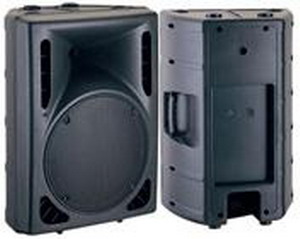
One factor is speaker efficiency, the 8" JBLs are 91 db for 1 metre and 1 watt, the 15" speaker replacing it is 97db/ 1 w/ 1 m
Posted by Louis Bornwasser (Member # 3063) on 10-22-2008, 06:18 PM:
I remember when Dolby suggested one speaker for each 3 seats! No power handling problem there!! Louis
Posted by Scott Christopher (Member # 834) on 10-29-2008, 08:38 PM:
Cameron, does 'PalaceNova Eastend' ring any bells?
I realise that auditorium size and total amount of surrounds does alter the final outcome, I was just referring to the JBL documentation as a starting point. You'd have to way up the costs of installing more of the same (plus repair) vs installing higher power units if you're burning out the voice coils.
Posted by Cameron Glendinning (Member # 3516) on 10-30-2008, 08:43 PM:
Yes Nova, former Imax and 18 metre screen
quote: Scott Christopher
Admittedly our installer put them in a 290 seat auditorium which JBL do not recommend. I suggest, if possible, installing the 8340A if you wish to keep the same brackets. The power handling is also better and the driver is 10inch.
That ws my first suggestion as well, the JBL 10 inch has a 96 db/1w/1m efficency, and is pretty much twice as loud per watt. Another option was to double the amount of 8" surround speakers.
The 15 inch surround speakers ended up being the safest option.
I think you will be impressed with the sound quality of the units. The brackets that are being sent with the units will allo the recomended 15 degree tilt.
Please note that these speakers feature different internal components than the ones Hoyts are now using.
Powered by Infopop Corporation
UBB.classicTM
6.3.1.2