This is topic Scratching on a simplex head... where's it coming from? in forum Film Handlers' Forum at Film-Tech Forum ARCHIVE.
To visit this topic, use this URL:
https://ft-forum.com/ft/cgi-bin/ubb/ultimatebb.cgi?ubb=get_topic;f=1;t=009620
Posted by Tyler Potts (Member # 4952) on 11-17-2008, 07:51 PM:
Ok, I'm at my wits end here. We've scratch a print just about every week for a month on this one projector. I've cleaned it out, looked for problem areas, replaced tension bands, lubed all rollers, and still it scratches. I'll build a print, I'll run it for two days, then I'll be off or on the floor for 2 days, then when I come back, the print is scratched. Usually a yellow/green emulsion vertical line about a foot from the left of the screen. Pretty strong, doesn't waver. A few prints this is coupled with one on the right, or once even straight down the middle.
I've asked our tech and he thinks it might be the aperture plate, but I don't see any burs on it and it's clean. I'm guessing the scratch is happening somewhere below the gate because people are noticing it after a shift (either casting blame to the joe before, or its scratching after the image is on screen).
What's worse is there's no dirt or shedding in the machine after a show to help locate where it would be scratching. I thought maybe the metal guide on the wrap detector on top of the tree, or maybe the guide on top of the sound drum, but those look clean. Here's the equipment I'm running and a few pictures to help:
Strong platters
Simplex Millennium PR2000 head
Simplex 5 star soundhead
FM-35 automation sensor
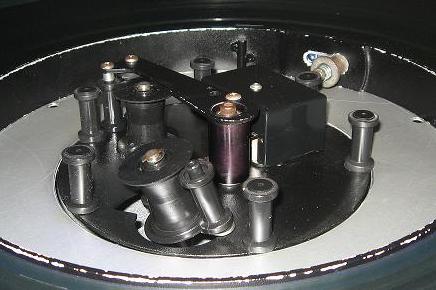
Brain with print of Role Models
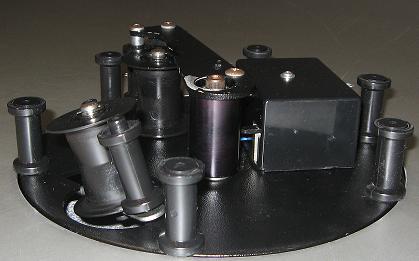
Brain on top platter
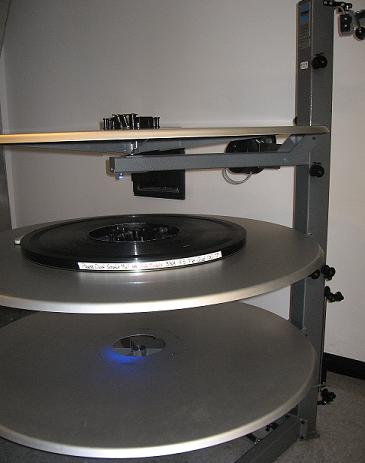
Full Strong platters shot
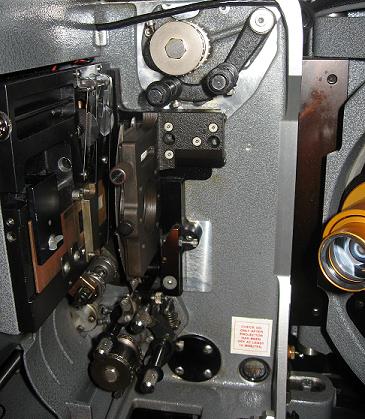
Millennium head
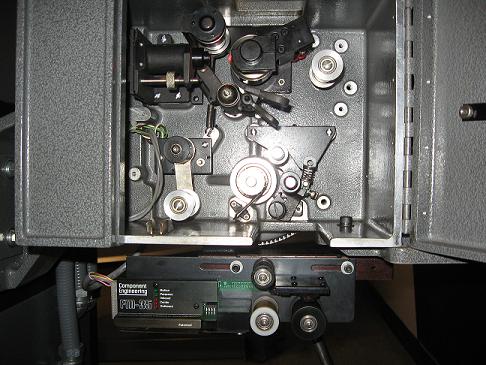
5 Star soundhead and FM-35 automation sensor
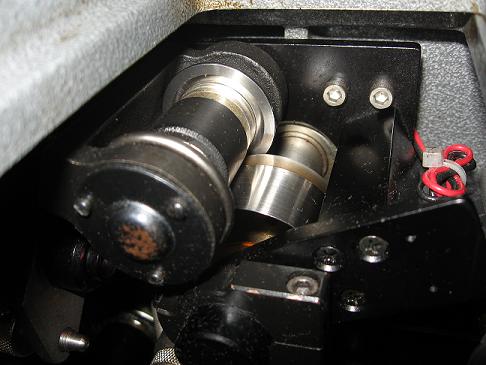
Closeup of closed sound drum & guide roller
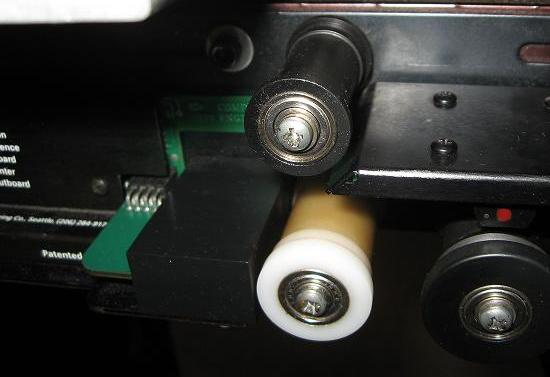
Closeup of FM-35 unit
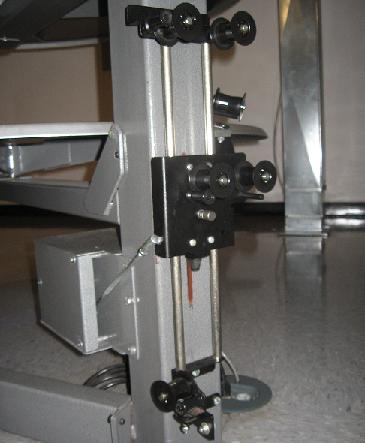
Takeup rollers
If anyone has any experience with this platter system or projector or soundhead, I'm all ears as to what is causing these scratches. We can't get any more replacement prints for another year because of this.
Posted by Joe Redifer (Member # 3) on 11-17-2008, 08:13 PM:
If you are getting the scratch on both flat and scope films, then that likely rules out the aperture plate. Maybe somebody there is threading under the locking pin of the take-up variac? I tried this when I was attempting to find out how someone scratched a print where I work.
Posted by John Wilson (Member # 269) on 11-17-2008, 08:14 PM:
Can you get a shot of the damaged print(s)?
Posted by Monte L Fullmer (Member # 2797) on 11-17-2008, 08:19 PM:
I got an 8plex of this exact same booth setup and we havent experienced any form of scratching with our STRONG setup.
Is someone lame on how to frame and when you twist the FRAME bar, the lower loop bangs into the lower loop panel assembly?
Posted by Tyler Potts (Member # 4952) on 11-17-2008, 08:20 PM:
Joe, I'll try that tonight on some test film. John, I'll try to get a shot on this next show.
Posted by Monte L Fullmer (Member # 2797) on 11-17-2008, 08:32 PM:
edit: wonder if the film is hitting that small box in front of the upper roller on the FM-35 unit?
Have you got some takeup issues with the platters to maybe have some slack problems right there to allow the film to leave that upper roller and rub against that block?
OR, the film is making contact with the back edge of the soundhead casing itself? Look on how the film would travel straight down to the FM-35 from the holdback sprocket, and there could be a risk of film contact with that edge on the casing.
Posted by Steve Guttag (Member # 268) on 11-17-2008, 08:41 PM:
Okay that doesn't jibe....you have yellow/green emulsion scratches...THERE HAS TO BE EMULSION SOMEWHERE! It can't just evaporate. Follow the emulsion side of the film the entire length of the threading...somewhere it is hitting and somehwere is some magenta colored dust...you don't get green, let alone yellow, without the magenta layer being scraped off.
Steve
Posted by Tyler Potts (Member # 4952) on 11-17-2008, 10:37 PM:
Steve, the problem is I'm getting to this projector a show or two after the incident. And I swear its the case of the magical mystery emulsion. No signs.
Monte, I tried and couldn't get the film to touch any part of the FM-35 unit that wasn't a roller. I'll try after this show with more test film to see if forgetting a roller might cause it to rub against anything.
Joe, I had time to run some trailers where they looped under the variac's lock pin, no scratches, at least after 1 run through.
I'm going to try running with the brain wrap detector totally tightened down, then at full tension against the gate to see if it is the aperture plate (then test with scope to see if it still scratches).
Posted by Joe Redifer (Member # 3) on 11-18-2008, 12:08 AM:
None of the plastic rollers anywhere have a flat spot?
I'd just take a trailer, load it up onto a ring and run it again and again and again until you see the scratches appear. Once they do appear, look for the emulsion that Steve describes. If they never appear, then it is likely that some other person is misthreading.
Posted by Monte L Fullmer (Member # 2797) on 11-18-2008, 12:43 AM:
quote: Tyler Potts
I'll try after this show with more test film to see if forgetting a roller might cause it to rub against anything.
..and I've seen film being missed going through the bottom roller heading to the platter on the machine and the film is dragging across the roller shafts/hdwe itself.
Look for pink stuff down that area.
I can't see aperture plate being the culprit since if the film was going through the trap even though, granted, the plate is close to the film plane. The scratches would have stop and go scratch markings instead of a continuous line due to a continous feed.
Side question: Do you have DTS per chance? I've also seen film being ill-threaded through the reader also...by someone can miss that lower roller on the reader...look for pink stuff and wear on the edge of the reader frame as well.
Posted by Jonathan Worthing (Member # 803) on 11-18-2008, 06:29 AM:
Do you see the scratch on the first showing on only on the second showing.
If you are not sure run a clean trailer that has not been run until it has passed through from feed out to take up & stop the projector.
Make marks on the film a places you can see the film edge, EG just as it comes off the feed out roller & just before it enters the projector & so on.
Take the film out of the projector & look for the scratch.
Where the scratch appears that is where the problem is.
Posted by Jim Cassedy (Member # 4115) on 11-18-2008, 09:45 AM:
quote: Monte L Fullmer
Do you have DTS per chance? I've also seen film being ill-threaded through the reader
Monte makes a good point.
I've had two prints severely scratched this way when somoene
missed the last roller on the DTS had, causing the film to drag
across the top of the projector casting on it's way to the top
feed sprocket.
But in both cases the cause was obvious since it
left a pile of film scrapings at the point of contact.
It should have been obivous to the person running the print
too, since this type of damage appears immediately on screen.
Heck, I'll confess I even managed to do this myself once,
but I immediately knew something was wrong and the only
thing that got trashed was a trailer for "Speed Racer"
which IMO was no great loss...
Posted by Gordon McLeod (Member # 33) on 11-18-2008, 10:20 AM:
I have had that happen when a threader went down through the FM35 wrong and scratched the emulsion on the angle metal that is the shroud for the presence/motion IR modules
Also a incorrectly set padroller assembly especialy the one in the soundhead could put some interesting emulsion lines on
Posted by Chris Slycord (Member # 4239) on 11-18-2008, 10:28 AM:
What you should do is keep a log of when the scratches appear and compare that to who was working.
Magical dust disappearing could simply be:
1) Guy scratches print
2) Guy goes to thread, see's pink dust
3) Guy cleans it off projector
So if someone was inconsistent in threading (sometimes threads fine, others scratches) they could scratch it, clean up what would give it away to you then thread it up fine.
Or they scratch and someone else takes over and cleans up the projector.
Posted by Joe Redifer (Member # 3) on 11-18-2008, 10:45 AM:
How could one get an emulsion scratch on a DTS reader? I guess I just can't picture it ever getting misthreaded.
Posted by Mike Blakesley (Member # 26) on 11-18-2008, 12:07 PM:
If a roller is clogged/not spinning, it could scratch. I could see one of the small rollers doing that.
But from the pics, this equipment looks nice and clean.
Posted by Joe Tommassello (Member # 4632) on 11-18-2008, 01:34 PM:
Sounds like a problem between the floor and the film.
Do you have the same equipment in every house? Perhaps someone is misthreading this particular unit.
[ 11-18-2008, 02:58 PM: Message edited by: Joe Tommassello ]
Posted by Monte L Fullmer (Member # 2797) on 11-18-2008, 04:26 PM:
quote: Joe Redifer
I guess I just can't picture it ever getting misthreaded.
Trust me, it aint hard to do. One can easily miss that lower roller after the scanner drum - I had one operator that wanged up 6 prints doing that by missing that lower roller and the film drug across the frame of the reader.
But doing this, it's the base side that gets the punishment being that the emulsion side is all inside of that unit as it travels through.
Posted by Tyler Potts (Member # 4952) on 11-18-2008, 06:06 PM:
[ 03-10-2009, 10:57 AM: Message edited by: Tyler Potts ]
Posted by Joe Redifer (Member # 3) on 11-18-2008, 06:16 PM:
I agree that it is not likely the brain. The only real way to scratch a print with a Strong brain is to misthread around the outer roller that is right next to the tri-rollers that lead to the platter tree. This causes base-side "hash-type" scratches toward the center of the picture. That outer roller should be removed to prevent this.
Posted by Richard B. Perrine (Member # 409) on 11-18-2008, 10:46 PM:
I've run into this on the old ORC and Potts platters....usually threading error....aroiund the wrong side of the center roller in the brain...which eventually causes the platter to run slow and wrap the film around the outer brain ring rollers and scratch there too.
The wrong side of the center roller give you a center screen scratch. The multiple wraps give you the edges.
The other place is misthreading on the platter take-up rollers...llike threading around the first roller on the platter from the machine....instead of properly thru the 2 roller set.
Can't find the dust? It's on the print.
Rich Perrine
Posted by John Wilson (Member # 269) on 11-19-2008, 02:57 AM:
quote: Joe Redifer
I agree that it is not likely the brain.
Agreed...a scratch from a brain will move about a bit...but quote: Tyler Potts
Pretty strong, doesn't waver.
Also,
quote: Tyler Potts
A few prints this is coupled with one on the right, or once even straight down the middle.
It's more likely a constant misthread or an issue in the gate lamphouse side (of course).
When you say quote: Tyler Potts
the problem is I'm getting to this projector a show or two after the incident.
is it you threading these shows or are you following someone else? If it's someone else, is it always the same guy/gal?
Posted by Tyler Potts (Member # 4952) on 11-19-2008, 09:45 AM:
[ 03-10-2009, 10:57 AM: Message edited by: Tyler Potts ]
Posted by Joe Tommassello (Member # 4632) on 11-19-2008, 09:46 AM:
Since it's only happening in one house swap the brains from that platter with another house. You'll find out quickly if that's the problem.
Sounds like you are pretty organized there. I would check the log for when the scratches were first reported and compare that with who was running the shows at or just prior to the report and look for similarities.
Posted by Tony Bandiera Jr (Member # 2365) on 11-19-2008, 02:12 PM:
Tyler, since it's also only happening when you're not on shift, why not simply pop in UNANNOUNCED and check out the booth when the other operators are on duty. That way you'll see conclusively what's happening. My money's on someone misthreading.
DO NOT let anyone know you're coming..you need to catch the day-to-day habits, not the ones where everyone's on best behaviour.
Posted by Mark Gulbrandsen (Member # 72) on 11-19-2008, 04:13 PM:
quote: Tony Bandiera Jr
simply pop in UNANNOUNCED and check out the booth when the other operators are on duty.
Thats probably the best idea presented here. I did just this many years ago when a manager/operator was having bad scratching problems on a Pro?35. The scratches were obviously because she was making her loops too large and it was easy for me to disgnose... but she blatently denied that she was threading wrong. On the third unannounced visit I caught her red handed... and the loops were not only large they were huge and the sound was also way out of sync... I guess the audience didn't care though. That was her last night of employment at that location.
Mark
Posted by Tyler Potts (Member # 4952) on 11-26-2008, 01:49 AM:
[ 03-10-2009, 10:57 AM: Message edited by: Tyler Potts ]
Posted by Joe Redifer (Member # 3) on 11-26-2008, 02:04 AM:
Put white tape around the post to make it clearly visible until you order new keeper rollers... which you are doing, right?
Posted by Tyler Potts (Member # 4952) on 11-26-2008, 10:41 AM:
Oh, we've got keeper rollers on now, haha! Don't know if I clarified that. This has really opened my eyes to the stupid things people can do in booth.
Posted by Steve Guttag (Member # 268) on 11-26-2008, 11:06 AM:
So...on the offending keeper shaft...there was NO build up or perhaps below that of scraped off emulsion?
Steve
Posted by Tyler Potts (Member # 4952) on 11-26-2008, 11:16 AM:
[ 03-10-2009, 10:58 AM: Message edited by: Tyler Potts ]
Powered by Infopop Corporation
UBB.classicTM
6.3.1.2