This is topic Cause of bouncy prints? in forum Film Handlers' Forum at Film-Tech Forum ARCHIVE.
To visit this topic, use this URL:
https://ft-forum.com/ft/cgi-bin/ubb/ultimatebb.cgi?ubb=get_topic;f=1;t=009634
Posted by Sally Ann Burgess (Member # 4746) on 11-26-2008, 05:17 AM:
Can someone explain to me exactly why some prints are 'bouncier' than others? What is it that happens at the lab that causes this to happen?
Every now and then we will get a print that will look a bit shaky even running on our steadiest projector!
Posted by Marco Giustini (Member # 4544) on 11-26-2008, 07:06 AM:
I'm curious too.
Posted by Mark Gulbrandsen (Member # 72) on 11-26-2008, 08:13 AM:
Sally,
Todays labs for the most part are run by suits... not by technical in the know folks. Prints are made at well in excess of 2000 feet per minute on equipment that seldom sees any maintainance at all. So the cause of that bounce would more closley be tied to greed than any other single factor.
Mark
Posted by Mitchell Dvoskin (Member # 751) on 11-26-2008, 08:37 AM:
To paraphrase what Mark said, the cause is high speed film printers at labs with little or no quality control.
The management at these labs feel it is cheaper to just replace bad reels/prints than to slow the process down enough so that they can monitor quality.
Posted by John Walsh (Member # 168) on 11-26-2008, 08:46 AM:
A small part of the blame lies at the theater, also. No one complains about poorly made prints. This reminds me of that joking quote from Woody Allen, "..these people were raised watching television; their standards have been systematically lowered through out the years .."
Posted by Gordon McLeod (Member # 33) on 11-26-2008, 09:17 AM:
To be fair often it is jitter in the internegs that show up the most
Also Hi speed printing in itself is not the source for jump but if the printer is to blame it is its setup
Posted by Martin McCaffery (Member # 37) on 11-26-2008, 11:02 AM:
It's really charming when you have a subtitled film and the picture is bouncy but the titles are rock steady.
Posted by Steve Guttag (Member # 268) on 11-26-2008, 11:04 AM:
Probably the biggest cause...lack of step printing. It is possible to contact print, at high-speed, with good steadiness BUT it requires that all of the processes that lead up to it be done properly.
That is, IN must be on short-pitch film (1866). The IN MUST have been step printed.
One can only contact print 1 generation (short pitch to long pitch perfs) then it is back to step-printing for the next generation before contact printing may be done. If this is not done, you will get the IN and release print sliding against themselves causing image movement and generally poor registration.
Steve
Posted by Monte L Fullmer (Member # 2797) on 11-26-2008, 10:15 PM:
(...A simple cure to bouncy presentations: change over to digital... ![[Big Grin]](biggrin.gif) )
)
Posted by Andrew Bangs (Member # 4938) on 11-26-2008, 10:50 PM:
I think it is a conspiracy to get us to change to digital. Just like the old scam (in the movies) Wreck the neighborhood to get the residents to move to new housing that has no rent control and when they are not ready for it plus jack up the price at the same time. I am joking of course... or am I???
I am just thankful that I now know that the jumping can be a print problem and not necessarily has to be my equipment. (cause I have enough of that) I have been killing myself changing out Previews that jump. Wondering why one jumps and the next is rock steady.
Posted by John Hawkinson (Member # 1135) on 11-27-2008, 12:08 AM:
A couple things.
Sally Ann (or do you go by Sally?): It may be that the print is just printed unsteady, which is what's been discussed here (i.e. the image on the film is in different positions with respect to the perforations and the edge of the film). But the other possibility is, for some reason, your projector runs steady with some prints and not others.
To tell the difference, try to project the perforations on the screen (generally by pulling the aperture plate and maybe it depends on which lens you use), and then take something that can stand up straight (a microphone stand is ideal, but a broom propped against a chair will do) and set it up to cast a shadow on the screen over the perforations. Then measure how much the perforations move with respect to the shadow. That's a very good indicator of how steady your projector is.
You can then compare it between prints to see. (Obviously if you're comparing different projectors, then you should measure the steadiness as a fraction of the size of the image, e.g. the displacement of some point divided by the height of the perforation on the screen, or whatever).
Steve's explanation is correct, but we can give a little more detail. The fastest printing machines out there in the labs are contact printers. They take a large sprocket (maybe a 64-tooth?) and run both the negative film and the positive film over the sprocket at the same time, while exposing both to a light. In order that the films sit steady, the film closer to the sprocket has to have a slightly smaller pitch (distance between perfs), because the diameter is smaller (by the thickness of one layer of film). That means that the perforations are usually type BH1866, which is 0.1866 inches in pitch. Regular release prints are KS1870, which is 0.1870 inches (and a slightly different shape hope, but that's not important).
Camera negatives come in BH1866. So if you were printing directly from a camera negative to the release print, you could use a continuous contact printer and you'd be golden. But of course, if you tried to print 8,000 prints on the original negative, you'd wear it out and destroy it.
So instead, you print the original camera negative to an interpositive, and then print the interpositive to an internegative, and print the internegative to the release print. But all of these steps cannot be done on continuous contact printers, because of the pitch issues.
So normally the OCN is printed to the IP, then the IP is printed to the IN via a special printer called a step printer, that advances one frame and then exposes the two pieces of film to each other (sometimes with a lens or other optics in between), and then advances again. Since the two pieces of film are not adjacent on a sprocket, the pitch issues don't come into play. This IN is again on short pitch stock (BH-1866), so it can be continuous contact printed to many release prints.
When the labs are in a rush, sometimes they don't have time or resources to step-print the IN, in which case they'll use a continuous contact printer, and because of slippage on that printing sprocket, you can see unsteadiness.
Now, the above explanation is for a strictly photochemical process. Lots of films nowadays (more than half! Probably more than that!) use a digital intermediate. But I think the same issues are there. A negative is printed from a laser film recorder which is then photochemically copied to an IP, which is copied to a handful of INs, which are copied to produce thousands of release prints.
It may be that they skip the original negative and output an IP directly from the laser film recorder. But still, they need to go from the long-pitch IP to the short-pitch IN.
On very small releases, perhaps the INs are made directly from the laser film recorders.
Anyhow, it's always possible it is something physical. For instance, just like certain kinds of scratching can cause film to bulge in funny ways on a platter (counterintuitive!), they might also make the film run through the gate of your projector in a way that is less steady. Do you use filmguard? Have you tried adjusting the gate tension on your projectors? What kind are they?
This business of contact printing instead of step printing is not always the labs fault. Amazingly, sometimes the studios don't get the final cut of the film to the labs before, say, the Monday before a Friday release. If the labs have to have the films printed by Wednesday so they can be shipped to the exchanges, there may simply not be enough time for them to step print the internegative.
I'm not sure what the rates of production are, but this Playback magazine article said that in 2002, Technicolor Mirabel could do about 800 prints per day. That sounds low to my thinking, but for a wide release of 8,000 prints, you could see why there might not be time to step-print internegatives.
I think continuous contact printers top out at around 400 ft/minute. (24fps is 90 feet/minute) I think step printers are about half as slow, maybe 200 feet/minute? Perhaps there is someone who has better numbers.
--jhawk
Posted by Sally Ann Burgess (Member # 4746) on 11-27-2008, 12:57 AM:
quote: John Hawkinson
But the other possibility is, for some reason, your projector runs steady with some prints and not others.
Thanks to you all for your detailed answers, especially to you John!
We use Kinoton FP30 projectors and I test screen every film I can using this particular one. A film that will play shaky in that one has always looked worse in the other two projectors. However, watching 007 last week, the image was flawless and rock-steady. Our print of Burn After Reading though looked really shaky when I ran it through, and looked even worse on another projector.
I will try your tip on measuring steadiness using the perfs. And we don't use FilmGuard. Yet!
Cheers, Sally.
Posted by Marco Giustini (Member # 4544) on 11-27-2008, 04:03 AM:
Burn After Reading was shaky in Italy too... More, it's Flat and Flat will enhance every print's unsteadiness rather than Scope.
Posted by Monte L Fullmer (Member # 2797) on 11-27-2008, 04:23 AM:
Okey, a serious question and I have to ask this for I get a lot of this brought to me where the picture is bouncing on the screen and I ask the simple and obvious question to the theatre's booth personnel:
IS YOUR INTERMITTENT SPROCKET CLEAN? For if there is any goo - like a piece of splice punchout for example, laying on the lands inbetween the teeth? For that will cause picture to bounce.
Sorry, but I have to ask this one even though a owner of a Kinoton would be dedicated in keeping this unit pretty well clean and maintained.
-Monte
Posted by John Hawkinson (Member # 1135) on 11-27-2008, 07:30 AM:
Oh yes, Marco has a good point. 1.85:1 flat movies are 0.446" high. Scope 2.39:1 movies are 0.690" high. So, assuming common-height projection, your flat lens has to magnify 690/446 => 1.55 times as much.
So, for a given quality of film, the apparent unsteadiness on the screen is almost twice as much for scope. (It's also true that the style of cinematography can have a lot to do with it. Probably nobody notices unsteadiness in The Bourne Identity...)
I mentioned filmguard only because it affects the way you set tension in your projector, because the only way the projector keeps the image stable is to apply friction in the gate. With filmguard, since the film is slipperier, you may need more tension.
--jhawk
Posted by Max Biela (Member # 1919) on 11-27-2008, 09:09 AM:
Sally,
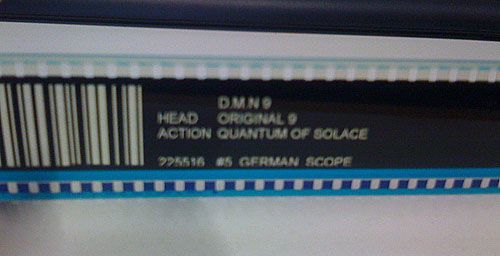
where's your Bond print coming from? Deluxe Italy? Deluxe (Technicolor too) strikes a few prints from direct made negatives, skipping the internegative/positive step mentioned by Steve and John. You can check wether you've received a standard or better print by looking at the head or tail of a reel. Standard negatives made by Deluxe are marked as "I/N xx" and are bouncing all over the screen. A Print from a digitally recorded negative says "D.M.N. xx" and is rock steady (in most cases) even though they are printed at the same speed on the same printer.
Posted by Marco Giustini (Member # 4544) on 11-27-2008, 04:06 PM:
Sprocket cleaning and Flat unstaediness are point to be taken in consideration.
But too often I got prints that really jump on the screen... A dirty intermittent will give a fast shaking image, while sometime I got prints that moves slowly (2-3 time at a second). So, you're right to distinguish between projector and labs issues, but an expert eye can usually identify where the problem lies!
Marco
Posted by Sally Ann Burgess (Member # 4746) on 11-28-2008, 07:12 PM:
Max,
Both our 007 and Burn After reading prints came from Atlab in Australia. 007 says L400xx Original (Image), and underneath that L402xx Original #2 (Sound). Burn After reading is the same except of course the numbers are different.
Posted by John Hawkinson (Member # 1135) on 11-29-2008, 03:32 PM:
Deluxe just bought Atlab, curiously enough (September 26), and also, sadly, our Film-Tech member who worked there (Dominic Case) has moved on.
--jhawk
Posted by John Hawkinson (Member # 1135) on 12-05-2008, 08:21 PM:
I wrote, "I think continuous contact printers top out at around 400 ft/minute. (24fps is 90 feet/minute) I think step printers are about half as slow, maybe 200 feet/minute?"
This is wrong. Step printers are much slower, running "a few frames per second." So a single reel could take several hours to be step-printed.
--jhawk
Powered by Infopop Corporation
UBB.classicTM
6.3.1.2