This is topic How to use scope software? in forum Film Handlers' Forum at Film-Tech Forum ARCHIVE.
To visit this topic, use this URL:
https://ft-forum.com/ft/cgi-bin/ubb/ultimatebb.cgi?ubb=get_topic;f=1;t=009822
Posted by Robert Hall (Member # 5169) on 03-29-2009, 08:27 PM:
Where could I find info on how to use oscilloscope software and pink noise generator to improve sound? I've already have everything installed and working, but don't know what I'm supposed to achieve.
Posted by Mark Gulbrandsen (Member # 72) on 03-30-2009, 02:37 PM:
Look in any Dolby manual... CP-55, 65, etc. Careful with those screwdrivers now ![[Eek!]](eek.gif)
![[Confused]](confused.gif)
![[uhoh]](graemlins/uhoh.gif)
Mark
Posted by Dave Macaulay (Member # 813) on 03-30-2009, 03:59 PM:
Really you can't.
You need a "real time analyzer" that displays the energy vs frequency content of a pink noise signal played through the sound system with the resulting sound picked up by a microphone (usually several microphones) in the auditorium. The RTA information guides you in adjusting the system equalization (combined with actual listening to the result of your adjustments).
The oscilloscope software may have the real time analyzer function as well, but an actual oscilloscope is useless for setting up the auditorium sound.
You generally need an oscilloscope and special analog optical sound films to set up the analog optical reader, and you can use an oscilloscope to help align a Dolby digital optical track reader. Some cinema processors have the oscilloscope and/or RTA functions built in.
Posted by Mark Gulbrandsen (Member # 72) on 03-30-2009, 05:18 PM:
He can get an i-Phone and the add on RTA software... I have it and use it all the time for quick checks. There should be soon or may be available now a calibrated mic to use with the phone. As it sits now its damed accurate against my PC-40 AND you are able to calibrate the phone's internal mics. I also use the SPL meter and the signal generator add ons. I am going to work on an input cable asembly/atenuator to be able to do A Chains with it as soon as I have a little spare time.
Mark
Mark
Posted by Tony Bandiera Jr (Member # 2365) on 03-30-2009, 07:15 PM:
Robert, I hate to be the wet blanket in this party, BUT: you can easily cause a lot of harm if you don’t have the proper test equipment, the right test films IN GOOD CONDITION, and the training to do it right. It is not difficult to learn, but you do need to do things in the right order and the right way.
Your best bet is to become good friends with a good tech in your area, and let him know you’re interested in learning more about the trade. That’s how I got started in the biz.
A typical "A" and "B" chain shouldn't cost a lot of money for a tech to do for you.
Of course, if you’re talking about learning on your own projection equipment at home, then dive right in and learn as you go. ![[Big Grin]](biggrin.gif)
Posted by Mark Gulbrandsen (Member # 72) on 03-30-2009, 08:40 PM:
I donno... in some areas the milage and driving time cost the exhibitor more then the service call itself!
Posted by Robert Hall (Member # 5169) on 04-01-2009, 07:08 AM:
Thanks for the help, I found an RTA program that should work fine. Which brings me to the next question, now don't laugh, I'm installing a SDDS 2000D to a Ultra Stereo js200. So do the Ultra Stereo outputs go to the bypass inputs on the SDDS instead of the amps? Or do both go to the amps as separate systems?
Posted by Chris Slycord (Member # 4239) on 04-01-2009, 08:59 AM:
I can't really help you with that except to say that there's a section of manuals on this site and for the DFP 2000, there's at least an installer's guide that has wiring schematics for hooking up to various processors and should give you a starting point for figuring out how to do with yours.
And upon rereading I realized you were asking more about hooking up the JS200. And again with that, I'd say the manual for the js200 would help you.
[ 04-01-2009, 11:17 AM: Message edited by: Chris Slycord ]
Posted by Jim Cassedy (Member # 4115) on 04-01-2009, 09:40 AM:
I agree with what others here have said about knowing
what you are doing before starting to twiddle with the
EQ adjustments.
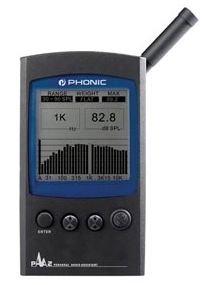
I've been been using this nifty little RTA from
Phonic Industries. It cost me a little over $300.
(stock photo)
I've checked it against two,more expensive, RTA's
used by local theater sound techs and its' readings
stand up against those of their instruments.
The display can be switched between several modes.
It has about 12 memories where you can store profiles
for different audioriums.
XLR's on the bottom provide test signal outputs and
line level inputs. (Although I usually use the
internally generated pink noise signals from the Dolby
or DTS system I'm checking or run a loop.)
It's computer interfacable and comes with a program
that allows you to store an "infinate" number of
readings and analyze and/or output them in either
a graphical or text-chart format.
And it does a lot more stuff I can't remember. . .
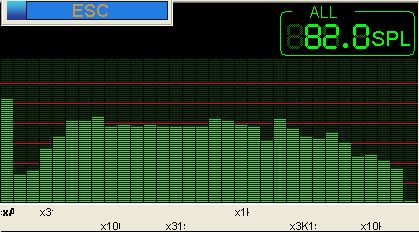
Here's a screen grab from the computer program of an
actual auditorium I was working on.
Complete Specs Available Here
Posted by Jarret Chessell (Member # 5077) on 04-01-2009, 02:08 PM:
That little meter looks pretty handy, I think the compact design and built in microphone would make it easy to use the Brad method of EQ'ing off the monitor as demonstrated in the new Film-Tech training video! ![[thumbsup]](graemlins/thumbsup.gif)
But seriously, it looks handy. Can you use the XLR's on it to have a microphone in an auditorium while you have the unit in the booth?
Posted by Elia Orselli (Member # 4673) on 04-02-2009, 07:35 AM:
This Phonic RTA (like the next version, PAA3) has a line input so you can connect a microphone only with a preamp. I use a PC with a long USB cable and the software to control the analyzer from the booth.
Posted by Jim Cassedy (Member # 4115) on 04-02-2009, 09:51 AM:
quote: Jarret Chessell
Can you use the XLR's on it to have a microphone in an auditorium while you have the unit in the booth?
This is one shortcoming of the unit.
The XLR input only accepts line level.
I've considered buying one of those microphones with
a line-level output, but I'd need to test one first
to see that they are 'flat' enough both in frequency
response and gain to work in this application.
The other alternative, as Elia suggested is to
mount the unit in the auditorium (it has a
threaded hole that fits a standard tripod screw)
and use a long cable to connect it to a laptop in
the booth. The read-out and all functions and
controls are then accessible from the laptop.
This works for me.
Otherwise, doing a critical alignment requires
either a lot of running to & from the booth or
two people and a set of walkie-talkies.
Posted by Scott Norwood (Member # 30) on 04-02-2009, 10:05 AM:
Can you put the unit in the auditorium and use a laptop in the booth to control it, or does the software not work in real time? In any case, a simple external microphone preamp like a Symetrix SX202 or similar wouldn't add much size or weight to the kit.
I'm using an Audio Control RTA with the USL microphones and multiplexer. The Audio Control unit is not super-amazing, but it works, appears to be accurate, and is reliable. All of this stuff shows up on Ebay from time to time.
Posted by Elia Orselli (Member # 4673) on 04-02-2009, 10:16 AM:
quote: Scott Norwood
Can you put the unit in the auditorium and use a laptop in the booth to control it, or does the software not work in real time?
Yes, you can. The sw works perfectly in real time.
Posted by Jarret Chessell (Member # 5077) on 04-02-2009, 07:17 PM:
Using this device brings me to another question. I see that the PAA2 uses a serial connection and the PAA3 uses USB. How long of cables can you use before the signals drop out? I thought USB had a fairly short range (could be wrong). I guess I have another problem too, my only portable computer is a macbook ![[Frown]](frown.gif)
Posted by Elia Orselli (Member # 4673) on 04-03-2009, 02:31 AM:
I use a 5 mt active usb cable and (if necessary) another 5 mt passive and I have no problem. Sure that if you have a very big auditorium it could be difficult. The PAA3 has the capability to measure the RT60 differently from PAA2.
Posted by Steve Guttag (Member # 268) on 04-03-2009, 08:59 AM:
Ever considered wireless USB? Just need an outlet in the theatre at that point.
Posted by Elia Orselli (Member # 4673) on 04-03-2009, 10:19 AM:
No. Really I've never seen one.
Powered by Infopop Corporation
UBB.classicTM
6.3.1.2