This is topic Projector Leveling in forum Film Handlers' Forum at Film-Tech Forum ARCHIVE.
To visit this topic, use this URL:
https://ft-forum.com/ft/cgi-bin/ubb/ultimatebb.cgi?ubb=get_topic;f=1;t=009935
Posted by Martin McCaffery (Member # 37) on 06-08-2009, 12:19 PM:
I've got an odd problem with one of my projecotrs. We have two Simplex XL's on Motiograph bases.
One projector give as perfectly straight image. Projector head registers as level, ditto lamphouse and base.
On the other projector, the head is level, but produces and unlevel picture. The lamphouse and base are out of level (but match each other). I've tried leveling the base by adjusting the foot screws, but if I get them level, the image is way off.
It would seem the head is mounted wrong, but with six bolts, I'm not sure what can be done other than remachine the interface.
But if the head is level, shouldn't the image be also?
Posted by Monte L Fullmer (Member # 2797) on 06-08-2009, 12:46 PM:
Are you running 35-PA (RP-40) though the flat lens with the aperture out on these adjustments?
Posted by Martin McCaffery (Member # 37) on 06-08-2009, 01:48 PM:
I've tried it with and without aperture plate. Flat lens.
Posted by Tony Bandiera Jr (Member # 2365) on 06-08-2009, 06:03 PM:
Are both projectors on the same screen? If so, the problem is keystone from the machine being off the center line of the screen.
If you're talking individual machines on separate screens, then the issue is in the base to projector head interface.
Start by leveling the base properly, then (with help!) carefully loosen the six bolts you refer to and twist the head to get a level image.
Can you get pictures of the affected machine to post here?
Posted by Martin McCaffery (Member # 37) on 06-08-2009, 08:39 PM:
Both on the same screen. I don't think it is keystoning as both machines are pretty close together and look equidistant from the center. I'll try to get some pix tomorrow.
Posted by Mark Gulbrandsen (Member # 72) on 06-08-2009, 08:58 PM:
First, make sure the base is level. Then loosen the bolts that secure the soundhead/projctor to the mounting foot. See if you can jockey it to be level then tighten the bolts down. Typically there is quite a bit of play in those mounting holes/slots. Next, place a level on the projector head top machined surface... you may have to remove the upper arm to do this. This is usually where you take the measurement, or run RP-40 and line the image up on screen and as you have a 2-machine booth you may have to slightly split the difference in levelness between the two machines because you'll have slight keystoning. The base may indeed be machined wrong but you should still be able to set the projector itself on the level. If memory serves me correctly the HD Motopgraph bases have a pretty good lamphouse alignment facility... so once the projector is level then re-align the lamphouse and you're done unless the aperature plates are now all way off... in which case you'll need to re-do those too.
Mark
Posted by Louis Bornwasser (Member # 3063) on 06-08-2009, 09:45 PM:
You are "high" shooting downward. Level ONLY on the top masking using the FLAT lens, no aperture plate. Just use the feet on the base, you will then not disturb your lamp alignment.
You may want to check the levelness of the top masking first; use a string and cheap spirit level to be hung on string. (Lowes or Home Depot.) Louis
Posted by Mark Gulbrandsen (Member # 72) on 06-08-2009, 09:55 PM:
Louis's method is the correct way assumming you are not interested in if the base is machined properly not. the drift I got was that he was interested in finding out if the base was or was not machined properly...
Posted by Louis Bornwasser (Member # 3063) on 06-09-2009, 06:14 AM:
Back in the 1976 era EVERY Century base had a twist in its neck. All of them looked as if they'd fall over. Level on the screen, however. Louis
Posted by Mark Gulbrandsen (Member # 72) on 06-09-2009, 08:32 AM:
Heck, The Century projector main castings had that same twist to them back in that era!
Posted by Gordon McLeod (Member # 33) on 06-09-2009, 08:57 AM:
Actually wasn't that a design feature the twist in the projector was to correct the twist in the base ![[Big Grin]](biggrin.gif)
Posted by Bill Enos (Member # 440) on 06-09-2009, 06:44 PM:
Mark's method assumes the projection room floor and the screen/masking are square with each other.
Posted by Martin McCaffery (Member # 37) on 06-09-2009, 08:27 PM:
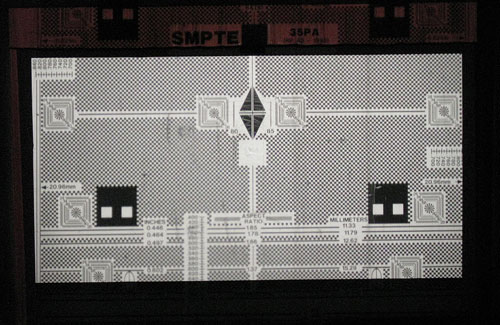
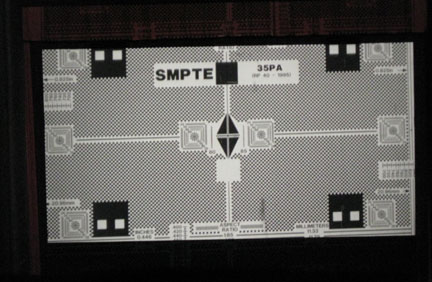
Ok, we have pix. Flat lens, no plate, side masking wide open. Ignore that the photos are crooked and just look at the image and upper/lower masking
For reference, here is the good projector to show the masking is more or less level:
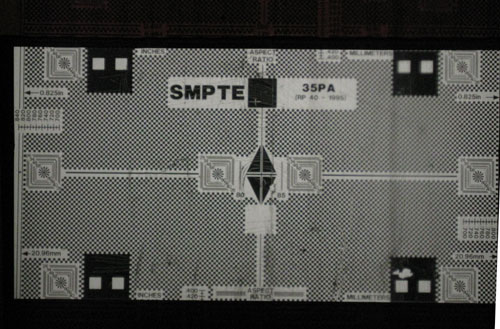
and another, framed down to show the Scope circles:
Now a picture of the image of the other machine with the head measuring perfect level:
And now with the base level (and a much crappier loop):
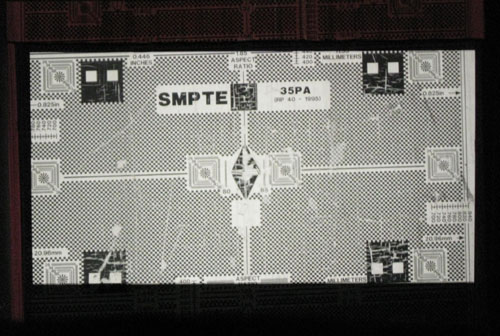
I can almost get a level picture using the feet. Can probably do it with shims.
When the head is level, the base is completely bubble to one side, not even close.
Suspect I will have to get some help and loosen the head, but if there are any other suggestions...
Powered by Infopop Corporation
UBB.classicTM
6.3.1.2