This is topic "UP!" Image Undersized? in forum Film Handlers' Forum at Film-Tech Forum ARCHIVE.
To visit this topic, use this URL:
https://ft-forum.com/ft/cgi-bin/ubb/ultimatebb.cgi?ubb=get_topic;f=1;t=009967
Posted by Jim Cassedy (Member # 4115) on 07-01-2009, 08:28 AM:
Has anyone else noticed that the image on 35mm
prints is apparantly slightly horizontally undersized?
I just moved the print from a large auditorum to a
smaller one, which has quite a downward projection
angle. I now have two annoying uneven vertical black
bars on the upper edge of the screen.
What makes them even more noticeable is that they
are not perfectly vertical due to the steep projection
angle. If I close the masking enough to put the bars
into the black, then I'm cutting off a significant
part of the picture at the lower end of the screen.
Yes, my aperture plate is cut in a "reverse trapazoid"
to compensate for the angle, and NO - I don't have it
in upside down.
I've run my RP-40 loop and my horizonal image area
is where it should be, although that auditorium does
have some slight vertical cut-off which is normal
or that room.
I haven't had a chance to examine the print yet,
but since I've never had this problem with any
other film in that auditorium and things check
out OK with my test loop I can only assume that
the image on the UP print is slightly undersized.
For now, I'm running it with the annoying tilted
vertical bars, since closing the masking to hide
them cuts off too much of the lower image area.
Has anybody else noticed this?
Posted by Marco Giustini (Member # 4544) on 07-01-2009, 03:14 PM:
I found that CGI movies are often printed exactly within specs, nothing more (I suppose because otherwise it would require extra rendering job).
I had some screens with Flat image few centimeters smaller than PA35 image (just few centimeters at corners) and some CGI movies were just like PA35 image, projecting a small black border at corners.
Maybe your screen allows projection sligthly out of specs at top, and with this movie you can see it?
Posted by Jarret Chessell (Member # 5077) on 07-01-2009, 04:08 PM:
I noticed in one of the auditoriums that you need to be very critical about your frame knob, otherwise you'll see a bit of the frame line on the top or bottom. I also noticed the frame position slightly disagrees with one of our house trailers (but it's probably the house trailer that is a little off).
I guess on the bright side we should be happy they didn't send a notice to adjust lenses and light output with this pixar movie.
Posted by Victor Liorentas (Member # 5272) on 07-01-2009, 05:23 PM:
Going as far back as Monsters INC , the position will vary reel to reel!?
This is fine if someone can re frame every reel all day long!
If not it is hard to avoid getting black at the top and then the next reel at the bottom,it's harder than keeping subtitles in the safe zone.
Posted by Jarret Chessell (Member # 5077) on 07-01-2009, 05:27 PM:
Maybe they're forced into weird aspect ratios to ease development of CGI films??
I always wondered if maybe they adjusted the frame sizes so that it would transfer to DVD/Blu-ray more easily....
Posted by Monte L Fullmer (Member # 2797) on 07-01-2009, 08:26 PM:
I'm playing it now in a regular house and noticed this bar on the right side. And yes, there is a bit of keystone due to the slight downward angle of our machine.
It looks like it came off of the digital release master - just like the anamporphic Pixar releases lately having a thicker frame line - also prob from a digital release master.
Only thing I could recommend is to have special under cut aperture plates for PIXAR released films to remedy this keystone situation here.
Posted by Jack Theakston (Member # 4484) on 07-01-2009, 09:22 PM:
Or if possible, pull your top masking in a little bit. Things might get tight, but it would be better than mattes jumping into the picture.
Posted by Jarret Chessell (Member # 5077) on 07-01-2009, 10:30 PM:
If you have an undercut aperture plates then you would likely need to reset your masking anyways unless you want to have some shorter focal length lenses on hand.
Posted by Jim Cassedy (Member # 4115) on 07-02-2009, 09:42 PM:
Here's an actual frame scan from UP!
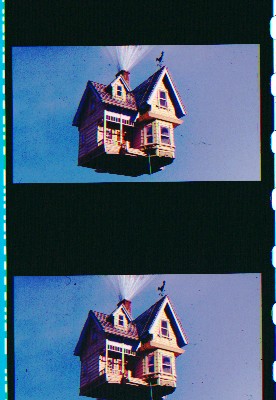
As you can see, the image IS slightly horizontally
undersized. In many auditoriums this is probably not
a problem, and the masking can be adjusted accordingly.
But in my particular situation, we're projecting it in
an auditorium with a steep downward slope which
means I wind up with diverging black lines on
each side of the screen. If I close the masking
enough to hide the uneven lines at the top of the
screen, then I loose a significant amount of image
on the bottom of the screen which winds up being
projected "into the black" of the masking.
I've managed to find "compromise" masking setting,
which still leaves me with some annoying (to me)
un-parallel image edges at the top of ths screen,
without cutting too much off with the masking at
the bottom. It will have to do for now.
I don't have the time to file a new custom
undersized trapazoidal aperture plate just for
the last week of this flick.
Posted by Steve Guttag (Member # 268) on 07-03-2009, 06:39 AM:
I'm curious...can you take a picture of your actual screen with 35PA projecting? Both with the masking full open (to see the edges of the plate) and with it set the way you like it.
Steve
Posted by Lyle Romer (Member # 1266) on 07-03-2009, 08:16 AM:
quote: Jim Cassedy
As you can see, the image IS slightly horizontally
undersized.
Have you actually measured the image in the frame to see if it is really "undersized"? It just looks like it is hard masked to 1.85:1 or 1.66:1. As far as I've ever noticed and going back for quite a while almost all animited and CGI films are done this way. Why spend the mondey drawing (in the case of old animation) or rendering (in the case of CGI) parts of the frame that are supposed to be maked off.
My guess would be that "Up" is rendered at exactly 1.85:1 and you've never noticed this before because your masking is slightly "wide" and prior animated stuff was "zoomed" a little and printed larger than spec.
Posted by Jack Theakston (Member # 4484) on 07-03-2009, 01:08 PM:
Exactly. The above image is hard matted to exactly 1.85, which is unusual practice for this very reason. I'm betting because of the keystone, Jim's plates are a little overcut.
That being said, pull in the masking, or cut a new plate.
Posted by Mike Babb (Member # 1379) on 07-04-2009, 12:45 PM:
I wonder if this is due to the floating box and safe/green area used in the digital copies?
Posted by John Hawkinson (Member # 1135) on 07-04-2009, 04:00 PM:
It's certainly hard to tell from Jim's picture.
Jim, when you say, "As you can see, the image IS slightly horizontally undersized," if you're referring to the black space between the DTS timecode and the left edge of the image, then that is not evidence of being undersized.
DTS specifies that the center of the timecode falls 0.299" from the reference edge of the film. SMPTE 195 specifies that Dimension D, the distance from the reference edge to the projectable image area, is 0.324". So typically there is 0.025" of space there, or just under 1/32" of an inch.
But with non-animation, there is the distinction between the projectable image area and the "film image area," the latter of which isn't defiend in SMPTE 195, but can be substantially larger. Typically that area extends much closer to the soundtrack, because of the camera aperture, etc.
As many have said, it seems likely that UP! is matted to exactly 0.825" wide, rather than filling the extra space with slop. Your scan isn't quite high resolution to tell with precision, but let's try anyway.
Assuming that that the horizontal and vertical are scanned at 1:1, measuring the top of the upper left perforation to the top of the next perforation down, we get 57 pixels. Since the perforation pitch is 0.187", then we conclude your scan is at 57/0.187 => 304.813 px/inch.
Measuring the width of the image across the top, I get 248 px, which comes out to 0.814". Which is just undersized from 0.825", the specification. But it would only have to be 252 px, or four more, in order to get 0.825". And because the pixel boundaries are fuzzy, I think there could well be 2 more pixels on either side. So I don't think the measurement here is instructive.
Things being what they are, I would tend to suspect that your apertures are indeed oversized, and you make use of the extra area in the camera aperture in most cases, and it's only for a film like UP! that's digitally rendered without attention to this question that you have a problem. But conceivably you might see the same effect from any Digital Intermediate film.
So run some RP40 (35PA or 35IQ) and let us know!
--jhawk
Posted by Monte L Fullmer (Member # 2797) on 07-04-2009, 07:53 PM:
I'd still cut a new plate for there could be more PIXAR releases in the flat format where this printing procedure could repeat itself in those future releases.
And, on this same topic - did we also notice, with the SCOPE releases of PiXAR, of the heavier framelines and the thicker edge on each side of the image on the film than a standard anamorphic release print?
-Monte
Posted by Jarrad Salmon (Member # 3818) on 07-06-2009, 06:04 AM:
Maybe it has something to do with the 3D side of things? It was made for 3D first.
Posted by Mark Gulbrandsen (Member # 72) on 07-06-2009, 06:18 AM:
Well, if it is indeed undersized you should be witholding the same amount of percentage of the gross as there is image missing... Protest until Disnney delivers the very last percentage of the image and all the people that missed seeing it get to see that percentage of the missing image in a private screening... ![[thumbsup]](graemlins/thumbsup.gif) Gee It might change the outcome of the plot
Gee It might change the outcome of the plot ![[Eek!]](eek.gif)
Mark
Posted by Gordon McLeod (Member # 33) on 07-06-2009, 08:16 PM:
I doubt any lab printed something that cropped the image beyond the smpte spec's
That being said everyone probably has set up a theatre and cheated a bit to cprrect a keystone size issue
digital intermediates don't allow any fudge factor since that increases file size
Posted by John Hawkinson (Member # 1135) on 07-06-2009, 09:19 PM:
Actually, Gordon, most DI movies *do* have the fudge factor. Go figure.
--jhawk
Posted by Jim Cassedy (Member # 4115) on 07-08-2009, 10:19 AM:
I've taken an EXTRA long 4th of July holiday so I've been away
for a few days.
Before leaving, we "solved" the undersize image problem by
moving "UP" into another auditorium without the extreme
downward tilt.
I was unable to find the time to photograph the screen
as Steve Guttag suggested, although I would have liked
to have done so.
However, I DID place a section of old PA35 and one
of the key frames in register on a light table and
examined it with a loupe and the UP frames do appear
to be one 'tick' smaller than the recommended .825 spec.
I examined my print of "Ice Age" and it does not have
the black bars on each side of the frame. And I did not
have the edge problem when we showed "Bolt", "Kung Fu
Panda", "Wall-E", or "Horton Hears A Who" in that
auditorium. (Granted most of those were scope though)
At this point I'm not going to loose any sleep over it.
It was just an observation and I was wondering if anyone
else had noticted the apparantly slightly 'undersize'image.
Powered by Infopop Corporation
UBB.classicTM
6.3.1.2