This is topic [HELP] Kinoton PK 60 D problem in forum Film Handlers' Forum at Film-Tech Forum ARCHIVE.
To visit this topic, use this URL:
https://ft-forum.com/ft/cgi-bin/ubb/ultimatebb.cgi?ubb=get_topic;f=1;t=009972
Posted by Array Pastrana (Member # 5163) on 07-06-2009, 08:28 AM:
Please help,, My kinoton PK 60D scratching 35mm print. at center vertically, it was horrible. Help me please,, the projector just scratching transformers print,,
Kindly reply this message, i appreciate if you could give me some advice and way out of this problem.
Regards,
Array
Posted by Cathal Griffin (Member # 5166) on 07-06-2009, 08:48 AM:
Which side of the print is being scratched? Is it scratching every time that the print is played?
We had an issue with a Kinoton FP50D that has the same projector head as the PK60D, what had happened was that the skate had been damaged at it's mounting point, this allowed the skate to move slightly and destroyed a print. This was a one off though so not sure if it will relate to your problem.
I guess other things to look at would be the sound drum and rollers.
Best of luck with it.
Cathal
Posted by Array Pastrana (Member # 5163) on 07-06-2009, 09:17 AM:
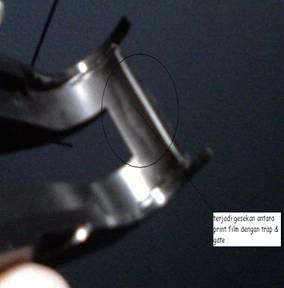
Probably this part, what if i cropped that point? there is some ash after movie showed in that side, but i have no idea, what if this is a disability issue from manufacture? is it possible? anyone use this machine?
It was scratching at center perfectly vertical black scratches , on the base side.
Thanks anyway Griffin, i would check the sound drum and roller also.
Posted by Cathal Griffin (Member # 5166) on 07-06-2009, 09:33 AM:
That skate is very worn and probably is responsible for the scratching. You can see where the sprocket has worn out tracks on your photo. If it was on my machine I'd replace it straight away.
Posted by Array Pastrana (Member # 5163) on 07-06-2009, 10:00 AM:
I did replace with the new one couple time, i won't work, the scratch thickness depend of the celluloid quality, it always happened. i did crop that (circle at pic)side to give some space for the celluloid to through this part without touch each other, but still scratching the print. Or maybe this part was not PK 60D standard..? how can i find this answer. I just move to a new site, and this is my first time using Kinoton projector, i used to operating Strong Projectors.
thanks for help Cathal ![[beer]](graemlins/beer.gif) , i still finding for the solution..
, i still finding for the solution..
![[Confused]](confused.gif)
Posted by Michael Schaffer (Member # 1204) on 07-06-2009, 10:11 AM:
I have a hard time picturing how the pressure skate could scratch a print like that, but it would be good to check if it is maybe too tight anyway. You can adjust the vertical position of the skate by adjusting the pin it is riding on. To do so, you have to loosen the little set screw at the bottom of the post (facing towards the screen) and then you can turn the post (the lower end is threaded like a screw) to move it up and down. The idea is that the skate is not tight on the sprocket. There should be 1 or 2 film thicknesses between the skate and the sprocket. So when the skate is closed and there is no film in the projector, it should be possible to move it up and down very slightly.
Posted by Robert Minichino (Member # 3495) on 07-06-2009, 10:15 AM:
I think the skates for the D and the E series projectors are different, that skate looks like it wraps around a larger sprocket than the standard 16 tooth sprocket on the D series, but it's hard to tell from that photo. In any case it doesn't look quite like the skate we have on our FP20s.
Posted by Pete Naples (Member # 761) on 07-06-2009, 11:09 AM:
If it's grossly maladjusted, set too close to the sprocket (as the machines in Cathals cinema were at one point)it will wear the film path to the point of it scratching the film in no time.
Replace the film path and adjust it in height as per Michaels instruction, there is good coverage of this in the manual.
Posted by Cathal Griffin (Member # 5166) on 07-06-2009, 11:11 AM:
A skate could be responsible for vertical scratching if it is left to wear for too long. In the pic above, you can see that it has worn down substantially already. If this is left to continue and the skate is continually adjusted up, it (the piece circled in the pic) will eventually make contact with the print as it passes through.
EDIT: Pete got in ahead of me! This issue appeared at our cinema before I started ![[Smile]](smile.gif)
Posted by Steve Guttag (Member # 268) on 07-06-2009, 12:28 PM:
I can say, there is no part of the PK60D that should be even close to scratching anything unless the skate/runners are grossly worn down.
Start with a fresh set (on the runners, often you can just transpose them as they are mirrors of each other).
Then carefully set the skate height as Michael describes. After that triple check your threading and don't make your lower loop too big.
Steve
Posted by Pete Naples (Member # 761) on 07-06-2009, 12:29 PM:
It's a fairly common thing on them. In all honesty they should be adjusted correctly with a new film path, and the film path replaced when the gap opens up due to wear.
Cathal, remember all the damage that cause? ![[Eek!]](eek.gif)
Posted by Brad Miller (Member # 2) on 07-06-2009, 12:35 PM:
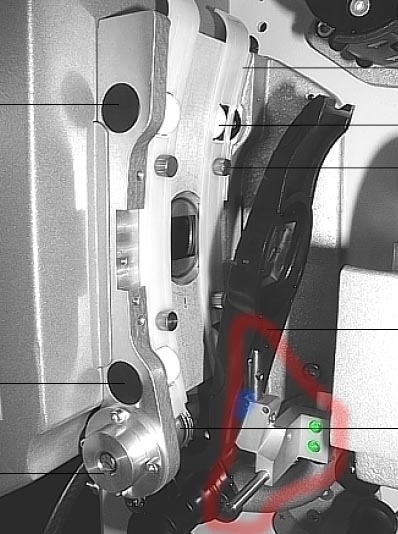
Look at the picture above. See the two screws that are colored green in this picture? If they come loose, the entire assembly that is circled in red will be rotated clockwise as the skate is closed. At that point the flat spot at the base of the pin which is colored blue in this picture will get pushed through the skate and pressed flat into the film causing some lovely stationary scratches.
Make sure you are NOT using ball-ended allen wrenches when you tighten these, as they will chew up the screws, and be sure to tighten that pin bracket securely to the arm as far clockwise as possible within its available range (so when the skate is closed, it won't have the tendency to push it clockwise to this point over repeated threads...which will force the skate up higher and chew it as you see in the picture).
Then adjust the pin height so the 6:00 position of the intermittent sprocket has a couple of film thicknesses worth of space between the bottom tip edge of the skate and lock the set screw down.
Posted by Array Pastrana (Member # 5163) on 07-07-2009, 01:19 AM:
Ok then, thanks for your valuable in formations ![[thumbsup]](graemlins/thumbsup.gif) . I did it yesterday, hope this problem solved.
. I did it yesterday, hope this problem solved.
To : Brad, where can i get the Kinoton PK 60D manuals? i can't find in this website? please advice sir, thanks.
regards,
Array
Posted by Brad Miller (Member # 2) on 07-07-2009, 02:01 AM:
Kinoton is the only company that does not permit anyone to publish their manuals.
Posted by Array Pastrana (Member # 5163) on 07-07-2009, 02:11 AM:
Wow..too bad.. well thanks anyway Brad..
Posted by Steve Guttag (Member # 268) on 07-07-2009, 06:07 AM:
Your dealer should be able to supply you with a manual. You can also email Kinoton directly.
Steve
Posted by Array Pastrana (Member # 5163) on 07-08-2009, 01:28 AM:
Ok steve, i'll try to reach them. Thanks
Powered by Infopop Corporation
UBB.classicTM
6.3.1.2