This is topic Film Raising on Platter in forum Film Handlers' Forum at Film-Tech Forum ARCHIVE.
To visit this topic, use this URL:
https://ft-forum.com/ft/cgi-bin/ubb/ultimatebb.cgi?ubb=get_topic;f=1;t=009973
Posted by Matt Young (Member # 5327) on 07-06-2009, 11:36 PM:
Big Sky platters, Simplex Millennium projector.
The film on one of my platter decks raises up in some areas when it's rewinding. It started a couple weeks ago when we had Star Trek and Drag me to Hell doubled up in one auditorium, but only did this with Star Trek, never the other movie. now we have Up in that auditorium and its doing it with this print. This print has always ran perfectly fine until we moved it here.
I've never had a problem with this before.
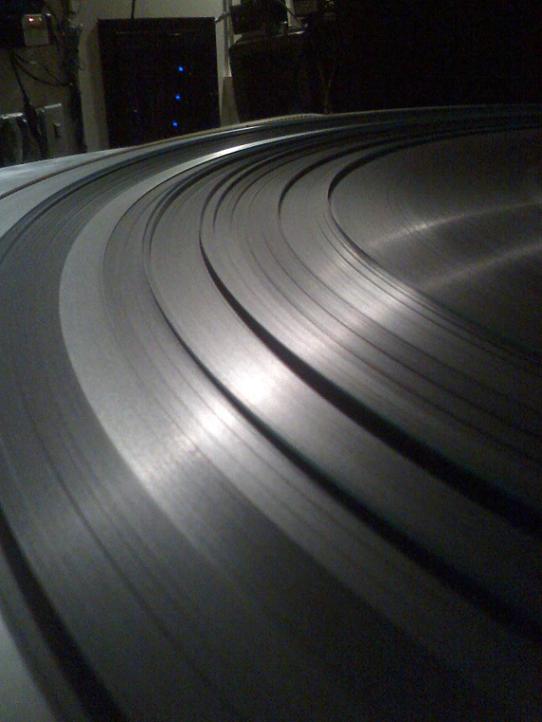
here's a picture of what I'm talking about.
Posted by Monte L Fullmer (Member # 2797) on 07-07-2009, 12:32 AM:
It could be a slight wear issue, or a curl issue. When these films were in their original houses, how is the bulb focus?
With the film running and when it enters the lower loop, touch the film. If it's slightly warm, that is normal, but if it's a bit on the hot side, the bulb needs to be backed up a bit into the reflector for the 'point of light' is too close to the aperture which increases the heat on the film.
It's nothing to worry about as long as your operation procedures are in check. I get them also from time to time..
-Monte
Posted by Matt Young (Member # 5327) on 07-07-2009, 01:03 AM:
bulb focus on this house is fine. everything is in check and i've never had this problem until we put Star Trek in there and UP.
What I thought was a little weird was when we had Star Trek and Drag me to Hell both in that theatre and we would alternate shows, Star Trek did that but Drag me to Hell didnt ![[Confused]](confused.gif)
Posted by Andy Bajew (Member # 5330) on 07-07-2009, 01:06 AM:
We had an issue exactly like this with one of our trees, however it would only do that on the top platter. I am not sure if this is your issue or not--we have very old ORC platters--but the platter was very worn and wasn't balanced (kind of like a wobbly effect). Combine that with a motor with bearings approaching the end of their useful life and it seemed to have caused this issue. I replaced both the motor bearings and switched the platter out for a much nicer one, and the problem has completely stopped. The film raising effect would happen on prints of every size, until so recently of course.
Posted by Randy Stankey (Member # 64) on 07-07-2009, 01:18 AM:
Check to see that the sprockets on the projector didn't go off track and leave little dents in the film between the sprocket holes.
If this is the case then your print is pretty much beat.
You might be able to get the marks to flatten out by various methods but you'll never get it back to original condition.
Two possible causes:
1) Misthread by one of the people who operated that projector.
2) Maladjusted pad rollers and/or pad shoes.
Solutions:
1) Kill the operator who damaged the film. (J.K. ![[Wink]](wink.gif) )
)
2) Have your tech realign and set the gaps in all the pad rollers.
It is possible that the damage was done on another projector before it moved to the one it is currently playing on. That might explain why one print seems to be okay while another one misbehaves.
Posted by John Wilson (Member # 269) on 07-07-2009, 03:52 AM:
I had this with my first print of 'ALI' back whenever. It was this way from the first run. We couldn't even move it it was so loose so we got another print.
Posted by Marco Giustini (Member # 4544) on 07-07-2009, 04:32 AM:
Some of my prints did this sometimes. If the print raised like your photo, it did it in the same point all the times, no matter the screen I was showing it.
Because of that I decided it was a static issue and something wrong with the static coating of the print itself.
Usually any of my print raises this way. It happens few times a year. If this is happening often to you, you might think of something else.
Marco
Posted by Phil Blake (Member # 2012) on 07-07-2009, 06:23 AM:
i have encountered this in the past , sometime running the print opposite side up for a few sessions fixes it.
Posted by Mark Gulbrandsen (Member # 72) on 07-07-2009, 08:31 AM:
Yes, try flipping the sound track the other way round on take up!!!
Mark
Posted by Louis Bornwasser (Member # 3063) on 07-07-2009, 08:35 AM:
If it was caused by a misthread(film damage) and if you don't repeat it, then it will get slowly better over time. Each time you run it you "iron out" the imperfection a little bit.
I have seen sprocket-run prints nearly repaired (the embossed part, not the emulsion) over 3 or 4 months. Louis
Posted by Randy Stankey (Member # 64) on 07-07-2009, 09:06 AM:
If you break the print down onto 6,000 ft. reels and wind it back and forth a few times under tension it might flatten out a little bit.
Put it on your rewind bench and tighten down the tension nut. Wind it back and forth two or three times. (Make sure it's heads up when you're done! )
It won't repair the damage. Nothing can. Once film is damaged it is permanent. You can, however, minimize the problem enough that it will run through your projector safely.
Like Louis said, it might also flatten out on its own after you run it for a while.
Posted by John T. Hendrickson, Jr (Member # 849) on 07-07-2009, 12:00 PM:
Matt-
When the film is rewinding on the platter, are you getting a loose wind? If so, that combined with the picture leads me to believe that Randy is correct- it's sproket damage.
Posted by Randy Stankey (Member # 64) on 07-07-2009, 12:31 PM:
I found a picture I took long ago. This is a print that has had sprocket damage.
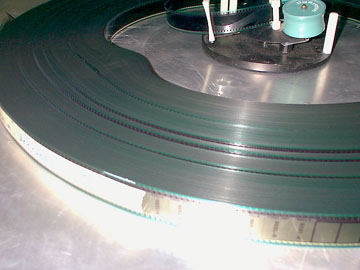
You'll notice the film riding up and down in layers much like yours. You may or may not have a "camel hump" in your print like the one in the picture. If you squeeze on the print while it's on the platter it will feel "spongy".
These are all sure signs that you have experienced some kind of film damage.
Posted by Jack Ondracek (Member # 1466) on 07-07-2009, 12:44 PM:
quote:
If you break the print down onto 6,000 ft. reels and wind it back and forth a few times under tension it might flatten out a little bit.
Put it on your rewind bench and tighten down the tension nut. Wind it back and forth two or three times. (Make sure it's heads up when you're done!
Ack! If I had nothing better to do with my time than that, I'd find another job. ![[scream]](graemlins/scream.gif)
Posted by Randy Stankey (Member # 64) on 07-07-2009, 01:44 PM:
Unless it IS your job... ![[Roll Eyes]](rolleyes.gif)
The print in the picture above was damaged so badly it wouldn't run steadily through the projector. The picture jittered all over the place and the projector made all kinds of noise.
Of course, I got called to that theater on a Friday night to figure out what was wrong.
So, here I am. I drove four hours to get there to find damaged film. There isn't much I can do. The film doesn't run right. Customers are complaining and the manager is asking me if I can fix it. Rewinding the film is the only thing I could think of that would get the film into playable condition on a Friday night.
You're right. It's not something I enjoyed doing but it worked.
Posted by Joe Redifer (Member # 3) on 07-07-2009, 01:51 PM:
I had a print recently that had similar damage. It laid flat on the platter, but it was very spongy and a bit unsteady onscreen, but not so much that people would likely complain. Since we have Simplex projectors and Strong platters, what likely had happened is that someone went to engage the rewind deck, let it "crash" and that pulled the tension on the bottom sprocket too tight. I had to replace the damper because it was slightly bent.
Posted by Jeremy Weigel (Member # 4208) on 07-07-2009, 04:31 PM:
We received a used print of Hangover that must have come from a reel-to-reel operation (the tail on the 3rd reel wasn't cut) that had their tension set too high and slightly damaged the leading edge of the sprocket holes. This caused the film too wind very loose and buckle inwards like in Randy's pic. The film did play steady, but I went ahead and had it replaced.
Posted by Matt Young (Member # 5327) on 07-07-2009, 06:48 PM:
The film is rewinding nice and tight on the platter deck. Next run I'll check to see if the film is damaged in certain places like some of you have said. I'f I dont find anything, I'll try winding it head down on the platter and report back. thanks for the help thus far! ![[thumbsup]](graemlins/thumbsup.gif)
Posted by Mike Moreno (Member # 4887) on 07-08-2009, 10:59 AM:
i have big sky platters and this problem hapend when the center of the plater is a little lose or the bearing is broken.
anotherthink you can check is the last roller in the take up system of that platter, you can move it up and down, it has 2 allen screws.
Posted by Matt Young (Member # 5327) on 07-08-2009, 12:19 PM:
ok, I checked the film last night when it was running through and some of the film is actually damaged. the edge opposite the sound head felt slightly rolled, that must be causing it to raise like it does like some of you said.
I'll check all the pad rollers, pinch rollers and such and make sure everything is in spec.
Posted by Dan Reiter (Member # 1386) on 07-08-2009, 01:52 PM:
Check the alignment of the feed roller that guides the film onto the deck. Also check for any tension in the rollers or the slider itself, it looks like it's wrapping too tight.
Posted by Matt Young (Member # 5327) on 07-08-2009, 05:06 PM:
Feed roller alignment - Check!... Slider roller tension - Check!
I'll go back and check the pad rollers, that's the only thing I can think of that would have done this...
Posted by Jeremy Weigel (Member # 4208) on 07-08-2009, 05:30 PM:
Just out of curiosity, did your print of Star Trek rewind this way during its run through after it was built up? If so, the damage could have happened on the make-up table.
Posted by Matt Young (Member # 5327) on 07-08-2009, 05:51 PM:
Star Trek didnt start doing this until we moved it to this auditorium (#8). Before that it always ran perfectly fine, so I know nothing happened on the make up table
Posted by Randy Stankey (Member # 64) on 07-08-2009, 08:51 PM:
Assume you know how to adjust pad rollers. Yes?
In my experience it is either the first sprocket (upper feed sprocket) or the very last (soundhead) sprocket that is the culprit.
If it was the intermittent sprocket that was jumping the track the picture wouldn't play right, if at all. If it was the constant speed sprocket after the intermittent your sound would likely go out of whack. Out of the remaining two, if it was the bottom sprocket the failsafe would be likely to fail.
Therefore, my main suspect would be the upper feed sprocket at the top of the projector.
The most likely cause would be a misthread or a maladjusted pad roller. A crummy splice or a broken sprocket hole can also cause the film to jump the track.
These are not the only things that can cause this kind of problem but in my experience of cleaning up messes left by other people this would be my first suspect.
The shitty thing is that the problem might not happen all the time. Either a slightly maladjusted pad roller or an inexperienced operator who makes this mistake infrequently can make it appear like the problem comes and goes. One day all your film will be perfect. The next, you'll come to work to find a damaged print. Then, once you think you have solved the problem, it will disappear for several weeks only to appear again when you least expect. (Most likely on a Friday night with a packed house... Thank you Mr. Murphy! )
Posted by John T. Hendrickson, Jr (Member # 849) on 07-09-2009, 07:23 AM:
I once experienced another cause of sprocket damage. I came in one morning and noticed one of our prints looked like a wet noodle, but the trailer pack was wound properly and the damage did not begin until the beginning of the feature. After inspection, I found the cause.
The person who made up the print had placed a long piece of cue tape over both sides of the film, completely covering the sprocket holes. You could see right where the tooth marks dented the tape and then ran off onto the area between the sprocket holes. So, when it hit the first sprocket, the teeth did not punch through, the film jumped, and left sprocket tracks on the whole print. ![[Eek!]](eek.gif)
Cue tape should be attached so that it does not cover the sprocket holes and cause this type of problem.
Posted by Justin Gorka (Member # 3727) on 07-09-2009, 12:39 PM:
Sprocket run off..why the waffle?
Powered by Infopop Corporation
UBB.classicTM
6.3.1.2