This is topic Distorted dolby tone waveform in forum Film Handlers' Forum at Film-Tech Forum ARCHIVE.
To visit this topic, use this URL:
https://ft-forum.com/ft/cgi-bin/ubb/ultimatebb.cgi?ubb=get_topic;f=1;t=010023
Posted by Eric Robinson (Member # 2966) on 08-11-2009, 04:29 PM:
As shown in the URL above, I have a nasty output from my Component Engineering basement reader for a Century soundhead. I have checked the power supplies to the reader and the LED and they have very low levels of sawtooth ripple. I have aligned and realigned the LED and reader but end up with this horrible buzzing sound atop the audio signal. The interesting thing is that the buzzing sound increases in amplitude when the audio signal output level increases. All I can conclude is that my reader has failed. Any ideas?
[ 08-11-2009, 05:41 PM: Message edited by: Brad Miller ]
Posted by Tim Reed (Member # 137) on 08-11-2009, 05:11 PM:
quote: It is important to note that our forum will no longer permit any image links served from off site. This means you may not upload an image to another webserver and display it on the forums. Also not permitted is linking to html pages on other servers containing images whether they comply with the self-upload restrictions or not. (Occasionally the need for a high resolution image is desired. For these types of situations, you need to email them in so they may be served on a seperate page from the Film-Tech servers.) Why so stringent about this? This policy is to preserve all images that are associated with a discussion for future viewing in the archives.
Eric, you should post the picture to Film-Tech proper, so it will remain with the thread for future reference.
Posted by Eric Robinson (Member # 2966) on 08-11-2009, 05:38 PM:
I have tried to post pictures here abiding by every rule and technical detail required and yet I can not post pictures here no matter how hard I try.
Posted by Brad Miller (Member # 2) on 08-11-2009, 05:41 PM:
Just because you can't figure it out doesn't give you the right to break the site policies. The upload page gives very detailed instructions if you care to read it. If you still can't figure it out by then, you should ask on the forum for assistance.
Next time = banned.
Posted by Monte L Fullmer (Member # 2797) on 08-11-2009, 07:11 PM:
I have a scanner program in my laptop here that also will do image reduction on either scanned or saved image stored on my HD.
I pull up the image and click on it's properties to see what pixel size it is. Then, through the editing part of the program, I reduce the image down to the maximum (or close-I ususally choose 475 pixels to be safe) required pixel size required by policy rules then cut and paste the description of the image in the required "upload" section to be displayed in my posts.
It does work ... - Monte
Posted by Chris Slycord (Member # 4239) on 08-11-2009, 07:42 PM:
If you shoot me an email w/ the pic attached I'll make it the right size for ya and upload it.
Posted by Eric Robinson (Member # 2966) on 08-11-2009, 11:16 PM:
quote: Brad Miller
you should ask on the forum for assistance
Yes, you are right. I'll give it another go round then I'll ask for help if I'm still stuck. This forum is valuable to me so I have no ambitions for being banned.
quote: Chris Slycord
shoot me an email w/ the pic attached I'll make it the right size for ya and upload it
Thanks, I'll email you the pic until I get my technical problem solved.
Posted by Marin Zorica (Member # 1716) on 08-12-2009, 09:09 AM:
Let's get back to problem......probably you have too much gain, or some lose ground inside reader preamp, so:
1: check OP amp, if you can replace it, but before check no 2,
2: check all resistors, because if some resistor (one in feedback) is bad soldered op amp will go to infinity gain = distorzion!
Posted by Chris Slycord (Member # 4239) on 08-12-2009, 09:53 AM:
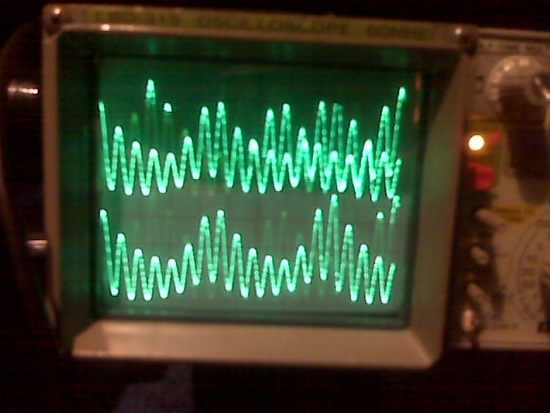
Posted by Sam D. Chavez (Member # 1841) on 08-12-2009, 10:04 AM:
Any ripple is too much ripple on the LED portion of the supply. Anything more than .1 Volt peak to peak can clearly be heard as hum in the audience. The LED is a direct radiator of anything that feeds it unlike an exciter lamp that lights indirectly by making a filament glow.
The hum would could go up and down with the loudness of the track as you describe because that is the nature of a hum source behind a variable area mask feeding a photovoltaic solar cell.
You should check whether there is hum there with no film and if there is, cover the LED and see if it goes away. If it does, you've found the cause.
Posted by Mark Gulbrandsen (Member # 72) on 08-12-2009, 11:48 AM:
Eric,
If you need a copy of Photoshop just let me know... I can send you one. Makes it a cinch to adjust file size....
Mark
Posted by Demetris Thoupis (Member # 833) on 08-12-2009, 01:07 PM:
I am not really aware of the CE readers but one thing to try is to tie the - signal of the dc power supply output to the chasis ground of your rack/projector as well as the ground of the power supply. mmost probably is a ground issue.
Posted by Bruce Hansen (Member # 281) on 08-12-2009, 09:04 PM:
It doesn't realy look distorted, it looks like there is a sine wave added to it. Look at the bottom of the waveform. What does it look like with no film, and with the light blocked? What does it look like (and sound like) with "normal" sound footage?
Posted by Dave Macaulay (Member # 813) on 08-12-2009, 09:13 PM:
So much fuss about film piracy and a member can glibly offer give away photoshop?
Posted by Jarret Chessell (Member # 5077) on 08-12-2009, 09:42 PM:
Search "GIMP" on the internet. It's an open source photo editor incredibly similar to Photoshop. I recommend it to anyone concerned with piracy. I'm also a big fan of Open Office as an alternative to MS Office (also open source).
BTW, those are some crazy ass wave forms.
Posted by Tony Bandiera Jr (Member # 2365) on 08-12-2009, 09:58 PM:
quote: Demetris Thoupis
I am not really aware of the CE readers but one thing to try is to tie the - signal of the dc power supply output to the chassis ground of your rack/projector as well as the ground of the power supply. most probably is a ground issue.
Not to pick on anyone, but: BAD advice! The CE readers use bipolar power supplies (for the reader electronics) and jumping the (-) side to ground WILL short out the supply! Which MAY damage the power supply but WILL LIKELY damage the reader's electronics.
Jumping the LED power to ground will accomplish nothing as it does not need a reference to ground.
Now the old JAX*LITE preamp module is a case where one side of the power input needed to be tied to chassis ground in most cases to avoid hum.
Eric: Is this a problem on a "new" install or is it something that cropped up on an existing install? It makes a difference in telling what the possible causes could be.
Listen to Sam's advice above..I think he's nailed it.
Posted by Gordon McLeod (Member # 33) on 08-12-2009, 11:58 PM:
Actually often connecting the led - to ground helps with some hum issues on many european machines
My suspicion is that the LED has ripple
Scope the DC to it and the Preamp ps as well
Posted by Sam D. Chavez (Member # 1841) on 08-13-2009, 01:03 AM:
The preamp can reject all sorts of power supply ripple, but the LED can not. As I advised, rule this out first.
Posted by Chris Slycord (Member # 4239) on 08-13-2009, 10:14 AM:
quote: Jarret Chessell
Search "GIMP" on the internet. It's an open source photo editor incredibly similar to Photoshop. I recommend it to anyone concerned with piracy.
Although, "the gimp" is what I used to reduce the size of the pic, saying it is "incredibly similar to Photoshop" is an exaggeration at best. It's nowhere near as good, even if it is perfectly fine for everyday stuff average people would use it for.
Posted by John Wilson (Member # 269) on 08-13-2009, 07:26 PM:
From the 'How to upload a picture' part of Film-Tech...
quote:
EASY INSTRUCTIONS FOR USING THE PROGRAM "PAINT" BUILT INTO EVERY WINDOWS OPERATING SYSTEM
Click START / PROGRAMS / ACCESSORIES / PAINT
From the PAINT program, click FILE / OPEN and select your image to be resized.
Click IMAGE / STRETCH-SKEW and reset the horizontal and vertical numbers equally from 100% and 100% to something like 15% and 15% (or if that produces too small of an image try 40% and 40%) and click OK.
I don't generally use that for my pics, but I have on occasions and it works just fine.
Posted by Jarret Chessell (Member # 5077) on 08-13-2009, 10:27 PM:
Alright, I'll admit Adobe Photoshop is superior to Gimp, however, you can't argue that it isn't feature packed, and mimics a lot of the functionality of photoshop. I was also pointing it out as a free alternative. Adobe products aren't cheap, and I don't endorse bootlegging (especially considering the field that most of us are in). When I first tried gimping I thought it was easy to use after Photoshop. Being able to work in layers and use many similar tools does make it fairly powerful for the average user.
Now how about that waveform?
Posted by Randy Stankey (Member # 64) on 08-14-2009, 12:44 AM:
Who said Mark was going to bootleg a copy of Photoshop?l
If mark has a copy of the program that he doesn't use he can give it to anybody he wants provided he erases it from any computer he has used it on.
Posted by Tony Bandiera Jr (Member # 2365) on 08-16-2009, 12:38 AM:
Any chance we can get back on topic? ![[Roll Eyes]](rolleyes.gif)
Eric, have you tried any of the suggested fixes and if so, what happened?
Posted by Eric Robinson (Member # 2966) on 08-17-2009, 06:32 PM:
Thanks to all for the photo editing tips. The photo properties of my upload was not the issue. The issue is that I receive the following message after I submit the image:
"Your login has failed! Please check your username and password and try again. If you have forgotten your password, click here to have it emailed to you"
I have submitted this issue to the film-tech administrator and am awaiting any possible assistance.
Now back to the topic - - thanks for all of your inputs!
I found the problem to be the AC supply to the DC power supply which supplies power to the Component Engineering analog reader and LED simultaneously (2 outputs.)
The AC supply was being tapped off of two different outlets. The hot side was from one outlet on one circuit and the neutral was tapped off the neutral of another circuit. Why this is I have no idea. The hot side of the AC comes on when the automation triggers the electric dowser. I am using an entirely different AC power source now to power the DC power supply and everything works great. Something odd happened in the wiring of the projector but I'm not sure what it is. Additionally, I installed a new LED. And to top it off I had to install a new DC power supply module on the Ultra Stereo processor because it went up in smoke (figuratively.) All is well now. ![[Cool]](cool.gif)
Posted by Tim Reed (Member # 137) on 08-20-2009, 09:44 AM:
quote: Eric Robinson
"Your login has failed! Please check your username and password and try again. If you have forgotten your password, click here to have it emailed to you"
Yes, you have to enter your user name and password before you hit the upload button... and it IS case-sensitive.
Powered by Infopop Corporation
UBB.classicTM
6.3.1.2