This is topic Blacking out frame markings in forum Film Handlers' Forum at Film-Tech Forum ARCHIVE.
To visit this topic, use this URL:
https://ft-forum.com/ft/cgi-bin/ubb/ultimatebb.cgi?ubb=get_topic;f=1;t=010032
Posted by Cathal Griffin (Member # 5166) on 08-19-2009, 01:12 PM:
Hi All,
We have an issue with film certs being supplied with frame markings running into the sound. With scope movies, we have to cut off frames of sound so that the markings don't appear on screen. On this one here, I've had to cut 4 frames of sound...
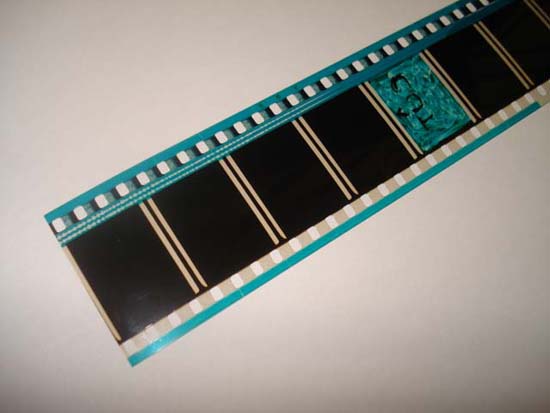
My question: Is there any way of blacking out the frame markings so that they won't be visible on screen? Maybe a tape that could be applied over it.
Cheers,
Cathal
Posted by Pete Naples (Member # 761) on 08-19-2009, 03:43 PM:
Not entirely sure what you're showing us there Cathal. Keep on example handy and we'll look at it in a few weeks.
Posted by Stephen Furley (Member # 1277) on 08-19-2009, 03:50 PM:
Black permanent marker pen on the base side seems to do a pretty good job of blocking out anything on film. Just make sure that it's dry before winding it onto the reel, so that it doesn't come off onto the next layer of film.
Posted by Cathal Griffin (Member # 5166) on 08-19-2009, 03:52 PM:
Will do Pete.
Just to clarify, this is the head of a 35mm cert that is attached to the feature. In an ideal world, I would have left those 4 frames on the clip but can't because if i did, the markings (at top and bottom of frame) would flash up on screen.
Posted by John Wilson (Member # 269) on 08-19-2009, 04:57 PM:
There's really not.
If you use black marker, it won't cover them up completely and you'll have black moving around over the frame markings (unless you're an animator and can get it exact on each frame). ![[Wink]](wink.gif)
You could use tape, but if it comes away or is affected by Film Guard, you'll have a nasty mess to clean up one way or another.
Short of the labs not putting them there in the first place knowing full well it's going to go on screen or be cut off (yeah, right) I'm afraid you have simply 2 choices...neither of which are ideal. Cut them off and chop the sound or leave them on and have them on screen. Of course, if you're a single screen you could dowser off between the trailers so they don't go on but obviously that's not practical on anything more than a single or twin screen booth.
Looking at that strip of film, I'm guessing the lab doesn't give a rats ass about what they do. Look at the Dolby Digital track for God's sake. ![[Eek!]](eek.gif)
Shoddy work all round. ![[thumbsdown]](graemlins/thumbsdown.gif)
Posted by Stephen Furley (Member # 1277) on 08-19-2009, 06:18 PM:
John, I was ale to get black markers in the local stationery store which would black out film completely, but not all of them would do this; I always used to buy the same ones, because I knew they would. I replaced them frequently; they were still usable for other purposes after they'd stopped being good for use on film. Also used them for touching out marks in the black between adverts, and blooping splices.
Posted by Cathal Griffin (Member # 5166) on 08-19-2009, 06:28 PM:
Cheers guys.
You don't happen to remember a brand name do you Stephen?
Posted by Louis Bornwasser (Member # 3063) on 08-19-2009, 08:10 PM:
"India Ink" works the best and was the original (1927) bloop technique. Louis
Posted by Monte L Fullmer (Member # 2797) on 08-19-2009, 08:40 PM:
(What I was gonna say with Louis beating me to it... ![[Big Grin]](biggrin.gif) )
)
India Ink is totally jet black fluid stuff that light will not penetrate.
You have to put it on the emulsion side of the film to really work since it will soak into the emulsion..
I used to use India Ink to bloop out the soundtrack area when doin wet splicing on occasion.
Trick was to get a fine tip fountain pen and actually "paint" a triangle over the splice in the soundtrack area. This triangle would reduce, or even eliminate any 'bloops' when the splice went through the scanner drum optical reader.
You can get India Ink at any stationery store - but could try art supply stores as well.
-Monte
Posted by Tim Reed (Member # 137) on 08-20-2009, 09:36 AM:
I wonder if masking off the track and the beginning of the pix, and then hitting the emulsion with a blast of matte black spray paint would work?
Posted by Michael Brown (Member # 890) on 08-20-2009, 02:59 PM:
quote: Cathal Griffin
Just to clarify, this is the head of a 35mm cert that is attached to the feature.
Why is there soundtrack on a cert? In england the certs just have silence.
Posted by Tony Bandiera Jr (Member # 2365) on 08-20-2009, 03:12 PM:
I may piss off a lot of people here, but I have to ask: why the fuss?
We're talking about FOUR FRAMES worth, which in real time is 1/6 of ONE second. And the problem is only on scope in this case. I can promise you that 99.99% of your audience either doesn't even notice this or cares about it.
I also strive for perfection in projection, but we're not talking about a HUGE distraction in the FEATURE film, so why go to the extremes?
Oh, and a very simple solution if the theatre is automated and uses a cue to open the dowser..move the cue four frames up to delay the dowser the 1/6 of a second.
Or if your automation opens the dowser at a specific time from the start command, simply roll down four extra frames before you press the start button.
quote: Tim Reed
I wonder if masking off the track and the beginning of the pix, and then hitting the emulsion with a blast of matte black spray paint would work?
In theory, not a bad idea. I wouldn't try it in practice though, because you have to deal with the extended drying time of paint, and most paints aren't flexible enough to take the abuse of running through a projector, which means you WILL have a LOT of dirt specks migrating onto the film.
The best idea is use a black marker to darken those frame lines..again, so what if it isn't perfectly blacked out? For the blink of time it would be onscreen, it would not be noticeable.
Again, I see a lot of wasted energy on something so trivial. ![[Roll Eyes]](rolleyes.gif)
Posted by Frank Angel (Member # 248) on 08-21-2009, 07:43 PM:
Louis's India ink is great, but you have to have a pretty steady hand; we found this black tape works well too. It is excellent for a variety of film-related needs. It makes a great sound blooping tape; we also use it when a splice comes in with too much of a gap which allows the film to hinge, a strip of this tape across the splice will both reenforce it as well as stop the soundtrack pop. It would work fine covering up those frame lines, Cathal. We use it all the time on older prints to cover up those mutilated cue frames with all manner of handmade cues. I've even used it to bloop out a entire sentence on the soundtrack of a old trailer which said "Coming this summer"....we were playing that title in January. I just marked the spot on the soundtrack as it ran thru the reader and then laid a strip of this black tape over the soundtrack -- the sound just noiselessly dropped out for that few seconds. What's nice about it is that when it's applied to the emulsion side, it has never come off in the projector; it's pretty agressive. We get it here: Blooping Film Tape - MisterArt.com
This place also has great prices on other good booth stuff like -- White Artist Tape and Silver Sharpies -- if you haven't discovered this new marker from Sharpie, it really is great for printing identication on film leaders; it matters not if the leader is clear leader or black or anything in between -- you can see it clearly from the other side of the room, even in a fairly dark booth.
Posted by Jarret Chessell (Member # 5077) on 08-21-2009, 08:05 PM:
Does the dolby digital really look that bad on there, or is it shadows around the perfs?
Posted by John Wilson (Member # 269) on 08-21-2009, 08:16 PM:
Pretty sure it's a dud track.
Posted by Tim Reed (Member # 137) on 08-23-2009, 01:02 PM:
quote: Tony Bandiera Jr
99.99% of your audience either doesn't even notice this or cares about it.
Maybe not, but Cathal notices it. I think it's admirable there are still operators out there who take that level of pride in their shows. I'd do the same thing if I were still a boothman. ![[Smile]](smile.gif)
Posted by Tony Bandiera Jr (Member # 2365) on 08-23-2009, 01:39 PM:
quote: Tim Reed
Maybe not, but Cathal notices it. I think it's admirable there are still operators out there who take that level of pride in their shows. I'd do the same thing if I were still a boothman. [Smile]
I agree with the fact that this is Cathal being a good showman. But the solutions were bordering on atomic overkill, which is why I suggested these:
quote: Me
Oh, and a very simple solution if the theatre is automated and uses a cue to open the dowser..move the cue four frames up to delay the dowser the 1/6 of a second.
Or if your automation opens the dowser at a specific time from the start command, simply roll down four extra frames before you press the start button.
But from the looks of the film Cathal posted, there are bigger issues with that Dolby Digital track that I would be a lot more concerned about addressing as opposed to the 1/6 second flash of framelines.
Posted by Cathal Griffin (Member # 5166) on 08-23-2009, 02:22 PM:
Cheers guys for all the advise.
While I can appreciate what Tony is saying about it being only 1/6th of a second worth of sound, it still bugs me & if there is an easy solution, why not fix it?
This also happens when we're playing trailers as most of our trailers come with British certifications included, we have to remove this cert and like above, end up cutting out sound.
I've tracked down a "paint marker" for myself so I'll try it out when I get hold of it.
The digital soundtrack on this clip is indeed a dudd. This is the first time and hopefully the last that we've got one like this.
Cathal
Posted by Tim Reed (Member # 137) on 08-23-2009, 02:39 PM:
quote: Tony Bandiera Jr
Oh, and a very simple solution if the theatre is automated and uses a cue to open the dowser..move the cue four frames up to delay the dowser the 1/6 of a second.
Or if your automation opens the dowser at a specific time from the start command, simply roll down four extra frames before you press the start button.
You're assuming it's at the very start of the show. Those would be obvious workarounds, if that were the case.
Posted by John Hawkinson (Member # 1135) on 08-23-2009, 08:24 PM:
I'm still very confused by the initial problem description: "film certs being supplied with frame markings running into the sound. With scope movies, we have to cut off frames of sound so that the markings don't appear on screen."
Is this an audio problem -- the framelines run into the soundtrack and produce noise in the analog track?
Is this a video problem, the framelines are too narrow and appear on-screen?
Is it both?
In my experience, ink on film tends to rub/flake off if its not under splicing tape. I'd recommend using foil tape.
--jhawk
Posted by Tim Reed (Member # 137) on 08-23-2009, 09:05 PM:
The white (clear) frame lines of the lead-in portion are too thick. The soundtrack begins several frames before the thick white frame lines disappear, so he is torn over whether to cut at the solid black (and truncate the start of the soundtrack), or preserve the track and let the white frame lines briefly show on the screen.
Posted by Frank Angel (Member # 248) on 08-24-2009, 09:32 AM:
Cathal, I would suggest that trying to paint over those white lines will result in what will look like an animated line moving on the screen because your hand can never be as steady as you would need it to be. I would use the black tape that I pointed out instead. It will be the width of those lines and because it's has a perfectly straight edge, it will not "dance" on the screen which will make less of a distraction than hand painted lines.
Posted by Stephen Furley (Member # 1277) on 08-24-2009, 02:21 PM:
I think they were W H Smiths own brand, The black was not unlike India ink, quite shiny, and very dense black. They were only usable on film for a short time, a couple of weeks maybe, but they were usable for other purposes, writing labels in tape on leaders for example for much longer. They were available with either pointed or chisel tips.
Powered by Infopop Corporation
UBB.classicTM
6.3.1.2