This is topic Film guard usage in forum Film Handlers' Forum at Film-Tech Forum ARCHIVE.
To visit this topic, use this URL:
https://ft-forum.com/ft/cgi-bin/ubb/ultimatebb.cgi?ubb=get_topic;f=1;t=010262
Posted by Michael Voiland (Member # 5386) on 01-09-2010, 02:34 AM:
We run a midnight Rockey horror once a week. We own the print unfortunately after a long time of running this print it has seen a lot of wear / scratches. Whats the best way to use film guard to restore old prints like this? If there is a good way to get out / reduce large scratches that someone knows then I will probably be investing in a bottle. The upper management wont buy it for us but our Rockey print might need that tlc that they don't understand.
Posted by Joe Redifer (Member # 3) on 01-09-2010, 05:52 AM:
I like to think of Filmgaurd as preventive maintenance. It helps you keep the print in good condition from the get go. It can really help old prints as well, but once they've been significantly damaged you'll never be able to make them look like new no matter what you do. Some of the dirt is literally baked on there and emulsion side scratches are there for good as are deep base side scratches. It will help your print look and run better than it does, but sad to say the scratches are probably there for life.
This is also why I don't wait until "prints get dirty" to run the cleaner. I don't allow them to get dirty in the first place.
Posted by Michael Voiland (Member # 5386) on 01-09-2010, 11:48 AM:
The print has been dirty / scratched since I got their. I am just looking for a way to make it better then it is. I am sure it is dirty as all sin since its been run every Saturday night for 5 years or so.
Posted by John Wilson (Member # 269) on 01-09-2010, 07:55 PM:
While it's true what Joe says, FG will make it look significantly better than it does right now...it just won't make it look new, just new-ish.
There are plenty of other FG threads here describing the best way to put FG on your prints. Just do a search. Good luck.
Posted by Randy Stankey (Member # 64) on 01-09-2010, 08:31 PM:
Virtually all the prints I run are "well used" to say the least. There is lots of dirt and many small scratches. Some prints are terrible to look at but I know if I send for a new print I'll get one that's just as bad and sometimes worse.
Every print I run gets Film-Guard. Every time. It does help rejuvenate and clean up old, dirty prints. It can make a big difference.
However, you still have to remember that there are times when even Film-Guard won't work.
If the scratches are deep.
If the scratches disturb the emulsion.
If there are lots of scratches in the soundtrack area.
If there is lots of ground-in dirt.
In cases like these, Film-Guard will lessen the appearance of scratches and dirt but it will not eliminate them. Even on prints that can be rejuvenated, it still takes a couple-three runs for the effect to be really noticeable.
If the film is really damaged, even Film-Guard will not help.
No matter how hard you try, you just can't polish a turd. ![[Wink]](wink.gif)
Posted by Ian Parfrey (Member # 5122) on 01-09-2010, 08:42 PM:
Randy.
Very true and sound advice.
..except for this.. quote: Randy Stankey
No matter how hard you try, you just can't polish a turd.
You CAN polish a turd- but it still looks like shit ![[Big Grin]](biggrin.gif)
Posted by Chris Slycord (Member # 4239) on 01-09-2010, 08:53 PM:
Mythbusters disproved that one. They used feces to make a type of hikaru dorodango (normally a high-gloss ball made out of mud). The ball they made one ball that was 106 and another with 183 gloss units (where high gloss is anything 70 or higher).
So you CAN polish a turd. It'll still smell like one, though.
Posted by Michael Voiland (Member # 5386) on 01-09-2010, 08:59 PM:
quote: Randy Stankey
No matter how hard you try, you just can't polish a turd.
As for polishing a turd
Polishing a turd
Mythbusters proved that one.
And I remember reading on the film guard website that it can be used to help clean up a print.
When I read the film guard web page
I saw this
quote: Jeff Winkler
Witness/Paramount Pictures
I haven't been in the projection booth for a long time now, but I've seen the results of what polyestar film is capable of doing to the equipment as well as our prints. Every week we must send out replacement prints due to brain wraps and tossed prints. This is a problem throughout the exhibition industry.
After knowing Mr. Miller for many years, I recently asked him if it was possible to perform some repair work on a few repertory prints of ours. He accepted and performed miracles with a solution I have learned is becoming available to the public in the very near future. I screened a couple of those prints prior to and after his rejuvenation work and can attest this solution he is using is nothing short of incredible. These prints I would've sent to junking were now perfectly acceptable for playdates.
Mr. Miller has been using this cleaning product for several years in public theaters and I have always noticed the superior level of quality at his complexes, but up until recently I had no idea he was using such a cleaner. I have been so impressed with the prints that come out of his theater, we have been specifically saving those prints for repertory use. I wish Mr. Miller the best of luck with his product and hope the industry as a whole takes the initiative and uses it. It will improve the movie going experience for everyone and keep the customers coming back.
Basically what I am asking is what are the best techniques to do repair work on film.
Posted by Randy Stankey (Member # 64) on 01-09-2010, 09:24 PM:
Is a turd still a turd if you squash it into a ball? I say that if you form a turd into a ball it is no longer a turd. It would then be a shitball but not a turd.
Yes, you can polish a shitball but you still can not polish a turd because once you form a turd into a shitball it forever loses its turdness.
Repairing prints is best left up to the labs. With the equipment you have at the theater level, your options are rather limited.
You can clean a print with various and sundry chemical preparations.
You can splice a print back into some semblance of original order.
You can patch broken sprocket holes with various methods.
But, once a print is damaged, there is usually no way to restore it to original condition at the theater level.
You should even consider fingerprints to be permanent damage!
Yes, the oil and dirt from your fingerprints can actually absorb into the emulsion, leaving a virtually permanent mark. There are some chemicals that can be used to remove fingerprints but they are usually pretty nasty.
If you send a print back to the lab it can be run through a special machine to "rewash" it and remove much of the dirt and even heal some scratches. But, once film is cut, it can never be "uncut." It can only be respliced.
Once film is scratched, it can never be "unscratched." You can only hide the damage.
If film is scratched down to the emulsion, that's all she wrote!
Scratching away the emulsion removes part of the image on the film. There is no way to restore it.
The simplest way to "repair" film is to never damage it in the first place.
Posted by Brad Miller (Member # 2) on 01-09-2010, 09:46 PM:
Michael,
I'll need some answers from your specifics to give the best advice.
1. Is this print plattered or running reel to reel?
2. If reel to reel, is it 20 minute reels or 60 minute reels?
3. If platter, does this print get moved off of the platter each week?
4. If platter, what brand of platter are you working with?
5. Do you have a Christie or Kelmar "media" cleaning machine like is pictured here?
To get the optimum results, I will need to know the answers to those questions. More may be forthcoming depending on the answers.
By the way, assuming you run that print once a week for 5 years, that is only about 250 passes. That is nothing. I've ran prints over 1500 passes before with NO hint of any deterioration, scratches or dirt buildup of any sort. The trick, as the guys above are trying to tell you, is that corrective actions are never as effective as preventive actions.
Posted by Michael Voiland (Member # 5386) on 01-09-2010, 10:11 PM:
@ Brad
I know its been at least 3 to 5 years with the same print.
1. The print is run from a platter.
2. N/a
3. The print each week gets moved to a couple sheets of cardboard and lexan spread between the platter legs under the very platter. Then a few pieces of cardboard are put on top.
4. The platter is a strong alpha 3 deck with a micro switch brain.
5. We own a Kelmar cleaner
The theater is the same one every week.
Ballantyne pro 35 with a tu2000 turret. Ballantyne sound head and a dts head.
Its got some deep emulsion scratches. I don't know when they happened. I know they will never be fixed.
@ Joe
That is what makes film cool its a picture not a pixel. Its an image transferred from stock to stock with light noting can replicate that.
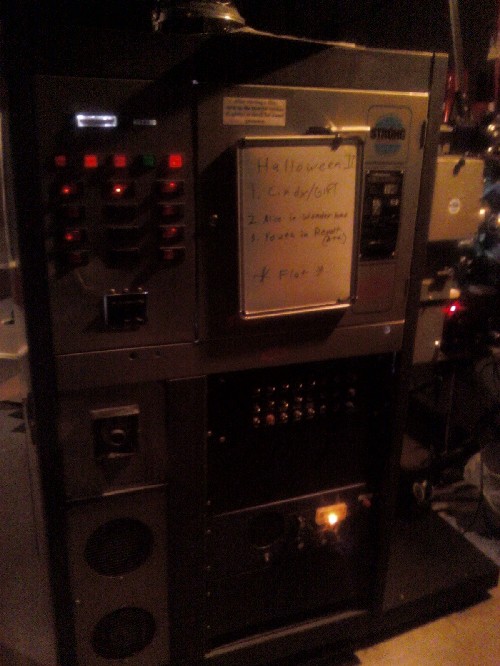
This is the projector that it runs through every Saturday
Posted by Brad Miller (Member # 2) on 01-09-2010, 11:08 PM:
You've got everything working against you here.
You have a platter that does not wind tight. You have a print that was permitted to get dirty. This means every week when you move it for storage, you are putting more and more scratches in it (little "scuff marks" and such...the lines were a threading error). Because the Strong platters don't wind tight, the film is permitted to slip on itself during this move. To top it off, your projector puts more wear on a print than a Century, Christie, Cinemeccanica, Kinoton, etc due to the soundhead design.
But wait there's more.
When you go to clean this print, that craptacular platter has no backtension of any sort, so any cleaning attempts on your part will take twice as many passes to do the same job as if you were running a Christie platter.
That being said, this is what I would do given the circumstances.
First off, use Film-Tech or Kelmar brand media ONLY. If it doesn't have the little embossed "brick" pattern on the surface, don't use it! You will create MORE scratches if you use that type of media on a dirty print because the dirt has nowhere to go. (The dirt on Film-Tech and Kelmar media can drop in the "grooves" of the media to protect the print from getting scratched.)
Next, makeup your film cleaner at least 24 hours before, by soaking the media down and letting it sit out. 48 hours before would be preferred. The reason is because when you are dealing with an old print like this being fed via a Strong platter, you do not want to over-saturate the print. You want the media barely damp for this purpose.
The first pass will do nothing for cleaning. It never does. The first pass is all about lubricating the print to protect it. The actual "cleaning" process starts with the second pass. Save the media pads after this first pass. Store the entire cleaner (or if you have to strip the media rolls off of it) in a ziploc baggie. They make large ones big enough for the entire cleaner.
The second week will be your second pass. Re-use the same stretch of media and make sure you put the same roll on the top spindle of the film cleaner that you did the week before. Don't mix and match the emulsion vs. the base side cleaning pads. You will NOT be adding any FilmGuard before this second show.
Starting with the third week you will be on a monthly change-out:
Week 1 - New media pads, saturated down 48 hours ahead of time (at least 24 hours before the show).
Week 2 - Same pads rewound so you are using the same stretch of media. Do not resaturate the pads.
Week 3 - Same pads rewound so you are using the same stretch of media. Do not resaturate the pads.
Week 4 - Same pads rewound so you are using the same stretch of media. Do not resaturate the pads.
Repeat steps 1-4 for weeks 5-8 and so forth.
I believe RHPS takes either 5 foot or 5.5 foot length rolls of media. If you are ONLY using FilmGuard on your RHPS print, one box of media and one bottle of FilmGuard will last you a couple of years. Hand-wind 5.5 feet of media onto an empty core and run those. If you run the full 16 feet of media on the rolls as they come from the manufacturer, the other 10 feet will absorb FilmGuard unnecessarily, emptying your bottle faster.
Remember, load the pads DRY onto the cleaner. Wind the takeup core a full 3 turns past bare minimum. THEN push the sprayer nozzle up against the dry pads to saturate them. If you wet the pads before loading them onto the cleaner, you run the risk of the tape loosening on the takeup shafts and if you hit some sprocket damage or a bad splice (both applicable on most RHPS prints), you could actually end up pulling the media free and causing it to unravel during the show. If you load them up DRY before wetting them down, that won't happen.
Also, see if you can go buy yourself two thick (half inch) pieces of masonite and have it cut into a circle 3.5 feet in diameter. (Make sure it is a smooth cut, not one hand-done with a jigsaw.) Then have the center cut out enough to clear the brain of the platter (I'm guessing 10-12 inches) and then drill out a couple of holes with a 1/2 inch drill for your two center ring pegs. This way you will be creating yourself a sturdy and only mildly bendable "donut" to run the print onto and off of during the show. This will help prevent more scratches in the future as you keep physically picking up and moving that dirty print, because you will be picking up and moving the "donuts" with the film sitting on top. Remember, that dirt is abrasive against the next layer of film!
Posted by Michael Voiland (Member # 5386) on 01-09-2010, 11:24 PM:
Thanks for the advice.
What if I used my rewind table with a kelmar bracket mounted to it. I can bet no one has ever went over the print and checked any of the splices since its been made. Could I run it from a set of reels through the cleaner and then build it back up for starters to have some back tension.
Also I am sure we can leave rocky on the platter I will talk to my boss about it that way we are not always moving it around.
And strong platters suck. How hard is it to convert the permanently mounted brain platters to ones with removable brains.
Posted by Randy Stankey (Member # 64) on 01-09-2010, 11:42 PM:
You can user your rewind bench to clean a print but do not run the film too fast. I'd say never go above "30" on the speed dial. If you use big reels to wind the film you should even slow it down when you get near the end of the reel.
If you go too fast it will scratch the film.
Posted by Brad Miller (Member # 2) on 01-10-2010, 12:29 AM:
Given the potential for scratching on the bench, coupled with the fact that the most effective cleaning is MANY passes, not just a few on the bench, I would still stick with the above guidelines. If however you can not move it during the week, that would definitely be a plus.
Posted by Demetris Thoupis (Member # 833) on 01-10-2010, 02:31 AM:
Brad in case of collecting film, does filmguard protect the film in storage for issues like vinegar effect, colour fading e.t.c? Does it do any good on nitrate film? (of course its bette nitrate to be avoided).
Demetris
Posted by Brad Miller (Member # 2) on 01-10-2010, 03:00 AM:
I have never used it on nitrate film, but have been told it does wonders and puts the possibility of it breaking at a much lower risk by those that have.
Nothing will prevent or cure vinegar syndrome, but I can attest it does slow it down and extends the useful life of VS prints.
Nothing will slow down color fading except for the usual cold storage, etc.
Posted by Steve Guttag (Member # 268) on 01-10-2010, 04:03 AM:
I could see a couple of advantages to breaking down the print and cleaning on the rewinder (at first).
One, the first pass on the platter will have a VERY streaky print...even with the 24-48 hour pre-soak.
Two, it will allow them to get about a years worth of cleaning done in a single day. After that point, platter cleaning will just be a maintenance cleaning.
Most of my venues use the Kelmar bench to rewind. However to set that up, you need a couple of brackets that you likely don't have. You need the Autowind bracket AND the film measuring machine bracket (both made by Kelmar). You then need to drill/tap holes to mount these two things together (at the proper spacing to align with the reels). There are pictures here on Film-Tech that show this set up (I believe if you search on "high speed film cleaning" you will find it.
Steve
Posted by Randy Stankey (Member # 64) on 01-10-2010, 09:31 AM:
Cleaning on the bench is not something I do every time. I only do it when the print is very dirty.
While I am building up, if I see my glove getting dirtier than usual I might decide to give it an extra cleaning right there on the bench as I am working.
(I always build onto 6,000 ft. reels.) I usually have to rewind the print before spinning it onto the platter. That is the time I get out my bracket and mount my film cleaner on the bench. I just take advantage of that rewinding operation to clean the film at the same time.
Yes, if you clean the film at the bench and you let the film run too fast you will scratch the film!
First, don't run the film too fast. If you are using the Kelmar bench, don't go above "30" on the speed dial. If you are using some other brand of equipment, don't go faster than 25% or 30% of maximum.
Second, remember that as the film winds along it will go faster.
Assume you are winding a roll of film from the left spindle to the right. The full reel on the left has a large diameter and the empty one on the right has a small diameter. As the right side gets larger and the left gets smaller, the speed of the film going through the machine will increase.
When you are about half way through the reel you should turn the speed down. I usually go down to 25% or 20%.
Finally, you should be using new, clean media on your film machine and be sure it is well saturated with fresh Film-Guard. If you don't do this, any dirt that is already on the media will act like sandpaper and leave microscopic scratches through the whole print.
If you use your film cleaner on the bench, just remember: You can easily do more harm than good! Be careful!
BTW: Whose idea was it to store that print on the floor? (Or even NEAR the floor?)
Basically, everybody who walks by that platter is kicking dust and dirt onto the print.
I'd say that print needs a good cleaning, either at the bench of through the projector. Method isn't important. Getting the print clean is key.
I think you should either break that print down onto 6,000 foot reels and store them in a film rack ABOVE FLOOR LEVEL or invest in a "Show Shipper."
http://www.film-tech.com/warehouse/wareview.php?id=1054&category=4
If you play that movie every week or even on a regular basis you should treat it like gold! That film is money! You should do all you can to protect your assets. ![[thumbsup]](graemlins/thumbsup.gif)
Posted by Steve Guttag (Member # 268) on 01-10-2010, 11:59 AM:
Randy,
I don't know what to say...I've tested, pretty extensively, bench cleaning with Film Guard, dry, with different vintages of cleaners and with different media.
I've tested Kelmar-WHITE and Film-Tech white (with brick pattern) using 4500 foot reels safely to 50% on a Kelmar RTV-8900 without any damage.
You can see my set up below:
High Speed Film Guarding Thread
The older cleaners are more fussy as they move the media slower. Kelmar Green will definitely scratch you movie on older cleaners (you can get aways with it on the current cleaners) as it is abrasive.
I, personally don't go above 30-40% on 4.5-6K reels or 50% on 2K reels as I don't see the need for speed in this situation and at best it will do an inferior job of cleaning/lubricating.
I'm curious to see you set up if you are getting any hint of scratching. Also, what media are you using and the vintage of your cleaner.
Steve
Posted by Randy Stankey (Member # 64) on 01-10-2010, 12:20 PM:
I'd have to agree with your testing. I don't do bench cleaning unless I need to. I've never done any formal testing either. I simply work slowly and carefully, operating under the belief that it is better to take a few extra minutes to do the job correctly than to take shortcuts and risk damage.
I've also got to admit that my "Don't go too fast or you will scratch film" mentality is born out of teaching college students to work in the booth. I find that, if you don't keep hammering on them, they will simply turn the control up to "100" without thinking.
Bottom line: Yes, you can probably go faster but still be careful.
Posted by Brad Miller (Member # 2) on 01-10-2010, 12:59 PM:
Guys, the main problem with bench cleaning is that the tension increases as the reel ends. It is not consistent throughout the reel like a platter. That (and going too fast) is where the biggest scratch potential comes. More tension is only better up to a point. For "high speed" cleaning my preference is always speed winding on the platter.
Bench cleaning can be done if you know what you are doing, but Randy is right you COULD do more damage than good if you don't know what you are doing. With that said, Neumade makes a special bracket to mount the film cleaner to the side of a Neumade or a Kelmar table. It is ready to go out of the box and is better than the Kelmar parts bolted together because gravity doesn't pull the FilmGuard toward the back side of the cleaner.
The "Show Shipper" platter reel isn't stiff enough to prevent your film from "bending" due to the Strong platters, so don't bother. Breaking down to 6000' reels is also a lot more stress on the film than just clamping it and moving it, so don't do that either.
Powered by Infopop Corporation
UBB.classicTM
6.3.1.2