This is topic Crazy Heart shedding like crazy in forum Film Handlers' Forum at Film-Tech Forum ARCHIVE.
To visit this topic, use this URL:
https://ft-forum.com/ft/cgi-bin/ubb/ultimatebb.cgi?ubb=get_topic;f=1;t=010356
Posted by Joe Redifer (Member # 3) on 03-01-2010, 01:50 PM:
I have a print of Crazy Heart which is shedding blue flakes like crazy, pardon the pun. Looking at the media pads, it is the soundtrack side of the print, emulsion side, SDDS track (or rather where SDDS would go). When looking at the film itself, you can see that the blue is fading away. The print looks fine onscreen other than it being very dirty. It runs fine. But at the end of the show, the entire projector, top to bottom is covered in blue chips. They get all over the film cleaner as well and I am thinking of pulling it because I think at this point it is doing more harm than good by redistributing the flakes since they are starting to get all over the picture area. The only way around this would be to run the cleaner only once and change the pads out each time.
Has anyone else seen this type of oddity? Simplex XL, Strong platters. We moved the print for one day last week and the shedding follows the print. The trailers are undamaged and do not shed.
Posted by Tony Bandiera Jr (Member # 2365) on 03-01-2010, 02:03 PM:
Well, until you said the trailers were undamaged I was going to suggest checking the intermitent sprocket shoes...but...
Sounds like just a f'd up print, possibly some sort of lab defect.
Posted by Jeremy Weigel (Member # 4208) on 03-01-2010, 02:12 PM:
We started playing it this past weekend and I have had no reports of shedding. Christie P35C/Strong Platters
Posted by Joe Redifer (Member # 3) on 03-01-2010, 03:13 PM:
It didn't start this right away. There were a few occasional flakes here and there from the beginning and it gradually increased. I checked the entire path of the film to see if anything was rubbing on it too hard. The only thing that might be exacerbating the problem is maybe someone putting too much tension on the Cat 702 Dolby Digital reader.
Posted by Tony Bandiera Jr (Member # 2365) on 03-01-2010, 03:32 PM:
Now that makes me think it could be a bad print from the lab...maybe the edge treatment (if still used...I do miss John P's contributions) was missed or improperly applied?
Would excess tension on the 702 do this? I would think you'd also see some sign of sprocket damage...
Posted by Randy Stankey (Member # 64) on 03-01-2010, 03:38 PM:
Don't know if you have the time to do this but it might help if you clean the print at the bench with a fresh set of media rolls.
The reason for this would be to eliminate the possibility of the vicious cycle where "dirt" comes off the film and deposits in the projector's film path then redeposits on the print the next time you run it through. Cleaning at the bench will, hopefully, remove as much "dirt" as possible without the possibility of it getting back on the film.
Then you could clean the hell out of the projector and install a fresh set of media rolls. The print should run cleaner even if it isn't completely clean.
But if you don't have the luxury of time this will probably be a moot point.
Posted by Joe Redifer (Member # 3) on 03-01-2010, 05:39 PM:
I'm sure I could make the time, but the problem is ability. I don't have the ability to clean prints on the bench. I have a Neumade PRT Ultra table so options are extremely limited. I have changed out pads in the middle of the week for it, but it only helps for the one show that it runs "wet".
Tony, I have seen one of my guys constantly make the tension one perf too tight on the two 702 readers we have. We have 4 BACP readers and he just applied the same tension on all of them (the BACP requires more "space" between the tensioning rollers than the Dolby-proper readers, it is difficult to get that much tension on the 702, but you can do it). The 702 reads fine with the extra tension and I don't see any sprocket damage (I have checked many times) but I tell him not to do it anyway.
Posted by Monte L Fullmer (Member # 2797) on 03-02-2010, 12:09 AM:
I call it a "effed" up print from the lab as well ...
I've seen the misalignment (aka.PR-1060's) of the shoes making sharp edges on the sprocket's outboard teeth and creating a "snowstorm" in the operation itself.
Posted by Manny Montes (Member # 5639) on 03-02-2010, 12:20 AM:
Do you have a lot of print shedding issues? Or is it just crazy heart? We've been playing it for 3 weeks and haven't had any issues, the first show was run through film guard and its been fine.
Posted by Joe Redifer (Member # 3) on 03-02-2010, 01:07 AM:
No other issues with other movies. Filmguard applied once per week on new pads, pads run every show. The "wear" is on the emulsion side which eliminates the intermittent show as the cause. Flakes do not appear heavier in one area of the projector than the others. You can see the stuff sitting on top of the print as it sits on the platter deck.
Posted by Gordon McLeod (Member # 33) on 03-02-2010, 06:47 AM:
It would be hard for a lab to produce an entire print with a problem as the reels are individually printed often on different lines
And if it was bad stock then I would again suspect it would not be an isolated problem
Check shoes in the trap often flaking is material that was abraded in the previous showing being deposited on the next pass through the machine
Posted by Scott Norwood (Member # 30) on 03-02-2010, 07:38 AM:
Did the print previously play at a different theatre? Maybe it was damaged before you received it.
Posted by Richard P. May (Member # 3598) on 03-02-2010, 09:57 AM:
This is something that should be reported to the distributor, and subsequently the the lab that made the print. Gordon's point that all reels are not made at once, or on the same machine, is right, but maybe running on a platter only some of the reels are having this problem, but it looks like the entire print is a fault.
I'd guess it's something in the lab processing.
DM
Posted by Joe Redifer (Member # 3) on 03-02-2010, 10:50 AM:
Scott, print was new. I don't have a lot of time to be checking on individual reels, but most reels seem affected, though definitely some more than others. It might be the first and last reels that are the worst, as if I wipe out parts of the projector during the show, it stays fairly clean for the most part, but it always flaky again at the end. I requested another print last week, but am not sure if I'll get one. The shoes were clean. I did change the bands for the hell of it last week, but no change in flakiness.
Could damage like this be caused by misthreading to where the mistreaded show runs fine and causes no other damage to the print? Why are the trailers fine?
Posted by Jeremy Weigel (Member # 4208) on 03-02-2010, 05:37 PM:
Did you check to see if there are any grooves cut in the intermittent shoe and/or pressure pad/skate (I assume you've already checked the intermittent sprocket teeth)? I had all these problems on my 1060's (as well as the shoe being set too close). Replacing the shoes, pads/skate, sprocket and readjustment of the shoe tension and alignment of the gate trap cured all my shedding problems.
It does seem odd that the trailers were unaffected, but perhaps a splice near the end of the trailer pack went through and "popped" the shoe over slightly on one or two runs (don't know if this can actually happen)?
Are you sure the shedding followed the print or was it the residual flakes still coming off the print in the other projector?
Posted by Joe Redifer (Member # 3) on 03-02-2010, 05:42 PM:
I'll just swap the entire gate/shoe and see what happens. We have tons of them lying around. But then again, no issues when another print played in there for a day and the shedding followed the print into two other machines.
Posted by Jeremy Weigel (Member # 4208) on 03-02-2010, 07:53 PM:
quote: Joe Redifer
We have tons of them lying around.
That's never good.
Posted by Joe Redifer (Member # 3) on 03-02-2010, 11:21 PM:
Why?
Posted by Jeremy Weigel (Member # 4208) on 03-02-2010, 11:44 PM:
Usually indicates repeated problems.
Posted by Joe Redifer (Member # 3) on 03-03-2010, 12:22 AM:
They are from old, spare XL's that were replaced with Milleniums. We still have two XLs.
Posted by Manny Montes (Member # 5639) on 03-03-2010, 10:35 AM:
did switching the gate/shoe fix it?
Posted by Joe Redifer (Member # 3) on 03-03-2010, 11:28 AM:
I don't think I will ever be able to answer that question as I don't work again until Thursday and I am confident the print will move to a Millenium house. For now I will leave everything the same and see if the next print eventually becomes affected, though I doubt it will.
Posted by Mark Gulbrandsen (Member # 72) on 03-04-2010, 09:52 AM:
There is no worse gate design than the flip open 1060! I feel for you Joe... I would take a hand cranked Powers or Edison projector over one of those any day. The block that hold the intermittent shoe in place doesn't even have the same radius as the tang it screws on to... The block distorts and then the shoe cannot move freely as it should. I always felt that Strong should have given everyone new gates to replace those...
I have only seen one other print do this... it was way back during the run of Out Of Africa... it was on Fuji stock... I don't think you were born yet!
Mark
Posted by Joe Redifer (Member # 3) on 03-04-2010, 01:52 PM:
I don't have any flip-open gates.
Posted by Rick Raskin (Member # 1561) on 03-04-2010, 05:13 PM:
I have seen this before. A very long time ago running a brand new 35mm print of "Lord Jim" on Norelco AAIIs. It was the print. We thought it might have been caused by the edge wax used at the time.
Posted by Tony Bandiera Jr (Member # 2365) on 03-04-2010, 11:10 PM:
It's the print, people!! ![[Big Grin]](biggrin.gif)
I swear I'm gonna have that made onto t-shirts and send them y'all.
Posted by Joe Redifer (Member # 3) on 03-05-2010, 12:27 AM:
I'm still not convinced that the print is doing this on it's own, though that could be the case. I think it is a combination of film stock exacerbated by someone putting too much tension somewhere. The only person who could have done that recently got another job, so I am curious as to why it is still doing this each and every show no matter what projector it plays on:
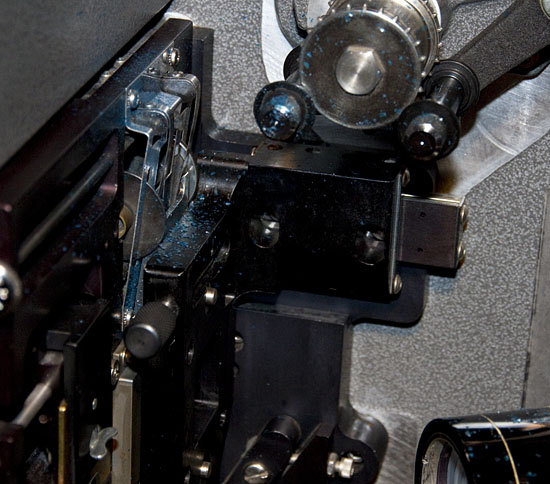
The flakes get all over everything that gravity allows. After a day or so, the floor by the projector and platter must be vacuumed.
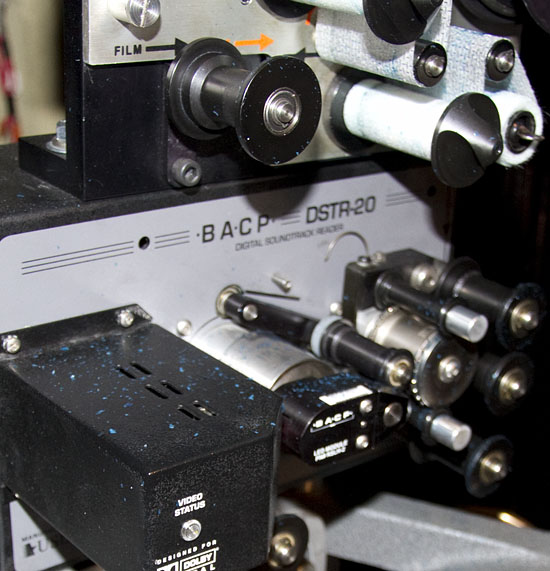
It literally is falling off of the print as it casually moves around rollers.
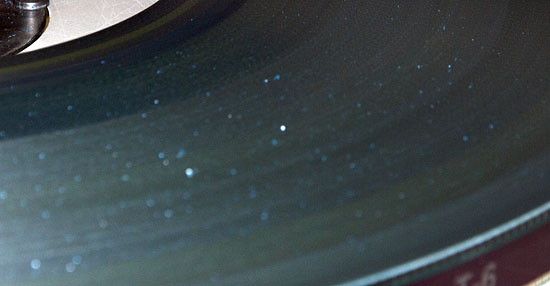
Here you can see the flakes on top of the print.
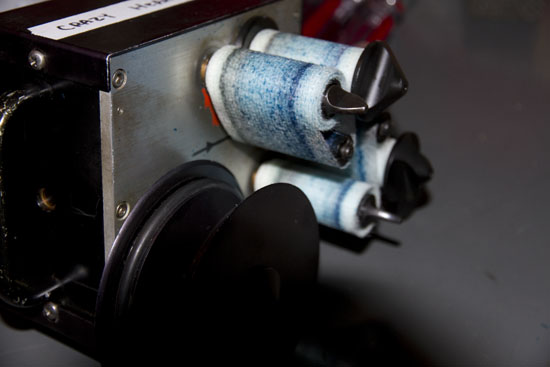
Here is the cleaner after 4 days or so. It is probably doing more harm than good at this point. The onscreen image is quite dirty. The portion where the trailers run through the media pads is virtually spotless.
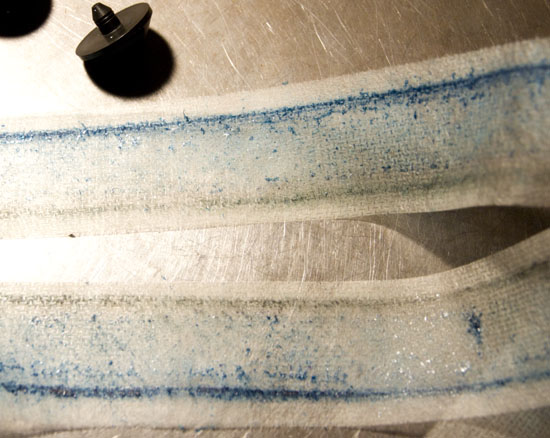
I will probably cease and desist using the cleaner as it is not helping.
Posted by John Wilson (Member # 269) on 03-05-2010, 12:36 AM:
If it really was the print, wouldn't both edges of the media be showing the same damaged flakes? Why only on the edge closest to the track?
When you physically inspect the print itself, do you see any other damage?
Posted by Ian Parfrey (Member # 5122) on 03-05-2010, 12:39 AM:
Joe.
Can you put up a macro shot of the film itself?
I'd like to see if the emulsion is getting stripped off by something or if it is flaking of it's own accord.
Long gouges will indicate stripping by mechanical trauma whereas random clumps of emulsion-less areas indicate emulsion brittleness, in which case rehumidifying may help - not that that is an option you have available.
Posted by Gordon McLeod (Member # 33) on 03-05-2010, 07:57 AM:
Alco check the sprocket alignment in the soundhead it may have a padroller that is too tight
tat is not a sympton of the print
Look closely at the perfs on the edge which has the dark blue stain and see if there is slight nicking
Posted by Joe Redifer (Member # 3) on 03-05-2010, 10:14 AM:
I don't think there is anything wrong with the projector as other prints play fine. What I am going to try when I get in there this morning is to do the paper towel/Filmguard thing against the edge of the film. No need to do the underside since that doesn't seem to be an issue. I might have to do this once every few days.
Posted by Manny Montes (Member # 5639) on 03-05-2010, 11:30 AM:
just looked at the pictures in shock, much worse than I imagined.
Posted by Randy Stankey (Member # 64) on 03-05-2010, 05:04 PM:
That's nothing!
I saw a projector that had the shoe out of line. They played the Technicolor print of Gone With the Wind in that machine and it literally looked like it was snowing! The projector was caked so full of pink crap that it had to be vacuumed out between every show.
Posted by Joe Redifer (Member # 3) on 03-05-2010, 09:40 PM:
It's gotten much worse. The blue flakes are now blue chunks. It is now running EXTREMELY rough through the projector. The Dolby Digital cuts out early on not because of track damage, but because the lens can't see the film due to the chunk accumulation. It needs to be constantly blown off every show. A new print will arrive tomorrow morning from the labs.
I was talking to my manager about this today, wondering if they had a mess-up with the waxing or whatnot. He said that it was almost as if they missed a step. He might be on to something.
quote: John Wilson
If it really was the print, wouldn't both edges of the media be showing the same damaged flakes? Why only on the edge closest to the track?
I wondered that myself.
quote: John Wilson
When you physically inspect the print itself, do you see any other damage?
Nope. Only the outboard SDDS track features any kind of damage or deterioration aside from the fact that the entire print is "hella" dirty because of this.
quote: Ian Parfrey
Can you put up a macro shot of the film itself?
I'd like to see if the emulsion is getting stripped off by something or if it is flaking of it's own accord.
Long gouges will indicate stripping by mechanical trauma whereas random clumps of emulsion-less areas indicate emulsion brittleness
I didn't take my camera with me today, but I can assure you that the damage is random. Looking at the film today, the damage starts right at the splice between the last trailer and reel 1. The outboard SDDS track is practically gone now. But it remains perfectly intact on the trailers, most of which have been with the print since it was new.
Posted by Gordon McLeod (Member # 33) on 03-05-2010, 10:24 PM:
bottom line is all it takes is one pass through the machine to cause damage that will cause infinte shedding every time it plays
Polyester stock is subject to Z axis damage that will cause it to break down and shed
Also it is impossible for a entire print to have the same lab flaw
Posted by Joe Redifer (Member # 3) on 03-05-2010, 10:27 PM:
Then explain the following (I expect answers for each of the following points):
-Why are the trailers not damaged?
-Why are the cues, which are on the outboard SDDS track, unscathed?
-Why only the SDDS track?
-How could this damage be caused while the print still runs (presumably without any extra noise because this one always starts earlier than the rest and would have been heard chattering away)?
quote: Gordon McLeod
Also it is impossible for a entire print to have the same lab flaw
I think you mean "improbable".
I think the problem could have been exacerbated by a misthread as I said before, especially since I saw the blue flakes since the print was new, but I have never seen anything of this magnitude and I've seen people run film in some pretty funky ways.
Powered by Infopop Corporation
UBB.classicTM
6.3.1.2