This is topic Scope focus not uniform in forum Film Handlers' Forum at Film-Tech Forum ARCHIVE.
To visit this topic, use this URL:
https://ft-forum.com/ft/cgi-bin/ubb/ultimatebb.cgi?ubb=get_topic;f=1;t=010486
Posted by Jessica Lois Phipps (Member # 3161) on 06-02-2010, 09:08 PM:
I did a search for scope focusing issues and didn't see anything specific to this problem.
The gist of the issue is that while projecting in scope and the center of my image is in focus, the image toward the upper part of the screen is noticeably out of focus (maybe the top foot or two on the screen) and the bottom part of the screen is less noticeably out of focus. The right and left sides appear to be in focus with the center.
Does this sound familiar to anyone? Any suggestions?
Posted by John Wilson (Member # 269) on 06-02-2010, 09:24 PM:
Hi Jessica.
What sort of Projector head do you have?
It would seem the lens is not at the same angle as the film going through the gate. That is...the top of the lens is closer to the print than the bottom of the lens (Or vice-versa)
On some machines (Century) this is an easy fix. On others...not so much.
Posted by Gordon McLeod (Member # 33) on 06-02-2010, 09:28 PM:
It is possible that the film is not sitting flat in the trap and the lens can't converge the entire frame
also is there a steep projection angle
Posted by Jessica Lois Phipps (Member # 3161) on 06-02-2010, 10:17 PM:
Hello, friends! Thank you for the help.
Lucky for us, it IS a Century. The lens says "264" and "Manufactured by Projection Optics Co" or some such, if that matters.
I'm not sure why the film wouldn't be flat in the trap, but I'm new to troubleshooting image quality issues like this, so please feel free to entertain any idea you might have!
Thanks again!
Posted by Danial Simmonds (Member # 4638) on 06-02-2010, 10:41 PM:
Just to share,
I had experienced a lens that was partially burnt due to a projectionist aiming xenon light for a very long time directly to the lens, it caused part of the picture to be blurred and the rest focus and vice versa. But it was a Scope lens..
Regards
Danial
Posted by John Wilson (Member # 269) on 06-02-2010, 10:54 PM:
quote: Gordon McLeod
It is possible that the film is not sitting flat in the trap
That'd be a more left/right focus issue.
What model Century do you have? (See plate on front of machine) Also, do you have a lens turret on it or do you slide the lenses in manually?
Posted by Joe Redifer (Member # 3) on 06-02-2010, 11:30 PM:
You probably have a loose element in your lens. If you can, remove the lens and gently shake it close to your ear. If you hear a slight rattle, it is likely time to replace the prime part of that lens.
Posted by Eric Robinson (Member # 2966) on 06-02-2010, 11:48 PM:
There are so many factors which could be the problem. Instead of guessing, why not perform some deductive reasoning?
For instance if there is another auditorium with similar throw and screen size, move the lens there and see if the problem follows.
If so, its a lens problem, if not, its a projector or port window problem.
Posted by Joe Redifer (Member # 3) on 06-03-2010, 12:45 AM:
You can trust Eric's advice. His face changes color, after all.
Posted by Monte L Fullmer (Member # 2797) on 06-03-2010, 01:44 AM:
..could have worn bands in the trap assembly, or a lateral guide roller at the top the trap catching the edge of the film which would tweak it...
It could be an Automatic with the slider in front where the prime is the common lens and the flat is a Magnacom lens...
Posted by Louis Bornwasser (Member # 3063) on 06-03-2010, 11:05 AM:
If you have any variant of the "SA" Century, it is likely that the "studio guides" are set too close together causing film to buckle. This is a common error, promoted by the factory. In fact, the guides should not touch the film. Proper operation is expected even with them removed.
btw: if you are still running ANYTHING made by Projection Optics, you are leaving serious brightness and quality behind when the light goes through the lens. louis
Posted by Jessica Lois Phipps (Member # 3161) on 06-03-2010, 12:57 PM:
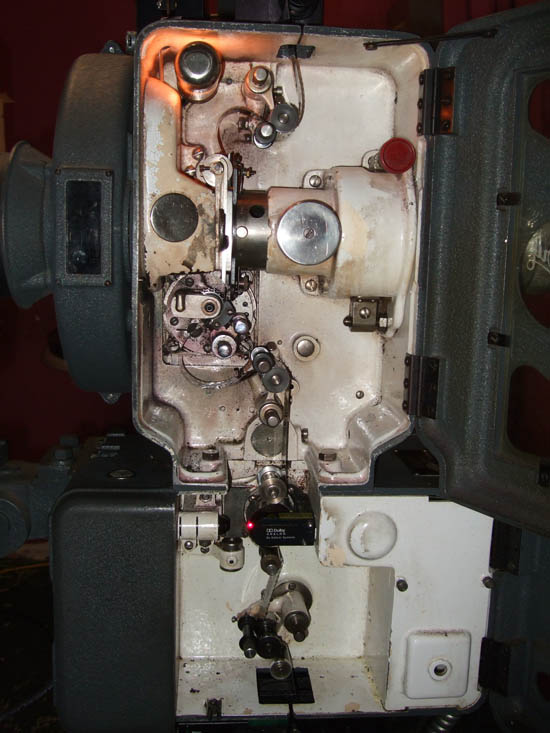
I'll check out the projector model when I get to work tonight. I couldn't see it last night when I was posting because the film was running and the (very old, falling apart) manual didn't have a model number listed. I am 95% certain it was purchased in the 80s based on a date listed in the manual. Here's a picture, if that helps in the meantime:
We slide the lens in manually, lining up a tab on the lens with a notch on the projector.
I'll try shaking the lens when I get in tonight.
If the issue were in the trap, wouldn't we also have a similar problem running flat films? The problem seems specific to scope films.
We have two screens and I've avoided bringing the other lens in because the throws are different. I figured it would be less destructive to ask here first before I go messing with anything.
Also, don't be hatin' on my lens. Its an inheritance from the previous owner. Not much I can do about that.
Oh, and thanks again to everyone for helping out!
[ 06-03-2010, 11:25 PM: Message edited by: Adam Martin ]
Posted by Mitchell Dvoskin (Member # 751) on 06-03-2010, 01:43 PM:
Your "scope" lens consists of two separate lenses screwed together. The lens toward the film gate is the "prime" lens, which is just a flat lens that enlarges the picture equally in all directions. The lens toward the screen is the anamorphic adapter that enlarges the picture twice as wide as it does high.
Separate the two lenses by unscrewing them and just put the prime into the projector. If the problem persists, then the prime is probably your problem and needs to be replaced. If the problem goes away, then you have a bad anamorphic adapter, and it needs to be replaced. You can double check the prime by placing it in another projector.
Those prism design "264" anamorphic lenses leave a lot too be desired. I have a few laying around the house that I use as paper weights. You would do better to buy a used ISCO anamorphic lens off of eBay, regardless of whether yours is defective or not.
Posted by Louis Bornwasser (Member # 3063) on 06-03-2010, 02:39 PM:
You have a Century "C" projector with a straight gate.(Could be from 1941 up to about 1960.
I would look first for a lens problem. Like the man says, seperate the front and the back scope lens to see if the back lens is OK. (Picture will be full height, but half as wide.) Louis
Posted by Jessica Lois Phipps (Member # 3161) on 06-03-2010, 06:38 PM:
The projector is actually an "SA" model - I think I may have accidentally posted a picture of our other projector, which is a "C". I never realized there was a difference between them until now, actually. From my perspective, they both seem pretty identical inside.
Thank you for the play by play on how to separate the lens. I'll try this tomorrow during down time. You guys are the best!
Posted by Jessica Lois Phipps (Member # 3161) on 06-03-2010, 09:20 PM:
Oh AND...
When I separate the lens, is there anything that I should be very careful about that isn't entirely obvious (I mean, outside of understanding the delicate nature of lens optics and surfaces)? Will I have to refocus the lens after this? I just want to make sure there aren't any "Well, of course you broke the hell out of it, you didn't do [blank]!" after this.
Posted by John Wilson (Member # 269) on 06-03-2010, 09:52 PM:
Yes. Don't drop it. ![[Wink]](wink.gif)
![[Razz]](tongue.gif)
Posted by Jessica Lois Phipps (Member # 3161) on 06-03-2010, 10:31 PM:
Duely noted.
Posted by Monte L Fullmer (Member # 2797) on 06-04-2010, 03:23 AM:
the threads on the barrels between the two lens units are of a very fine thread and the casings are made of aluminum.
Just do be careful when rescrewing the two together for it's very easy to cross-thread the two if one isn't very careful enough.
Good luck-monte
Posted by Jessica Lois Phipps (Member # 3161) on 06-04-2010, 11:13 AM:
I've just tried to remove the anamorphic adapter from the prime lens, and it won't budge. There are 2 screws on the side of the prime lens that I don't know if I need to loosen - I fear loosening them lest they keep some improtant and delicate glass peices in place.
Do I just need to wrench the dang thing apart (or have our more burly projectionist do it) or are these screws involved?
I can post pictures tomorrow, if desired, but this sounds like it should be a standard thing?
Posted by Mitchell Dvoskin (Member # 751) on 06-04-2010, 11:50 AM:
No screws are involved.
Posted by Demetris Thoupis (Member # 833) on 06-04-2010, 12:29 PM:
Post pictures. Standard procedure is rotating the prime anticlockwise and the anamorphic clockwise to separate them.
Demetris
Posted by Eric Robinson (Member # 2966) on 06-04-2010, 05:58 PM:
quote: Mitchell Dvoskin
Separate the two lenses by unscrewing them and just put the prime into the projector. If the problem persists, then the prime is probably your problem and needs to be replaced. If the problem goes away, then you have a bad anamorphic adapter
Excellent idea, I like it!
Posted by Gordon McLeod (Member # 33) on 06-04-2010, 06:19 PM:
Projection Optics made the lens under the brand name HiLux
in the 50's they were a respectable optic house but they do not perform well with most xenon lamp systems and the coating will have deteriorated that said if one has the correct correction front element the 264 was a very sharp anamorphic and more efficient than most of the other prismatic lens
But it is still a light eater
Posted by John Wilson (Member # 269) on 06-04-2010, 08:33 PM:
quote: Demetris Thoupis
Standard procedure is rotating the prime anticlockwise and the anamorphic clockwise to separate them.
Demetris
True...unless you're holding them the other way.
Posted by Louis Bornwasser (Member # 3063) on 06-04-2010, 09:40 PM:
Projection Optics is at least a 50% light loser, compared to anything new. Louis
Posted by John Wilson (Member # 269) on 06-07-2010, 06:08 PM:
Any luck yet?
Powered by Infopop Corporation
UBB.classicTM
6.3.1.2