This is topic CP-500 Format select outputs in forum Film Handlers' Forum at Film-Tech Forum ARCHIVE.
To visit this topic, use this URL:
https://ft-forum.com/ft/cgi-bin/ubb/ultimatebb.cgi?ubb=get_topic;f=1;t=010730
Posted by Marin Zorica (Member # 1716) on 12-01-2010, 04:32 PM:
I am having to install CP500 to system which allready consist of sony DCP1000 and DTS6. The thing is CP500 will use only as digital player, and DCP1000 is used as master and for optical, now I need to hook up audio from dolby to sony, which is quite simple, as I can use bypass relays on DTS, or plug in extra 8ch input card for sony. After that I need to tell sony if dolby is playing digital or not, there is "format status bit" on Cp500 automation connector, which is great, there are some 5V on pins when some formats are selected, but I can't use that since if dolby goes bad and revert to other format (SR) status bit won't change status, it keeps status there like dolby digital format is played, even if system is running SR. I would need one pin which would give me information, like 5V digital on, 0V digital off, since I don't care for rest as CP500 is only player. I could get signal from front panel led and hook up opto-coupler, but that will add some extra things to unit and I don't want as unit is not mine. So if any have idea let me know.
Posted by Steve Guttag (Member # 268) on 12-01-2010, 05:42 PM:
The CP500 gave the ability to have each format to set the status of three pins. You could use those status bits (since you set when those bits are active in the CP500 set up). Then, all you need to do is look for those status bits to determine if the CP500 is in SRD mode or not (or even if it is powered on). Look on the automation connector terminals 18, 19 and 20.
Are you sure that the 05 button has different status bits set?
-Steve
Posted by Marin Zorica (Member # 1716) on 12-01-2010, 06:04 PM:
I know what you think Steve, it's like this, depending which format is selected:
SK1 - pins 18,19,20 0V
SK2 - pin 18 5V, pins 19&20 0V
SK3 - pins 18&20 0V, pin19 5V
SK4 - pins 18&19 5V, pin 20 0V
So, when digital comes dolby switch auto from SK3 to SK4 and logic level changes like I wrote, but in case digital drops out, processor switch back to SR, so SK3, but logic level on that pins are not changed, they stay like processor still plays on dd SK4, they change only if you press SK3, so manualy selec format.
You talking about setting this status bit in setup, do you know where, maybe there is posibility to set them to switch auto off when dolby drops out.
Posted by Marin Zorica (Member # 1716) on 12-02-2010, 08:18 AM:
It happend to be that Sony knows more than dolby, check this out, from Sony tehnical note about connecting DFP3000 and CP500 to it.
With the firmware and cat. 684 card versions described above, the CP500
supplies output pulse tallies for every preset selected. When in fallback, the
CP500 does not change its format status bit but instead actually changes presets
and so sends pulse tally outputs that the DFP-D3000 can use to select presets
within it to deal appropriately with the CP500’s fallback.
This is true, because when you measure voltage between some of format select inputs and ground there is 5V, in case you select that format for a moment this voltage goes down to 2 or less, don't know much but there is a pulse for sure.
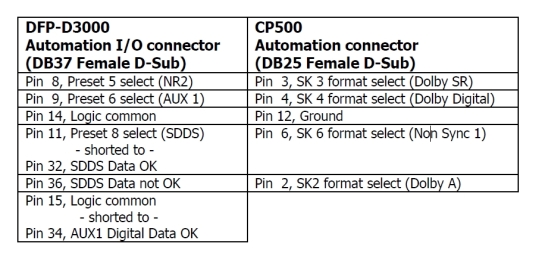
From this diagram is abviously that when dolby pulses on SK4 sony select aux input and dolby is going true there, in case dolby drops out it puleses to sony power NR2, in case sdds is reading sony pulses dolby to non sync so that dolby can't go to digital anymore while sdds is playing hehe ![[Big Grin]](biggrin.gif) . Than in case sdds drops out sony pulese dolby back to SK2, dolby A which must be set as source format for digital....
. Than in case sdds drops out sony pulese dolby back to SK2, dolby A which must be set as source format for digital....
Posted by Steve Guttag (Member # 268) on 12-02-2010, 08:49 AM:
I believe that starting with CP500 firmware 1.51 it would "echo" format changes to the automation connector. This was necessary to allow things like the SA-10 to track and not have EX mode active while in SR fallback.
-Steve
Posted by Marin Zorica (Member # 1716) on 12-02-2010, 11:12 AM:
Yea, on Sony tehnical note it's stands that firmare need to be 1.51 and up.
Powered by Infopop Corporation
UBB.classicTM
6.3.1.2