This is topic Dolby Digital/Surround Sound Problems in forum Film Handlers' Forum at Film-Tech Forum ARCHIVE.
To visit this topic, use this URL:
https://ft-forum.com/ft/cgi-bin/ubb/ultimatebb.cgi?ubb=get_topic;f=1;t=011010
Posted by Justin Schroepfer (Member # 6004) on 08-29-2011, 05:50 PM:
I don't know what the problem is, but here are the symptoms:
Recently, while playing a 35mm print, the sound has been switching back and forth from digital to surround, when it should just be staying on digital.
This has happened on more than one print, but also seems to be sporadic: Sometimes the sound would be fine with a print, then later it wouldn't. However once it does happen, it doesn't go away for a while, but eventually will. Then it happens again...
I've tried cleaning the sound head thoroughly and the light bulb in it was changed only a month ago.
I need help diagnosing this problem so it can be fixed. If you need anymore info just ask and I will respond as quickly as possible.
Thank you.
Posted by Tom Wienholt (Member # 1510) on 08-29-2011, 06:16 PM:
Have you noticed high error rates?
Posted by John Wilson (Member # 269) on 08-29-2011, 07:03 PM:
Equipment type and model please. A photo may assist.
Posted by Justin Schroepfer (Member # 6004) on 08-29-2011, 07:48 PM:
Soundhead: Dolby Digital Cat. No. 700
Processor: Dolby CP500
Projector: Simplex 35/70
Posted by John Wilson (Member # 269) on 08-29-2011, 08:04 PM:
Does the film bounce about on its way to the reader?
What error rate is the film reading in the 500? Does it fault?
Has anything in this booth changed that could correlate with the arrival of the problem?
Posted by Justin Schroepfer (Member # 6004) on 08-29-2011, 08:54 PM:
I found this in the CP500 manual. It describes the symptom perfectly...
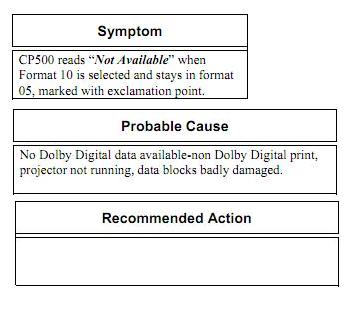
...but it says the problem would be caused by a print without dolby digital, but the print we are using now played in dolby digital in the past.
It also suggests that maybe the data blocks in between sprocket holes could be damaged, but the print is in very good condition so I doubt that would be the problem.
Posted by Manny Knowles (Member # 1171) on 08-29-2011, 10:18 PM:
do you have another projector that you could use -- with this print -- to see if the problem goes away? if the problem goes away, then the fault is not with the print, but instead it would lie somewhere in that particular SRD system.
Alternatively, do you have other SRD material you could try with this projector, to see if you get the analog reversion continuing to happen?
The data blocks may look good to the human eye, but there may be enough going on there to confuse your system. Is there a predictable, repeatable pattern with the reversions to analog? does it happen in the same portions of the show? if so, that would point to damage to the SRD data blocks between perforations. in that case, there may be something in your film path that is scratching that area of the print.
I've also seen this with improper threading of the reader -- lack (or loss) of tension. You are new to this website...are you also new to projection?
Posted by Tony Bandiera Jr (Member # 2365) on 08-30-2011, 12:45 AM:
Change the bulb in the CAT 700 soundhead, using the one from Dolby, NOT any other type/brand. Make sure it is seated properly in the holder.
Check the condition of the electrical connections to the CAT 700 power supply and to the bulb..if any are loose/burned replace.
Check the condition of the lightpipe with the CAT 700 lamp powered up..if it is yellowed or has dark spots, replace it.
Gently clean the CAT 700 reader lens with a clean cotton swab.
Make sure the reader is being threaded properly...especially if you have new booth staff that started work recently.
Posted by David Stone (Member # 4846) on 08-30-2011, 02:59 AM:
Hi Justin,
Do you have a SRD tag, trailer etc that you have run recently that did not fault ? If you do I would splice together a 8-10 foot loop that you can run thru the reader and projector. Run it for say 10 mins ocnstantly checking the error rate. Also I found using filmguard on a print to actually decrease error rates by cleaning the srd blocks on the print.
Cheers,
David.
Posted by Justin Schroepfer (Member # 6004) on 08-31-2011, 05:19 PM:
Thanks for all the replies. I'll start looking at the things you have all suggested soon.
We did move the problem print to another projector and will be played tonight, so if I have similar problems with this other (newer) projector then the print itself could be at fault.
As for my projection experience, I'm not completely new but I'm not a veteran. At this theatre, I probably have the most projection experience, or close to.
Posted by Richard Hamilton (Member # 321) on 09-01-2011, 08:16 AM:
quote: Justin Schroepfer
the light bulb in it was changed only a month ago
Was it properly aligned and what are the error readings? Sounds like this could be the culprit.
Rick
Posted by Monte L Fullmer (Member # 2797) on 09-01-2011, 11:58 AM:
I've seen light pipes get knocked out of alignment when one is lacing that reader..
Posted by Justin Schroepfer (Member # 6004) on 09-21-2011, 05:31 PM:
UPDATE:
The problem still exists. But, I have noticed now that the 'tension arm rollers' on the Cat. 700 sound head are wobbling and bouncing up and down much more than I think they should be.
Could that cause the problem of not picking up the digital audio track and switching back and forth between surround and digital?
Also, how could this problem be fixed?
Thank you all, once again, for helping me out with this.
Posted by Ron Lacheur (Member # 1126) on 09-21-2011, 09:07 PM:
Most likely the airpot inside the 700 has been damaged. Call your tech.
Posted by Carl Martin (Member # 1146) on 09-22-2011, 02:43 AM:
what kind of platter do you have? does the problem correlate with what deck you're feeding from?
Posted by Monte L Fullmer (Member # 2797) on 09-22-2011, 01:23 PM:
Yep, I agree with the airpot being gone - the arm that attaches to that piston in that glass cylinder is either broken, or has come unscrewed from the piston.
Posted by Louis Bornwasser (Member # 3063) on 09-22-2011, 09:26 PM:
Good luck with that one. Dolby normally won't sell that part and when they do, the threads are not the same. There is a real liklihood of breaking the new one too. For those of us who have done (hundreds?) of these adjustment is easy.
The real approach is to make the system impervious to future breakage. (It is possible.) Louis
Posted by Mark Gulbrandsen (Member # 72) on 09-23-2011, 08:53 AM:
quote: Tony Bandiera Jr
Check the condition of the lightpipe with the CAT 700 lamp powered up..if it is yellowed or has dark spots, replace it.
The light pipe has long been NLA.
Mark
Posted by Louis Bornwasser (Member # 3063) on 09-23-2011, 10:16 PM:
We have converted the 700s to the 701s.The bracket fits perfectly where the light pipe was, the LED works exactly right. You then switch to high gain on the camera and power the LED and you are done. I have used the Kelmar LED supply from one of the old Gray boxes. It is smaller and more reliable. I have never had a failure.
Youhave now creatd a 701, with no light pipe. Louis
Posted by Walter Rabey (Member # 5968) on 09-24-2011, 12:36 AM:
I have had a tension arm wear out before, and cause exactly this to happen. Our CP500 would get stuck in the wrong mode and I would have to reset it to get it back into the proper mode. Replacing the tension mechanism solved the issue.
Posted by Frank Angel (Member # 248) on 09-30-2011, 11:38 PM:
Justin, when you say that the system is switching back and forth between digital and "surround," what exactly do you mean? I am assuming you mean it is switching between digital and analog, but I am also thinking that you are saying it's switching to "surround" because that's what you hear in your auditorium when the digital fails. If that is the case, then your analog system is badly out of alignement.
Now I know this is not going to help you with your digital fail issue, but this also may be a good time to address the alignment of the analog A-chain, if indeed when you revert to analog you hear a lot more out of the surrounds. It is possible to get your analog playback to sound so close to digital so that even if the digital fails and reverts to analog, i.e., to your backup system, most patrons will not even know it occurred. In a case such as yours where you are having trouble with digital, a well aligned and reliable analog system will save your butt, BUT you analog has to be right on the money. If when you revert to analog all you hear is surrounds, then your analog is seriously out of wack.
Powered by Infopop Corporation
UBB.classicTM
6.3.1.2