This is topic How to bridge a 2 channel amp for sub ? in forum Film Handlers' Forum at Film-Tech Forum ARCHIVE.
To visit this topic, use this URL:
https://ft-forum.com/ft/cgi-bin/ubb/ultimatebb.cgi?ubb=get_topic;f=1;t=011143
Posted by Paul Vollmers (Member # 927) on 01-30-2012, 07:46 PM:
I have a Smart TA425 2channel amp that I want to Bridge for a subwoofer.
The info page in the paper manual says it is 250 watts per channel at 8 ohms, and 650 watts at bridged mono at 8 ohms.
The manual does not explain how this is done.
How do I wire this to power a subwoofer?
Posted by Markus Ito (Member # 6207) on 01-30-2012, 11:37 PM:
There is usually a set of dip switches on the back of the amp that set bridged mono mode. What this does is use the two amplifiers inside the amp to amplify the signal in different directions; one goes negative, the other goes positive. Channel 1 does the positive side, and channel 2 does the negative side (depends on the amp). Once you have the amp set in bridged mono, you will need to connect the positive and negative speaker wires to the two positive(red) posts on the rear of the amp. They are usually marked indicating which one will become positive and negative when operating in bridged mono. Hope that helps.
Markus
Posted by Monte L Fullmer (Member # 2797) on 01-31-2012, 12:31 AM:
Is this like a "push-pull" circuit then when you bridge the amps like this?
Posted by Sean Weitzel (Member # 244) on 01-31-2012, 12:34 AM:
Echoing what Markus said. In car audio amplifiers, there's no need for dip switches or jumpers. Just connect the positive lead to positive channel 1 and the negative lead to negative channel 2.
Posted by Ian Parfrey (Member # 5122) on 01-31-2012, 03:10 AM:
Page 4 - 2nd bottom paragraph.
"Bridged mono output is easily achieved feeding the two inputs of the dual channel amplifier with a balanced audio source. Both of the front panel gain controls are used to set the level. Make sure both of the controls are in approximately the same position."
![[thumbsup]](graemlins/thumbsup.gif)
Posted by Paul Vollmers (Member # 927) on 01-31-2012, 06:16 AM:
Okay, here's where I'm confused....
From the Dolby CP65 SW out ...two wires normally go to the channel one, red (+) and one black (-) to the input side of the Amp. two wires one red (+) from the output and one Black (-)from the out put to the subwoofer + and - red and black etc.
So what is changed from that wiring pattern to Bridge the amp?
Two wires input...two wires output to subwoofer??
Posted by Gordon McLeod (Member # 33) on 01-31-2012, 07:52 AM:
You will need to get a small balancing transformer and connect the unbalanced output of the cp65 sub to the txmr input and the + output to the hot input of the left input and the - output of the txmr to the hot input of the left input and the speaker load is across the two hot terminials

Posted by Paul Vollmers (Member # 927) on 01-31-2012, 01:55 PM:
Gordon,
Thank you for your reply.
What is a txmr , and where would I find such a thing??
Posted by Gordon McLeod (Member # 33) on 01-31-2012, 02:10 PM:
txmr is short for transformer
Jensen is one of the best makes you probably want a 10k to 10k one
mouser and newark will sell other broadcast grade ones Hammond mfg also make them
Posted by Paul Vollmers (Member # 927) on 01-31-2012, 05:25 PM:
Man.........I'm still in the dark on this transformer......have no clue what this is about, and how it works.
Posted by Gordon McLeod (Member # 33) on 01-31-2012, 07:42 PM:
The output of the 65 is unbalanced ie a hot signal (+) and earth
a balanced signal is a + and a - signal not referenced to earth
to bridge the amp effectively one needs to send a + going signal into on channel and a negative going signal into the other so that the signal measured between the two + speaker terminals will be double that of just one channel driven effectively a larger voltage swing
So one need to drive that arrangement with a differential signal one way is a transformer because as you notice neither lead of the output side is connected to ground it is floating
It also is important that on the speaker and booth monitor that there is no connection to ground on the output lines
The other way is to use a inverting op amp
Posted by David Buckley (Member # 2600) on 02-01-2012, 04:21 PM:
Heres what should be a workable solution.
It uses a RDL ST-DA3 Line Level Distribution Amplifier 1 1x3. Avaliable from Amazon and myriad other places, do a google for it.
You'll need to get a 12vdc wall wart power supply for it.
Connect it up like this:
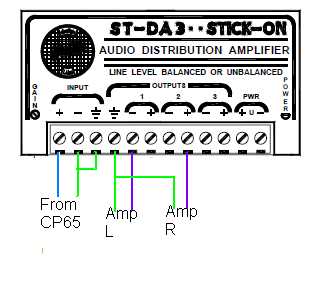
Greens are shields of cables. Note one hot of each amplifier input goes to a +, and the other one to a -.
The transformer suggestion above is a reasonable solution, but many small transformers will not handle line level at 20Hz without saturating, so I'd prefer something electronic. This device claims flat from 10Hz to 100KHz, so even if you're running Bag Ends down to 7Hz there should be much LF drop, and no loss or distortion at all down to 10Hz.
Disclaimer: this should work, but my advice is worth (and liable to the tune of) exactly the price paid.
Posted by Gordon McLeod (Member # 33) on 02-01-2012, 04:58 PM:
http://www.rdlnet.com/product.php?page=159
Radio Design Labs - Bridging Input Transformer
[How to buy this product]
[ECO PASSIVE – The RDL product is passive with no provision to connect an external power source. ]
Used to add transformer isolation to any line‑level RDL product input
Frequency response: 20 Hz to 20 kHz (+/‑ 0.5 dB)
THD: < 0.05% (1 kHz)
10 kΩ input bridges any audio line
Balanced input and output
Connections on Detachable Terminal Blocks
Posted by Rick Raskin (Member # 1561) on 02-01-2012, 05:34 PM:
quote: Monte L Fullmer
Is this like a "push-pull" circuit then when you bridge the amps like this?
Strictly speaking, not really. To be brief, push pull amps typically are biased Class B (or AB) so that each half amplifies either the positive or negative portion of the sine wave input signal. The amplified outputs are usually combined at the output transformer.
Posted by Dave Macaulay (Member # 813) on 02-02-2012, 08:12 AM:
Not really "push-pull". Transistor stereo amps (ie no output transformer) have one of the output terminals grounded and the other one's voltage swings between some positive voltage and some negative voltage. The voltage depends on the amplifier's output power (as does the current capacity of the output semiconductors).
For "bridge mono" two amp channels are fed the exact same signal, but one is inverted. One channel's not-grounded output terminal will be at positive-to-ground voltage and the other channel will be at the same voltage but negative-to-ground. The speaker is connected from one channel output "live" wire to the other channel channel output "live" wire, the grounded terminals are not used. This effectively doubles the output voltage and quadruples the output power. That rarely actually happens, the power supplies and output stages in most amplifiers will not put out 4X the single channel power in bridge mono, but it's definitely more than a single channel. There are output impedance limits as well: an amp that can with a 2 ohm minimum load impedance in single channel mode will have a 4 ohm minimum in bridge mono for example.
Posted by Paul Vollmers (Member # 927) on 02-02-2012, 09:13 AM:
You high tech guys..........I need this in leigh mans terms, I'm not an electric wiz.......I did a search on the net and got several ways to do this bridging to mono thing, but it is just plain confusing to me...how can you have two + wires going to a sub speaker, what happens to the - post / wire?
Posted by Robert Minichino (Member # 3495) on 02-02-2012, 09:19 AM:
Push-pull just means there are two active devices on the non-grounded output line, one connected to each voltage rail. A push-pull output stage can be class A, B, or C (or even D, but this is rare). All class B and C amplifiers are push-pull, and most class A amplifiers are as well.
A bridged output (also called bridge-tied load or BTL) uses two active outputs to double the voltage swing for the same power supply voltage as compared to a single-ended output, which usually grounds the - terminal.
Posted by Louis Bornwasser (Member # 3063) on 02-02-2012, 10:10 AM:
I am not intimately familiar with thie Smart amp, certainly not in a subwoofer application.
Wouldn't any decent amplifier be set up for MONO or MONO BRIDGE operation, just by pushing buttons or dip switches. Like a QSC or Ashly for example?
Disregard the negative and connect your sub to the 2 pos. terminals, see above.
Louis
Posted by Gordon McLeod (Member # 33) on 02-02-2012, 10:25 AM:
The original SMART amps did not have bridgeing switchs or push buttons probably that a sub app was the main time that was called for and all of their procesors had a balanced sub output
Posted by Paul Vollmers (Member # 927) on 02-02-2012, 05:19 PM:
Okay Gordon, I purchased the RDL TX10B Part needed to Bridge the Smart TA425......So I hope you can walk me through the install when it arrives.....I'll let you know when...cost about $38.74 shipped.
Thanks for your advice...
Posted by Monte L Fullmer (Member # 2797) on 02-02-2012, 06:41 PM:
..and thx for the info on "Push/Pull" circuitry. I had an idea what it was, but not for sure..why I asked the question. - Monte
Posted by Oscar Neundorfer (Member # 458) on 02-03-2012, 11:57 AM:
Gordon said this: "It also is important that on the speaker and booth monitor that there is no connection to ground on the output lines"
I will be a little stronger about this. If you intend to use the booth monitor for the sub channel monitoring function, DO NOT do it unless you are 100% sure your monitor has a truly balanced input, is capable of accepting the level generated by the amplifier, and you are 100% sure you know how to properly make the connection. You may end up blowing the monitor, the amp, or both.
Posted by Paul Vollmers (Member # 927) on 02-03-2012, 07:27 PM:
Oscar,
Thanks for the addional info on using a monitor.
I only have it wired for the main speakers.
Very good to know....
Stress level going up another notch..!
Posted by Tony Bandiera Jr (Member # 2365) on 02-04-2012, 12:06 PM:
Paul. relax man, it's not that difficult.
And I never connect the Sub channel to a booth monitor..think about it for a minute..do you really think a 3"-4" speaker driven by a 5-15 watt amp is even gonna be able to reproduce a sub's signal with enough volume or clarity to tell if there is a problem? ![[Big Grin]](biggrin.gif)
Even the QSC DCM series (excellent monitors in many respects) cut out or puke when you try to monitor the sub channel.
Posted by Monte L Fullmer (Member # 2797) on 02-04-2012, 04:27 PM:
...all you really need is the three main ones of L/C/R to monitor....
True, why would one want to monitor sub channel since that just rumbles and grunts to listen to.
Posted by Jim Cassedy (Member # 4115) on 02-04-2012, 06:28 PM:
OOPS! I hit the wrong button!! This needs to be moved to a NEW TOPIC!
Sorry!
Topic is: "DTS-6D/CP45 Random Mode Switching"
I have twice received reports from one auditorum which is
using a DTS-6D & CP45 that the "45" has gone into "system
insanity", randomly stepping through all the format modes
in the middle of a movie. Re-booting the 6D brings everything
back to normal. This has apparantly happened twice in the past
month, but it's never happened when I've been there, and I am
unable to duplicate the problem.
Also, I'm getting this info 2nd hand from some booth-monkeys who
have limited technical skills. But I'm unaware of anything even
a REAL monkey could do that would cause this to happen.
The "6D" is running current software and was upgraded to the
newer drives about 2 years ago, and I've never had any problems
with it.
All interfacting between the DTS & CP-45 is through a commercial
break-out board using hard-wired connectors, so there's little
chance a wire is touching something somewhere in the back of
the unit.(But yes, I've checked anyway!)
The automation is only capable of pulsing the CP-45 into
either Format 4 or non-sync. So I don't beleive it's possible
for it to cause the CP-45 to start switching between all modes.
If the reports I've gotten are correct, it's happened at least
twice since December.
>Has anyone else heard of or experienced this problem before?<
Also, I know the DTS test disk has a track on it that can make
the CP-45 step through all the different format modes. I've run
that test & all is working OK.
But I'm curious- - does anyonee know how the DTS test track makes
the CP-45 do the mode stepping? Is it done through "tones" on
the disk?
Or is there some machine code on the disk that the DTS
recognizes and then outpulses a format change to the processor?
Just curious!
Posted by Monte L Fullmer (Member # 2797) on 02-04-2012, 11:50 PM:
Simple fix for Jim: cut the body of the new message, and paste this new message in a new window and type your topic title in in the New Topic bar.
Then, in this prior message window, simply type "Deleted" in its place and save.
Powered by Infopop Corporation
UBB.classicTM
6.3.1.2