This is topic Help with scratches in forum Film Handlers' Forum at Film-Tech Forum ARCHIVE.
To visit this topic, use this URL:
https://ft-forum.com/ft/cgi-bin/ubb/ultimatebb.cgi?ubb=get_topic;f=1;t=011320
Posted by Kirk Futrell (Member # 5006) on 09-17-2012, 05:52 PM:
I need some help diagnosing a very frustrating scratch that I am at a lost to find the cause for.
Equipment we are using:
Century C model, Cat-701 Dolby Digital penthouse sound, Kelmar or Christie film cleaner (does it with either), Potts A-3 platter ( with brain wrap fail-safe), Xetron fail-safe on projector, Simplex sound head with Kelmar digital and analog combo reader (installed before dolby penthouse)
First off I have serious doubts its due to projectionist error as the projectionists are all experienced and work on nearly the same equipment in another booth where the scratch has never occurred. Also, this scratch had never occurred in this auditorium before July. The scratch takes about a week of plays to begin to be barely noticeable on screen (If you look directly at the film) When you see it on screen it looks like emulsion, vertical, moving, dots. One or two dots every one or two seconds. Mainly visible during dark scenes. After about 1.5 months of playing it the film damage can be seen in the attached images. On screen it looks like a bunch of hatch marks many many vertical dots plus sort of hook marks. It sort of looks like the way the way the inbetween parts of the sprokets and the film guide rails, damage the film between the sprocket holes, except extended about an 1/8 of the way into the frame on the inboard edge.
Things I have done to diagnose it:
1)Looked very carefully at EVERY roller many many times. The only burrs I detect are from the poor design of the black plastic platter rollers which are formed in two halves and then put together over the bearing races, but leaves two raised ridges where the film contacts in some places. But these are minor and appear to be the same on the equipment in the other hall. Found a knicked roller on the penthouse reader that was exactly in place with where the scratch was occuring, assumed this was the cause. Very lightly sanded it down, very smooth. It still does it. Cuss and swear loudly.
2)Rechecked keeper rollers to have 2 film thicknesses between roller and sprockets.
3) Ran a test loop of brand new film trailer (about a 30 second loop) the loop ran about 50 times without the scratch showing up. I ran the loop from the topmost projector roller down through the film cleaner, projector and all connected apparati to the bottom most roller that goes to the platter and through the platter tree brain wrap detector and back to the the projector. No noticeable scratches. Its in the platter somewhere right?
4) Built up a trailer ring with 2 brand new trailers ran it from the top platter through the projector to middle platter, Didn't notice scratches. Ran it from middle platter to top platter, noticed scratches during playback. Cussed alot. Have swapped brains from old potts platter and back does not seem to stop it. Skipped the Dolby penthouse reader both times.
Troubleshooting 101 What's changed?
1) Installed used Cat-701 reader installed right before it started happening (well there's your problem, right?) That is why I ran a loop through 50 times to check it, seems to be fine. Also on my platter trailer test, I skipped it to be sure. Projectionists are used to threading one in the other hall for about 3 months prior.
2) Installed used Potts A-3 platters a few months prior. Not sure we played anything long enough to really start noticing it.
3)Probably a few other little things I won't remember until somebody guesses something that reminds me.
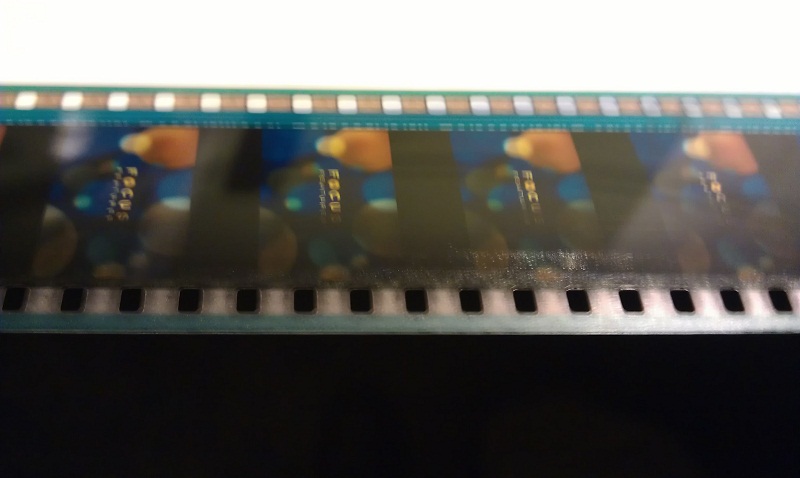
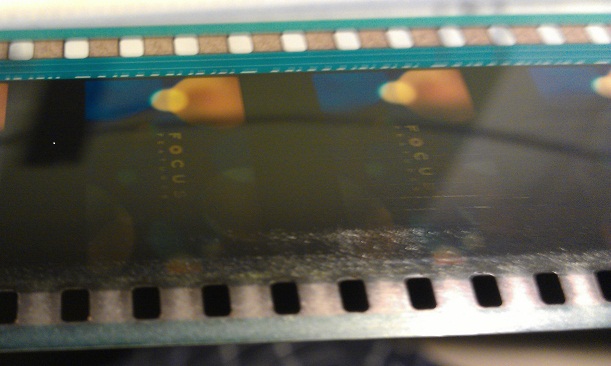
What appear to be vertical scratches toward the center are not, they are (onscreen invisible) lines of film-guard.
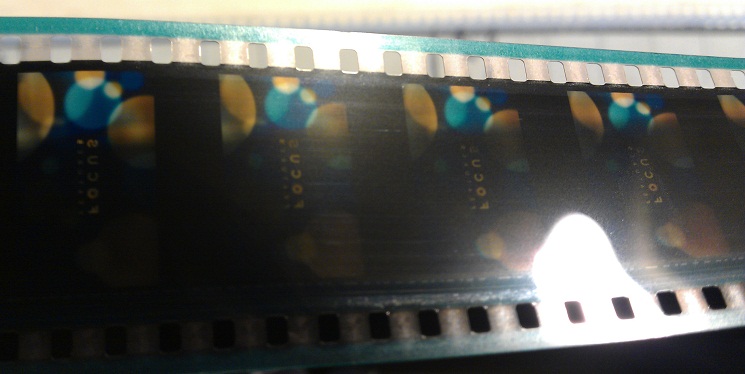
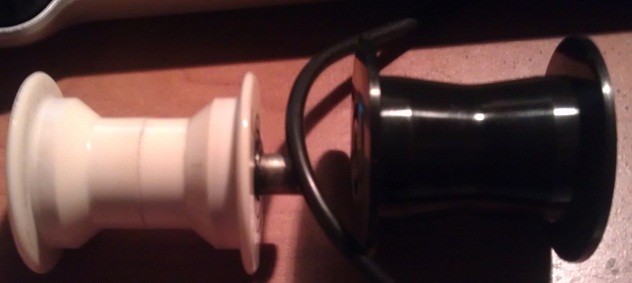
Also does anyone know where I can get the platter rollers that either don't have seams or mate in the middle out of harm's way? Like the white ones in the pic below
Posted by Tony Bandiera Jr (Member # 2365) on 09-17-2012, 08:59 PM:
quote: Kirk Futrell
Installed used Potts A-3 platters a few months prior. Not sure we played anything long enough to really start noticing it.
I guarantee you that the problem is being caused by one of your operators misthreading the take-up assembly and looping the film over the pop-out pin that holds the take-up in place during threading. A serious flaw in the design and very easy to do.
I recognize the damage because many years ago running a Potts platter I did it, luckily I caught it during the trailers and unhooked it before it got too far. The damage was exactly like your pic.
As for the rollers, don't lose sleep over them. Unless your film has serious curl the black rollers are fine.
Posted by Louis Bornwasser (Member # 3063) on 09-18-2012, 08:35 AM:
It is possible to add a roller just below and overlapping the offending/scratching pushbutton on the Potts. This way damage won't occur if you misthread.
I've only had to do this twice. Louis
Posted by Kirk Futrell (Member # 5006) on 09-18-2012, 08:35 PM:
quote: Tony Bandiera Jr
I guarantee you that the problem is being caused by one of your operators misthreading the take-up assembly and looping the film over the pop-out pin that holds the take-up in place during threading. A serious flaw in the design and very easy to do.
I agree that was one of the things I was most suspicious of. The only thing that made me think that is not the case is that we have the exact same equipment in the other hall and they haven't been scratching prints there. But I will have a meeting with the operators and remind them to be very careful about it. The other thing is that because I it happened on my test trailer pack, that means, I would have had to thread over that thing too, and I was being pretty cautious at the time. I will make up a fresh trailer pack tomorrow and test out the theory.
THANKS!
Posted by Victor Liorentas (Member # 5272) on 09-18-2012, 09:00 PM:
If your cat 701 reader has a small roller at the top front which is the first roller the film touches. I have seen this roller let the film pop out partly or completely! Dolby made wide 70mm like rollers to prevent it. It will not happen all the time but a splice going through or a gust of wind or looking at it the wrong way...BAM! Damage depends on how far out it moves. Oopps just read you skipped Dolby penthouse on your tests...
Posted by Kirk Futrell (Member # 5006) on 09-18-2012, 09:27 PM:
Thanks, Victor. I skipped the reader partially, I used the roller you described and a couple others on the reader to route the film down and around it to the projector, so I did actually use that roller. Also, just remembered, that roller is not present in the hall that is NOT scratching prints... I will check this out tomorrow too. Sounds like another good lead.
Posted by Manny Knowles (Member # 1171) on 09-20-2012, 10:36 AM:
If it only happened once, then I'd suspect that it was operator error, but because it's constantly adding new scratches with each use -- on one screen, where all screens are identically equipped -- then it starts to look like the equipment.
I. THE VALUE OF CLEANING
Any time I buy something used, I clean the hell out of it. That's a great way to become intimately familiar with it. That's how you uncover "hidden" problems.
This is true in relationships too. ![[Big Grin]](biggrin.gif)
I'd start with that -- Clean the entire film path in the projector, and clean each and every one of those platter rollers. Clear any prints that are being stored on the platters and wipe down the decks. (You'll need all decks empty for full platter testing anyway.)
And, don't just clean -- study each part as you clean it. Ask yourself, "could it be this?"
II. RULE OUT THE PROJECTOR
An unscratched test loop through the projector helps to rule out the projector. Test with the Dolby reader, since that is part of the projector.
If that first test loop gets scratched then try again with a fresh loop -- this time without threading the Dolby reader.
If the scratching stops, then the Dolby reader is the culprit.
Once you can rule out the projector (and the Dolby reader) then it's time to look at the platters.
III. RULE OUT PLATTER COMPONENTS
Even if you find trouble in the projector, go ahead and check the platter system anyway!
First, make sure that all rollers spin freely. This includes little "helper" rollers that are designed to keep film from slipping off.
Use an unscratched trailer pack, and take a close look at how the film is transported through the system. If you have three platters, then you'll have to do three separate tests.
Examine the movement of the film through the payout heads, all of the rollers, and also pay attention to how the film is being rewound to each of those platter decks.
FWIW, I suspect a rewind platter. From the image, it appears that something is rubbing against one edge of the print -- could it be due to a misaligned guide roller to a rewind platter? If you rewind with the "soundtrack up" like most people, then it looks like the scuffed edge is the one that makes contact with the platter. There could be some slight scraping going on there. If only one of them is out of alignment, it could explain why the problem takes a while to accumulate - the problem would only get worse after the offending platter was used to rewind.
Posted by Monte L Fullmer (Member # 2797) on 09-23-2012, 02:24 PM:
Looks like a pressure scratch ...Something is pressing against it to give it that textured look. Something that is inboard is pressing on the film causing this.
Posted by Kirk Futrell (Member # 5006) on 10-26-2012, 02:37 PM:
After much searching, I decided to change out every roller on the platter that touches the emulsion side of the film with our threading method. I changed out six rollers, that hadn't already been changed out. The new rollers fixed the problem! I put the old rollers in an old film guard film pads box labeled " suspect rollers". There they lay looking like a police line up. After examining all of the rollers carefully in the suspect rollers box ,I have determined that I could not tell you which one was scratching the film if my life depended on it. None of them show any signs that they would cause that scratch. Oh well, problem solved. Thank you all for your help!
Posted by Manny Knowles (Member # 1171) on 10-26-2012, 11:34 PM:
Thanks for the followup.
Powered by Infopop Corporation
UBB.classicTM
6.3.1.2