This is topic 35mm Projector Realignment in forum Film Handlers' Forum at Film-Tech Forum ARCHIVE.
To visit this topic, use this URL:
https://ft-forum.com/ft/cgi-bin/ubb/ultimatebb.cgi?ubb=get_topic;f=1;t=011522
Posted by Dan Crittenden (Member # 5537) on 09-29-2013, 12:05 AM:
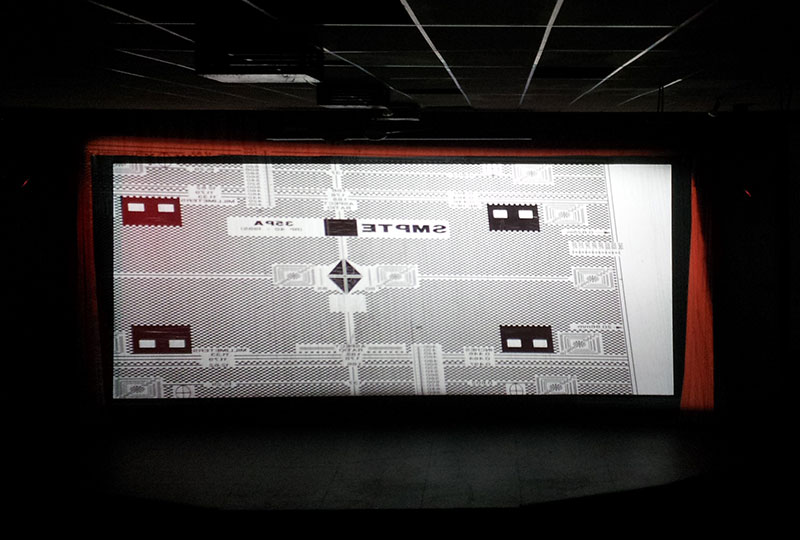
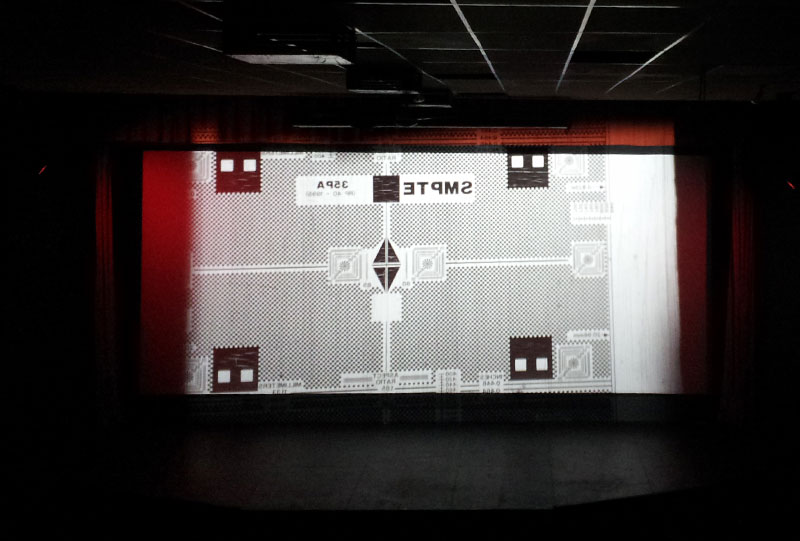
So my theatre recently made the switch to Digital Cinema. We held on to our 35mm systems because we still occasionally run archive prints (changeover shows). However, during the digital install, they had to move one projector over to the next port window. It's now about 5 feet off-centre. The left projector remained untouched, and is also about 5 feet off-centre. Now the right one looks pretty wonky (I've attached a couple photos to give you an idea). I know I'll need a totally new set of aperture plates, but what else is involved? None of us have done this kind of alignment/install before, and we could really use any pointers or tips you guys could offer. Thanks!
Posted by Manny Knowles (Member # 1171) on 09-29-2013, 01:39 AM:
This is gonna make me seem like an insensitive prick but...
Oh. Never mind.
Posted by Jim Henk (Member # 3628) on 09-29-2013, 04:03 AM:
Um... is the image supposed to be backwards? Is there a chance that the loop is threaded with the soundtrack side facing *in*?
Posted by Dan Crittenden (Member # 5537) on 09-29-2013, 04:33 AM:
Yes, yes, I know. The loop is in there backwards. Not by me, I was just emailed those images. ![[thumbsup]](graemlins/thumbsup.gif) I would have taken better ones, but I didn't want to fire up everything just for a photo. And for demonstration purposes OTHER than image centering, I thought it would serve fine.
I would have taken better ones, but I didn't want to fire up everything just for a photo. And for demonstration purposes OTHER than image centering, I thought it would serve fine.
But more on the topic of my original question, what's the procedure for a realignment like I described?
If you really think it would help my description of the situation make more sense, I can take some new ones myself haha.
Posted by Steve Moore (Member # 4753) on 09-29-2013, 05:28 AM:
Get the loop in the correct way around as this will give a better idea (the image will appear even more out of line due to the sound track edge of the film. Once the loop is the correct way, you will need to get the image as central as possible (depending on the projector model might involve pushing or kicking the base of the machine left and right). Then adjust hight (might be feet adjustment or an angle adjustment on the base) From there you will see how bad the image actually is. You might need new plates possibly (and file out) you might not. Once central, try run a bit of old trailer and see how it actually looks with film on. If only for an occasional screening it might be ok once central.
Posted by Louis Bornwasser (Member # 3063) on 09-29-2013, 06:19 AM:
You might also look at the existing other projector. Using the FLATlens, level the projector after putting the center line in the middle of the screen, left to right. I fold a strip of paper over the lower masking for this.
Part of your problem might be the twist in the scope lens. You won't know until after the FLAT is straight and centered. Louis
Posted by Richard Hamilton (Member # 321) on 09-29-2013, 06:45 AM:
Are those the original plates that were in it before it was moved? Please post pictures of the left projector images also.
Manny....Never mind ![[beer]](graemlins/beer.gif)
Posted by Scott Norwood (Member # 30) on 09-29-2013, 07:00 AM:
Brad posted a set of instructions for doing this a while back.
Basically, though, use Louis' method: put in your shortest spherical lens and center level the projector with RP40 (and the aperture plate removed). If the keystoning is bad or the masking is not perfectly square, I prefer to level the projector with respect to the bottom masking (so that subtitles look straight) rather than the top, as the alignment may be different with respect to the top and bottom masking. If you have a lateral adjustment for the lens holder (e.g. in a Century SA) adjust this so that the projector is tilted as little as possible (i.e. kept as close as possible to being perpendicular to the screen) when making the initial alignment, allowing enough adjustment to re-center the lens for silent films if needed.
Then, go through each lens and make sure that all formats are centered (you may have to rotate the lens collars or use tape on the lens to adjust it slightly within the collar to keep the image centered. Sent the lens collar rings and adjust the tilt of the scope lens.
Then, align the lamphouse.
Finally, cut new aperture plates.
Posted by Mark Gulbrandsen (Member # 72) on 09-29-2013, 02:41 PM:
quote: Scott Norwood
Finally, cut new aperture plates.
If you can get them.... Some are already NLA!
Posted by Gordon McLeod (Member # 33) on 09-29-2013, 05:27 PM:
Well the left projector #1 is 2 feet of centre line the right is over 6 feet on s fairly short throw
FYI there was a issue with the booth wall where ports could be cut
there are keystone correcting lens adapters but they would represent a large light loss and those old xetrons would be starved for light
Posted by Dan Crittenden (Member # 5537) on 09-29-2013, 05:55 PM:
Thanks for the replies, we'll give that a shot and see what we can do.
The projectors are Kinoton FP30s, to answer the question.
Gordon, do you know where we can source a set of new aperture plates?
Posted by Gordon McLeod (Member # 33) on 09-30-2013, 09:24 PM:
contact tom at independent theatre supply
tkhutch@gmail.com
Posted by Dan Crittenden (Member # 5537) on 10-01-2013, 03:38 AM:
Well, thanks to all your help, we've got it looking pretty good now. It's not perfect, but it will work for our purposes (though it does look even better than the left projector now). Because of the keystoning, we found that the image lined up better with our masking if the image was slightly off-centre. We also didn't really have to do much of anything to our aperture plates after all; there's a little bit more masking spill on a couple of them now, but I think it's probably acceptable for occasional use.
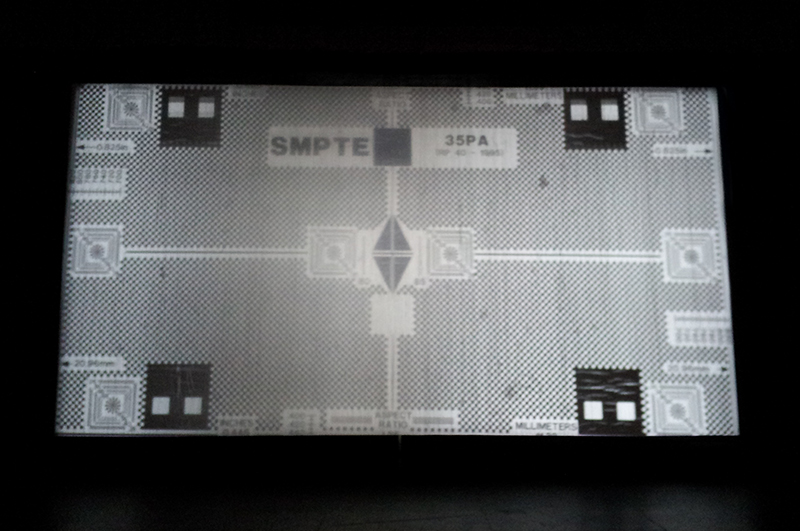
This is just the flat lens, but all the others line up just as well.
Thanks again! ![[Big Grin]](biggrin.gif)
Posted by Steve Moore (Member # 4753) on 10-01-2013, 07:41 AM:
That looks much more acceptable
Powered by Infopop Corporation
UBB.classicTM
6.3.1.2