This is topic Various Dolby Digital setup questions in forum Film Handlers' Forum at Film-Tech Forum ARCHIVE.
To visit this topic, use this URL:
https://ft-forum.com/ft/cgi-bin/ubb/ultimatebb.cgi?ubb=get_topic;f=1;t=011635
Posted by David E. Nedrow (Member # 4981) on 04-03-2014, 12:50 AM:
Since there are no DTS discs for Captain America, I installed a BACP DSTR20 reader and have it all connected to the CP650. Green lights and sound.
Since I've never worked with DD before, I have some questions.
1) Audio Offset - If the audio is coming before the matching mouth movements, do I increase or decrease the offset? It's off a tiny bit, but I'm not sure which way to move the offset. Also, is there an easy way to figure out the offset "statically" with just a length of film. I thought maybe I could thread it up, place a mark at the optical head, and another at the digital head, measure the distance between them in feet, multiply by 16 and then by 4 to get the offset. This seems to have gotten me close-ish.
2) Digital Level - The digital signal level seams ridiculously high. Running trailers (not the best source material for level setting) basically keeps the channel levels pegged at the top. Is there a way to lower the digital level relative to the levels set during calibration? SR and DTS sound perfect, but digital is running at 11. ![[Wink]](wink.gif)
Posted by Brad Miller (Member # 2) on 04-03-2014, 01:00 AM:
1. Most 35mm projectors use an offset of 240-260 if I recall correctly. Yes there is a sync test film, but if you don't have it, you'll have to watch a reel of film with dialogue carefully. Don't base it on trailers for sync. Rarely do you actually see lips while hearing the dialogue coming from that mouth. You need to increase the number if the audio is coming too soon to delay it longer.
2. That's how it was recorded. Don't worry about it.
Posted by Markus Ito (Member # 6207) on 04-03-2014, 01:11 AM:
In the CP650 setup software it defaults to 250 perforations with your reader model, but that will vary depending on your projector and how you have it installed. If you have a trailer with some kind of loud noise that matches an on screen event that might be helpful to fine tune the perforation count.
I believe our tech got both the optical and digital track to play at the same time (so there was this weird echo when the digital was out of sync), but you would need the software for that.
Posted by Ken Lackner (Member # 1002) on 04-03-2014, 07:01 AM:
quote: David E. Nedrow
Is there a way to lower the digital level relative to the levels set during calibration? SR and DTS sound perfect, but digital is running at 11.
quote: Brad Miller
2. That's how it was recorded. Don't worry about it.
Not necessarily. Optical gain and the output of DTS-6 and -6D players are both adjustable; Dolby Digital to the best of my knowledge isn't. It is possible that the optical level is not adjusted properly and the DTS was improperly adjusted to match. I would certainly run a loop of Dolby Tone and make sure the optical level is set properly. If it is, there *should* be very little perceptible difference in the auditorium when switching between SR and SRD. (Assuming, of course, that the rest of the A-chain is aligned properly.)
Posted by David E. Nedrow (Member # 4981) on 04-04-2014, 01:58 PM:
Thanks everyone, I got it all setup. I used a real of Divergent to get the offset right (or as close as I can tell).
As for the overwhelming levels on trailers, I'll just run them SR and switch to digital starting with the DD Rain snipe.
Which leads to what should be my last question for this.
I want to automate switching audio modes on the CP-650. I've set up my MAXI12 to pulse SR and digital (mode 10). The CP-650 seems to ignore these pulses and won't leave digital mode unless I manually do it. Am I missing some type of "Auto Digital" setting in the CP-650? I know there is a setting for "Auto Digital EX".
Posted by Ken Lackner (Member # 1002) on 04-04-2014, 02:24 PM:
It's been years since I've run film with a CP650, but I believe this is what you are looking for:
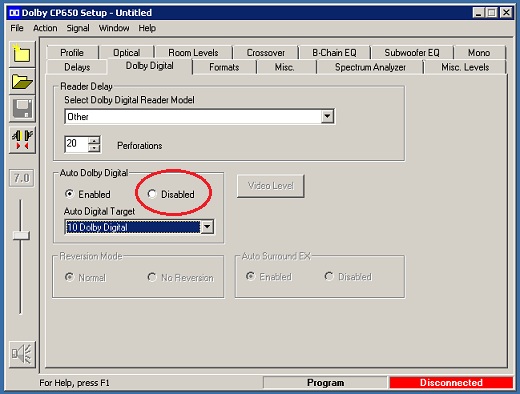
With it set to disabled, if you pulse SR at the start of the show, it will stay in SR until digital is pulsed. If it is enabled, when you pulse SR it will automatically switch to digital if there is a valid digital track.
Posted by Manny Knowles (Member # 1171) on 04-04-2014, 02:25 PM:
In the user menu, you can disable "Auto Dolby Digital."
This is in the Installation Manual. Appendix D, section 2.
Posted by David E. Nedrow (Member # 4981) on 04-04-2014, 02:46 PM:
Thanks. I knew I had seen something about this, but I could only find the auto EX setting. Turns out, the setting is only available through the CP-650 manual controls when it is NOT in setup mode.
Posted by Manny Knowles (Member # 1171) on 04-05-2014, 04:21 AM:
Exactly.
...and, just in case some present or future reader is wondering why anyone would want to DISABLE Auto Digital...
I have it disabled on mine, since I run repertory prints that are sometimes plagued with high error rates and failures.
I test each film prior to screening. If it is struggling/reverting, it gives me the option to run the film as Format 05, with the confidence in knowing that it will stay put.
If a print passes the 2-reel inspection and we run it as Format 10 and then it fails during show, we can force it to Format 05 and not have to worry about any further format reversions.
This is very rare, mind you. But the first time it happened to me, I decided to make it the last time.
Posted by Marco Giustini (Member # 4544) on 04-05-2014, 05:55 AM:
quote: David E. Nedrow
As for the overwhelming levels on trailers, I'll just run them SR and switch to digital starting with the DD Rain snipe.
You can also assign two Dolby Digital formats on the processor - say one on 01 and the default on 10. You can then set a low volume on 01 and a higher on 10. Selecting 10 will only raise the volume.
And as it has been said, check your analogue levels ![[Smile]](smile.gif)
Posted by Steve Guttag (Member # 268) on 04-05-2014, 01:20 PM:
It is only said that way on YOUR side of the pond (or border) ![[Razz]](tongue.gif)
Posted by Pete Naples (Member # 761) on 04-07-2014, 09:07 AM:
quote:
It is only said that way on YOUR side of the pond (or border) [Razz]
You mean it's only said correctly on this side of the pond, surely? ![[Big Grin]](biggrin.gif)
Powered by Infopop Corporation
UBB.classicTM
6.3.1.2