This is topic Problems with Kinoton Digital Reader in forum Film Handlers' Forum at Film-Tech Forum ARCHIVE.
To visit this topic, use this URL:
https://ft-forum.com/ft/cgi-bin/ubb/ultimatebb.cgi?ubb=get_topic;f=1;t=011667
Posted by Stephen Pritchard (Member # 8241) on 06-12-2014, 09:22 AM:
I have an old Kinoton FP20 I've been restoring over the last year. The projector at some point has been modernized and has had a nice Kinoton combined Digital Analogue basement reader fitted to it.
The projector is currently running nicely and I have a CP500D which i've hooked up to the Analogue head which is giving good 5.1 sound.
Recently I've been trying to get the Dolby digital reader working but the CP500 isn't seeing any data from the reader. The Cat 673 card in the CP500 is has the block error led on, even when I'm running a film with Dolby digital data. I'm not sure if this is a cable problem or a problems with the digital reader.
I'd like to check the cable to make sure its ok but I can't find any pin outs for the Kinoton digital readers. Does any one have the pin outs for the Kinoton digital reader boards?
Thanks
Posted by Sam D. Chavez (Member # 1841) on 06-12-2014, 10:27 AM:
There is a pinout for the cable on the DA20 manual and also the CP500 install menu, both available here in under manuals.
Kinoton used a different color code than in the manual but as long as it is pin for pin from one end to the other it should not be a problem.
Posted by Sam D. Chavez (Member # 1841) on 06-12-2014, 02:36 PM:
A later thought. With the glut of SR.D penthouse readers laying about these days, if possible just plug the reader end of the cable into a handy penthouse reader and see if the block error goes way. Process of elimination at work. Power off before plugging or unplugging the cable though as that is the #1 way to blow up the CCD board.
Posted by Steve Moore (Member # 4753) on 06-12-2014, 07:10 PM:
Yes numerous things it could be (though I've not worked on Kineton) but with the cinemeccanica basement heads it could be the LED/laser failing, or the LED or the CCD out of alignment (or both); it could be a knackered bit of film, it could be the projector speed is a shade too fast or slow or fluctuating or the drum not spinning quite as freely as it should. I've also had failing PSUs that power the LED or as you said, a faulty cable. Have you got a scope to look at the waveform (find details in DA-20 manual) or look at it using a serial cable and WinDras software, which if i recall is available on this site to download to what is happening
Posted by Mark Gulbrandsen (Member # 72) on 06-12-2014, 10:34 PM:
Going to follow this because thread as I have a PK-60D here at home I need to hook up to a DA-20 in the very near future... So I'd appreciate it if you'd post what you find out in regards to matching up the standard digital cable at Kinoton end. I have the PK-60D manual but haven't even looked at it yet. Finally had time to mount the projector to the pedestal a couple days ago.
Thanks!
Mark
Posted by Pete Naples (Member # 761) on 06-13-2014, 04:28 AM:
You really need to get a 'scope on the test points of the Cat670 video acquisition board. That board or the reader could be fried if the cable has been unplugged with the power on. I've also seen them fried by RF pulse from a noisy ignitor.
I an ideal world you'd have the SR.D test generator handy to check the CP500 SR.D path, but those are pretty few and far between. That's where Sam's idea works well.
Correct me if I'm wrong, but doesn't the standard SR.D cable hook up to the CCD board? Granted it's been some years since I installed any, but I don't remember them being anything unusual.
Posted by Sam D. Chavez (Member # 1841) on 06-13-2014, 10:03 AM:
The cable is really a non issue except it's confusing when you actually examine it closely.
Posted by Pete Naples (Member # 761) on 06-13-2014, 01:32 PM:
I had another thought.
Motor start? What happens if the DB9 header with M1 jumper is missing, what happens?
Posted by Sam D. Chavez (Member # 1841) on 06-13-2014, 07:16 PM:
Nah. The reader is always hot. The DA20 or 500/650 would just stay in projector one.
Posted by Steve Guttag (Member # 268) on 06-14-2014, 03:27 AM:
If the motor start isn't present...while the CCD and Video portion will still work, you'll get NO SOUND because the DA20/CP will think the projector is off and break the audio path (in the case of the DA20, it will still be in digital but not passing audio).
Kinoton uses the standard Dolby CCD board...in fact, on the couple we have had fail, we always replaced them with Component Engineering's...aside from being cheaper, domestically sourced, they had gold pins...which in the mid-atlantic area just have fewer issues. So if you find that your CCD is fried...there are likely a pile of parts that you may need in a basement reader somewhere...4 screws later and you are back in business.
Kinoton did wire their cable differently than Dolby but as Sam said, if the same person wired both ends, then it doesn't matter since one should be consistent at both ends. Now if you decided it would be easier to cut one end off to pull the cable through conduit...you could be in trouble if you don't look a the other end before terminating it. In about 95% of our Kinoton installations...including the pair we put in this week, we make our own cables...we always used Dolby's color code to the Belden 8164 (I hate the Carol cable equivalent...way too stiff). Never had an issue.
Posted by Mark Gulbrandsen (Member # 72) on 06-14-2014, 12:59 PM:
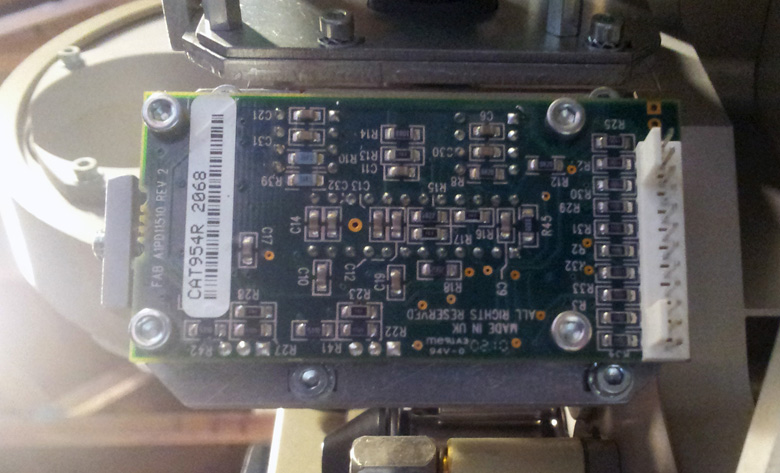
I just pulled the cover off mine for a look and it's just a regular CAT 945 card in there... I don't see what the confusion is here. Any standard cable you get with a penthouse reader or basement reader ought to work fine. If any of you need a cable just let me know! I have at least 6 or 8 of them here on the shelf from decommissioned equipment.
Posted by Stephen Pritchard (Member # 8241) on 06-15-2014, 09:11 AM:
Thanks for the responses. Lots of really good suggestions.
I tested the cable and the pinouts are the same as the ones in the CP500 manual and I also can't see any signs of lose pins or broken wires.
I have an original Dolby CAT700 reader which I'm not using. I connect up the cable to it and powered it on. I wanted to see if the block error on the CP500 would change, which it didn't. I don't have any way of running film through the cat700.
I suspect, and maybe someone can confirm, that the block error light on the CAT673 card might be normal if there is no digital signal present.
I also check the motor start jumper on CP500 which looks good. The CP500 also shows projector 1 as running on the display.
I loaded the WinDRAS program on my laptop and eventually found a serial cable which worked with it. If anyone is interested WinDRAS seems to work happily under Windows 8.1 Pro. Watching the output on WinDRAS makes me think the problem is with the head alignment. WinDRAS seems to show the CP500 is receiving data from the head but it can't detect the Dolby signal. I need to read the WinDRAS manual to properly understand the output.
Early on I did have to change the LED head assembly. The analogue head was damaged when I first received the projector. Although I aligned the analogue LED and it runs fine, it looks like the Dolby digital is very sensitive to alignment issues. I would have though the CAT 673 card would display an E or some error number, but it looks like the head is to far out of alignment for this.
Next steps are to read up on the alignment procedures and the WinDRAS manual. I have managed to source some Dolby test films so hopefully I have every thing I need for this.
My wife thinks I should be satisfied with the analogue sound but I hate leaving things unfinished.
Posted by Steve Guttag (Member # 268) on 06-15-2014, 09:52 AM:
quote: Mark Gulbrandsen
I don't see what the confusion is here.
It isn't the CCD board Mark...it is the Kinoton factory supplied cable...they didn't use Dolby's color scheme as laid out in the DA10/DA20 manuals. There are four shielded pairs in the cable and they chose the pairs differently. Electrically, it is identical but if you are used to working with the Dolby wiring scheme and you merely cut off or disassemble one end for installation and install it the Dolby way...you'll blow it up because the power conductors will move. So again, so long as the same guy makes up BOTH ends, there shouldn't be a problem.
Posted by Mark Gulbrandsen (Member # 72) on 06-15-2014, 12:21 PM:
All of the cables I have here are either original Dolby or BACP... I did not get the original Kinoton cable with the projctor.
Posted by Pete Naples (Member # 761) on 06-15-2014, 12:44 PM:
Get a 'scope hooked up as per the CP500 manual. WinDRAS won't tell you anything remotely useful until the video level, illumination unformity and basic alignment is on the park.
And even then, I used to find I could align them just as well without WinDRAS at all.
Once you've got a decent trace you can start worrying about scan drum bearings, lay-on roller bearings and pressure etc.
Posted by Louis Bornwasser (Member # 3063) on 06-15-2014, 02:40 PM:
Again, you must use the scope. In hundreds and hundreds of basement reader installations, we got a usable signal using only the LED and a scope. Film allowed a tweak or two. Using the light and the scope, we were able to maximize the optical alignment, set LED level and thread the film. Not one time did the film not play correctly.
Lose the dras: confuses most people. Reads out after error correction and time delay. Almost worthless.
Posted by Steve Guttag (Member # 268) on 06-16-2014, 01:09 AM:
Dras is good for setting azimuth, if you know what it should be for the film you are running. It is also good for getting focus optimal...with an O'Scope, you can get it 90% there...with WinDras...you can get it even better.
Though less critical, WinDras will also let one get lateral alignment optimized. Again, if the test film being used is known/measured.
Posted by Steve Moore (Member # 4753) on 06-16-2014, 11:36 AM:
Yes 'scope for sure, I only originally suggested the DRAS, as he might not have a scope to hand and it would be a quick way to see if it was receiving video data at all. I did once get an alternating 7. F 7. F read out on a DA20 with software alone, but without seeing the waveform trace, it seemed impossible to get any further at all.
Powered by Infopop Corporation
UBB.classicTM
6.3.1.2