This is topic Several questions regarding DTS XD10 in forum Film Handlers' Forum at Film-Tech Forum ARCHIVE.
To visit this topic, use this URL:
https://ft-forum.com/ft/cgi-bin/ubb/ultimatebb.cgi?ubb=get_topic;f=1;t=011719
Posted by Fabian Schreyer (Member # 5120) on 10-05-2014, 04:15 PM:
Hi everyone,
I have several questions regarding the DTS XD10-unit which I recently got via eBay.
First thing is that I want to upgrade it to the most recent firmware which is V2.2.06, according to what the datasat website tells me. I've noticed the 2.00.43 firmware in the film-tech warehouse, which I'm downloading right now. Still, is there a link to the most recent firmware or do I have to contact datasat about this?
The next question is about networking. Does anyone here know the root password of this device? As I expected, it has nothing in common with the three-digit password you can set on the front panel.
My last question for now would be: Is there a simple way to import feature soundtracks via network without owning some special DTS-server?
Posted by Brad Miller (Member # 2) on 10-05-2014, 04:58 PM:
The current (and final) version is v2.2.06 which can be downloaded as an ISO file (use a blank DVD-R disc) here.
Just put the disc in, power cycle the unit and walk away for 40 minutes and it will install itself. When the disc ejects, you're good to go.
You have to load feature discs one at a time into it. Just put the disc in and the screen will tell you when it has been ingested. Once you have that done, you can then turn on network sharing in the setup, assign two DIFFERENT IP addresses of a second machine on the same subnet and content will transfer any loaded between them.
Make sure to go into the disc space option and turn preshow all the way as low as it will go and then increase film sound as high as it will go so you don't have a silly limitation on how many movies you can fit onto it.
If you can't find these settings let me know and I'll fire one up and give you specific menu structure navigation.
If your old IDE drive is flaky, you can use one of these SATA to PATA/IDE interface adapters and replace it with a SATA drive. I would recommend you cover the back side with electrical tape though just to ensure you don't have an accident.
Posted by Fabian Schreyer (Member # 5120) on 10-05-2014, 06:27 PM:
Thanks for the link and all your advice, Brad!
I've burned and verified the iso and it boots up fine till the point, where it asks me to press "[ENTER]" in order to start the installation. I can press this button as many times as I want - nothing happens. I've been watching the device for 30 minutes now. Absolutely no noticeable access to the DVD drive or the harddisk.
May this be connected to the fact that this device runs a very old 1.X firmware?
Posted by Brad Miller (Member # 2) on 10-05-2014, 07:18 PM:
Take the lid off and try reseating the cables to that front panel board. I've seen a "dead button" that will start working after a reseat.
Posted by Fabian Schreyer (Member # 5120) on 10-05-2014, 08:07 PM:
I'm afraid the enter button works just fine when used during normal operation (running the old firmware).
I tried to install the older 2.00.43 firmware, but I had no success either. The disc doesen't even boot up.
By the way: The firmware currently running identifies itself as version 101.17, in case that matters.
As I purchased two XD10 units I tried to upgrade my second unit, which was running v2.1.07. It upgraded to v.2.2.06 without any problem. At least now I know that it is not my DVD...
Interesting thing: On this device the message asking me to press enter never showed up. Installation process just started straight ahead. Something is really weird here...
Posted by Fabian Schreyer (Member # 5120) on 10-16-2014, 06:18 PM:
Just a short update on what I'm doing ![[Smile]](smile.gif)
As I was unable to upgrade from v101.17, I just replaced the harddrive with a blank (no partition table on it) 160-GB-IDE-drive I still had from some old PC.
The installation process ran flawless and everything works fine now. I guess it's just impossible to upgrade from that specific version.
Posted by Leo Enticknap (Member # 534) on 03-01-2015, 03:44 PM:
I had the same problem - enter button on the unit itself not doing anything after booting from the update DVD, but working OK when running the old software.
The workaround I found was to connect a keyboard, monitor and mouse to the back of the thing, and then, when prompted, to press enter on the PC keyboard rather than the front of the unit. That started the updating process for me, which worked successfully.
Posted by Brad Miller (Member # 2) on 03-01-2015, 03:55 PM:
Remove the hard drive. "Clean" it using a PC. Reinstall the hard drive. Run the dts cd installer.
This way it can't see an older version.
Posted by Leo Enticknap (Member # 534) on 03-01-2015, 04:34 PM:
My guess is that there's a bug in the bootloader of the 2.2.0.6 update disc and/or the version of the software that was on Fabian's and my unit to start with, such that under some circumstances, when it displays "Press enter to continue" on the front panel of the unit, it's actually listening for the enter key being pressed on a PS/2 keyboard, not the enter button on the front of the unit.
Given that the update DVD contains a warning on the label to the effect that running it will nuke all configuration settings and ingested audio tracks, I'm further guessing that it at least reformats the hard drive and possibly even rewrites the MBR at the start of the installation process. So if you have a PS/2 keyboard easily to hand but do not fancy taking the player out of the rack, opening it up and extracting the HDD from it, using it is probably a quicker way of achieving the same result.
That having been said, any XD-10 in use now that still has its factory-installed, original HDD probably has a drive in it that is 5-10 years old and therefore effectively on borrowed time, especially if it's been doing significant hours each day. That, IMHO, is an argument in favor of replacing it with a new one anyway, especially if the player is to continue in regular service (e.g. for DTS 70 shows).
Posted by Brad Miller (Member # 2) on 03-01-2015, 06:00 PM:
Agreed. Honestly if I had to choose between a used XD10 vs. a dts6-d (3 drawers) with no backup unit for a dts70 show (since those don't have an analog emergency fallback), I would rather have the dts6-d. If a cdrom drive died in the 6-d, at least the disc could be quickly moved to the third drive and the show continue to run. On the XD10 if the hard drive starts to die, you're dead.
This is why I used dual XD10 units in a couple of my Interstellar dts70 shows. Should the primary unit fail, audio would continue on the second unit.
That being said even on the installs where I use XD20s with a raid, I still setup two XD20s for automatic failover.
Posted by Steve Guttag (Member # 268) on 03-01-2015, 11:41 PM:
I just recently worked on the AFI/Silver's XD10s. I put in new HDD (1TB since that is what we stock for DCinema) and the latest/greatest XD10 software...however, before doing so, I had them all networked so that they could "share" their content...then updating one at a time bounced the content back on the new HDD...with the storage each one now has (about 800GB effective storage for audio), and with 4 systems, they should be able to hold whatever content comes in the door and have redundancy for when a HDD dies.
Note, they also needed new capacitors (they had started to flake out due to leaky caps)...once recapped...they all came back to life perfectly.
Theatre 1 at the AFI has two XD10s (one for each pair of projectors) so they effectively have a backup right in the rack though they are not set up to failsafe to each other, they would need to be repatched.
Posted by Jack Ondracek (Member # 1466) on 03-02-2015, 12:54 AM:
quote: Brad Miller
Honestly if I had to choose between a used XD10 vs. a dts6-d (3 drawers) with no backup unit for a dts70 show (since those don't have an analog emergency fallback), I would rather have the dts6-d. If a cdrom drive died in the 6-d, at least the disc could be quickly moved to the third drive and the show continue to run. On the XD10 if the hard drive starts to die, you're dead.
Good point. In our case (somewhat unusual, granted), our double-feature format required that we swap discs every night before every show. That was doable, but a pain. We enjoyed our last few years with film a bit more after we swapped our 6-D units for XD10s.
I recall something similar about the upgrade problem. I think DTS had to send me some files on a thumb drive. After I loaded those, the new version upgraded fine. I could be wrong, but the thumb drive may have had a version that you could not jump over with the ones on the DVDs.
Posted by Andrew Maddison (Member # 4499) on 03-03-2015, 05:34 AM:
quote: Steve Guttag
Note, they also needed new capacitors (they had started to flake out due to leaky caps)...once recapped...they all came back to life perfectly.
How bad a job is replacing the capacitors? Had to do our CP500 a couple of years ago just to keep it going until it could be properly sorted out, but from what I remember of the XD10 the power supply looks like a more complex PC-like PSU! We have 2 XD10s (as the 1st stopped powering up shortly after we got it) so it would be good to resurrect it if possible
Posted by Leo Enticknap (Member # 534) on 03-03-2015, 05:26 PM:
quote: Andrew Maddison
...from what I remember of the XD10 the power supply looks like a more complex PC-like PSU!
That's because it is a PC PSU.
An XD-10 basically consists of a PC motherboard of early 2000s vintage, attached to which are a bunch of bespoke cards for audio input and output and the front panel. It runs a customized version of Red Hat with the DTS application software on top. If you plug a PC monitor into the VGA port at the back and watch it boot up, you'll see that it looks just like any other PC booting a Linux image.
Steve - were the bad capacitors you found on the motherboard, the input/output cards or in the PSU? If the latter, I'd just be inclined to replace the PSU.
The "Capacitor Plague" scandal coincided almost exactly with the years that the XD-10 was in production, so I'm not surprised to hear that it was affected.
Posted by Steve Guttag (Member # 268) on 03-04-2015, 06:56 AM:
It was just the motherboard...though we did change the ones on the D/A converter too (there are three up there). The change out isn't bad though the bottom of the mother board is "coated" so you have to "burn" your way through that or dissolve it.
Didn't have to change out any PSUs.
Posted by Stephan Shelley (Member # 8587) on 03-04-2015, 04:08 PM:
I installed some early XD-10s way back when. There was an upgrade that reformatted the hard drive. It wants you to insert a thumb drive for it to save settings ans licenses. Later on it wants you to insert the thumb drive to restore settings and licenses. I suspect that is what you are seeing. It was looking for the thumb drive to save stuff on.
Posted by Leo Enticknap (Member # 534) on 03-04-2015, 08:20 PM:
Steve - thanks. Useful to know in case ours starts to act up.
On Brad's point about being screwed if the hard drive fails during a DTS 70 show, you're equally screwed if there is a serious CD read error when playing a show using a 6D.
We have two 6Ds and a failsafe board in one of our theaters, and a solo XD-10 in the other. I did once have a sound dropout during Lawrence of Arabia on the 6Ds, I suspect because of a scratched disc in one player and the failsafe not switching over, for whatever reason. Since then I've always burnt two fresh sets of discs for every show, which is obviously a time-consuming exercise.
I'm not sure, statistically, what is the greater risk - a CD read error playing from a 6D or a hard drive failure on an XD-10 or 20, but suspect that as long as the hard drive is replaced at regular intervals (I would be inclined to go for every five years, which is how long a consumer grade HDD is typically designed to last, assuming average use), the risk of failure is negligible. DTS must have thought that the risk of failure was very low, because if they'd judged it to be significant, surely they'd have designed it with a RAID 1 rather than a single hard drive?
I also like the XD-10's display telling you how long is left on a reel, because I can get ready for the changeover with only a minute or so to go and not have to be standing around for 2-3 minutes waiting for it.
Of course what would be the perfect solution is a modification to the XD-10/20, such that it has enough RAM on the motherboard to hold the complete show in memory (4GB should be enough, even for a three-hour 70mm epic), meaning that it wouldn't have to read from the hard drive at all during an actual screening. Assuming that the motherboard is capable of holding that much RAM, achieving this should be a relatively simple software patch, I'd guess.
Alternatively, I may just put a SSD in ours when the time comes for the next drive replacement.
Posted by Brad Miller (Member # 2) on 03-04-2015, 08:41 PM:
quote: Leo Enticknap
Since then I've always burnt two fresh sets of discs for every show, which is obviously a time-consuming exercise.
Surely you mean you burn a fresh set of discs for every engagement and not every performance, right??? (The discs won't get scratched sitting in the CD trays.)
quote: Leo Enticknap
I'm not sure, statistically, what is the greater risk - a CD read error playing from a 6D or a hard drive failure on an XD-10 or 20, but suspect that as long as the hard drive is replaced at regular intervals (I would be inclined to go for every five years, which is how long a consumer grade HDD is typically designed to last, assuming average use), the risk of failure is negligible.
I find it interesting that all of the XD10s I have are still on their original IDE hard drives. Not a single one has failed yet (but that doesn't stop me from installing them in a failsafe manner). Let's face it, the hard drives from several years ago are simply better built than the ones being made today. (For the record most consumer drives are now 3 years and some are down to 1 year warranty, whereas several years ago they were all 5 year warranties.)
quote: Leo Enticknap
DTS must have thought that the risk of failure was very low, because if they'd judged it to be significant, surely they'd have designed it with a RAID 1 rather than a single hard drive?
Well, GDC seems to have the same thought process, because every GDC server out there is running the operating system with one non-RAIDed hard drive...which is just fine and dandy until the day it isn't.
It should be noted that dts DID make RAID1 an option on the XD20, but very few went out the door configured for it because hey, cheaper is better!
That being said I was sad to hear when I tried to order some hard drive mounting brackets to upgrade some XD20s I had to a RAID1, datasat didn't have any left and wouldn't be making any more. HOWEVER I did arrive at a solution, and it's all about those thin Seagate drives.
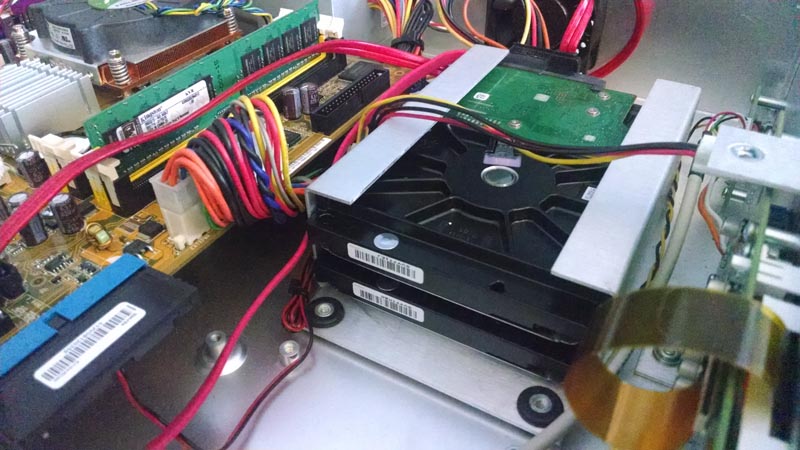
Basically the bracket inside a XD20 is oversided for a normal 3.5" SATA drive, but it just so happens that two of the thin Seagate drives fit in there perfectly! (I had to put a strip of gaffer tape on each side, at which point it fit in there quite snugly and in no way would ever slide.) Then it was just a matter of adding another SATA cable to the motherboard and to use the extra power plug that was already there.
While I'm sure Steve Guttag will be along shortly to tell me how awful Seagate drives are, I'll take "awful Seagate drives" in a RAID1 configuration over an enterprise WD or whatever Steve prefers on its own anyday. ![[Wink]](wink.gif)
Posted by Leo Enticknap (Member # 534) on 03-05-2015, 04:34 PM:
Yes, I meant per engagement. The only DTS shows we do regularly are the usual 70mm favorites, I have ISOs for all the DTS 70mm titles (except The Master and The Bible: In the Beginning, which we haven't shown since I started here anyway) archived, and 10-20 minutes plus about $2-worth of blank CDs per engagement seems to me to be worth it to minimize the chance of a disc read error during the show.
Posted by Fabian Schreyer (Member # 5120) on 03-11-2015, 08:25 PM:
I guess this would be possible with an XD10 as well. My plan for the future is to install a PCI-SATA-RAID controller and remove one of the DVD drives. It should not be that big of a problem to get this configuration to work.
Posted by Jim Cassedy (Member # 4115) on 03-11-2015, 09:44 PM:
quote: Steve Guttag
Note, they also needed new capacitors (they had started to flake out due to leaky caps)
I had a couple of XD-10 units crap-out on me within a few weeks of each
other about 3 or 4 yrs ago. I could clearly see the caps were ka-put.
As someone else pointed out, I'm pretty sure DTS got stuck with a bunch
of power supplies that were victims of "the great capacitor conundrum"
(or whatever it was).
I was able to get one of the systems up & running by pulling a power supply
out of an old computer in the booth. It wasn't an exact replacement, and it
required a rats-nest of clip-leads & jumper wires to get it to work, since
it wouldn't even fit into the XD-10 enclosure.
(I wish I'd taken a picture) but I got it working long enough until I was
able to find identical supplies at a computer warehouse store. About a
year later, another system died for the same reason.
But that one had been recently purchased refurbished from an an authorized
dealer, & was still under warranty, so they replaced the power supply free
of charge.
Powered by Infopop Corporation
UBB.classicTM
6.3.1.2