This is topic JSD-100 Network Automation Problem in forum Film Handlers' Forum at Film-Tech Forum ARCHIVE.
To visit this topic, use this URL:
https://ft-forum.com/ft/cgi-bin/ubb/ultimatebb.cgi?ubb=get_topic;f=1;t=011989
Posted by Sascha F. Roll (Member # 9043) on 05-02-2016, 04:35 PM:
I'm having some trouble setting up a Sony XCT-S10 to control a JSD-100 via Ethernet.
I checked the installation manual and tested out pretty much everything that came to my mind, including upgrading the JSD-100 to the latest Software, disabling all Firewall options ect.
The problem is:
When I try to send the following command
jsd100.sys.fader 700 <CR>
(or any other command)
via Port 10001 I get the following error message:
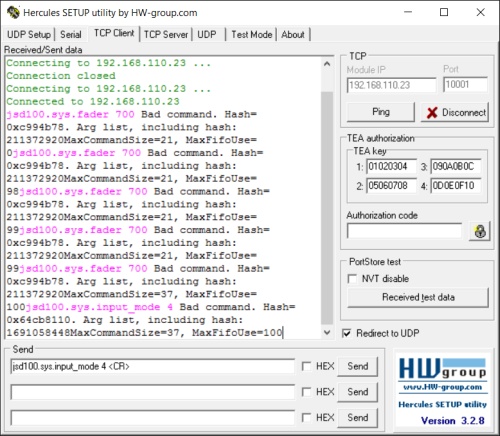
Just sending "jsd100.sys.fader" without a value correctly returns the actual fader level - same with inputs ect.
(The Hercules program shown in the screenshot works perfectly with all my other devices).
Instead of <CR> for Carriage Return i also tried out "/0D" or "\r".
So, where's the error here?
I Would be glad to FINALLY (after years of waiting for SONY to implement Ethernet Automation) control my JSD-100 units via Ethernet.
Sascha
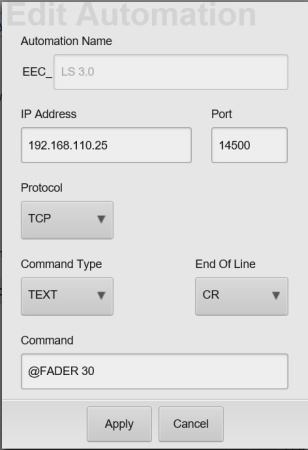
PS: That's what the "Ethernet Automation" implementation on the Sony XCT-S10 looks like, configured to control a Datasat AP20 (which works fine):
Posted by Ian Freer (Member # 1940) on 05-02-2016, 05:20 PM:
Harold at USL is active in these forums so hopefully he lets us know, but maybe one thing to try;
In you command you have a [space] between fader and 700, but in the manual for the JSD100 I have it shows that same command as:
jsd100.sys.fader\t700\r
\t is a tab delimiter, is that the same as a space? My knowledge is limited in this area...
Posted by Harold Hallikainen (Member # 5405) on 05-02-2016, 10:05 PM:
Ian is correct. The commands are tab delimited and terminated with a carriage return. Does Sony document how to send control characters? Some systems accept \t. Others require \09 or \x09. The bad command message you were seeing was because the space an stuff following it was all considered a command by the command interpreter. The command is terminated by a tab or carriage return.
Let us know how Sony does control characters so I can document it for others.
Thanks!
Harold
Posted by Sascha F. Roll (Member # 9043) on 05-03-2016, 05:41 PM:
Hi Harold and Ian,
thanks for your feedback.
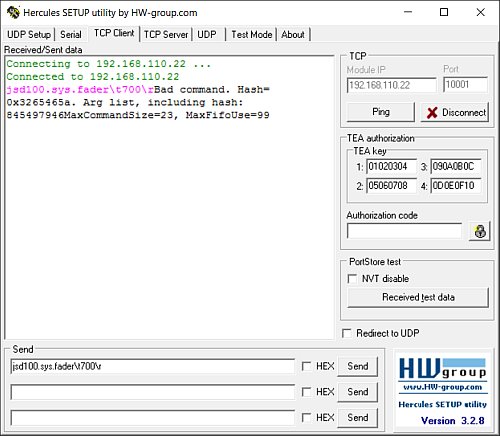
Unfortunately the same result using \t and \r:
@Harold:
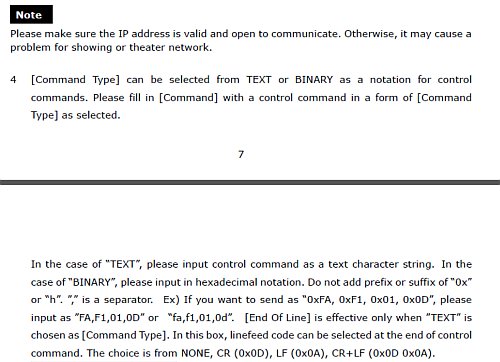
(from "4D System Control Guide, (c) Sony Corporation)
Posted by Carsten Kurz (Member # 5396) on 05-03-2016, 07:23 PM:
Maybe you need to get back to Sony for more information on escape code options. If the Sony doesn't support inline control codes, you may be able to compose the necessary data in binary form. There are online calculators for conversion.
Maybe Harold could supply HEX equivalents in a support document as well.
- Carsten
Posted by Harold Hallikainen (Member # 5405) on 05-03-2016, 08:29 PM:
I've looked around for an online converter and so far have not found one. I'll see if I can write one in the next couple days. Meanwhile, you can use http://www.asciitohex.com/ with a little hand editing. For example, to do jsd100.sys.fader\t100\r, I converter jsd100.sys.fader to get this:
6a 73 64 31 30 30 2e 73 79 73 2e 66 61 64 65 72
Add a tab
09
Add 700
37 30 30
Add CR
0d
Resulting string, adding commas:
6a,73,64,31,30,30,2e,73,79,73,2e,66,61,64,65,72,09,37,30,30,0d
Harold
Posted by Sascha F. Roll (Member # 9043) on 05-04-2016, 11:38 AM:
Thanks Harold, sending the full string in HEX works! :-)
(Via the Hercules Program AND via the SONY EEC)
Posted by Frank Cox (Member # 6258) on 05-11-2016, 02:30 AM:
#include <stdio.h>
#include <string.h>
int main (void)
{
int command, counter;
char parameter[5];
const char *strings[]={"jsd100.sys.fader","jsd100.sys.fader_rel","jsd.sys.input_mode","jsd.100.sys.mute","jsd100.sys.sleep"};
printf("1. %s\n2. %s\n3. %s\n4. %s\n5. %s\n", strings[0],strings[1],strings[2],strings[3],strings[4]);
printf ( "Enter Command number from above list: (1-5) " );
scanf ( "%i", &command );
printf ( "Enter numeric parameter, for example 700, maximum 4 characters: " );
scanf ( "%s", parameter );
for ( counter=0; counter < strlen(strings[command-1]); counter++ )
printf ( "%x,",strings[command-1][counter] );
printf("09");
for (counter=0; counter < strlen(parameter); counter++)
printf( ",%x",parameter[counter]);
printf(",0d\n");
return 0;
}
Powered by Infopop Corporation
UBB.classicTM
6.3.1.2