This is topic DTS-6D with recurring problem. in forum Film Handlers' Forum at Film-Tech Forum ARCHIVE.
To visit this topic, use this URL:
https://ft-forum.com/ft/cgi-bin/ubb/ultimatebb.cgi?ubb=get_topic;f=1;t=012004
Posted by Rob J. Buskop (Member # 3338) on 06-13-2016, 06:03 AM:
This is an unpleasant recurring problem for which I hope some of you can can give me some advise on. The problem shows itself on a rather regular basis. I have an ISA card and monitor screen hooked on the 6-D. It's a 2 projector set-up. At some point in the show the DTS freezes. The reader shows a continuous green led, and the monitor shows a stalled timecode for reader and disc. To get everything going again I switch the 6-D off, wait 3 seconds and then switch it on again. A re-boot and disc reading follows and surprise, surprise...everything works again. Very annoying! Would appreciate any advice,experiences and suggestions to get rid of this behaviour. Thank you for reading this.
Posted by Tony Bandiera Jr (Member # 2365) on 06-13-2016, 10:05 AM:
Several suggestions/questions:
First, is the DTS 6D on a UPS? If not, get one, even a basic 350va rated home computer type will work. That will help eliminate incoming power issues from causing the freeze ups.
Second, try running without the ISA card and monitor connected. (Remove the card!!) If the freezes stop, then the ISA card is causing it.
Third and one of the two most likely causes....bad capacitors on the mainboard. That was an issue with a lot of computer and electronic products in the timeframe the DTS 6Ds were popular. (There was a huge run of fake/out of spec caps on the market that fail prematurely.) Google "Bad capacitors" for more info and pics of what bad caps look like, then open your 6D and look for leaking or bulging tops on the capacitors in the unit.
Fourth, the power supply for the 6D is going bad. Mainly due to old age. You can still get replacements for it online, search for the specific model number on your unit's power supply.
Let us know what you find out based on this info..
Posted by Marco Giustini (Member # 4544) on 06-13-2016, 11:48 AM:
Does it freeze when reading from the same drive? Try swapping the discs around and see if the show now freezes while playing the same drive or the same disc.
Posted by Leo Enticknap (Member # 534) on 06-13-2016, 12:03 PM:
Agreed completely with Tony on capacitor plague. In particular, earlier XD-10s are well known for succumbing to it. However, this is easy to spot visually: if you open up the unit and see capacitors like the ones pictured in the Wikipedia article, you've got it.
Agreed also with Marco on discs and drives. I had one 6-D that froze and the audio dropped out in the middle of Lawrence of Arabia, and I couldn't see anything visually wrong with the disc. I took it home and analyzed it with Nero disc analyzer, which gave it a clean bill of health. I then took it to our other theater, where it ingested into the XD-10 there without complaining. The only explanation that makes sense is that one of the drives in that 6-D (since replaced with an XD-20, thankfully) was starting to wear out.
Bizarrely, the 6Ds seem to be more tolerant of minor scratches and dirt on burnt discs than on factory-pressed ones.
Posted by Rob J. Buskop (Member # 3338) on 06-13-2016, 01:37 PM:
Thanks, guys for your responses. Fact is: It's not the discs and it's not that long ago I had the unit open and am pretty sure there were no obvious bad caps, but will check again with ESR meter. Before you ask:.., Yes both readers should have proper gain and have 4V between tp1 and tp2. What puzzles me that after a quick reboot everything is back on line though, since I'm completely unaware of sudden power aberrations here. Since the system is only used occasionally I'm not entirely sure whether it'happens on the same drive, although I'm pretty certain that that was the case with the last two occurrences. Will follow that up of course.
Posted by Marco Giustini (Member # 4544) on 06-13-2016, 02:52 PM:
Are you using original/approved drives? I did test some similar drives in the past and the player would crash exactly as you describe - a reboot would fix. I ended up using exactly the same drives DTS installed and with those it was ok.
I used to have a VGA monitor plugged in too, for the life of me I cannot remember how the software would behave but I am pretty confident that a bad drive would kind of crash the software while the drive becomes unresponsive.
Oh, shall I mention the old say "make sure your TCR chip is version 1.46"? ![[Big Grin]](biggrin.gif) Good old memories!
Good old memories!
Posted by Rob J. Buskop (Member # 3338) on 06-13-2016, 04:04 PM:
Oh Gee... Maybe I'm now caught with my pants down. I've been using caddy drives from Plextor, type PX-32CSi for a long time. These drives are very solid and are supposed to be the best in the business.I also like these because they're caddy ones,which is a system I prefer to use over the drawer things. With the proper jumper settings they worked very well indeed. Yes,1.46 is installed.
Posted by Marco Giustini (Member # 4544) on 06-13-2016, 04:57 PM:
Rob,
I had a set of failed 4X Toshiba in my DTS6D. I didn't want to spend an arm and a leg on DTS' ones so I went for similar drives from the bay. I thought that being Toshiba would work. They worked but 1. the drives went to sleep so when the other disc was accessed the player would drop to analogue while the disc spun up 2. the player would freeze every now and then 3. (if memory serves) those 40x drives would never slow down (DTS's were forced to a slower speed for added reliability) and the player sounded like a jet taking off.
Once I found the same exact model (old, brand new, non-DTS stock), then they worked beautifully for a couple of years - that was the lifespan of Toshiba's.
If you have non-DTS drives in there, that may be your problem - at least I had exactly the same problem.
I reckon DTS somehow optimised their software for those 2-3 drives they were using. Someone told me the DTS drives had a special firmware. If that was the case, then they must have kept the original name as my drives from the internet showed the same exact firmware than DTS's.
I know it sounds weird - after all they are just CD-ROM drives. But they definitely did not work with my player.
Posted by Rob J. Buskop (Member # 3338) on 06-14-2016, 05:54 AM:
Thank you very much Marco for sharing your experience, which seems to confirm other comments on the subject which were about the same topic long ago. So, since I'm really kind of stuck on caddy drives, there's an option available now that might be of interest. The original Toshiba drives of the plain -6 model were the reliable Toshiba drives XM-3401B.These are 4x drives and had an excellent reputation. They were made in 1993. In 1994 Toshiba continued this series with the XM-3501B, which is also a caddy drive and looks (apart from the wider grip on the lid)exactly the same as the 3401B model. The 3401's are extremely hard to find, but right now I know of a company who sells good 3501B's at a low price. These are also 4x drives and are from 1994. Would you or anybody else know if these would behave like their venerable predecessors? Suppose they do, but a confirmation would be nice.
Posted by Marco Giustini (Member # 4544) on 06-14-2016, 06:42 AM:
I do not know but I have a feeling the drives have to be exactly the original ones.
I wouldn't invest in "good" drives though. You never know how many hours they've been used.
Either brand new drives or why not finding a new player which is being thrown away? An XD10 possibly?
Posted by Rob J. Buskop (Member # 3338) on 06-14-2016, 08:56 AM:
Well, actually I'm very keen on the older "original" equipment that I also have spare parts for. The same applies to my nostalgic, but practical preference for caddy drives. Just find that a more solid, safe and elegant construction design than the tray variety for the purpose at hand. Suppose it would be worth a try with the XM-3501B. They cost very little, and are guaranteed to be in excellent working order. My application is for my private cine archive so these units will see only occasional use. Also this design has a great track record for utter reliability. They just carry on quietly.
Posted by Marco Giustini (Member # 4544) on 06-14-2016, 12:05 PM:
Hi Rob,
I do understand. I too have a DTS-6 in a box - with caddies! - for sentimental reasons!
I guess the only way is to try and see what happens. And don't forget to let us know the outcome!
Posted by Rob J. Buskop (Member # 3338) on 06-15-2016, 10:08 AM:
Last update: I found a DTS paper dated June 16, 1995.
NOTICE TO FIELD TECHNICIANS.
Subject: Quad CD-Rom Drive.(Toshiba)
We have upgraded our CD-ROM drive from dual to quad. The quad drive's model will be 3501 (dual drive is 3401).The quad drive can be used with a dual drive only if the ROM-DOS chip inside the DTS player unit is programmed to "Rev.C" or higher. If both drives are quad, you must still use ROM-DOS "Rev "C" or higher.
=====================================
This illustrates that the XM-3501B is a fully authorised replacement for the earlier 3401B. Solid info: Good to know!
We're goin to get these asap.
Posted by Gordon McLeod (Member # 33) on 06-15-2016, 10:45 AM:
DTS 6 and 6D were very specific which SCSI drives they supported
Is the system running the last version of firmware V1.46
The best solution was to install the adapter board and the scsi convertors on the back of standard 32x DVD drives and it will then work with almost any drive you want to throw at it
Also I have had some where the memory sim's had got bad or poor connection
Posted by Mark Gulbrandsen (Member # 72) on 06-16-2016, 01:29 PM:
What Gord said! Its really the only option now anyways.
Mark
Posted by Monte L Fullmer (Member # 2797) on 06-16-2016, 07:24 PM:
I've gotten away with using APPLE SCSI drives for 6D units.
Posted by Gordon McLeod (Member # 33) on 06-21-2016, 10:57 AM:
If you have the proper aquilla board installed these can be put on the back of any sata drive and it usually works
http://www.addonics.com/products/adsalvd160.php
the DTS firmware needs to be v1.46
Posted by Greg Routenburg (Member # 1742) on 06-22-2016, 01:14 PM:
Additionally, the DTS conversion kit included 3 of the ACARD IDE to SCSI bridge
http://www.acard.com/english/fb01-product.jsp?idno_no=23&prod_no=AEC-7720U&type1_idno=2&ino=43
and three off the shelf IDE DVD-ROM drives.
The kit also included the new bootrom board with the AQRM_RC chip and an Adaptec ISA SCSI adapter. I don't remember which one the kit included but I successfully used many 1520B ISA boards in the kits that I put together for our own units.
Posted by Rob J. Buskop (Member # 3338) on 07-03-2016, 05:23 PM:
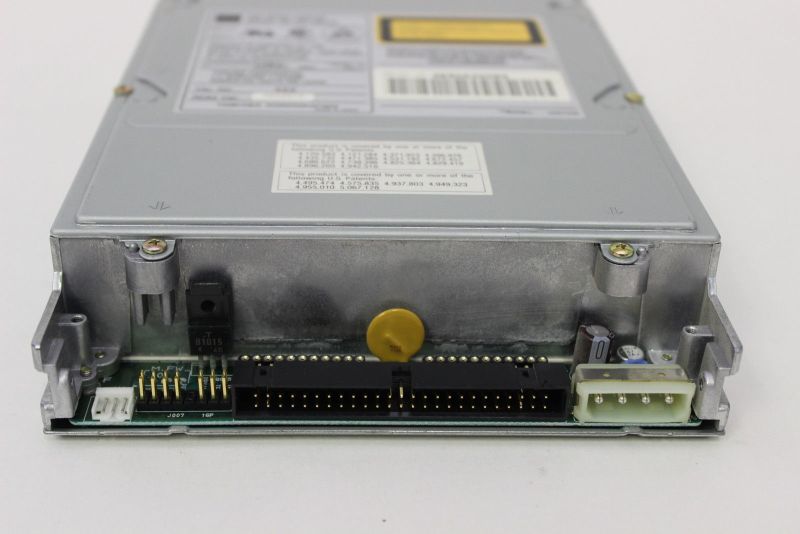
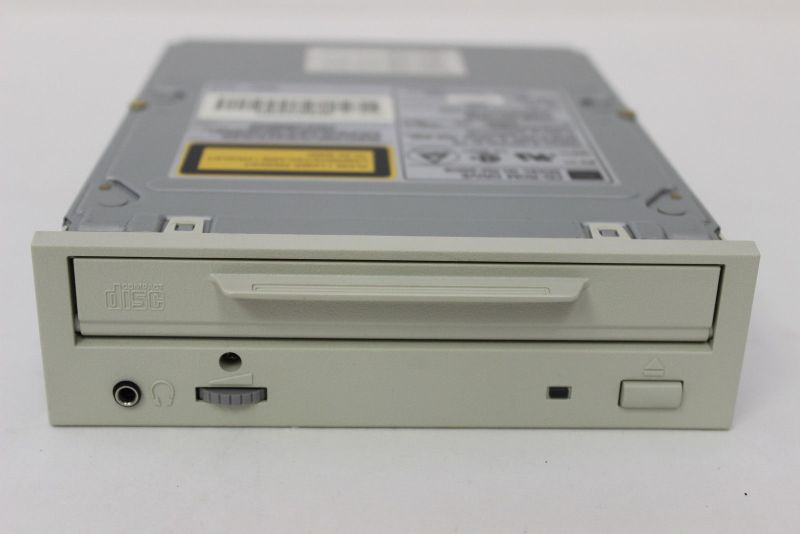
Received like new Toshiba XM-3501 drives last week. As mentioned before these are official DTS approved caddy drives, as described in "Notice to field technicians" dated June 16th, 1995.
These units are the last version of the one year older 3401 that served the DTS-6 model so well.With ROM-DOS chip Rev.C or higher these are the drives to have if one wants original adaption without after-market modifications. They spin at 1-4x speed and work absolutely perfectly as expected. If anyone still uses a non DTS approved drive set, this is the time to get hold of a set of these rare and extremely solid drives.They sport a casting as main structure (!) and they're available now. Superb units that work like a dream and will do that for a very long time!
IMG]http://www.film-tech.com/uploads/uploads0503/ToshibaXM-3501B.jpg[/IMG]
Posted by Rob J. Buskop (Member # 3338) on 08-08-2016, 05:45 AM:
O.K., I've promised Marco Giustini to report back on the subject, so here it is: The Toshiba XM-3501B units have been installed some time ago now. Hereafter, to make sure there were no problems with the TCR's, I hooked my timecode generator on and ran several reels on timecode. All drives performed perfectly fine, as expected. The only thing you've got to get used to is the longer booting time that these drives need. (remember I used to have Plextor Ultraplex 32x units before...) No problem. After this I've run some shows in DTS. No drop-outs, perfectly steady green light throughout without any "winking", and no freezing so far on the system. All in all it's working absolutely perfectly and the acquisition of these drives has been a good choice for me. Both from an originality standpoint and a technical one as well, whilst retaining the protection of the discs by the venerable caddy design philosophy. This procedure is recommended to those who, like me before, are using alternative alien drives that "work", but are not 100% in concert with the original DTS design particulars. If interested, here's the website where to get these babies:
http://www.ebay.com/itm/TOSHIBA-XM-3501B-4X-50-PIN-SCSI-CD-ROM-DRIVE-WITH-CD-CADDY-WITH-WARRANTY-/141600211757?hash=item20f807c32d:g:znoAAOSw3YNXaZ0C
Posted by Carsten Kurz (Member # 5396) on 08-08-2016, 06:07 AM:
Can you report which SCSI controller is used in your DTS-6D? There are technotes explaining that faster drives need a different SCSI card and ROM card to work reliably (same as with the SCSI->ATAPI conversion kits).
- Carsten
Posted by Marco Giustini (Member # 4544) on 08-08-2016, 11:21 AM:
Thanks Rob for reporting back - and glad I could be of assistance. As you did, I hit a brick wall in the past when I tried to go the cheap way on my DTS unit!
Posted by Rob J. Buskop (Member # 3338) on 08-09-2016, 10:27 AM:
The 6D is equipped with the 1.46 chip and the AQRM update.
Powered by Infopop Corporation
UBB.classicTM
6.3.1.2