This is topic installing cat 204 in forum Film Handlers' Forum at Film-Tech Forum ARCHIVE.
To visit this topic, use this URL:
https://ft-forum.com/ft/cgi-bin/ubb/ultimatebb.cgi?ubb=get_topic;f=1;t=012109
Posted by Tim Androes (Member # 9010) on 02-08-2017, 03:02 AM:
I am installing a couple of cat 204 remotes. the owner says he got them about 20 years ago but says when he installed them himself they never worked. so now i am revisiting their hookup. i have found one (A) to have blown components on the main board and the other (B) appears okay. i have B hooked up, have double checked all connections to the unit and to the CP-200 control backplane strips BS-21, BS-22 and BS 23. i also have the backplane jumper set to "remotes installed". the remote will switch formats and show the proper projector on the front of the 200; the MUTE will work; but the remote fader does not activate with either the GO button or the ACTIVATE THIS FADER button.
any suggestions as to what to try next would be appreciated.
Posted by Steve Guttag (Member # 268) on 02-08-2017, 05:55 AM:
Did someone mention CP200?
Pull out the Fader/Mute card and you'll find more jumpers on there. Smack dab in the middle will be a jumper that will let you enable the remote faders.
There isn't too much going on the CAT204 (nothing active) but there are some small signal diodes that I suppose to be bad (I have found it on one that we acquired years ago). I've had the shadow switches fail over time and if they stick, it could cause a permanent selection situation.
Posted by Tim Androes (Member # 9010) on 02-20-2017, 11:59 PM:
found the jumpers on the 157 card...changed the jumpers and the switch in various combos...changed the 157 card...rechecked all of my wiring...all i succeeded in doing was disabling the volume control on the front panel of the 200 control unit. using a multimeter checked the diodes, resistors, transistor and switches on the remote and all seem to read as intended. with only the REMOTE ENABLE jumper changed can still affect formats and mute and projector # but not remote volume control. maybe a broken trace on the backplane of the 200 control unit?
Posted by Sam D. Chavez (Member # 1841) on 02-21-2017, 01:14 AM:
Hello Tim,
Say hi to Bob Leader from me. Lucky guess?
I will try to have a look at a manual if I can find one close by.
I seem to remember a remote fader terminal on the back plane and a specific pin to be used as the fader return. Way too long!
Posted by Steve Guttag (Member # 268) on 02-21-2017, 06:44 AM:
You are setting your CAT204s to the right projector number, right? The remote fader jumper on the CAT157 allows for the remote faders. When one presses the "GO" or "Activate This Fader" button, that, in turn allows a specific fader to be selected on the remotes (the difference between the GO and activate this fader is that the GO will switch both format and projector, the fader button just switches the fader).
The same current that lights the LED on a particular fader button also is what is going through the 100K pot and on the fader return buss (and yes, you have to be on the fader return because that is what drives the VCA circuit). This is why when one mutes, the fader LED fades out right with the audio because the fader current source is fading out too.
The Fader board decides which fader gets the current (local, 1, 2, 3, 4 or auditorium). You are leaving that switch down on the remote fader board (LED off)...with that switch up, it will only activate the auditorium fader on the backplane (again the lit LED tells you who has fader control at the moment).
Posted by Tim Androes (Member # 9010) on 03-02-2017, 02:06 PM:
Steve and Sam...thank you for your responses. good guess Sam. i grow a bit frustrated working on these 204's as i don't know enough electronics to know what i am missing in getting them hooked up properly. i've followed the instructions in the 200 manual and have double checked wiring; i do have the dip header installed so that it corresponds to projector 2 and when i GO to a format it also goes to the correct projector. there is a note about landing the SPECIAL terminal to EARTH via the appropriate proj control relay on connector block BS23 to light up the GO led on the remote that it is being used but could not get anything to happen there (BS23-5 or -6 for proj 2). i am not sure where the fader buss is. Steve; is labeled as something other than fader buss? ![[Confused]](confused.gif) also the switch on the 517 is off but there is another jumper on that board labeled FADER BP with the choice of OUT or IN (currently OUT)
also the switch on the 517 is off but there is another jumper on that board labeled FADER BP with the choice of OUT or IN (currently OUT)
Posted by Steve Guttag (Member # 268) on 03-04-2017, 10:31 PM:
First things first. Getting the fader working.
The CAT204 remotes are "daisy chained" This can be done by running a single multi-conductor cable to the first unit and then doubling the wires up on each terminal and running to next one and on down the line. Alternately, in a 2-projector system, you can run two "home-run" lines and merely tie in the particular projector wires that are relevant to each projector. If you did it that way...any chance you mis-wired and connected up projector 1's terminals for projector 2s and vice-versa? I've always done the single 30ish conductor cable and daisy-chained from remote to remote with my last two systems being 4-projector booths, most any other way wouldn't have made sense.
Looking on the back of the CP200, there are the four fader terminals (To Remote Faders). They connect up to the Fader 1, Fader2...etc on the remotes. The other key one is right next to those four called "Fader Return." That single terminal is the common return for ALL faders. So if you ran two home-run lines there should be two wires on that terminal on the CP200. The current flows out of the appropriate "To Remote Fader" terminal, to the remote, through the fader on the remote and then back to the "Fader Return" terminal.
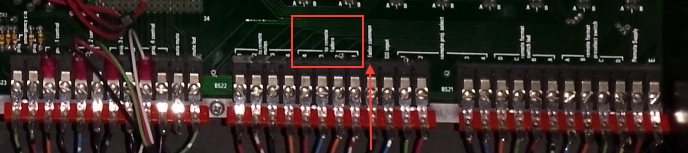
So when you select a particular remote by using either the GO button or "activate this fader", does the LED illuminate on the particular fader you just selected? If so, you've won half the battle...you've got the fader signal to the right fader. Then it is a matter of getting the fader common connected up right. If you DON'T have LED lit, then you are not getting the fader signal to the remotes and that is going to be on the CAT157 (Fader/Mute) board. I believe the CAT204 calls that return the "Fader Common" terminal versus the CP200 backplane that calls it "Fader Return." From each device's perspective, it is correct but from your wiring, it may seem confusing. Again, the Remote Fader Enable jumper MUST be set to enable on the CAT157. That is what turns on the switching logic to send the current to the appropriate remote fader.
The lit "Go" led is to signify that a particular projector is the active projector. Some ignore it since the "Activate This Fader" led is also lit on the active projector, except when it is muted. I always connect it. There is no magic there. If you, as a temporary experiment, connect the "special" terminal to the "E" terminal on the CAT204, the Go LED will light (to prove to you how it works). So, what you want to do is run that "special" terminal to the projector relays on the back of the CP200 (there are four of them on the back of the Control unit). To the right of those relays are the terminals with two terminals per relay. The relays are dry contact so you have to wire up a ground (E) for each projector you have. I merely bring a convenient "E" terminal over and daisy-chain it to each relay and then land the "special" terminal from each remote to the other terminal from the appropriate remote.
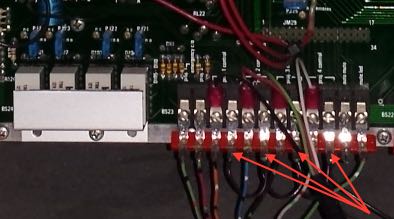
The arrows in the picture above show the black wire I used to daisy chain the "E" to each relay.
Posted by Tim Androes (Member # 9010) on 03-07-2017, 01:55 PM:
Steve. again, thank you for the response. I know I said I had checked my wiring but I went thru it one more time and found a mistake: I had swapped FADER 1 and FADER 2 on one end. So everything is working now on the one remote installed and i will be more careful when i hook up #2.
Posted by Tim Androes (Member # 9010) on 03-10-2017, 08:57 PM:
slightly off topic...Steve. do you have a source for the Schadow switches? i've googled the name but haven't come up with anything that looks right. one of my units has two switches that are dead (activate fader and mute)
Posted by Steve Guttag (Member # 268) on 03-11-2017, 12:03 PM:
ITT was the original Schadow switch. Kind of like Cannon was the original "XLR" connector (that was their part number). E-switch is the current supplier of that style of switch. They have them in colors as well as the CP200 or CP65 size (With and without 1 or 2 LEDs). I'm sure the usual suspects have them (Mouser, Digikey, Newark). A quick search showed the 5500 series. If nothing else, that should be a good start for you.
Posted by Tim Androes (Member # 9010) on 03-13-2017, 12:33 AM:
thank you, Steve. using E-switch in the search was much more productive. found a 5501MGRYRED at Mouser that looks correct.
Powered by Infopop Corporation
UBB.classicTM
6.3.1.2