This is topic Looking for some DCP expertise. in forum Film Handlers' Forum at Film-Tech Forum ARCHIVE.
To visit this topic, use this URL:
https://ft-forum.com/ft/cgi-bin/ubb/ultimatebb.cgi?ubb=get_topic;f=1;t=012131
Posted by Jered Gordner (Member # 9989) on 04-25-2017, 06:33 PM:
TLDR: I'm looking for assistance with settings on a DCP export for movie theater projector. I'm using Adobe Premiere Pro and my audio plays but the video is blank.
I would appreciate help from anyone who has experience in creating a DCP for use on a digital movie projector. I sit on the board of directors of a local non-profit (www.theberwicktheater.com), single screen movie theater. We've recently upgraded from 35mm film to a digital system and as such we're exploring our capabilities. Since we're a single screen non-profit, we try to keep as much work in-house as possible so we can minimize our expenses. In an interest to raise funds to help keep us in business we have started to look at doing on screen advertising.
I'm basically as green as one can be with Premiere Pro but I'm otherwise rather tech savvy and since anything tech related automatically defaults to my oversight, I was tasked with trying to get this sorted out.
Here's what I've done so far:
- Created a PowerPoint with our still images and recorded some audio for a few of the advertising scripts.
- Ran a macro that exports this out into a 1080p .wmv
- Imported the .wmv into my sequence.
- Imported royalty free music into my sequence.
- Ran a preview and verified everything was working as I wanted.
- Exported as a Wraptor DCP with the "2K Digital Cinema - Flat, 24 fps" preset.
- Imported the DCP into our projector (which I think is an SX-3000 Standalone IMB) with no problem.
- Noticed that DCP I imported says J2K 4K next to the file name but I definitely exported in 2k. Also, none of our actual movies are showing as 4K, just J2K.
- Ran the mock ad and discovered only the audio was coming out, screen stayed blank.
- Verified the file is the issue as any of our other stuff plays fine in the projector.
- Ran DCP in a trial version of neoDCP and verified the file plays audio and video in there.
- Banged my head against the wall for the past two weeks.
I recently moved from the theater and now live about two hours away so getting up there to test a DCP each time I create one isn't easy for me.
Does anyone have any idea what I could've done wrong? Thanks in advance!
Posted by Mike Blakesley (Member # 26) on 04-25-2017, 08:08 PM:
Does the .wmv file play with picture on a computer?
If so, then...I don't know anything about Premiere Pro or "Wraptor" so I can't help you with it, but I would suggest you download DCP-o-Matic and use that to create your DCP. It will work like a charm and probably be easier to use, as well.
On top of that, there are several people on this forum, including a couple of the developers of DCP-o-Matic, who will be able to answer any questions you might have about it (either here or by email).
www.dcpomatic.com
Posted by Leo Enticknap (Member # 534) on 04-25-2017, 08:27 PM:
The DCP plugin that comes free with Premiere is a pile of poop. It won't even let you create an ISDCF-compliant CPL name, let alone any other refinements. For my DCP creation, I use DCP-o-Matic if I don't need to edit the footage (or otherwise manipulate it in a way that DCP-o-Matic can't, e.g. deinterlace NTSC video footage properly), or the Cute DCP plugin for Premiere if I do need to edit the content significantly first.
There are other DCP export plugins for Premiere out there, but IMHO, Cute is very good value for the flexibility it gives you in terms of output options.
In your case, if all you're looking to do is create DCP-ized Powerpoint slide shows, DCP-o-Matic should be all you need. I would be inclined to output the Powerpoint slides as individual still images and import those into DCP-o-Matic, rather than have Powerpoint output a video file: your DCP will render a helluva lot quicker. However, if you need to preserve Powerpoint slide transitions (dissolves/fades, etc.), you will need to export a video file from Powerpoint and use that to make your DCP from.
Posted by Jason Raftery (Member # 6291) on 04-25-2017, 10:15 PM:
I've seen this before. I've never used Wraptor but have encountered a number of DCPs with invalid video MXF header values that were created by Wraptor. On your SX-3000, try playing the bad DCP and click the information button on the SMS. Then check to see what resolution the server thinks the content is supposed to be:
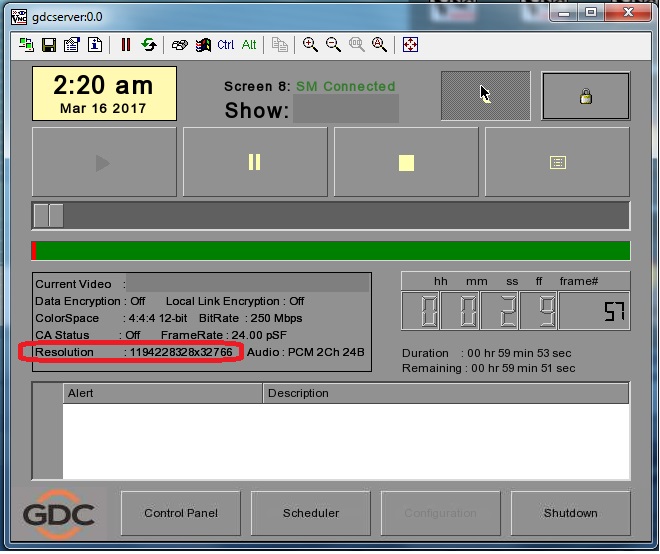
If you see a ridiculous value like the image above, the video MXF headers are your problem. That screenshot is from an older model GDC but the same thing can occur on the SX-3000. If you are not on a recent software release, ask your technician to update the server to version 9.0-build417 (or later) as there have been improvements made in some of the recent releases to overlook bad header values in certain cases, which may allow the DCP you made in Wraptor to play successfully.
Someone with more knowledge of Premiere / Wraptor than me may be able to advise exactly where in the program one can correct the incorrect header information, but I'd also suggest using a different program like DCP-o-matic or OpenDCP for DCP creation going forward.
Posted by Bobby Henderson (Member # 840) on 04-25-2017, 10:55 PM:
quote: Jered Gordner
I'm basically as green as one can be with Premiere Pro but I'm otherwise rather tech savvy and since anything tech related automatically defaults to my oversight, I was tasked with trying to get this sorted out.
The Wraptor DCP plug-in in Premiere Pro is the "lite" version. It is pretty limited compared to the full version that costs $700. I can't tell if QuVis and Adobe have done any updates on Wraptor DCP, even in the latest update of Premiere Pro (CC 2017.1) released last week. Cute DCP costs a lot less money. DCP-O-Matic is free and has more features than the Wraptor plug-in.
Jared, which version of Premiere Pro are you using? Do you have an older, standalone version of it or do you have an Adobe Creative Cloud subscription? If you have the latter I would consider building up your sequences directly in Premiere Pro or Adobe After Effects and build the project matching the resolution settings of the projector. Graphics re-sized from 1920 X 1080 to a DCP layout like 1998 X 1080 will look a bit soft and maybe have other problems.
Building a project in Premiere Pro and/or After Effects will give you far more creative control over titles, graphics and transitions than what PowerPoint can deliver. Lots of people like to use PowerPoint because they're just used to it (the US Army seems to live on PowerPoint). Title generation in Premiere Pro is improved and can take on certain functions directly from After Effects.
The user interface in PPro and After Effects can seem pretty disorienting at first. But there's lots of how-to videos on YouTube, Adobe TV and other places. You can start off with layered artwork in easier to use apps like Photoshop and Illustrator and bring that into PPro and AE to put it in motion.
Posted by Scott Norwood (Member # 30) on 04-26-2017, 07:57 AM:
Agreed with everyone else who says that Wraptor is a piece of garbage and that OpenDCP and DCP-o-Matic are both free and work well. There are some commercial software options as well that I have not used, but that is probably unnecessary for a simple advertising DCP.
Posted by Jered Gordner (Member # 9989) on 04-26-2017, 09:32 AM:
Wow, thanks for the quick responses everyone! I've been trying to chase this answer down for about a month now and have received no help at all, so I really appreciate all of your input. Since I'm actually going back home tomorrow and again on Saturday, I'm going to try to first play with DCP-o-matic tonight to try to create a package that will work.
I'm currently at work so I can't respond to each individual post at the moment, but I'll try to tonight. I just wanted to at least say thank you and let you all know I appreciate your insight!
Posted by Carsten Kurz (Member # 5396) on 04-26-2017, 09:57 AM:
Yup. 'Wraptor is a pile of poop' put's it down nicely.
Start feeding Powerpoint stills (export slides as images) into DCP-o-matic directly. It also seems that recent versions of Powerpoint do a much better job exporting to movie files than earlier versions did. If you don't have too delicate animations in them, movie export for DCP conversion should be doable now.
- Carsten
Posted by Jered Gordner (Member # 9989) on 04-26-2017, 10:12 AM:
Hmm..I'm wondering if I put myself into a bit of pickle now. I've created the majority of the project in PowerPoint which included the slides/transitions/some voice recording I did. I then added in music in Premiere Pro along with the video reel animation I found and the film leader at the beginning.
You can watch the video here: https://www.dropbox.com/s/cjel89hnw719diu/BTCCA 4-14-17 Ad DropBox Version.wmv?dl=0
Again, I'm entirely new to this whole thing and I'm just trying to save our theater a lot of money. Turns out, I really enjoy doing this too so I want to be able to figure out how to make it work so I can continue doing it.
Posted by Scott Norwood (Member # 30) on 04-26-2017, 12:34 PM:
As long as it is in some sort of reasonably common video format at 24fps, DCP-o-Matic should have no trouble converting it into a DCP with picture and sound properly synchronized. Remember that the soundtrack should be a cinema mix (mono or 5.1, not Lt/Rt) in order to sound "normal" when played in a cinema auditorium.
Also, you probably already know this, since you were able to load your earlier attempt at making a DCP apparently loaded, but most servers will only read ext2/3 or NTFS drives (and NTFS is not guaranteed). HFS+ and Exfat drives will be generally unreadable with D-cinema servers.
Posted by Jered Gordner (Member # 9989) on 04-26-2017, 02:20 PM:
quote: Scott Norwood
As long as it is in some sort of reasonably common video format at 24fps...
This brings up a new question: I've been exporting my DCP at 30fps...could that be my problem?
Posted by Monte L Fullmer (Member # 2797) on 04-26-2017, 02:28 PM:
That's what is great with DCP-o-Matic that the video can be 30fps and the conversion process takes this down to 24fps with no issues.
I've converted video via this program to play through DCinema units.
Posted by Scott Norwood (Member # 30) on 04-26-2017, 02:46 PM:
30fps is only legitimate for SMPTE formatted DCPs. Interop DCPs are 24fps only. If you somehow managed to create a 30fps Interop DCP, then, yes, you have a problem and it should not be expected to play anywhere. Some, but not all, servers will play a 30fps SMPTE DCP.
Assuming that you are showing normal movies that play at 24fps, you should probably make your DCP 24fps in order to avoid any potential glitches on screen at the frame rate change.
The real problem is Wraptor, though.
Posted by Dennis Benjamin (Member # 1137) on 04-26-2017, 04:40 PM:
quote: Scott Norwood
Agreed with everyone else who says that Wraptor is a piece of garbage and that OpenDCP and DCP-o-Matic are both free and work well. There are some commercial software options as well that I have not used, but that is probably unnecessary for a simple advertising DCP.
I've used these two programs (DCP-O-MATIC and OpenDCP) with no issues. They both work great.
Posted by Leo Enticknap (Member # 534) on 04-26-2017, 04:42 PM:
If Carl would consider it, a very useful addition to DCP-o-Matic would be a nag box that appears if you try to sslect Interop and a frame rate other than 24 in the DCP video tab, with text along the lines of: "The JPEG Interop standard for DCP encoding only allows the frame rate of 24. Depending on your server, media block/IMB and projector combination, an Interop DCP with a non-24 frame rate may play OK. But there is no guarantee that it will, and so if you need to create a DCP with a non-24 frame rate, you should select SMPTE unless you know of a specific reason why it has to be Interop, and have tested an Interop DCP with your chosen frame rate on the system(s) on which this DCP is to be played."
As it is, the software will let you create a non-24fps Interop DCP without any warning to someone who doesn't know, that it may be unplayable on many cinema systems in the field. There can be circumstances under which someone who knows the risks might want to do this: for example, I recently did with a 25fps transfer from PAL Beta SP that needed to be subtitled and was playing once on a series 1 projector and server that I made a test DCP for and so knew would play it. SMPTE, subtitles and series 1 projectors = I hope you can speaka da lingo, buddy, hence Interop. But IMHO, it would be good if the software tried to prevent someone from making a non-standard DCP like this by default.
Posted by Carsten Kurz (Member # 5396) on 04-26-2017, 05:05 PM:
There is a nag box - the trouble is, you can choose to have it not show up anymore, and while I personally hate nag boxes, I think it should always come up with warnings/hints.
I have received quite a few calls about DCPs playing in weird colors or stuttering, and the reason was that they received 50fps or 60fps source footage, and disabled the nag box when they created their first test DCP. So now, they always create 50 or 60fps DCPs without knowing...then they find out they play nicely on IMB systems, but not HD-SDI...
I guess I have to nag Carl a bit so he removes that check box allowing to disable the nagging...
- Carsten
Posted by Carsten Kurz (Member # 5396) on 04-26-2017, 07:37 PM:
Jered - what server and projector do you create these DCPs for? Be as precise as possible.
- Carsten
Posted by Jered Gordner (Member # 9989) on 04-26-2017, 07:47 PM:
I wasn't part of the ordering process but I'm remoted into the system now and I see NEC NC1200C and SX-3000 Standalone IMB.
Also: I was mistaken about outputting at 30fps. The source file is 30fps but the output is 24fps.
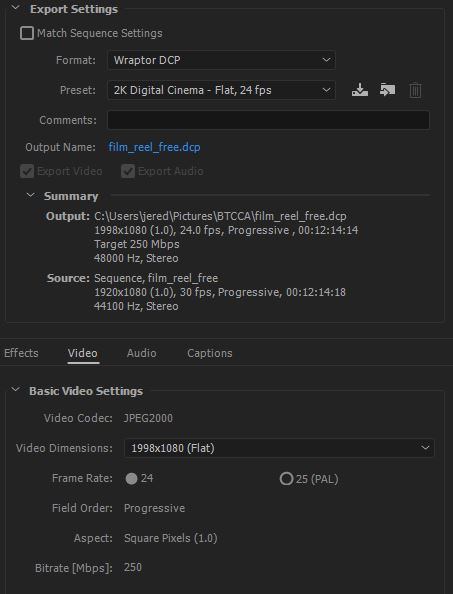
Also - If anyone has the availability and interest, I can do a Skype call to share my desktop and let you see what's happening in real time. I can also open a remote connection to the theater's device and manipulate settings there as well.
Posted by Carsten Kurz (Member # 5396) on 04-26-2017, 08:34 PM:
I looked at the video and it appears fine to me. As long as you are doing this for your own cinema only, you can do whatever works for you. The SX3000 will do 30fps.
If you start doing this for other cinemas, you should stay at 24 fps, because some cinemas are limited to 24fps.
I suggest you download DCP-o-matic and throw your WMV to it. Set DCP-o-matic to SMPTE, create a 2k 30fps DCP with stereo audio, and try it on your system.
Do you know wether you can create the Powerpoint export at 24fps? It would be better to keep all source, intermediate and final footage at the same frame rate. Audio should be 48KHz, but DCP-o-matic will resample if needed. For this kind of work, stereo is fine. If you stay in Premiere for the finishing, you could as well route the voice audio to a separate channel and create a discrete center channel, which is a nice to have, but not a must in this case.
Put the finished DCP folder onto an NTFS formatted USB stick and try to ingest it. Note the DCP is not the full DCP-o-matic project folder, but a single folder within it. If you choose 'Show DCP' from DCP-o-matics 'Jobs' menu, you will see exactly that folder being highlighted.
I am kind of a DCP-o-matic promoter, but at our cinema, we do the preshow stuff directly from Powerpoint. We play it directly from a PC sitting next to the projector through DVI/HDMI. The same PC is playing iTunes playlists during admission.
Powerpoint is a pain in the ass in general, but it is very handy for this task - it will render to a secondary monitor, which can be set to a black background, so no desktop symbols etc. will ever show up on screen. Plus, it is very easy to add, remove, or shift individual slides day to day. You can even correct a typo or change a date or misspelling while the show is running. Also, we receive many slides already in PP format from our advertising clients, so we can just copy/paste them in. You do not need to put special music into powerpoint, as iTunes is playing in the background anyway on our system. Having an iTunes playlist on shuffle allows for more variation.
- Carsten
Posted by Jered Gordner (Member # 9989) on 04-26-2017, 11:19 PM:
I looked and I didn't find an outright answer on whether I can export a 24fps PowerPoint file, however I did what you said and exported a 2K SMPTE DCP. I did drop it down to 24fps as a trial run. I also ran it as 5.1 (tested in my own home theater and the audio ran perfectly) since our theater is 7.1 and I'd like to try to take full advantage of that. I'm going to bring this file with me tomorrow and if I have time I can hopefully test it out and report back with results in the evening. Thanks again to all for your help!
Posted by Carsten Kurz (Member # 5396) on 04-27-2017, 06:12 AM:
You will probably see stuttering in the transitions due to the 30fps to 24fps conversion. There is no clean way to do this. Just try both versions and then use what you like. In your own cinema, you should be fine with a 30fps SMPTE DCP.
I always avoided Powerpoints video export in older versions, as it delivered grotesque results. A few days ago tried it with a more recent version and the result looked much better. I can't remember though wether there was an option for frame rate selection.
- Carsten
Posted by Leo Enticknap (Member # 534) on 04-27-2017, 10:14 AM:
Our publicity officer often makes slide shows for walkins by exporting .wmv Powerpoint from Office 2013 (for Windows), which creates DCPs that look good to me, as long as I don't try to change the frame rate (which will make the transitions look jagged).
The Powerpoint video export option won't let you change the frame rate (it will only do 30), but it will allow you to select the resolution from two options. It exports at something like 1440x780 by default, but you can select 1920x1080, and I have to keep asking her to do that. I then make a F-178 DCP from it, stretch it to F or pillarbox it to S-178, depending on what is needed to avoid having to do a lens and/or masking change immediately after it.
Jared - I noticed from your screen grab that you're rendering your DCPs at 250mbps. That is way bigger than you need for a slide show DCP, and will give you lots of unnecessary gigabytes to wrangle. Unless this is a fixed value that the free version of Wraptor won't let you change, I'd suggest lowering it. As a rough rule of thumb I've found by trial and error, Powerpoint-derived DCPs look fine at 75mbps in our smaller screen (about 30ft across in 1.85) and 100 in our larger one (40ft across in 1.85). Below those, you start to see digital noise, especially in decent resolution photos that have been used in the original Powerpoint.
I have gone below those bitrates when I've had to do last minute DCPs to upload from home into the server to save upload time, and if there is just text and non-photographic images in the Powerpoint, you can get away with it.
quote: Carsten Kurz
There is a nag box - the trouble is, you can choose to have it not show up anymore, and while I personally hate nag boxes, I think it should always come up with warnings/hints.
I'd suggest that the nag box system perhaps wants to distinguish between issues that might degrade the viewing/listening experience, but won't stop a DCP from playing at all (e.g. the nag you get when you try to make a DCP in an aspect ratio other than F or S, or one with 2.0 audio), and one which will potentially stop the DCP from being played at all (e.g. an Interop DCP with a frame rate that isn't 24). Maybe nags for the former could be disabled by user choice, but for the latter you have to click an "I understand the risks" button before it lets you start to render, like the one that appears when you enter about:config in Firefox.
quote: Carsten Kurz
As long as you are doing this for your own cinema only, you can do whatever works for you.
This is a very important general rule, the violation of which gives us trouble at many of the regular festivals we host.
Professional DCP-making post houses, e.g. Deluxe/Technicolor, Indie DCP, Simple DCP, etc., ensure that their DCPs are playable anywhere in two ways: they author them to the absolute letter of the relevant DCI, ISDCF and SMPTE requirements, and they then test them on a variety of servers, media blocks/IMBs and projectors at their facility before they ship out. Someone rendering a DCP on their home or booth PC doesn't have the ability to do the latter.
So, as you say, if the DCP is only going to play in your booth, make it whichever way you like, test it in your booth, and if it plays as you want it to, you're good to go. But if it has to play anywhere else, you really have to be careful not to go off piste with any of the variables (bitrate over 250, Interop at 25fps, on a drive that isn't MBR + ext2 or ext3, etc.), because if you do, you're at the mercy of whoever made the equipment in the booth it's going to, to support the non-compliant element you introduced into the authoring process.
I can't tell you how much pain the DCPs we receive from semi-professional moviemakers, doing all the post on their Macs in their bedroom, who don't understand what most of the options in DCP-o-Matic do, don't bother to take the time to educate themselves, don't know that many DCP servers can't read exFAT drives or ones that have an EFI partition at the start, etc. etc., cause us. A big part of this problem is that, unlike the professional post houses, they don't have cinema equipment to test their DCPs on (and neither do the print traffic operations of all but the most lavishly budgeted festivals), and so have no way of knowing that their DCP won't work until it gets to the theater.
Posted by Carsten Kurz (Member # 5396) on 04-27-2017, 02:39 PM:
Amen!
Posted by Jered Gordner (Member # 9989) on 04-28-2017, 01:26 PM:
I knew I came to the right place, you guys are just a deep well of amazing and great information. I've taken the majority of the suggestions here and was able to successfully create a DCP that actually works in our theater.
On top of your help, I did a little research of my own and was able to get a 5.1 audio track as well! I had to make a second working copy though because for some reason the first one I made tacked on an additional 3 minutes of just blackness. No idea what did that but I re-did the DCP and it's perfect now.
Leo - Regarding your comment on the 250mbps, that is no longer so when using DCP-O-Matic. It's right around 100 now and everything still look flawless.
THANK YOU ALL SO MUCH!
Posted by Mike Blakesley (Member # 26) on 04-28-2017, 02:35 PM:
I think I can speak for everyone when I say, "Glad to be of help" and "Welcome to the forum!"
Powered by Infopop Corporation
UBB.classicTM
6.3.1.2