This is topic intermittent hum on optical mono in forum Film Handlers' Forum at Film-Tech Forum ARCHIVE.
To visit this topic, use this URL:
https://ft-forum.com/ft/cgi-bin/ubb/ultimatebb.cgi?ubb=get_topic;f=1;t=012428
Posted by Anhtu Vu (Member # 7689) on 05-04-2019, 12:20 PM:
I'm getting an intermittent hum when playing a 35 mm with mono optical send track.
I will do an azimuth and focus check of the soundtrack lens, anything else I should be concerned with ?
On a side note, my aging oscilloscope just died, are the sound card / software oscilloscope any good ?
Can anyone recommend a new hardware or software oscilloscope ?
Thanks
Posted by Gordon McLeod (Member # 33) on 05-04-2019, 12:22 PM:
I use the Rigol ds1054
Posted by Anhtu Vu (Member # 7689) on 05-04-2019, 12:26 PM:
Hi Gordon,
The Rigol will be adequate for my calibration needs ?
I'm in Montreal, where did you buy yours ?
Thanks
Posted by Stephan Shelley (Member # 8587) on 05-04-2019, 12:29 PM:
Check the lateral guide adjustment with buzztrack. Check for ware and play in the lateral guide assembly. I have had worn out assemblies where the film wandered back and forth getting sprocket or frame line noise in the system. If one side of the flanged rollers in the lateral guide is spring loaded make sure it moves freely so it keeps the film against the fixed side.
Posted by Dave Macaulay (Member # 813) on 05-05-2019, 08:19 AM:
The obvious suspect is light from a fluorescent or LED lamp getting to the pickup, have you eliminated that?
Posted by Gordon McLeod (Member # 33) on 05-05-2019, 09:28 AM:
Electro-Meters Company Ltd.
Technology For All Your Measurement Needs
Ph: (905) 428-3413 x:206
Toll Free: (800) 617-3413 x:206
Posted by Anhtu Vu (Member # 7689) on 05-05-2019, 10:13 AM:
quote: Dave Macaulay
The obvious suspect is light from a fluorescent or LED lamp getting to the pickup, have you eliminated that?
You mean an outside light source ?
The projectionist uses a small fluorescent light mounted on a pivoted arm to thread the projector, otherwise the booth is fairly dark. I will check.
Posted by Paul Finn (Member # 10726) on 05-05-2019, 12:42 PM:
I second eliminating all sources of direct or reflected light, especially fluorescent light (the worst), into the solar cell pick-up area of the projector sound head. Even 60 Hz hum can be introduced from direct exposure to incandescent light. This precaution also applies for reflected picture light into the solar cell area from an incorrectly angled or unshielded window port glass.
Paul Finn
Posted by Gordon McLeod (Member # 33) on 05-05-2019, 12:48 PM:
What is the make of soundhead and reader and what is the processor
if it was worklight hum i would believe it would occur in stereo as well as mono tracks
Posted by Sam D. Chavez (Member # 1841) on 05-05-2019, 01:11 PM:
Back to basics here. Does it only hum in Mono format? Does the film need to be running to have hum? If so, cover the exciter lamp/LED light source with a piece of paper. Does it still hum? etc.
Posted by Anhtu Vu (Member # 7689) on 05-05-2019, 04:22 PM:
quote: Gordon McLeod
What is the make of soundhead and reader and what is the processor
if it was worklight hum i would believe it would occur in stereo as well as mono tracks
Processor is CP650, century sound head, Kelmar reader.
According to the projectionist, the hum is only on Mono print.
I would be very surprise if it comes from outside light source as we have not change our ways of working for the past 8 years.
quote: Sam D. Chavez
Back to basics here. Does it only hum in Mono format? Does the film need to be running to have hum? If so, cover the exciter lamp/LED light source with a piece of paper. Does it still hum? etc.
Hum only on Mono format.
Yes film needs to be running to get the intermittent hum
Will try covering the exciter lamp when I have access to the booth
Posted by Gordon McLeod (Member # 33) on 05-07-2019, 09:00 AM:
So it is a excitor not LED type of reader Is it a cinemecanica projector
If so sometimes i have had stray reflections inside the bells of the sound drum reflect perfs back into the reader
Posted by Scott Norwood (Member # 30) on 05-07-2019, 09:44 PM:
Does it only hum in mono when playing a particular print? Or do you get hum if you play a Dolby print in a mono format? If the former, then it is possible that your print has shrunk to the point where the soundhead is scanning perfs.
What is the frequency of the hum? If 60Hz or 120Hz, then it's probably an AC or fluorescent light problem. If 24Hz or 48Hz, then it is probably reflected light from the lamphouse. If it is 96Hz, then it is probably perfs being scanned (or a soundtrack that ran off of a sprocket at some point).
One situation that I have seen is that leaving the soundhead door open is often an invitation to weird light reflections that affect the sound. Always leave the door closed when it does not need to be open.
One more thought: if you are using an exciter lamp instead of an LED reader, make sure that the power supply is putting out good DC and is not in the "AC/Emerg" position.
Posted by Stephan Shelley (Member # 8587) on 05-08-2019, 04:10 PM:
If it is a specific print check for damage in the optical soundtrack. Also I have seen prints made from shrunken negative where the sprocket holes get printed at the edge of the soundtrack area. May West films come to mind.
Posted by Anhtu Vu (Member # 7689) on 05-09-2019, 06:51 PM:
Finally had access to the booth for an hour today.
Here's my finding so far:
- When I turn on everything (projector, lamp etc)...no noises
- When I run the projector with NO film, I hear noises...not necessarily low cycle hum but noises from the 35 mm running. Sounds like the noisy acoustic in the booth is getting picked up.
Posted by Marcel Birgelen (Member # 6801) on 05-09-2019, 07:42 PM:
quote: Anhtu Vu
When I run the projector with NO film, I hear noises...not necessarily low cycle hum but noises from the 35 mm running. Sounds like the noisy acoustic in the booth is getting picked up.
That doesn't really make any sense to me, since it's an optical scanner. How would the sound of the booth end up in your sound processor other than via an actual microphone?
I think that some light leaking into the cell, some form of interference and/or badly grounded equipment are more likely culprits.
Posted by Randy Stankey (Member # 64) on 05-09-2019, 07:57 PM:
You have tried operating the projector and sound with no film.
Now try operating the sound with no film and the projector motor OFF.
I had a similar problem, years ago, in a theater I serviced in North Carolina.
If the sound is clean with the projector motor turned off you might have a case where vibrations are traveling through the frame and gear train of the projector, causing interference in the sound due to vibration of the exciter and/or cell.
I spent a whole night going through a projector with such a problem until I gave up and called my boss at 5:00 a.m.
He answered quickly... Change the drive belt.
I was like, "Wha?..."
He said, "Change the damned belt and call me back."
Sure enough, the projector belt had frayed and the rough edges were rubbing against the pulley flanges, causing vibration that propagated through the projector frame and appeared as noise in the sound system.
Changing the belt solved the problem instantly.
I called the boss back and he said, "See! I told ya'!"
The name of the phenomenon, I believe, is "Microphonics."
i.e. Anything that causes vibration in the projector frame or gear train can, in turn, cause the sound reproducer parts to vibrate, causing distortion or noise in the sound output.
I don't know if it's true in your case but it's a simple test.
Worth a try. ![[Smile]](smile.gif)
Posted by Marcel Birgelen (Member # 6801) on 05-10-2019, 05:58 AM:
You know Randy, your story even seems to make sense. ![[Wink]](wink.gif)
I can get how it could pickup some frequencies that way, although, I doubt it will ever work as a microphone, without a very dedicated setup to achieve exactly that.
Posted by Gordon McLeod (Member # 33) on 05-10-2019, 09:55 AM:
Depending on the make of soundhead you might try running a bonding ground wire from the earth ground of the porocessor to the cell bracket Also if this a solar cell and not a reverse scan with LED change the excitor lamp as the filament maybe vibrating a bit inducing modulation into the cell
Posted by Sam D. Chavez (Member # 1841) on 05-10-2019, 11:07 AM:
I don't know if the soundhead model has been identified but Cinemeccanica V5 had a tendency to shake the solar cell/LED bracket while running due to the bracket being cantilevered around the large sound drum. Makes an odd LF ringing sound.
Posted by Helmut Maripuu (Member # 2281) on 05-13-2019, 01:14 PM:
Do you turn off the new LED ![[Big Grin]](biggrin.gif) lamp you purchased for the projector boot?
lamp you purchased for the projector boot?
Posted by Anhtu Vu (Member # 7689) on 05-13-2019, 01:59 PM:
quote:
You have tried operating the projector and sound with no film.
Now try operating the sound with no film and the projector motor OFF.
I had a similar problem, years ago, in a theater I serviced in North Carolina.
If the sound is clean with the projector motor turned off you might have a case where vibrations are traveling through the frame and gear train of the projector, causing interference in the sound due to vibration of the exciter and/or cell.
I spent a whole night going through a projector with such a problem until I gave up and called my boss at 5:00 a.m.
He answered quickly... Change the drive belt.
I was like, "Wha?..."
He said, "Change the damned belt and call me back."
Sure enough, the projector belt had frayed and the rough edges were rubbing against the pulley flanges, causing vibration that propagated through the projector frame and appeared as noise in the sound system.
Changing the belt solved the problem instantly.
I called the boss back and he said, "See! I told ya'!"
The name of the phenomenon, I believe, is "Microphonics."
i.e. Anything that causes vibration in the projector frame or gear train can, in turn, cause the sound reproducer parts to vibrate, causing distortion or noise in the sound output.
I don't know if it's true in your case but it's a simple test.
Worth a try. [Smile]
Tested sound with no film and projector off. Dead silent.
I will definitely give your suggestion a try.
Thanks
Posted by Randy Stankey (Member # 64) on 05-13-2019, 07:16 PM:
It might be a bad belt but it's not necessarily so.
Microphonics can be caused by anything that causes vibration.
It could be a loose screw or bolt. It could be a random part that has come loose. It could even be some external device that's vibrating through the floor and propagating through the projector.
Do check the belt. It's the easiest thing to look for.
However, you should also check to be sure that everything that is supposed to be tight is properly locked down.
Posted by Anhtu Vu (Member # 7689) on 05-17-2019, 02:36 PM:
The motor boating problem was fixed by changing the reverse scan assembly reader.
The hum was caused by lateral misalignment. Unfortunately, I still can't get it as good as projector 1 (to the point where the buzz track sound completely disappear) and as a result SR sound is not as focused (a bit smeared).
Maybe after years of wear and tear perfect alignment is no longer possible. Anyways, I would like to change the whole assembly...anyone knows where I can get this piece (pic) minus the reverse scan assembly reader ? It's from a Century sound head.
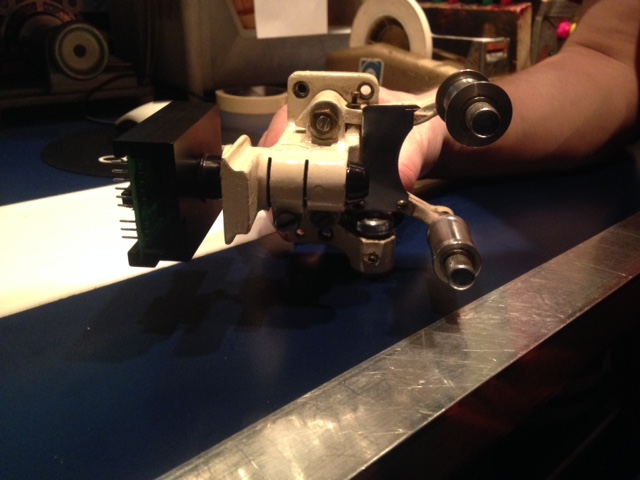
Thanks
Powered by Infopop Corporation
UBB.classicTM
6.3.1.2