This is topic Dolby CP500 Output connection in forum Film Handlers' Forum at Film-Tech Forum ARCHIVE.
To visit this topic, use this URL:
https://ft-forum.com/ft/cgi-bin/ubb/ultimatebb.cgi?ubb=get_topic;f=1;t=012448
Posted by Steve R Pike (Member # 6238) on 06-22-2019, 05:39 PM:
Hi. I posted earlier about acquiring our old 35mm system for my home cinema. I've just purchased a Dolby cp500 from eBay and having a look at the output connection to amp/speakers.
Having never actually installed any equipment, can any one advise what I need to use to connect the cp500 to an amp/speakers. I see that it says to use a pheonix connector but I'm sorry to say that I don't know what that is! And how it can connect to the speakers.
I realise that this question may sound silly, but having never seen or used a cp500 setup I'm just struggling to work it out!
Any help or info is greatfully received.
Steve
Posted by Stephan Shelley (Member # 8587) on 06-22-2019, 06:16 PM:
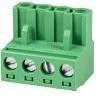
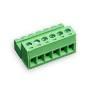
It should come with the connector. It is a green plastic strip and there are hole/clamps for each wire with a small screw to close the clamp. You will need a small strait blade screw driver to open/close the wire clamp. While you do not have to it works best if the wires are tined. Images below:
Posted by Sean McKinnon (Member # 612) on 06-22-2019, 06:33 PM:
I would not advise tinning the wires. While it may make them easier to insert it will interfere with the bond created by the connector.
https://www.eptac.com/ask/when-to-tin-and-not-tin-wires/
Posted by Steve R Pike (Member # 6238) on 06-23-2019, 04:32 AM:
Thanks both for your replies. Ordered a couple of connectors so they should be here this week.
Sorry, one final question - am I right in thinking that the wires coming out of the processor are connected to an input on an amp and then out to the various speakers?
For the home cinema setup I was thinking of using a Denon receiver amp (something like
Denon AVR-X250BT) or do you have a suggestion for something else?
Apologies for the questions - i can show a 35mm film with my eyes closed but I've never setup the equipment that goes with it ![[Smile]](smile.gif)
Posted by Don Furr (Member # 1469) on 06-23-2019, 09:19 AM:
Page 138 of the CP500 manual begins describing the connections you need to use in your project.
http://www.film-tech.com/warehouse/manuals/DOLBYCP500.pdf
Posted by Carsten Kurz (Member # 5396) on 06-23-2019, 09:54 AM:
It appears that this Denon AV receiver only offers stereo analog inputs:
https://assets.denon.com/assets/images/productimages/AVRX250BT/AVR-X250BT_slider5_eu.png
- Carsten
Posted by Steve R Pike (Member # 6238) on 06-23-2019, 10:40 AM:
Thanks both ...
Any suggestions on a suitable AV receiver and what to use to connect the outputs of the cp500 to the AV receiver (RCA?)? I was hoping to use the same AV receiver for the video projector I am going to use for Bluray presentation.
Thanks
Posted by Jonathan Wood (Member # 4614) on 06-23-2019, 03:57 PM:
Hi Steve ,
As Stephen above pointed out you need the connector pictured connected to RCA phono plugs (the number depends on whether you’re going to run digital or analogue.) Which you then simply plug into your AV receiver/ home cinema amp. You just need to make sure the amp has separate analogue inputs for L/C/R etc . The other issue you need to be aware of with CP500 is whether or not it’s configured to run in bi amp mode , if it is it will sound awful when you play it through your home cinema amp. It can be set to non bi amp very easily by moving a jumper on the main board, sorry I can’t remem the exact procedure but it’s in the manual. Jon
Posted by Steve R Pike (Member # 6238) on 06-24-2019, 11:17 AM:
Hi Jonathan
Thanks for your reply. I've got some of the connectors on their way in the post and found an amp that can take multi channel RCA (Denon AVR 1908) but need to wait until payday to buy it!
Hopefully the processor works fine, but will bear that in mind about the bi-amp if the sound is awful.
Thanks
Steve
Posted by Randy Stankey (Member # 64) on 06-24-2019, 09:17 PM:
quote: Sean McKinnon
I would not advise tinning the wires. While it may make them easier to insert it will interfere with the bond created by the connector.
I was just about to say that IPC standards forbid tinning of wires in threaded or clamp fasteners:
1) The connection isn't as sound because the fastener can't "bite" into the wire as well.
2) The wire is more likely to break off.
3) Tinning wires, unnecessarily, can encourage the growth of dendrites in some circumstances. (AKA: "tin whiskers.")
Posted by Gordon McLeod (Member # 33) on 06-24-2019, 10:32 PM:
I always use ferrules on wires for a terminal
Posted by Gary A. Hoselton (Member # 3447) on 06-25-2019, 12:13 AM:
In the early 1980’s a congressional committee was touring a kidney dialysis center in Washington DC and, with press cameras rolling, an artificial kidney machine commenced emitting smoke and flames. It was an older machine, and stranded wire to the power switch had been tinned and wrapped around each screw. Over some years the tinned area relaxed, the connections commenced arcing, stuff overheated, and we, the manufacturer, suffered the embarrassment of the demise of our product being seen on dinner-time TV news in the nation’s capitol. We initiated a voluntary recall and quickly corrected those of that model still in use, and received no penalties.
Regarding your new CP500, power it up and see that the display is working OK, no black areas large enough that you can't read some of it. Otherwise, a fine sound processor. You may need a software update downloaded, to latest version.
Posted by Marcel Birgelen (Member # 6801) on 06-25-2019, 07:37 AM:
quote: Gordon McLeod
I always use ferrules on wires for a terminal
Depends on a whole lot of factors. I usually like using ferrules for stranded wire, but I often find them to be crimped badly or they choose the incorrect size, where they slide right off the wire...
Some of those clamp-style connectors nowadays also don't work right with ferrules, because they can't really get a grip on the ferrule.
Posted by Mark Gulbrandsen (Member # 72) on 06-25-2019, 11:05 AM:
What Sean said! Also try to get the gold pated version if possible...
Mark
Posted by Scott Norwood (Member # 30) on 06-25-2019, 11:28 AM:
Note that those Phoenix connectors come in different sizes, with different spacing. I know this because I usually order the wrong ones....
Posted by Steve R Pike (Member # 6238) on 06-30-2019, 04:40 PM:
Hi All
Cp500 and phoenix connectors delivered and all seem to be ok.
Quick question - the software seems to be on version 1.60. Would that be the latest version? If not, any idea on where I can get the download for software update?
Thanks all.
Posted by Don Furr (Member # 1469) on 06-30-2019, 10:54 PM:
Both 1.65 and 1.65EX firmware can be found in the Warehouse section of this Forum under the "software" section.
Posted by Steve R Pike (Member # 6238) on 07-01-2019, 02:11 PM:
Thanks ... I'm getting closer!
Ok so I've tested the non sync today via my Denon receiver (not actually getting 35mm projector until later this month) and all I get is very muffled bass. I suspect that this is the bi-amp issue I was told about.
The audio is very muffly and just bass and has no high frequency.
Connections are:
RCA into non sync 1
Signal coming out as per digital display
Output out of phoenix connectors to rca into Denon
But I just have a muffled sound
Any ideas? I feel like I'm getting there but seem to have stumbled again here.
Does anyone have any ideas of this the bi-amp issue and how to revert it out of bi-amp?
This forum is amazing so thank you again for all your help so far. I even found out how to find out the password that the previous cinema had set it to from this forum.
Steve
Posted by Steve R Pike (Member # 6238) on 07-01-2019, 05:08 PM:
Sorry - me again!
I've just read online about the cat 683 card which I have installed, which appears to be an optional card.
Should I disable this via a jumper on card 682?
Posted by Carsten Kurz (Member # 5396) on 07-01-2019, 06:21 PM:
683 is the crossover, so that is quite probably your issue. Do you have all the documentation on the CP500? I guess you need to read through all of that sooner or later anyway. A used CP500 is not PlugAndPlay.
- Carsten
Posted by Steve R Pike (Member # 6238) on 07-02-2019, 02:35 AM:
That's what I thought. I had a quick look this morning but it appears that the jumpers on the 682 are set to the up (No) position for LCR crossover.
I've had a read through all the material I can find but like you say it's definitely not plug and play.
I'll have another play tonight
I would have thought that even if the 682 cards are set to NO for crossover then the higher frequency would come out of the main output connector.
How easy is it to remove the cards? I tried to remove them but they seem either just stiff or there's a special way to remove them.
Posted by Carsten Kurz (Member # 5396) on 07-02-2019, 04:16 AM:
I guess you have seen this document?
http://www.film-tech.com/warehouse/manuals/DOLBYCAT683.pdf
- Carsten
Posted by Steve R Pike (Member # 6238) on 07-02-2019, 04:54 AM:
I have yes, I'll try and remove the cards when I get home. To remove a card is it simply just to pull it out or do I need to unclip it somewhere first?
Posted by Dave Macaulay (Member # 813) on 07-02-2019, 06:24 AM:
They just pull out, there is a pull hole at the bottom of the card and the 500 came with a "crochet hook" pull tool clipped to the inside of the chassis right side... but the clip glue often decays and it falls down ... if the tool wasn't already lost. They take a strong tug particularly if undisturbed for decades.
Not 100% sure about the crossover card but for the SR-D cards the system checks what is present on boot and adapts itself to not use what isn't there. You can remove all the cards labelled for digital and save power supply load, this is pretty common for a 500 at a screen converted from 35 to digital projection: a Cat685 D-A card is added and those SR-D cards get removed. Probably you remove the xo card and it just reverts to full range.
Posted by Steve R Pike (Member # 6238) on 07-02-2019, 12:11 PM:
You guys are awesome.
I've removed the 683 xo card and sound is crystal clear. It really did take some force to take the card out! It was really stuck in there ... With a date of 1994 printed on the circuit board!
Thanks all for your help. Now to wait for the 35mm to arrive and to test a film!
Thanks all again.
Steve
Powered by Infopop Corporation
UBB.classicTM
6.3.1.2