This is topic How to find out if Cat 773 board is installed in forum Film Handlers' Forum at Film-Tech Forum ARCHIVE.
To visit this topic, use this URL:
https://ft-forum.com/ft/cgi-bin/ubb/ultimatebb.cgi?ubb=get_topic;f=1;t=012506
Posted by Anhtu Vu (Member # 7689) on 11-16-2019, 09:32 AM:
How do i find if a CP650 has the Dolby Digital board installed ?
I'm looking to buy a CP650 and found a unit on Ebay. The seller mentioned that when he engage Format 10, it says "Reverted Optical Dolby SR", i assume this means the unit reverted to SR because the SRD track was unreadable.
Doe this mean this unit has the UD/650, which includes a Cat. No. 773 plug-in circuit board ?
EDIT: Never mind,found the info i was looking for.
Thanks
Posted by Jim Cassedy (Member # 4115) on 11-16-2019, 09:56 AM:
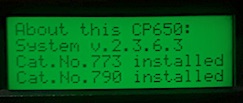
If you step through the menus, there are several "About This CP650"
pages. One of them lists the cards that are installed in that unit.
I've done this multiple times, but I need to have a CP650 in front of
me to remember how to do it. I know the procedure is in the CP650
manual, which you can find in the 'Warehouse' section of the FT website.
Posted by Leo Enticknap (Member # 534) on 11-16-2019, 10:14 AM:
My memory is hazy, too, but I think you have to push one of the DIP switches on the front panel upwards (6?), to put the 650 into "f*** with the configuration and tuning" mode, and then press menu multiple times until the display shows you what option cards are installed.
Alternatively, you can hook your laptop to either of the two RS232 jacks (front or back), and run the CP650 setup app - it tells you on the front page. However, if your laptop doesn't have an RS232 port (very few made after around 2010 do), you'll need an RS232 to USB converter to do this.
Posted by Jim Cassedy (Member # 4115) on 11-16-2019, 04:39 PM:
quote: Leo Enticknap
I think you have to push one of the DIP switches on the front panel upwards (6?)
I wasn't sure either, so I pulled my spare 650 out from under my bed & checked.
> "NO" - - you can find the "Status Screens" from the main menu without having
It's one of the last items that comes up as you go through the menu choices.
" ACUTAL PHOTO ! "
Posted by Leo Enticknap (Member # 534) on 11-16-2019, 07:56 PM:
Thanks, Jim. I have to deal with so many different servers, audio processors, automation controllers, etc., that my memory of many operations isn't good enough to give a precise description without having the unit in front of me.
Making changes via the front panel buttons is so fiddly and counter-intuitive that about the only thing I ever do that way is to set the IP address. If my imperfect memory serves me correctly (which again, it probably doesn't), that is the only significant function you have to do using the front panel buttons, and cannot do via the Windows configuration app that uses the RS232 connection.
Posted by Stephan Shelley (Member # 8587) on 11-20-2019, 04:15 PM:
Leo, you can set the IP address via the ap but there is a special menu via the action or view drop-down menu. I forget which. It is not done through the normal tabs on the main screen.
The one thing you can not do via the ap is set a button for 7.1 Surround. That has to be done via the front panel but the main menu not the setup one that you have to flip a dip switch to get to.
Powered by Infopop Corporation
UBB.classicTM
6.3.1.2