
I had my cable running from the outlet to a VCR (about 25 ft apart) and then RCA video out to a reciever, then into an LCD projector. The projector is up on a shelf, and the VCR is in an open cabinet with the reciever.
I noticed some translucent horizontal lines, (about 3 or 4, one being thick) scrolling vertically through the picture on every channel, and on the A/V input screens of the VCR. Also, this would occur on any other input selected through the reciever, such as a video game console (independent of the VCR) AND was apparent on the different inputs on the projector, even though nothing was plugged into them. As soon as the coaxial cable was unplugged, this would disappear completely.
I tried changing the orientation and location of the cable, the cable itself, bypassing the reciever (going directly from the VCR to the projector), running a longer cable from a different outlet (bedroom), and finally swapping out the VCR with the one in the bedroom.
The last thing worked! For a while, anyway. The horizontal lines were gone on the new VCR, and I brought the old one into the bedroom. The old one didn't show the line problem in the bedroom (this was never a problem here), but it did when I ran the cable from the bedroom outlet to the screening room. Strange... Anyway, later on the new VCR I put in there started doing the line thing later in the evening, again on all channels and inputs, and disappears when the cable is unplugged.
I thought some electrical appliance that turns on and off intermittently may be causing it, but the problem remained for a good hour or so. Nonetheless, I turned off the air conditioner and the refrigerator, but that didn't help.
Anyone have any ideas before I call the cable company? The box outside has no cover, but if the problem was there, it should be on all the outlets, correct? Maybe hooking up cable in the screening room was a bad idea?
=TMP=
Did the interference only come back when you re-attached the old VCR to the cable system?
If you plug everything in the same receptical and your problem goes away, there is probably a gound loop. Ground on one receptical may not be the same as on the other for one reason or another. The coax shield may be carrying a minute amount of line current, and that will create hovac with the video signal.
After reading William's post below, there could be an impedance mis-match. Proper termination can do wonders.
By the way, the coax you are unplugging...are you talking about the coax that leads to the dish? Check for corroded conditions on the F connector at the LNB, and put the unit that supplies power to the LNB on the same phase of AC power as the rest of your devices. The "Room to Room" thing sounds like a crappy connection somewhere, or a ground loop developing through the coax connections.
Cable guy came out and temporarily disconnected the ground where the cable enters the house, noting that the bars became fainter, but did not disappear. He said that this showed the cable ground for my house had a slight potential relative to true ground, and needed to be checked. Since the bars did not totally disappear, he said there was still a ground loop or AC interference, probably up the line in one of the line amplifiers. After checking all the ground connections (ultimately to the cold water main) in the home, he put in an order for the line crews to check out the amplifiers upstream. The bars completely disappeared within the week.
So, bottom line, call your cable company.
------------------
John P. Pytlak, Senior Technical Specialist
Worldwide Technical Services, Entertainment Imaging
Research Labs, Building 69, Room 7525A
Rochester, New York, 14650-1922 USA
Tel: +1 585 477 5325 Cell: +1 585 781 4036 Fax: +1 585 722 7243
e-mail: john.pytlak@kodak.com
Web site: http://www.kodak.com/go/motion
I don't remember if the problem came back before or after re-connecting the "problem" VCR in the other room, but I will try that today. Strange thing is, I don't get any bars in the bedroom with this VCR. All of the cable outlets in the house are in-use with either televisions or the cable modem.
John -- Did your "hum bars" appear occasionally, or were they present all the time? I will definitely call the cable company, if nothing else than to fix the box outside. It's a complete mess, and exposed to all the elements.
Thanks for all your help! More suggestions certainly welcome.
=TMP=
Looking for ground loops can be very evasive at times. John's comments are a very good start for finding and eliminating them.
Problem is, some of the cable company technicians are not the brightest bulbs in the box, and it sometimes appears the coax is smarter than some of those technicians.... 
Evidently, the primary ground for your cable system is where the cable enters the home. If the cable is then connected to a TV, VCR, or other component that has a slightly different potential relative to this ground, enough AC can travel in the shield of the cable to cause the "hum bars".
------------------
John P. Pytlak, Senior Technical Specialist
Worldwide Technical Services, Entertainment Imaging
Research Labs, Building 69, Room 7525A
Rochester, New York, 14650-1922 USA
Tel: +1 585 477 5325 Cell: +1 585 781 4036 Fax: +1 585 722 7243
e-mail: john.pytlak@kodak.com
Web site: http://www.kodak.com/go/motion
I had an idea you could have tried if it was RF.
If it is a video signal, my idea will not work.
The other problem often seen with older cable (e.g. chewed by squirrels) or poorly shielded (e.g., no-name cheaper consumer) cable is leakage of the off-air channel into the cable, producing a constant "ghost" due to the time delay between the off-air signal and the signal coming from the cable head end. As mentioned, ghosts can also be caused by poorly terminated lines.
------------------
John P. Pytlak, Senior Technical Specialist
Worldwide Technical Services, Entertainment Imaging
Research Labs, Building 69, Room 7525A
Rochester, New York, 14650-1922 USA
Tel: +1 585 477 5325 Cell: +1 585 781 4036 Fax: +1 585 722 7243
e-mail: john.pytlak@kodak.com
Web site: http://www.kodak.com/go/motion
A problem in some areas is older coax cable that does not properly ground or protect against signal absorption. The newer cables do this, but the older ones, and I mean like twenty years old, are crap.
In my new apartment I just moved into, clear channel reception. The cables were just recently replaced with the newer digital cables so we get nice clean signals.
Dave
True, there will be some DB loss, but that should not be too big of a deal if the signal is strong enough. At least, if that cable is causing the ground loop, it'll be isolated and your bars should go away. I never tried it, but I don't see why it should not work.
Something like this, which is what I thought of today for you to try.
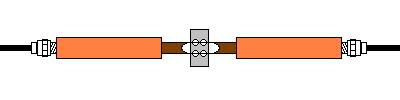
Since there is no dish involved, there is no LNB or LNA/Down Converter power to worry about. The impedance matchers are cheap, and you can get them at Radio Trash. (Ummmm....Radio Shack)