This is topic Recommend to me an HDTV. A good one. One that I would want. in forum The Afterlife at Film-Tech Forum ARCHIVE.
To visit this topic, use this URL:
https://ft-forum.com/ft/cgi-bin/ubb/ultimatebb.cgi?ubb=get_topic;f=12;t=000328
Posted by Joe Redifer (Member # 3) on 09-01-2004, 07:26 PM:
I am in the market for an HDTV. Unfortunately I have high standards and cannot settle for LCD, Plasma, or DLP. That leaves me with CRT. Why? Because I want a set that NATIVELY displays 480i, 480p, 720p, and 1080i in their proper modes. Non of this up or downscaling crap. If a picture is 720p, I want to see it in 720p. I don't want to see it "uprezed" to 1080i. Screw that. That is retarded. Unfortunately most HDTV sets do just that. And LCD, Plasma, and DLP all have 1 fixed resolution, which is also retarded. Please suggest a non-retarded TV. I am looking for something between 33" and 40" or so. No projection. I want to be able to view the screen from more than 12 degrees.
I have been looking at the Sony KV34XBR910. Does that support 720p natively?
Posted by Brad Miller (Member # 2) on 09-01-2004, 08:11 PM:
Buy a 6000 lumen 3 chip DLP projector for each format you want to run and just stack them up all preset, then just turn on the one you need depending on the format you want. Assuming you choose a proper screen, you'll have just as wide of viewing range. Plus 6000 lumen projectors shrank down to 40 inches would be great provided you get a gain screen. ![[Big Grin]](biggrin.gif)
Posted by Joe Redifer (Member # 3) on 09-01-2004, 08:21 PM:
Not bright enough, especially with my 6 foot throw distance. Plus they don't make DLP projectors in exact HDTV resolutions. Instead they are made to act as computer monitors. They have square aspect ratios. Retarded.
Posted by Mike Olpin (Member # 1115) on 09-01-2004, 08:55 PM:
According to an article in In Focus magazine, them new fangled 2k DLP projectors have a rectangular DMD array.
Posted by Joe Redifer (Member # 3) on 09-02-2004, 06:22 PM:
I demand more responses to this thread, and I also insist that they be constructive and help me in my situation.
Posted by Bobby Henderson (Member # 840) on 09-02-2004, 06:46 PM:
I wish I could offer some constructive suggestions. But I'm just not happy at all with the product offerings in the HDTV market right now. As you said, many of those monitors don't display true 1080i HD. That's a deal breaker for me at least.
I'll tell you what's retarded. Those overpriced, small-ish LCD TVs. They have shitty resolution yet carry price tags upwards of $4,000. The 30" Apple Studio Cinema Display has a native resolution of 2560 X 1600. Why is it that the computer monitor makers can kick ass on resolution but the TV makers can't get out of puny-rez territory?
Posted by Joe Redifer (Member # 3) on 09-02-2004, 08:37 PM:
I've often wondered that myself. Monitors switch resolutions easily to match the input signal and refresh rate of the signal, but TVs have to up and downscale to fit. Retarded! Also, most TV's do 1080i natively, but not 720p.
I'd get a D-VHS machine as well, but Kill Bills aren't available!!!! That makes me angry.
Posted by Mark Gulbrandsen (Member # 72) on 09-02-2004, 11:08 PM:
I guess for Joe I can offer hima nice 1946 RCA set that I have here. Really, you guys are way too wrapped up in the wrong place! Resolution is adaquate on most new HD sets. Except for artifacts todays HD picture quality sure beats the pants off of NTSC. What you need to be alot more concerned about is all the artifacts in fast moving images, dissolves, effects and such that are inherent in HDTV. The artifacts are alot bigger problem and will become even more visable in higher resolution displays. They have a looooong way to go with data compression tweeks and other problems that are inherent in the system. I'd be willing to bet that for now and probably the long forseable future you'll probably have to be happy with things the way they are. HDTV is just another set of compromises anyway.
Mark
Posted by Joe Redifer (Member # 3) on 09-02-2004, 11:41 PM:
Compromises kick ass!
Posted by Bobby Henderson (Member # 840) on 09-03-2004, 12:05 PM:
quote: Mark Gulbrandsen
Really, you guys are way too wrapped up in the wrong place! Resolution is adaquate on most new HD sets.
Then what is the point of even buying a High Definition Television in the first place? I could just as easily say NTSC/480p has "adequate resolution." It sure costs a hell of a lot less.
What point is there in having the broadcast and electronics industries develop these 720p and 1080i "formats" if none of the televisions on the market can show them natively in ALL of their picture detail?
I especially have to wonder about that one given the very expensive prices all those companies ask for those products.
Maybe I'm wrong, but I'm not blowing thousands of dollars on a high end television until it can honestly address that 1920 X 1080 pixel specification. Computer monitors seem to have no problem doing that. This is one reason why it is very likely the first HDTV setup I'll have in my home will be via a computer system. There are add-in cards for PCs with HDTV tuners and other imputs for HD signals. And it doesn't cost the giant fortune commanded by those big, but low rez televisions.
Posted by Scott Norwood (Member # 30) on 09-03-2004, 01:07 PM:
NTSC is 525i, not 480p!
Posted by Mark Gulbrandsen (Member # 72) on 09-03-2004, 01:24 PM:
I'd have to say that Bobby must be using some of that I-30 stuff !
I just bought a 17" LCD set and it didn't cost 4000.00. It cost a tad over 700.00 for 1280 X 768 resolution and the picture quality is light years ahead of any NTSC TV set in its size class. There are 30" LCD sets you can buy for under 3000.00 that will do the same resolution which is a hell of alot better than the old standard of 525i. Since the off air HD receivers in reality do the up or down converting what difference does it really make what the TV does since its going to live on 1080i?
Mark
Posted by Bobby Henderson (Member # 840) on 09-03-2004, 05:45 PM:
quote:
NTSC is 525i, not 480p!
True; I threw the "480p" thing in there for all the DVD stuff. I wish folks were as nitpicky when it comes to the HD displays and how many pixels they can natively show.
quote: Mark Gulbrandsen
Since the off air HD receivers in reality do the up or down converting what difference does it really make what the TV does since its going to live on 1080i?
The difference is most of the TVs have a fixed, native resolution unable to display all of the detail of a 1080i picture. The best you're able to do with most flat screen displays, LCD or plasma is in the neighborhood of 1280 X 720 or 1300 X 800. That's a long way off from 1920 X 1080.
I know broadcast HD and highly compressed satellite HD signals are compromised. BUT! Those are not the only HD signals you're going to be feeding such a monitor. D-VHS "D-Theater" tapes show a lot more detail and wider data bandwidths than typical satellite broadcast signals. Other playback formats will improve past what D-VHS can do.
I would much rather have the limitations in HD lay in the broadcast signal or the playback format rather than have terrible limitations right there in the hardware. The "software" can be improved. It's a lot more expensive for you to have to upgrade your hardware when the electronics companies decide they want to finally get it right after all these years. I'll get in line to buy when they provide some products I feel do the job well enough. Until then, my "big ticket item" money is going to be directed at purchasing new computer and video gear. HD can wait for my dollars.
Posted by Joe Redifer (Member # 3) on 09-03-2004, 06:09 PM:
Mark, most of us want to do much more than just "watch TV" with HDTV. That may be all you do, but that will be the LEAST of what I would do. Videogames use 100% uncompressed HDTV signals since they don't have to be "encoded" first. Just raw output. And I don't want that signal fucked with in the display.
I want a CRT TV and most of those can do the full 1080i. But even so, they don't truly support 720p. They "upscale" it to the slightly flickery 1080i. Who the hell wants interlaced, anyway? Interlacing should be illegal. I want 1080p, not wimpy retarded-ass 1080i. Since it is interlaced, the actual picture detail is LESS than 720p.
Posted by Mark Gulbrandsen (Member # 72) on 09-03-2004, 06:24 PM:
Joe,
Then its all settled... just go out and buy a CRT based projector or TV or what ever. But you will have to live with what ever up or downscaling has to be done in what ever you buy. Remember that CD's were not perfect when they were introduced either, actually they rather sucked as to the sound quality. Right now HDTV pretty much sucks overall but its still alot better than the old hat. I can certainly see that you have time to play games but I have zero time for games per say and barely have much time to watch TV as it is. The one thing to remember is that the CRT's in your new will begin to peter out after just a few hundred hours. Its more of a phosphor/heat issue then a gun issue. The phosphor in projection CRT's goes way before the gun and generally results in alot softer image. This was once pointed out by a friend that owns a large rental house outside of Chicago, and yes, I got to see the difference between two Barco sets. One that had 400 hours on it and one that had just been re-tubed....startling difference! So as your resolutuion peters out you will probably just become more frustrated with the whole thing, then you WILL begin to kick ass but it may be your own ![[Eek!]](eek.gif) !
!
Mark
Posted by Paul Mayer (Member # 355) on 09-03-2004, 10:51 PM:
Joe, have you ever done a visual shootout between 720p and 1080i? The two formats are supposed to have about the same dynamic resolution when looking at moving images. Look up "Kell Effect" or "Kell Factor" and have at it. Progressive scanning still has other advantages over interlace though. I salute your superior tastes in prefering 'p' over 'i'. ![[thumbsup]](graemlins/thumbsup.gif)
The Sony model you asked about does not display 720p directly. It converts everything it sees to 1080i.
Presently there are no consumer direct-view TVs or monitors that do 720p natively. Princeton Graphics made monitors and TVs that could do it. Their original 30" monitor was the AF3.0HD, the follow-on TV set with improved connectivity and an improved version of the same CRT was the AS3.0HDW. The monitors were designed to specifications outlined by Joe Kane, then the chair of the SMPTE working group for monitor standards. He insisted on native 720p capability. I've seen the AF3.0HD in action myself (almost bought one back in 2001)--it does make very nice pictures. It's not quite as sharp as its 40MHz bandwidth spec would lead you to think, but on real-world moving images, it looks very good. I imagine the AS3.0HDW looks as good or better. Both are discontinued now, but used ones do show up. Also look at Monivision, CTX, Proton, and JVC pro displays for native 720p capability.
Sampo and Konka both came out with 32" flat CRT TV sets that also did 720p natively. Don't know how they looked, and they too have both been discontinued. Currently, support of native 720p display is rare, since it requires a deflection yoke that can handle a 45KHz H-scanning frequency (1080i yokes can't handle it). But things may be changing. ABC was the only major network using 720p, but now ESPN and FOX have both decided on 720p as well. The rest use 1080i. That well may convince the HD TV set manufacturers to develop product that can do native 720p. This is rapidly shifting ground. Watch your step!
Posted by Bobby Henderson (Member # 840) on 09-03-2004, 11:44 PM:
Maybe someone can answer this question, because I'm a bit unsure about the scenario. Will a computer doing HDTV display both 720p and 1080i natively? Since computer monitors are normally progressive scan devices, it would seem they would have no trouble at all doing 720p natively. But what do they do to imitate an interlaced system like 1080i?
I'm only asking since there is a growing number of add-in cards that allow a PC to display and even record HD signals.
Posted by Steve Guttag (Member # 268) on 09-03-2004, 11:46 PM:
One the one hand you say you prefer the CRT but on the other hand you say you want progressive scan. It is the CRT faction that has the interlace thing to continue. Why not 1080p? All indicators show that the CRT technology is on the way out.
Personally, I like the look of CRT monitors the best but there is definately size limits there. With digital monitors, there are always the tradeoffs on how they look based on what technology they used.
Then again, I'm not so hung up on the upscale/down scale sort of thing except when it comes to pixel mapping...those have to be one-to-one.
I think DLP has an issue with their whole "field sequential" technology. It is kinda like the CAP codes...a certain percentage notices them right away and others will notice it, once pointed out. Yet others get headaches over the field-sequential technology. Due to cost, you won't see 3-chip DLP machines in the home, at least not in the anywhere near future until costs can be more reasonable. These are certainly interesting times...kinda like when color came to the home TV...they had field sequential options too...and it didn't succeed then...what do they say about not learning from history?
Steve
Posted by Joe Redifer (Member # 3) on 09-03-2004, 11:57 PM:
CRTs can do interlaced (TV's) and progressive scan (computer monitors). CRT technology is not the limiting factor here. Also, I don't need the screen to be giganto-huge.
Maybe I will get a Canon XL2 instead and wait for HDTV technology to catch up to 1996 technology.
Posted by Mark Gulbrandsen (Member # 72) on 09-04-2004, 07:05 AM:
"have you ever done a visual shootout between 720p and 1080i? The two formats are supposed to have about the same dynamic resolution when looking at moving images."
There IS definately a difference but its not huge, its subtle. There are a tad bit less artifacts and moire effect with 720P than with 1080i. Its easy to see the difference on something like a football game where 1080i(NBC) is full of pixilization and artifacts on a fast moving scene but when watching a football game on a 720P system (ABC), the image is a bit cleaner....though not by a big margin. Typically there is no moire effect on 720p at all. Image dissolves seem to look about the same on either system where one pixilates into the other but that may be more related to video switchers and their inherent problems. Resolution between the two is almost indistinguishable. There is no flicker with eiither...don't know what Joe meant in regards to flicker. When it comes to DLP the three panel are the only ones that pass for me. The spinning color wheel DLP sets suck and have worse artifacts than any other display system. Mitsubishi has/had a 3 chip DLP rear screen system a year ago, perhaps they abandoned it due to lack of interest. It was something like 18K U.S.. Well, I guess Joe is right back to considering my 1946 Emerson TV set with channel 1. Look....Joes favorite program is on........
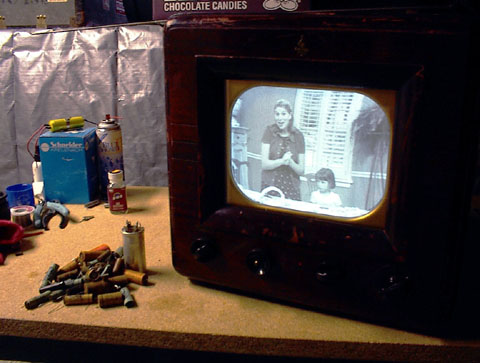
Mark
Posted by Steve Guttag (Member # 268) on 09-04-2004, 08:05 AM:
Hmmm...note the "chocolate candies" on top of the set and the Schneider lens box for close visual inspection of the various resolutions and scan rates.
Steve
Posted by Bobby Henderson (Member # 840) on 09-04-2004, 12:09 PM:
quote: Joe Redifer
Maybe I will get a Canon XL2 instead and wait for HDTV technology to catch up to 1996 technology.
24p and real 16:9 capability makes it tempting to run out and get a $5000 loan for one of those cameras. Make sure you test drive one really well before buying though. I've read some serious complaints about it in some online reviews. Aliasing issues, and Canon's pixel shift method can make for some soft video.
What scares me about the XL2 is the size of the 1/3" CCD sensors. They're no bigger than the 1/3" sensors in Panasonic's AG-DVX100A. What's worse is how 4:3 and 16:9 are treated in the sensor. The 4:3 image is literally window-boxed, using an area significantly smaller than a normal 1/3" sensor. You get the full width of the sensor in 16:9 mode. This is a method very similar to that used in Sony's $2,400 DSR-PX10 DVCAM palmcorder. The difference is the number of pixels in each sensor. Canon's XL2 has 460K total per sensor (350K being used in normal 4:3). Even though the Sony PX10 has smaller 1/4" sensors, each CCD has over 1 million pixels.
Posted by Robert Harris (Member # 1712) on 09-04-2004, 06:27 PM:
My CRT of choice is the 34XBR960.
Great image quality, and not to be confused with the 910.
RAH
Posted by Mark Gulbrandsen (Member # 72) on 09-04-2004, 09:37 PM:
Bobby said.....
"Then what is the point of even buying a High Definition Television in the first place? I could just as easily say NTSC/480p has "adequate resolution." It sure costs a hell of a lot less."
_________________________________________________________________
The point of buying one is cause it has alot more to offer you channel wise for free, and cause NTSC is going bye bye in a few years. BElieve me when TV stations get the order to cease NTSC its going to happen overnight... it costs a bundle just in power consumed to have both the Analog and DTV trannys up all the time.
And for Steve G......
The original was at 1080i, now here's that same picture at 525i, or 2/3 less pixels. The chocolates were yummy!
Mark
Posted by Joe Redifer (Member # 3) on 09-05-2004, 02:36 PM:
The Canon XL2 does not use the pixel shift technolgy. That was the XL1. The XL2 is supposed to be much sharper. Also, why would I want to shoot anything in 4x3? Who cares? In fact, it has been reported that both the XL2 and the DVX100 look nearly identical in 4x3 mode. Here is some other stuff from an actual XL1s, DVX100, GL2, and now XL2 owner from another forum:
quote:
Image quality.
We were viewing the footage on a 34" sony Wega HD set. The footage I shot was primarily in 16:9, stretched manually by the monitor. Well, all I can say is I've never seen anything like it. Viewed from about 10 feet the image was remarkably detailed...but when I got close to the monitor there was almost no evidence of the sharpening, noise, and aliasing that I expected to see (from viewing a SD-DV source on a HD monitor). Much of the footage was relatively backlit surfer-in-the- water stuff, and so it had very high contrast edges...I thought for sure that this would bring out the aliasing that "the famous cinematographer" spoke of in his "report" from dvexpo. Sorry (ok, happy) to say...I have never seen a cleaner, more HD like image projected on my HD set...not from my dvx, xl1s, gl2 or the compressed streams off of DirecTV. The color seems natural, the contrast about what you'd hope for.
By accident I popped in a 2 week old tape taken from the same vantage points on my xl1s...the difference between the two camera's is, shall we say, huge.
Posted by Bobby Henderson (Member # 840) on 09-05-2004, 05:29 PM:
If you buy an XL2 anytime soon, let me know how you like it. I'm mulling over the choices between a few different three chip cameras, with the Panny DVX-100 and XL2 being the primary models of consideration.
Powered by Infopop Corporation
UBB.classicTM
6.3.1.2