This is topic Projectors for DVD's in forum The Afterlife at Film-Tech Forum ARCHIVE.
To visit this topic, use this URL:
https://ft-forum.com/ft/cgi-bin/ubb/ultimatebb.cgi?ubb=get_topic;f=12;t=000393
Posted by Larry Myers (Member # 738) on 03-17-2005, 06:20 PM:
I am interested in purchasing a DPL projecter to project only DVD's. Two projectors I kind of like because of the high contrast ratings of over 2000:1. Both are Dells. The model 1100MP is rated at 800x600 resolution for about $800 and the 2300MP rated at 1024x768 resolution for about $1300.
Since DVD's are 800x480, is the $800 unit a better buy for me?
Larry
[ 03-17-2005, 07:38 PM: Message edited by: Larry Myers ]
Posted by Joe Redifer (Member # 3) on 03-17-2005, 07:31 PM:
DVD's are 720x480. Other than that I don't know too much about projectors, besides their lack of true HDTV capabiltiy (which you don't need).
Posted by Bobby Henderson (Member # 840) on 03-17-2005, 08:05 PM:
Dell projectors are primarily designed for computing purposes, such as Powerpoint presentations and such for a board room audience. Such projectors are not really designed in mind for home theater, in spite of the DLP chips inside of some. I don't find their pictures nearly as bright as a home theater oriented video projector.
Granted, you're probably going to pay a good bit more for a real home theater video projector. On the upside, such products give you imagery closer to HD (at least the 720p version of it anyway) and perhaps in 16:9 ratio.
Posted by Tao Yue (Member # 836) on 03-17-2005, 10:05 PM:
800/16*9 = 450, so an 800x600 projector will be downsampling vertically for 16x9 DVDs. (Some people go out and get a 1.33x anamorphic lens to solve this problem, but the lens can easily cost as much as the projector and one might as well get a projector with a native 16x9 chip.)
Posted by Joe Redifer (Member # 3) on 03-18-2005, 12:06 AM:
Can video projectors automatically snap back and forth between 4:3 and 16:9 as required? My TV can do that, as long as there is a 16:9 flag in the video. Projectors are extremely weird, so I'm not sure about them.
Posted by Brad Miller (Member # 2) on 03-18-2005, 12:09 AM:
What is your budget?
Posted by Scott Norwood (Member # 30) on 03-18-2005, 06:03 AM:
Joe--a CRT projector can do that (just as a CRT monitor can) without losing resolution by changing the pattern of the scanning beam. DLP or LCD projectors use a fixed array of "pixels" and can't change image shape from the "native" configuration without either losing resolution or moving a different lens into place.
Unfortunately, CRT projectors are expensive and the image isn't very bright. In most cases, LCD or DLP would be a better choice for home use, unless you have a light-tight room and gain screen.
Posted by Phil Hill (Member # 371) on 03-18-2005, 06:08 AM:
Scott,
WTF RU doing up so early?
OBTW: Sony VPH-1252's rule! Hubba Hubba!
Posted by Larry Myers (Member # 738) on 03-18-2005, 11:36 AM:
Hi
What I think you are saying is, you can't get max resolution from an anamorphic DVD DLP project image unless you use a Anamorphic lens. So if you set the DVD player to give you an anamorphic image, there is no way to adjust the projector to unsqueeze the image like in a wide screen TV.
I am more or less trying to figure out what a $2000 machine buys you vs a $1000 machine and if I want to get a DVD projector in the first place.
Larry
Posted by Brad Miller (Member # 2) on 03-18-2005, 12:00 PM:
You're going to have to spend more than $2000 to get a good DLP projector, unless you go to the used market and get an industrial model with a couple of years on it.
Posted by John Pytlak (Member # 331) on 03-18-2005, 12:59 PM:
quote: Brad Miller
You're going to have to spend more than $2000 to get a good DLP projector, unless you go to the used market and get an industrial model with a couple of years on it.
And that's for a single chip projector, which has the rotating color filter wheel that can sometimes have the "rainbow effect":
http://hometheater.about.com/cs/television/a/aavprojectora_4.htm
Posted by Joe Redifer (Member # 3) on 03-18-2005, 01:27 PM:
Have they solved the rainbow effect? I have been telling people to avoid DLP due to it's fabulous rainbow effect.
Posted by Larry Myers (Member # 738) on 03-18-2005, 02:01 PM:
Hi
I am not trying to dup film here. I am just wondering just how good you can get a DVD/Digital projector setup vs cost. On ebay, I actually see PRO digital theater projectors come up for sale every so often. They say originally $32,000 with an opening bid of $12,000 and maybe a "Buy it Now" for $21,500.
There must be another 3000 digital projectors on ebay ranging from around $800 to about $6000 with a few in the $10,000 range. Some new in the box and others are up to 4 years old.
Are any of these any good and would they at least match a typical $15 DVD resolution for resolution?
Larry
Posted by Scott Norwood (Member # 30) on 03-18-2005, 02:15 PM:
Rainbow effect only applies to single-chip DLP systems. The 3-chip ![[dlp]](graemlins/dlp.gif) machines don't have that issue.
machines don't have that issue.
Some people notice it more than others. It doesn't bother me, personally, though I have noticed it more with B&W source material and with some video projectors more than others. Obviously, the 3-chip configuration is far preferably, but as far as I know, the "home" DLP machines are all single-chip models.
Posted by Joe Redifer (Member # 3) on 03-18-2005, 06:19 PM:
You could use an overhead projector to watch movies on like we discussed HERE.
Posted by Larry Myers (Member # 738) on 03-18-2005, 07:16 PM:
Hi
The only real technical problem with overhead projectors is that the lenses are uncorrected maybe even uncoated. So contrast will be low and the real lack of color correction would make any rainbow effect on a DPL projector look mild.
So no one has any inputs to the various projectors out in the market place? I find it interesting that John Pytlak's link more or less featured the Dell series of projectors. This goes along with my first impression of what I may want in a projector and something that is under $1500.
Larry
[ 03-19-2005, 10:24 AM: Message edited by: Larry Myers ]
Posted by Steve Guttag (Member # 268) on 03-18-2005, 10:30 PM:
Okey Dokey....
First off...stick with 16:9 projectors...they can "snap" between 4:3 and 16:9 though I don't think there is any "flag" to tell them the source material is one or the other. Most have three (or four) modes, 4:3, zoomed 4:3 to eliminate letter box bars, and 16:9 is for anamorphic sources like DVDs to maximize resolution. The fourth one is that evil fill the screen mode or "wide zoom" so that everyone is wider just to fill the screen (some cheat and only expand the sides so the middle area looks somewhat normal).
As for contrast ratio...those are the biggest lies in video today...the second is Lumens. Any video projector that is boasting contrast ratios above 1000:1 is full of it. I defy any of them to take a contrast test pattern (one with white and black areas) and achieve the numbers they claim. One of the best theatres in the world (Samual Goldwyn theatre in LA) can only achieve about 1000:1 on film....and I've never seen a video projector yet that had true blacks when their whites were a mere 12-14 fL. If you have any ambinet light in your house and/or you don't have a flat-black room, you are not going to be able to achieve near 1000:1 and you will be able to see just how un-black a video projector's blacks are. Use the contrast ratio spec (within a manufacturer) as a relative number
Lumens are always quoted with the theoretical bestest fastest lens in place adjusted just so. Plan on 85% of what the manufacturer claims.
Right now, there are two home theatre projectors that are getting really good reviews. The Sanyo PLV-Z3 and the Panasonic AE-700U. Both boast CRs around 2000:1 and have lumen ratings knocking around 1000.
They are 1280 x 720 projectors and they really are geared toward showing DVDs and HDTV. Their pixel spacing is such the most do not see the screen door of the LCD unless you really go down the the screen and look for it (they have very tight spacing on the LCD panels).
They are also knocking around $2000 street price...the Panasonic being a little more though it has an active iris/gamma feature to enchance its apparent contrast ratio.
The active iris will close down for darker screens and open up for lighter scenes. It is updated at the refresh rate of the projector (60Hz). It is the same feature that was used in Panasonic's display at ShoWest 2005 using their bigger DLP projector the 7000U.
Posted by Joe Redifer (Member # 3) on 03-19-2005, 01:48 AM:
quote: Steve Guttag
I don't think there is any "flag" to tell them the source material is one or the other.
Yes there is. My TV knows when to go to 16:9 or 4:3. It even knows when to zoom on non-anamorphic letterboxed DVDs like Truman Show. I do not tell it to go into the proper ratio. When authoring DVDs myself, I have complete control over this flag and what it tells the TV at all times. If I videotape an anamorphic DVD or videogame to VHS and then play it back on a widescreen TV, the TV will automatically go into widescreen mode even for the VHS tape. Once the material ends and 4:3 stuff comes on, it snaps back.
What I am wondering is if home theater projectors have advanced far enough to recognize these flags. Like I said, projectors are very strange beasts that seem to follow no typical convention so I really have no idea.
Posted by Steve Guttag (Member # 268) on 03-19-2005, 02:28 AM:
Hmmmm....I've yet to see one do that (video projector automatically switch modes). I wonder where the flag is on the signal. I would think it is more likely for something like that to be on a projector geared towards consumers rather than for pro use. The PLV-Z3 and the AE-700U are the type of projectors that should have that feature if any do.
How long has that flag been encoded onto videos?
Posted by Joe Redifer (Member # 3) on 03-19-2005, 04:22 AM:
Since DVD came around at least. I imagine it is somewhere in the video sync since the flag can be recorded on to video tape. If you are really curious I can videotape a whole bunch of 16:9 and 4:3 stuff back to back and then point my camera at the TV so you can see it snapping back and forth as required as the video plays.
Posted by Adam Martin (Member # 641) on 03-19-2005, 03:28 PM:
There is a 4:3/16:9 flag on DVDs, as shown in the illustration below under Menu Attributes and Title Set Attributes.
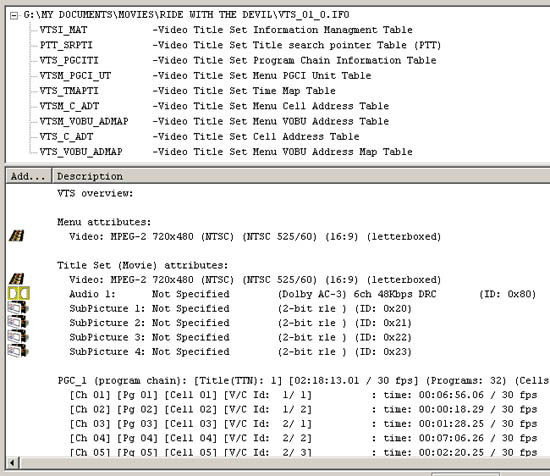
As far as the television adjusting for VHS as well, I would have to say that the television itself is looking for blank space on letterboxed video and adjusting itself.
Posted by Steve Guttag (Member # 268) on 03-19-2005, 03:33 PM:
I would presume that the flag on a DVD would allow the DVD player to choose between an anamorphic or letterboxed representation of the feature (depending on how the DVD player is set up...only if the 16:9 setting is chosen on the DVD player will the anamorphic version be sent out of the DVD player).
In Europe, I see that the SCART connector has on Pin-8 a flag to tell a receiver the aspect ratio. Apparently there is a line on the encoding of the film to trigger this pin.
Posted by Joe Redifer (Member # 3) on 03-19-2005, 06:28 PM:
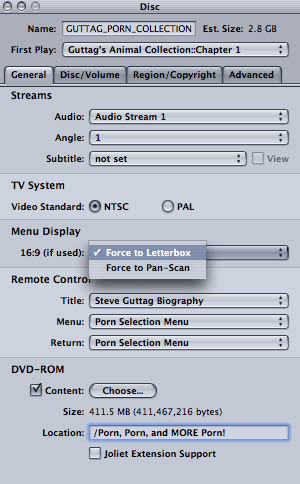
You can tell the video to force letterbox if the player has been set up for 4:3 pan and scan for the menu s items don't get chopped off. A good example of this is the menu for the DVD I am creating for you. Since there are so many selections on it, I didn't want to risk any of them getting cut off.
Posted by Bobby Henderson (Member # 840) on 03-20-2005, 12:12 AM:
LOLROF, Joe you really have too much time on your hands to put something like that together. It's either that or you're really fast at what you do.
Posted by Adam Martin (Member # 641) on 03-20-2005, 12:25 AM:
When it comes to porn, Joe is proud to be the first one finished! ![[Big Grin]](biggrin.gif)
Posted by Joe Redifer (Member # 3) on 03-20-2005, 02:21 AM:
I'm pretty quick. Though I do think that it is interesting that whenever someone does something creative, people usually assume that the person must have a lot of time on their hands. I have seen that a lot on the internet.
Posted by Sam Graham (Member # 2889) on 03-24-2005, 11:54 AM:
The April "Sound and Vision" magazine has a feature on three "bargain" front DLP projectors that sound like they're right up your alley.
In the end, the reviewer liked the InFocus ScreenPlay 4805 (MSRP $1299) best. They also covered the HP EP7100 and the NEC H410.
Sound and Vision Magazine Online (I didn't see the article there)
Posted by Warren Smyth (Member # 1838) on 03-28-2005, 08:55 AM:
I have a Panasonic AE-700 and am extremely happy with it in fact providing the DVD is a good transfer from 35mm film, the viewer could easily be fooled into believing that they are watching 35mm film. The blacks certainly appear black in a dark theatrette even when the projector set on the dynamic setting, which lifts the light output and is intended for rooms that are not completely dark.
The light output of 1000 ansi-lumens provides a well lit scope picture which is 11 foot 6 inches wide on a matt screen.
Another advantage other than the specs Steve mentioned is the zoom range. I had been looking for a projector that has a long enough focal length lens to enable me to install it in the projection room without the picture being too large for my existing theatrette screen which is 9 feet wide on wide screen The throw is 27 feet. The AE-700 manages this with the 16 x 9 image fitting between the top and bottom maskings.
The aspect ratio does have an automatic change or you can select between standard 3 x 4, or 1 : 1.85 anamorphic manually. The fit to fill feature, I don't use. Scope DVDs play on 1 : 1.85 anamorphic with black at top and bottom so a zoom adjustment is necessary if consistant height is required. A control at the front of the projector permits horizontal and vertical adjustment of the picture optically . Because of the claimed 1 to 2000 contrast ratio the projected black at the top and bottom is not noticed. Co ordination between the aspect ratio settings on the player and that of the projector is however necessary. This, and given the range of settings and variations between disks, the whole aspect ratio issue does become quite complicated. I really don't know how the non technical owner copes.
Another feature is the HDMI (digital) link between the player and the projector. This is a recent high definition standard and can be used provided you have a recent player that supports it. The picture resolution is better when using this, but only noticable on a disk with good resolution.
One problem I have had with the projector, is a flash of disturbance for about 2 frames duration, occupying about a third of the picture. This happened when using the HDMI link but not when using s-video, composite, and component connections. It usually occured about three times per movie. A software upgrade by Panasonic has remedied the problem. If you are thinking of purchasing an AE-700, make sure it has the upgrade.
The only other imediment is varying sync on some disks. I believe however that this problem maybe related more to the DVDs rather than the projector. Perhaps someone can throw some light on the subject.
I have two friends who have also bought the AE 700 and are very happy. By the way, I don't have any business links with Panasonic and my opinion is based on my experience as a customer only.
Posted by Larry Myers (Member # 738) on 03-28-2005, 10:03 AM:
What kind of price for the AE-700? Right now they are selling Dell 2400's which has the same specs as the AE-700 for about $1200. I am using about the same setup as you for the theater specs. About a 27 foot throw for a 4x9 ft 35mm scope image that is about 15 foot lamberts in brightness. It would be great to get the same 27 foot throw 4 ft high digital DVD image with a digital projector.
Larry
Posted by Christian Volpi (Member # 2370) on 03-28-2005, 10:43 AM:
Just whip out your AMEX and buy a Barco.
Posted by Steve Guttag (Member # 268) on 03-28-2005, 08:45 PM:
quote: Larry Myers
Right now they are selling Dell 2400's which has the same specs as the AE-700 for about $1200.
I checked the DELL website and could not locate the 2400...I found four Dell projectors NONE of them were 16:9 projectors as the AE700 and Z3 are. So unless I just can't find the projector (post a web address for it) you are not comparing identical projectors at all.
The Z3 and AE700 have very tight pixel spacing, control their light output for optimum conditions are are truely optimized for home theatre. Also, I believe some of the Dells are single chip DLPs so you will get bizzar color fringing which may or may not bother you or give your headaches.
Dell seems to be offering "me too" type of projectors that are probably better suited for boardroom shows.
The going rates for the AE700 are just over $2K and the going rates for the Z3 are right around $2K.
Posted by Larry Myers (Member # 738) on 03-29-2005, 08:20 AM:
I am sorry, it's the Dell 2300. They are all over ebay under DELL PROJECTOR. They seem to go for around $1200 and I though they were 16:9 capable but maybe not.
Larry
Posted by Steve Guttag (Member # 268) on 03-29-2005, 05:03 PM:
Larry,
The Dell 2300MP is an XGA projector. That is, it is a 4:3 projector with a native resolution of 1024 x 768. In order to run wide-screen or HD material, it must rescale the image down to 1024 x 576. Not all that much better than standard definition in height.
If you zoom out the picture to fill a 16:9 ratio screen, you light will be sucked away too. Your pixels will also be enlarged.
As such, this is not an equivalent projector to either the Z3 or the AE700 in resolution.
Take into account that the AE700 and Z3 are somewhat optimized for the purpose of running HDTV and other "home theatre" programs, they are going to appear a bit better. I've seen what Sanyo does with their scalers and deinterlacers...they are pretty good for the home-theatre stuff. Panasonic's active iris and gamma circuit is also pretty impressive when set up.
I know I would have no problem putting either of these projectors up against the Dell (dude) with favorable results.
The Sanyo Z3 has street prices right around $2K (I know I would sell it for that and work for a dealer). Sanyo even has the Z2 still that is also optimized for Home-Theatre, is a 1280x720 projector that sells for under $1,500. Someone always has a projector for less...often that is what you get though...less.
Then again, the Dell projector does look like it has its uses and one might use it for Power Point shows for work and then pop a DVD on it for after work, I guess. Then again, Sanyo and others have projectors that can go head to head with the Dell with similar specs and price.
Posted by Joe Redifer (Member # 3) on 03-29-2005, 06:49 PM:
It sounds like the Panasonic AE700 produces combing artifacts when DVDs are run via progressive scan. They recommend running in interlaced mode and having the thing remove the pulldown. Bleh.
Posted by Monte L Fullmer (Member # 2797) on 04-20-2005, 06:38 PM:
quote:
Take into account that the AE700 and Z3 are somewhat optimized for the purpose of running HDTV and other "home theatre" programs,
Steve..big, but obvious question on these two machines: One has the lumens of 1000 and the other as the lumens of 800, yet other LCD units have lumens up to 2000 lumens (being the regular 4.3 XGA units), would this lesser lumens of the two WXGA machines have noticable reduction of display on the screen than if one used the 2k lumen units?
Also, if one used the WXGA units, can these still be used in 4.3 display when featuring regular full-screen movies-just might have to "zoom" up the image if one has full actual adjustable maskings on their home theatre screens-both vertical and horizontal?
Granted, if one only has the vertial masking adjustments, then the 4.3 image size would be smaller and not have to be "zoomed to fit," so to say.
I'm asking these questions on possible construction of a "home theatre" system in my home. If one is going to do "home theatre" why not go all the way and do it right?
Myself, I'd rather use LCD, than DLP due mainly to the "rainbow" effect of the colorwheel and the single chip display. Maybe, down the road a few years DLP units will have the 3 color chip array where no colorwheel is needed (like the big Christie and Barco units for theatres), and at a reasonable price for home usage.
thx-Monte
Posted by John Pytlak (Member # 331) on 04-21-2005, 02:56 PM:
Kodak's latest pre-show HD digital projection system uses a 3-chip DLP projector:
Another Really Long Link
quote:
The Kodak Digital Cinema system includes a package consisting of proprietary software, as well as hardware and services to prepare, distribute, and display quality pre-show advertising through feature movie presentations on theatre screens.
The full system is being demonstrated on multiple cinema screens at ShoWest at a special event prior to feature presentations attended by hundreds of industry professionals. "It's important for us to demonstrate our system in a real world environment to some of the most demanding audiences," Doeren says.
For the pre-show demonstrations, Kodak is using the new three-chip DLP high definition ScreenPlay 333 projectors from InFocus.
"High definition projection is the next step for pre-show presentations," says Doeren. "On the InFocus projectors, the images are brighter and sharper with a greater range of contrast and more color saturation. Combined with surround sound, they make everything, including concerts and other events, a more enjoyable experience. HD images on our system have a crispness and depth that seem to jump off the screen."
Doeren emphasizes there is still a difference between high definition and motion picture-grade quality. For feature presentations, the company is demonstrating the new Kodak CineServer, which is compatible with a range of digital projectors up to 2K resolution. Kodak is using the Barco 2K DLP projector to show trailers and motion picture content at ShoWest.
http://www.aecnewsroom.com/articles/viewarticle.jsp?id=31190
quote:
(March 09,2005)
InFocus Corporation, the worldwide leader in digital projection technology and services, today announced it has been selected by Eastman Kodak Company and Cinema Screen Media (CSM) to provide three-chip Digital Light Processing (DLP) digital projectors to bring high-definition clarity and excitement to pre-show entertainment programming.
http://www.uemedia.net/CPC/digitalcinemamag/printer_12034.shtml
quote:
By teaming with Kodak and CSM, the world's largest independent provider of digital pre-show presentations, InFocus projectors will be a part of Kodak's new high-definition pre-show capability. CSM is using the Kodak system to raise the standards for the unique programming they provide prior to feature films in movie theaters nationwide.
InFocus will provide high-definition digital projectors with customized lens options to complement the Kodak Digital Cinema system. The specially-produced InFocus ScreenPlay 333 projectors use three DLP chips by Texas Instruments and provide captivating images to set the stage for the feature film presentation. Built from InFocus ScreenPlay engineering, the ScreenPlay
333 uses this legacy to create a professional product ideal for the needs of public cinema.
[ 04-21-2005, 03:39 PM: Message edited by: Adam Martin ]
Powered by Infopop Corporation
UBB.classicTM
6.3.1.2