This is topic HDMI vs Component Connection in forum The Afterlife at Film-Tech Forum ARCHIVE.
To visit this topic, use this URL:
https://ft-forum.com/ft/cgi-bin/ubb/ultimatebb.cgi?ubb=get_topic;f=12;t=000585
Posted by Larry Myers (Member # 738) on 07-06-2007, 07:20 PM:
I am now using a standard slightly older Sony DVD player with a Panasonic PT-AX100U LCD Projector. I am projecting on a 3 x 7 ft slightly curved screen image viewed at 9 ft. For the most part, I only play anamorphic wide screen. The quality looks very good with this setup. Some or about 20% of the new DVD's actually look like film.
This system is now hooked up by using component cable. What happens is, the DVD player projects for a few seconds with the image squeezed. After a few seconds, the projector senses the squeezed image and corrects it to the 3 x 7 foot image.
I tried a newer Panasonic DVD player with an upconvert with a HDMI connection. The projector just played the image in 16:9 with the sides cropped. I could not get the projector to play 2.35 widescreen with that $100 best buy Panasonic DVD upconvert player so I took it back.
Now I am thinking of purchasing a true HD-DVD or Blue-Ray player. Must I use the HDMI connection or can I just use component connection with the HD DVD Player?
Posted by Joe Redifer (Member # 3) on 07-07-2007, 01:24 AM:
The problem is most likely your projector and not the DVD player, unless you had the DVD player's options set incorrectly. I wouldn't bother with HDMI on standard definition stuff.
Also, be sure you don't spend too much on an HDMI cable. You can HDMI cables for under $10 that will look every bit as good as the $100 cables. 1s and 0s are still 1s and 0s regardless if it has an evaporated gold plated connector with intertwined evaporated quad-shielded fibers and all of that Monster Cable® nonsense.
Posted by Larry Myers (Member # 738) on 07-07-2007, 07:37 AM:
I realize I don't need a HDMI cable for standard DVD. The question is, must I used a HDMI cable for HD DVD or can I use the existing component cable?
Posted by Bobby Henderson (Member # 840) on 07-07-2007, 11:28 AM:
You might be able to get by using a component cable...so long as the HD-DVD disc doesn't have the HDCP flag activated to prevent HD-quality video from streaming over the component video outputs.
Both HD-DVD and Blu-Ray have the capability of restricting the quality of analog video output. The players can down-sample the HD quality video down to 480p (or possibly cut off output completely) if the security measures in the disc demand it.
Posted by Larry Myers (Member # 738) on 07-07-2007, 11:53 AM:
In a round about way, that's what I wanted to know. That is, can I get HD DVD quality on a HD DVD player using component cables to the projector? The answer seems to be NO! I must use the HDMI cable and try to get both machines to work together to display 2.35 anamorphic.
It also looks like "any" cheap HDMI cable will work since 0's and 1's are 0's and 1's. So the cable WORKS or it does not.
Thanks
Posted by Mike Olpin (Member # 1115) on 07-07-2007, 01:00 PM:
quote: Bobby Henderson
so long as the HD-DVD disc doesn't have the HDCP flag activated to prevent HD-quality video from streaming over the component video outputs.
They wouldn't dream of doing that at this point. Can you imagine the PR nightmare when everyone who bought the HD DVD add ons for XBOX cant use them anymore?
Posted by Steve Guttag (Member # 268) on 07-07-2007, 01:37 PM:
The HDMI signal is more difficult to move than Joe leads on...if the cheap cable works, it works but don't be surprised if it doesn't. Beyond about 15' HDMI isn't really specified. The shorter the cable, the less it matters of its quality as to its liklihood of working (from a signal standpoint...it could still fail due to crappy connectors or build quality).
Steve
Posted by Larry Myers (Member # 738) on 07-07-2007, 01:51 PM:
The projector and DVD player are only one foot apart, so cable length is not an issue. The issue will be how much better will HD DVD play in 2.35 projected anamorphic vs standard DVD's
Posted by Scott Norwood (Member # 30) on 07-07-2007, 01:53 PM:
quote: Mike Olpin
They wouldn't dream of doing that at this point. Can you imagine the PR nightmare when everyone who bought the HD DVD add ons for XBOX cant use them anymore?
Exactly. Not to mention pretty much everyone who bought HDTV sets before HDMI connections were standardized. As far as I know, no commercial disks have used the flag to date.
Posted by Bobby Henderson (Member # 840) on 07-07-2007, 02:42 PM:
Movie studios, so far, haven't used the HDCP flag to limit the kind of video that can stream from component video outputs. That current policy is by no means any insurance against the studios changing their minds in the future. The electronic infrastructure is there for them to do it if they feel so inclined.
I think one real test of that policy will come when these HD-disc formats are no longer high end niche items and gaining mainstream adoption by the general public.
There is also another factor with HDMI which I have always regarded with a certain level of suspicion. The technology can be used to bring back a pay per every view system for movie discs.
Many of Hollywood's movie studios really wanted the pay per every view business model of DiVX to work. They drooled over the idea of getting someone to buy a disc and keep paying extra every time they wanted to watch it. The thinking was that they could gain huge increases on revenue from home video by forcing this system on consumers.
DiVX didn't work for a number of reasons. Most were bare bones discs with pan and scan video making the product itself pretty crappy. The real killer to DiVX was that enough studios were backing "Open DVD" and loading the discs with original aspect ratio video transfers and loads of extras.
Both HD-DVD and Blu-Ray have the HDCP system built into their formats. Product activation schemes via Internet connection can eventually be applied to these discs. Basically everything is getting put into place to potentially bring back the pay per every view format.
In the end, the general public will need to be aware of that potential and vote with their dollars (by spending them elsewhere) whenever a movie studio tries testing that sort of thing.
Posted by Larry Myers (Member # 738) on 07-07-2007, 03:37 PM:
Well, if this flag doesn't really exist on any normal HD DVD made to date, then the answer looks like a yes. That is, I can use component cable for HD DVD and actually get HD. I just have to realize that any new HD DVD disc I might purchase even a month from now might not work due to the added flag. In that event, I just purchase a HDMI cable.
[ 07-07-2007, 05:54 PM: Message edited by: Larry Myers ]
Posted by Joe Redifer (Member # 3) on 07-07-2007, 05:02 PM:
No, it doesn't even end there. You see, HDMI is seriously messed up. They come out with a new version of it every other month, it seems. If the version in the player doesn't match the version in the projector/TV, then things could be messed up/limited. Or if the two hardware devices don't "shake hands" (their term, not mine) properly then you could get no video at all ever. HDMI was designed by retarded amateurs with no foresight. I wish smart people would have been involved.
Also, Steve, who would put their HD-DVD player in a completely different room or house than their projector/TV, thus requiring such a long cable? The only scenarios I can think of are industrial presentations, boring corporate stuff and the such where they are forced to use long cables. If you enjoy boring, you might need the longer cable.
Posted by Steve Guttag (Member # 268) on 07-07-2007, 10:29 PM:
I hung my projector from the ceiling and the DVD player is greater than 15-feet of cable away once everything is routed neatly.
HDMI is stupid in that it wants to fall out too! I understand consumers just can't deal with "locking" type connectors like the XLR, BNC and such but this is just plain silly. Seriously, HDSDI would have been a good standard to adopt...a single 75-Ohm coax...nothing fancy...just good performance...and I'd forced the consumer to deal with BNC connectors too...they seemed to have dealt with "F" connectors tha screw on (yes, I know there are friction versions of them too).
Steve
Posted by Joe Redifer (Member # 3) on 07-08-2007, 12:17 AM:
Consumers cannot handle locking connections. I think the "logic" is that they are supposed to unplug when you trip over them (which you are expected to do since consumer IQ does not go above 75) instead of pulling the entire piece of equipment down to the ground which will cause its doom due to the shoddy manufacturing of the unit.
I've already got 50 feet of 75-ohm coax laying around doing nothing... the locking kind. I'm just waiting for someone to invent a use for it.
Posted by Bill Gabel (Member # 1105) on 07-08-2007, 11:06 AM:
quote: Larry Myers
must I used a HDMI cable for HD DVD or can I use the existing component cable?
No, you don't have to use the HDMI connection to get a HD signal. The Toshiba HD-DVD decks output the HD signal through the component too at this time.
Posted by Steve Guttag (Member # 268) on 07-08-2007, 12:43 PM:
Not to worry Joe...they have the "RCA" style "Phono" connectors for consumers...I'd just make em adopt to the BNC style anyway.
Posted by Mitchell Dvoskin (Member # 751) on 07-09-2007, 01:01 PM:
quote: "Bill Gabel"
No, you don't have to use the HDMI connection to get a HD signal. The Toshiba HD-DVD decks output the HD signal through the component too at this time.
Not quite correct. The following applies to both HD-DVD and Blue-Ray:
When playing a HD-DVD or Blue-Ray disc, HiDef is output via component unless the disc is flagged not to permit this. At present time, non of the major studio discs are setting the flag, but that could change at any time.
When playing a standard definition DVD, Upconverted HiDef is output only though the HDMI or DVI outputs. The components only outputs 480I or P. This also applies to standard definition DVD players with upconvert capability.
Posted by Larry Myers (Member # 738) on 07-09-2007, 04:38 PM:
Just exactly what is upconvert anyway? I tried one of these $100 units at Best Buy plus a $35 HDMI cable and I really didn't see any difference. Then on top of that I had problems getting the right anamorphic display. I returned it. The return Manager agreed with me. The standard Sony DVD players using component cables are better buy at about $70.
Posted by Joe Redifer (Member # 3) on 07-09-2007, 05:20 PM:
I have an upconverting DVD player that outputs the 720p and 1080i signal via component. It's called an Xbox. Of course you need to install Xbox Media Center onto it first. Upconversion isn't anything special on any player.
Posted by Bobby Henderson (Member # 840) on 07-09-2007, 05:21 PM:
quote: Larry Myers
Just exactly what is upconvert anyway?
In the context of HDMI and standard DVD players, "upconversion" is just a fancy way of saying "faking" a HDTV image. The 480p video image is blown up to 720p, 1080i or even 1080p. Still, you only get so much native detail in a 480p image. It compares poorly to material with truly native HD resolution.
Posted by Scott Jentsch (Member # 1681) on 07-09-2007, 05:32 PM:
The term "upconvert" usually refers to the conversion of standard definition video to one of the high definition resolutions. For example, taking a 480 line image and converting it to 720 lines or 1080 lines, depending on the capability of your display.
Imagine taking a 4x6 photo and blowing it up to an 8x10 or a 16x20. None of that extra resolution can be found anywhere, so the upconverting device needs to interpolate the missing pixels in the hope of creating something acceptable.
As you probably realize, the results can be good or bad, depending on the quality of the device doing the upconversion. Anyone expecting a $75 Best Buy special to do a great job is being unrealistic. Your projector will probably do a better job of upconverting SD material than a cheap upconverting player.
DVD players are not supposed to send upconverted SD from a DVD via analog component connections. A few do, but I don't know if they're made any longer. I bought a Samsung upconverting player for that very reason, but the player was iffy and the upconverted picture wasn't any better than I was getting out of my Pioneer SD DVD player.
As has been stated here already, both HD DVD players and Blu-ray players can be connected to displays via analog component video cables and you will have access to both the 1280x720 and 1920x1080 resolutions. An HDMI connection will allow you to handle everything you can throw at it; upconverted SD, 1280x720, and 1920x1080 (both interlaced and progressive).
Very expensive HDMI and component cables aren't necessary, but good ones are. For a couple of feet, just about anything capable of carrying an electrical signal will probably be OK, but good cables can be had for not very much money.
I got my 35-foot long HDMI and component cables from Blue Jeans Cable, and I'm very happy with the build quality and the performance of the cables. The component cable was around $140, and the HDMI cable was right around $70.
Could I have found them cheaper? Maybe, but these guys have a very good reputation on some forums I read, and places like Monoprice.com make me nervous by selling stuff at way too low of a price (at some point, the quality can't possibly be there).
Upconverted SD is a poor substitute for real HD. Once you become accustomed to real HD, you want it all the time!
For $255, you can get a Toshiba HD-A2 HD DVD player that will not only play HD DVD's (248 and counting) but also upconvert standard definition DVD's as well. The high end Toshiba HD-XA2 has a Reon processor that is supposedly excellent at upconversion, on par with high end DVD players costing upwards of $1500-$2000.
Posted by Liam Utley (Member # 1931) on 07-09-2007, 06:32 PM:
If you adopted the PAL format you could have 576p.
Posted by Larry Myers (Member # 738) on 07-09-2007, 07:43 PM:
I have looked at the Toshiba HD-A2 but Best Buy wanted $350 for it. They wanted $500 for the HD-XA2. I also looked at the Blue Ray. To me, the Blue Ray seems to be better on the Flat Screen equipment they were using. I guess the XA2 will play 1080P.
I am not really interested in paying $30 per disc right now. Although, Nex-Flex says they included HD disc's in their standard membership. So far I am having fun collecting DVD's at flea markets for less the $4. I have a collection of 50 films that are mostly anamorphic widescreen.
My biggest score just last week was a nice copy of the original "Night of the Living Dead" in stereo full frame for $1. So far I have had very good luck collecting since I can mostly tell the difference between a bootleg copy and an original.
Posted by Mike Heenan (Member # 392) on 07-09-2007, 08:24 PM:
Assuming you bought one of those $1 copies in those huge bins at Walmart or the dollar store, and not just a marked down Anchor Bay release (or elite, I forget who released it officially), it likely was a "bootleg".... the film is pretty much PD, and whatever company that released the version you bought likely "borrowed" (stole) the transfer from another release.
Posted by Larry Myers (Member # 738) on 07-10-2007, 10:30 AM:
If indeed this DVD of Night of the Living Dead is a bootleg copy, then they sure did a nice job with the three color label on the back of the disc and the image transfer itself. There are fake items then there are fake items. Many fake items are actually overruns at the sub-contract factory. The factory in China needs to produce 10000 real Nike shoes so they produce 20000 and give the Nike company 10,000 and sell the rest as fakes. Well, not exactly fakes are they?
Posted by Bobby Henderson (Member # 840) on 07-10-2007, 12:55 PM:
Larry, I don't think you understand the nature and sophistication of counterfeit product operations in China, North Korea and other countries that allow that kind of thing. It is not an issue of selling the surplus of a product run. The bootlegging that goes on is very deliberate. For instance, North Korea has the most advanced setup to counterfeit US currency. The "super notes" coming from that rouge state are the main reason why our money is getting changed so much all of a sudden.
Just about anything people want to buy gets counterfeited. Any legitimate product made in China will be an even more likely target of counterfeiters -such as those Nike shoes. To compound the problem further, Chinese citizens have very little buying power with their very low on average wages and very undervalued currency. Imported products cost a lot. Counterfeit versions of the same thing are far more affordable.
FYI, most DVDs stocked on store shelves in the United States are replicated at plants in the United States or Mexico. The printed materials may come from any number of countries, but often are generated in North America. It costs too much and takes too long to ship mass produced products like Region 1 DVDs halfway around the world.
Posted by Larry Myers (Member # 738) on 07-10-2007, 02:08 PM:
I understand all about counterfeiting. I worked on the US Currency Counterfeting project. The biggest issue was the bills were actually better then our own. The counterfeiters didn't have to stick with low bid stuff. They could buy the best of everything. That is paper,ink and equipment. That meant nothing but the best from the Swiss. So the US government was stuck with a Made in America machine for $12 million dollars. The counterfeit people demanded nothing but the best in a $27 million dollar Swiss press.
I someone wants to counterfeit a DVD that looks great and plays better then a real one all for a buck and make money, then more power to him.
Posted by Bobby Henderson (Member # 840) on 07-10-2007, 03:04 PM:
"Better than our own" is a really odd statement to make about counterfeit US currency. A good counterfeit bill is either a faithful reproduction or not. Making a fake bill somehow "better" than the original is still making it different.
Knowing a little about professional printing, I do know the equipment used by the Bureau of Printing and Engraving in Philadelphia is worth quite a bit more than $12 million. Anyone who watches Modern Marvels on the History Channel regularly has probably seen the episode about making "paper" US currency. The printing process goes through many stages and is much more elaborate than what you would get from most standard mass production offset printing operations.
As to the brands and quality of equipment used by North Korean counterfeiters versus that of the US, it sounds to me like you're making up some of your own trivia. How about providing some actual specific proof?
quote:
If I someone wants to counterfeit a DVD that looks great and plays better then a real one all for a buck and make money, then more power to him.
You claim to work on a US currency counterfeiting project but allow a sentence with that kind of grammar to go uncorrected? I also find it very strange to hear you make that claim, but then seem to be 100% in favor of copyright infringement.
![[Roll Eyes]](rolleyes.gif)
Posted by Stephen Furley (Member # 1277) on 07-10-2007, 03:11 PM:
US paper money always seems to have a strange smell to it, rather like very old books stored in a slightly damp room. I'm not sure how you'd reproduce that smell if you wanted to counterfeit the stuff.
Posted by Bobby Henderson (Member # 840) on 07-10-2007, 03:24 PM:
The "paper" used for American currency can be reproduced if you have the industrial setup used to make it. 75% of the paper in U.S. printed currency consists of cotton -typically left over cotton from blue jean manufacturing. There's a lot of other stuff that goes into the material itself to give the paper its look, feel and snap.
Counterfeiters in North Korea have taken great strides to duplicate that paper manufacturing system. They have also copied the "intaglio" printing method that presses the plate into the paper to create that raised feel on new bills. Lots of other details have been duplicated.
I don't know how well the latest changes to U.S. currency have thrown off counterfeiters in North Korea, Bulgaria and other places. Ultimately, it seems like printed money will eventually be made useless, all thanks to the thieves in this world.
Posted by Larry Myers (Member # 738) on 07-10-2007, 04:00 PM:
The issue on making a bill better is how they were discovered in the first place.
The counterfeiters would go through the original bill correcting mistakes that were really "mistakes" or were intended to be mistakes to discover a counterfeit bill. As far as the machines, more then one machine is used by the mint. Usually the price of the machines is based on the amount of bills produced in one hour. Most pro counterfeiters pass up $1 bills. It stands to reason you don't use the same high production machines to make $100 bills. Some of these high production machines take years to install and cost's 100's of millions of dollars and fill a whole building.
I was on the reproduction side and not on the reports side. The final reports I left to someone else. My only job was to track down these very high quality low production printing machines. That is, who makes them, who sells them and where are they going?
If you think a company can bookleg DVD's, sell them for a dollar and make money then that's your issue. If I buy a DVD for a dollar at a flea market and it's wrong, I simply throw it away.
If it plays great I am happey. Just like my last purchase of U-571 with a Walmart sticker on it for $2, I would say it's not a bootleg copy.
Posted by John Hawkinson (Member # 1135) on 07-10-2007, 10:58 PM:
Bobby writes, "Better than our own" is a really odd statement to make about counterfeit US currency. A good counterfeit bill is either a faithful reproduction or not."
While true, so-called "supernotes" have been in the news recently for having finer and better detail than our own notes.
Kevin Hall wrote a story for the McClatchy newspapers on May 22nd that discussed a report from the Swiss Federal Police that gave pictures of the differences. Unfortunately the original story no longer seems to be online, and the archived version doesn't have pictures.
I do have some saved images from the article:
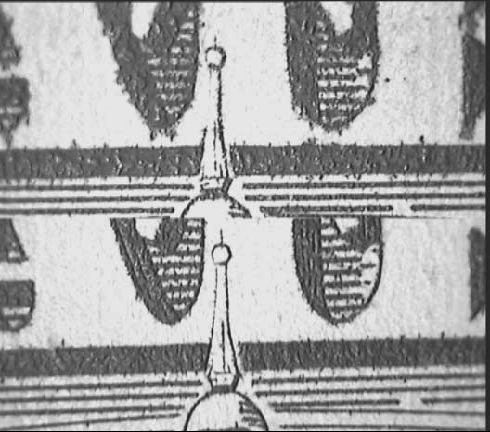
The top half is an actual US $100 note, the bottom is a "better" reproduction ("supernote"). Note how the left side of the steeple is continuous in the bottom half, but not the top.
--jhawk
Posted by Bobby Henderson (Member # 840) on 07-10-2007, 11:28 PM:
That difference in print quality looks much more like an issue of paper differences than quality of printing hardware. The ink spread is more pronounced on the U.S. bill than that fake "supernote." That usually indicates a more coarse "tooth" in the paper.
quote: Larry Myers
If you think a company can bookleg DVD's, sell them for a dollar and make money then that's your issue.
The mass production counterfeiters in China seem to be able to do that just fine. I don't like that or any of the other thousands of copyright and patent infringements regularly occurring there, and I certainly will not do anything to support it directly -such as buying bootleg DVDs.
The price on a legit American DVD release is another matter. Even at $20, I think a lot of DVDs have a good amount of value in them so long as the movie is good in the first place. I also think it's just fine for HD-DVD and Blu-Ray discs to command an even higher price, at least for now.
When it comes to pre-recorded entertainment on disc, the only thing I find overpriced is a good amount of bare bones music CDs. They often cost as much as any DVD. And they don't gradually fall down in price in manner of DVD movies.
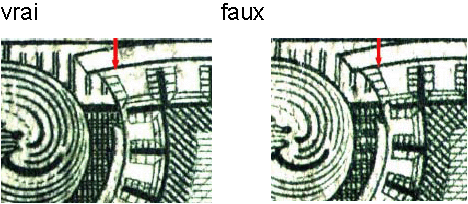
Posted by John Hawkinson (Member # 1135) on 07-10-2007, 11:39 PM:
You're right. That's not such a good example. Try this one:
--jhawk
Posted by Joe Redifer (Member # 3) on 07-10-2007, 11:48 PM:
Have you guys checked out www.monoprice.com for cables and the such? Sure, you may want to get your 7-mile HDMI cable from those great guys at Monster®, but for shorter runs I'm sure it's more than adequate and the prices are almost scary.
Posted by David Stambaugh (Member # 1102) on 07-11-2007, 06:18 PM:
I bought an HDMI to DVI converter cable from monoprice.com. The build quality seems excellent despite the scary cheap price.
Posted by Larry Myers (Member # 738) on 07-24-2007, 05:05 PM:
I just went back to Best Buy. Blue Ray 1080P is now $599 and HD DVD 1080P is $499 with 5 free HD DVD's out of a choice of 10 or so possible titles. I talked to the sale guy about the HDMI and the Component issue. As before, he said you can't use component connections to play 1080p. I told him the info I got on this thread. He went away thinking I was crazy only to back peddle about 10 minutes later. After checking with several managers, it was well HDMI connection is just better then a component connection. The Blue Ray unit did have the component connections.
I am still thinking Blue Ray is a better choice. If I wait another week or so it might come down even more.
Posted by Mark Gulbrandsen (Member # 72) on 07-29-2007, 08:46 PM:
quote: Bobby Henderson
You might be able to get by using a component cable...so long as the HD-DVD disc doesn't have the HDCP flag activated to prevent HD-quality video from streaming over the component video outputs.
FWIW: The ver.2.0 of the firmware for the Toshba HD player includes this flagging ability, apparently the older versions did not have this ability. The other nice thing is that the player now displays the resolution on screen at the beginning of the disk if you're playing a regular DVD. There is a definate improvement using the HDMI connections here... I can switch back and forth between component and HDMI. No expensive HDMI or Component cables either... just mid priced stuff. On HDMI here is less noise in some of the colors and the picture just plain looks sharper with HD-DVD's.
Or do what I did and get he cheapo Toshiba for $238.00 and still get the 5 free DVD's. I dare you to leave the store without also buying at least a half dozen other HD titles as well! Circus City has a really good selection of both Blue Ray and HD-DVD's here in SLC. Then when the dual fomat players apear jump on it and spend the big bucks. The Toshiba also does a fantastic job at up-converting regular DVD's.
Mark
Powered by Infopop Corporation
UBB.classicTM
6.3.1.2