This is topic Digital Editing programs in forum The Afterlife at Film-Tech Forum ARCHIVE.
To visit this topic, use this URL:
https://ft-forum.com/ft/cgi-bin/ubb/ultimatebb.cgi?ubb=get_topic;f=12;t=000602
Posted by Phil Blake (Member # 2012) on 11-12-2007, 11:49 PM:
Hi everyone,
I am looking at the Sony Vegas 8 PC editing program , it looks good on paper , as do they all .
Has anyone here used this program ? and if so is it better or worse than Pinnacle 9.
I was told it renders on the fly unlike Pinnacle.
Posted by Bobby Henderson (Member # 840) on 11-13-2007, 04:32 PM:
This "rendering on the fly" thing needs a little explanation. At first glance, that sounds bad. Are you talking about encoding a finished video project to a compressed format such as Quicktime in the background while you edit something else. Or does the program just start rendering graphics or video encodings before you're even finished editing?
If I'm doing something between Premiere, After Effects (and maybe even Encore, Photoshop & Illustrator too) I don't want Premiere or AE rendering something until I am finished. The Adobe programs have a feature called "Dynamic Link" to allow you to place files you're still working on from one application into the timeline of another (such as an After Effects animation on the timeline in Premiere or Encore) without having to render anything. Update the project in AE and it's automatically updated in Premiere or Encore. It's a more flexible arrangement that allows you to go back and change and tweak different things without it costing a bunch of rendering time.
Posted by Joe Redifer (Member # 3) on 11-13-2007, 06:41 PM:
The rendering he speaks of is likely if he applies any transitions or effects to the existing MiniDV footage. I don't know if I like the whole "background rendering" idea. I agree that it shouldn't be rendered until you say so. Final Cut Pro will play the applied effects and transitions without rendering and if the effects/transitions are too complex for your computer it will lower the resolution so you can preview what it will look like before rendering. Many DV programs recompress in DV format which is lossy, so each time you change something, you lose. Apple's Compressor goes around this and avoids the extra "recompress to DV or whatever format you are editing in" step and applies the rendered effects as it makes your final export movie (for example if you were going straight to DVD, then any pure red titles you added wouldn't be super-blocky like the MiniDV format would make them). Not sure if Pinnacle or Vegas or Premiere offer that.
Here's an example of what I'm randomly straying off-topic about.
Let's say you added the following title to your video:
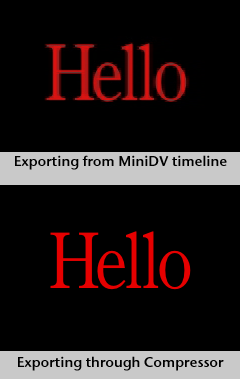
The point is that rendering in the MiniDV format = BAD!
Posted by Bobby Henderson (Member # 840) on 11-13-2007, 09:51 PM:
That makes more sense.
Some of this reminds me of the "RAM previews" that are available in Adobe After Effects, as well as Premiere when you are applying certain effects within that program. The act of rendering video or motion graphics routines is time consuming. If you change anything you essentially must re-render the clip rather than applying changes to something already rendered and likely lossy compressed.
Maybe the Sony Vegas 8 application just has something equivalent to using "RAM preview" for video/motion graphics effects. That's sort of the impression I get.
On that subject, I wish I had huge sums of money to throw away on such things as motion graphics software. High end applications like Fusion have native 64-bit versions able to use insane amounts of RAM for lots of preview and rendering flexibility.
Posted by Joe Redifer (Member # 3) on 11-13-2007, 11:32 PM:
I can only do a RAM preview 30 seconds long in After Effects. Maybe I need more than a paltry 4GB o' RAM?
Posted by Phil Blake (Member # 2012) on 11-14-2007, 12:37 AM:
I am not too concerned about the rendering options with vegas 8 I am hoping that it will deliver the end product to DVD with less hassles. I currently use Pinnacle 9 however i find the setting up of chapters and menu's etc too complex and not reliable so I save it as and AVI then create a dvd with Nero , I sometimes find the audio out of sync and the overall quality down .
I was hoping this new Sony product may offer a better menu and chapter features so I can use it all the way from digital video to dvd.
Posted by Bobby Henderson (Member # 840) on 11-14-2007, 06:11 PM:
I've never messed around with Sony's Vegas software. The only one in their suite I have any experience with is Sound Forge (which is pretty decent). Looking at the overview of the suite, it looks pretty decent for the $600 price tag and doesn't look as clunky as the Pinnacle stuff. Definitely look around for some reviews on Sony Vegas Pro 8 before you buy.
Any "affordable" video-to-DVD creation software is going to be pretty labor intensive and may even have a serious learning curve as well depending on what you're trying to accomplish. There tends to be trade-offs in making things like video editing and DVD production software more affordable.
The more expensive suites available on the Windows platform, specifically those from Avid and Adobe give you certain things to expand your creative capability or simply be able to get things done faster.
It's too bad Apple never bothered trying to sell a PC-version of Final Cut Studio. Clearly if you have a Mac it's a suite worth having, even if you have to buy some Adobe applications like Illustrator and Photoshop to get more out of it. The interface is laid out more intuitively and the suite has a hell of a lot of capability, especially for the $1200 price. I like using the Adobe Production Studio suite, but then I have been using applications like Photoshop and Illustrator for over a decade and am used to Adobe's interface design.
quote: Joe Redifer
I can only do a RAM preview 30 seconds long in After Effects.
Are you previewing HD-quality stuff? There shouldn't be a hard 30 second limit on RAM preview. Normally it's just going to preview as much as possible before you run out of available system memory. That time limit should vary depending on how complex the scene is that you're creating. AE is not compiled in 64-bit form, so you wouldn't gain much benefit from putting more RAM in the system.
Posted by Phil Blake (Member # 2012) on 11-15-2007, 12:30 AM:
Thanks Bobby , I will try to find out all a can on this as Vegas carrys a big price tag , I want to be sure it will do what I want.
All editing programs seem to have good and bad points I am hoping this one will have more good ones.
Posted by Bobby Henderson (Member # 840) on 11-15-2007, 08:59 AM:
Vegas Pro 8 has a big price tag? It looks like a bargain to me provided what all the suite reportedly can do. It would especially be a bargain if it performs its tasks reasonably well.
By comparison, the Vegas suite has a lower price tag than the retail version of Adobe Photoshop "Standard" alone. Final Cut Studio costs over $1200. Adobe's Production Studio Premium suite costs over $1600. Avid's suite is around the same and then you would jump up to over $2500 for their "Mojo" external video input/output acceleration device. And all of those applications are considered to be in the "affordable" range of semi-professional and professional video authoring suites. When you get into truly professional systems for broadcast use the cost really spikes sky high.
Posted by Joe Redifer (Member # 3) on 11-15-2007, 06:13 PM:
Except the broadcast stuff is ruined by, well, being broadcast. I am amazed they spend so much.
Posted by Stephen Furley (Member # 1277) on 11-16-2007, 04:57 AM:
The BBC still move a lot of stuff around in composite format, which doesn't help. O.B. material in particular is quite likely to have been hrogh a composite stage.
Posted by Scott Jentsch (Member # 1681) on 11-16-2007, 02:59 PM:
I have been using the Movie Studio versions of Sony Vegas for a couple of years now, and for my purposes, it has worked fine. The interface is the same as for Vegas Pro, it's just that many of the high-end features are not available. There are so many things that Vegas Movie Studio can do that I don't think I'll ever run into the limitations of the product.
You can download 30-day trial versions of all of Sony's video and audio editing tools, including Vegas Pro, so you can check them out for yourself. I've found the interface very easy to pick up and the DVD creation tools are pretty good as well.
I just upgraded to Movie Studio Platinum 8, and now I can edit in HD and even output video in an iPod-compatible format (to give you to extremes of the output choices).
For $100, it's a great price for a great piece of software. Advanced people that really know what they're doing probably need the Pro version because of the extra features, but I recommend looking long and hard at the comparison chart before putting out the extra money.
There is a guy named Douglas Spotted Eagle that is connected with Sony and he does some of their demonstration events, he's authored many tutorials on using Vegas, and he's active in some of the support forums as well. If you ever doubt the capability of Vegas as a package, just look around for some of his work.
Posted by Mike Heenan (Member # 392) on 11-16-2007, 04:28 PM:
Joe, what's the best way to output say roughly 2 hrs of 8mm film home movies (transferred to mini dv and imported into final cut) to get it onto DVD? Is compressor better than Quicktime's MPG2 codec? that's what I've been using so far.
Posted by Joe Redifer (Member # 3) on 11-16-2007, 05:01 PM:
Compressor uses Quicktime's M2V codec, it just goes around the rendering that Final Cut does to make the final product have fewer generation losses. Also you can batch compress with Compressor. I don't know if I'd try to put 2 hours of stuff on a single layer DVD. Get a dual layer burner, dual layer blank disc and at least DVD Studio Pro 4.1.2 and burn it. I'd set the compression to average around 6 mbps and max at around 8.1 or so (2-pass VBR of course). The audio needs to be converted to Dolby Digital, probably 192kbps stereo would be fine. Then you need to set a break point which I don't have the time or space to go on about here.
Posted by Phil Blake (Member # 2012) on 11-21-2007, 11:24 PM:
well I took Scott's advice and downloaded the trial Vegas 8.
At a first glance it sure looks like it will do quite alot , maybe too much, which it what many of these programs seem to suffer from .
I dont have the spare time to get my head around this one so I might just upgrade to Pinnacle 10 for the moment. I like the simple drag and drop editing.
Posted by Tim Reed (Member # 137) on 01-20-2008, 02:29 PM:
Vegas has a great sound editor that will do 5.1. quote: Joe Redifer
I can only do a RAM preview 30 seconds long in After Effects. Maybe I need more than a paltry 4GB o' RAM?
Ever since version 4.5 and beyond, the RAM preview has been for ![[bs]](graemlins/bs.gif) in AE. With each press of the preview key in a session, the less time it gives. I eventually have to close and reopen the program to get the full time again. Clearing the buffers doesn't help, either. If anything, it brings it closer to running out of RAM and locking up!
in AE. With each press of the preview key in a session, the less time it gives. I eventually have to close and reopen the program to get the full time again. Clearing the buffers doesn't help, either. If anything, it brings it closer to running out of RAM and locking up!
Powered by Infopop Corporation
UBB.classicTM
6.3.1.2