This is topic DLP Projector (non-cinema) problem in forum The Afterlife at Film-Tech Forum ARCHIVE.
To visit this topic, use this URL:
https://ft-forum.com/ft/cgi-bin/ubb/ultimatebb.cgi?ubb=get_topic;f=12;t=000630
Posted by Thomas Pitt (Member # 4322) on 04-07-2008, 01:30 PM:
I went to a presentation today, where they were trying to use a laptop connected to a consumer DLP projector to show Powerpoint slides. However, the projector had a problem!
The left side of the image was extremely dark and barely visible. There was then a band of off-color image to the right, and the remainder of the image had proper color and luminance.
Obviously they couldn't do the slides properly with only half a screen, so they had to do the presentation without the demonstration images.
I've never heard of this kind of thing happening to a DLP projector before, and couldn't find any information on Google about anything similar. The projector is the InFocus ScreenPlay 4805; it uses a single DLP chip and rotating color wheel.
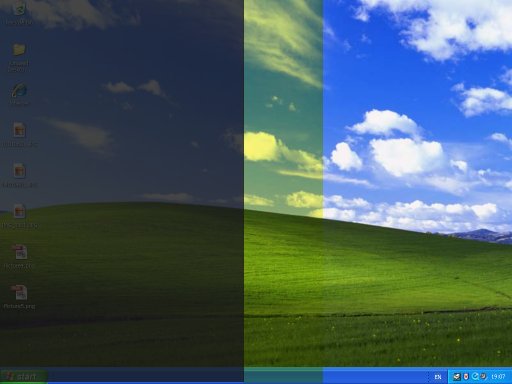
Note this isn't a picture of the actual projected image; it's a picture I made to show what the problem looks like. Also note that the actual projected image seemed to have more 'rounded' edges to the bands than shown here.
Anyone have suggestions as to what could be wrong, and what we could do to fix it?
Posted by David Zylstra (Member # 4230) on 04-07-2008, 01:53 PM:
Does content from other sources work fine? (i.e. S-Video, composite, etc?)
I've seen funny things happen if the laptop video card is putting out a resolution or refresh rate that the projector can't understand - try lowering the laptop's resolution or changing the refresh rate to see if it gets better or worse.
The Infocus website shows the SP4805 projector as having a native resolution of 854X480 and that it can accept 640X480, 800X600 and 1024X768 input resolutions (it also recomends a refresh rate of between 60 and 75hz and to have the laptop plugged in).
Posted by Thomas Pitt (Member # 4322) on 04-07-2008, 03:08 PM:
No, other sources have the same shadow on the projected image. Even the projector's OSD is affected, which makes me think it's either the DLP chip itself, or something loose near the lens or chip casting a shadow. Do DLP projectors have any kind of aperture gate or polarizer? It might be that's what has come loose and is casting a shadow. Perhaps the bulb or reflector is out of alignment?
The fact that I can see a full image (albeit dark) on the left side of the picture suggests that the DLP chip itself is probably working without problems. Likewise, the right half of the picture has proper colors, so the color wheel is probably fine.
Posted by Robert Minichino (Member # 3495) on 04-07-2008, 03:22 PM:
This may be a problem with the color wheel alignment or the color wheel motor is failing. I've seen problems with the color wheel cause similar issues on screen.
Posted by Ron Funderburg (Member # 4561) on 04-07-2008, 04:07 PM:
If it is jpeg it can't be corrupt data corrupt data on picture files have clear pictures at the top with proper color and then get hinkey the further down the picture you move. Usually the bottom of these files is just gray!
I would think it is a resolution problem as well or a damaged video card. The native resolution of the projector is pretty low if the posted resolution is correct and I have no reason to doubt it.
Posted by David Zylstra (Member # 4230) on 04-07-2008, 05:39 PM:
I've had some Infocus projectors where the color wheel fell apart - it started with one color that put the wheel out of balance, which also caused a really loud whining noise that sounded like a bad cooling fan.
I had some other problems that caused a color shift on one side of the image that was also blurry -- the warranty repair department never told me what the issue was.
Posted by Ron Funderburg (Member # 4561) on 04-07-2008, 05:53 PM:
I think I will write Infocus off my list of projectors for home use! I have a couple of DLP2 projectors that have beautiful pictures on them but I can't remember the model and brand right now. 2500 lumens though!
Posted by Cameron Glendinning (Member # 3516) on 04-07-2008, 07:33 PM:
quote: Thomas Pitt
Also note that the actual projected image seemed to have more 'rounded' edges to the bands than shown here.
This quote leads me to think it could even be a problem with the bulb.
Posted by Frank Angel (Member # 248) on 04-07-2008, 11:56 PM:
Before spending hours trouble shooting problems like this, the first thing you need do is the old RCA Tech Service School method, know as the Attack method -- you lift the rear legs of the projector (or any other electronic piece of gear) about a foot off the table.....drop it. This will verify if there is any mechanical instability that could be causing the problem. You'll get a 25% chance of it being fixed right then and there or at least point you in the direction of something not sitting quite right, poor contacts, etc.
I swear an RCA service tech told me he learned this in the RCA school. Another RCA method for tracking down a universal problem -- presistant hum: starting at the sound source, go to every piece of equipment in the system one at a time; cut the ground. If the hum decreases, leave it off; if it increases, solder it back on. Proceed to the last piece of equipment in the system. Have a beer. ![[beer]](graemlins/beer.gif)
Posted by Brad Miller (Member # 2) on 04-08-2008, 12:08 AM:
I would've loved to watch an RCA tech troubleshoot a DP70.
Posted by Frank Angel (Member # 248) on 04-08-2008, 07:22 AM:
Betcha he would have tried. Hernia time. ![[Wink]](wink.gif)
Back to this DLP projector. I would put my best guess on something to do with the color wheel....maybe out of sync with the chip? That might explain the band of yellow, but not sure about the darker portion of the image. Does the chip go blank any point in the cycle between frames? Then again, if the circuit that presents the color coded images to the chip is faulty and or out of sync with the wheel....just speculating.
Oh, and as with all things digital: power it down, then reboot....it's the digital equivalent of dropping it on the bench.
Posted by Paul Mayer (Member # 355) on 04-08-2008, 12:05 PM:
Ah yes, the brogan method of troubleshooting. Closely related to the BFH method. Being a former television guy brought up on RCA gear, I am BFH certified.
But this does seem to be a settings issue between the laptop and the projector. The recreated images make me think of wrong scanning format or sync source and/or type selected, or possibly clock timing and phase issues. Re-setting the settings would be where I'd start. It is amazing how often the digital bench drop that Frank mentions (cycling the power) works. Or to be less charitable: "Lack of troubleshooting skill dictates economy of troubleshooting style." Nonetheless there is great beauty in simplicity.
Getting physical would be next, looking at mechanical things like bad or loose connections, pushed pins and the like, hence the brute force methods mentioned above.
When I was at Channel 10 ('Vegas PBS) we produced a series of educational videos about various careers, including one about being a television engineer. We created a scene showing the master control operator running for the tape room when his on-the-air source went to static. One of my favorite shots in that sequence was a tight closeup of the video demod module on our RCA TR-50 being pounded gently in its slot by a closed fist.
InFocus machines are perfectly fine for things like Powerpoint or other non-critical image projection. No data or graphics grade projector would be my first choice for a cinema application regardless of how inexpensive the machine might be.
Posted by Thomas Pitt (Member # 4322) on 04-10-2008, 07:46 AM:
Today they actually let me have a look at the projector and try some basic fixing. Before powering up, I took the lamp cartridge out and cleaned it (the filters were covered in dust). I looked at the lamp through the front aperture gate thing, but couldn't see anything obviously wrong with it - no burning, discolored reflector, misalignment etc.
Powered up the projector without the lamp cartridge, and observed that the color wheel was indeed spinning as it should and nothing was obscuring the hole leading to the optics. Interestingly, the color wheel had Cyan, Yellow, Magenta and clear segments as opposed to Red/Green/Blue!
Put the lamp cartridge back in and powered up the projector. The 'dark half' effect was still there, but this time I was able to get a better look at it. It seems that the right hand side of the picture is perfect, then there's a 'rainbow' curved band and a darker section of the image. Closer inspection revealed a second rainbow band and an area that had no light whatsoever.
I tried bumping various areas of the projector, but it made no difference whatsoever to the shadows on the image. I also took a picture of the projected image with my camera phone; not sure how well it shows up though:
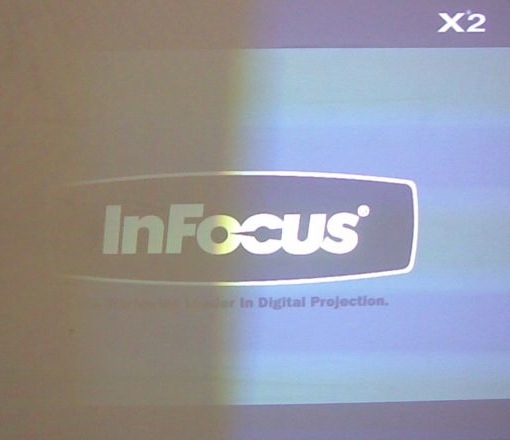
(note that the horizontal banding is the result of the color wheel flicker on my camera's CCD - the right side of the image looks perfect to the naked eye)
I'm beginning to wonder if it is the lamp. Could the lamp itself have two filaments or discharge gaps, and one has failed? I don't think it's something loose inside, or my 'beating' of the projector would have caused a change in the shadow ![[evil]](graemlins/evil.gif)
Posted by David Stambaugh (Member # 1102) on 04-10-2008, 11:51 AM:
Unlike the 1st photo, to me that 2nd photo looks like an optics (lens) problem.
Posted by Ron Yost (Member # 1850) on 04-10-2008, 11:55 AM:
Thomas,
I think you have the infamous Light Tunnel problem. The Light Tunnel is a squarish unit of four very tiny mirrors that are glued together. When one comes unstuck it causes the problem you're seeing (though sometimes it appears on the right-side of the image, depending on which mirror came unglued). I doubt your banging helped it any, either. ![[Smile]](smile.gif) It is fixable, though I've never needed to attempt it. (I have an original X1, but have replaced it with another much newer projector [Optoma HD65 -- great little PJ]).
It is fixable, though I've never needed to attempt it. (I have an original X1, but have replaced it with another much newer projector [Optoma HD65 -- great little PJ]).
Anyhow, you could go to AVS Forum and search for "light tunnel", as there are a number of threads about the problem, and what to do about it. It's my understanding that the X2 is a slightly different animal than the X1 or 4805, tho, so you'll want to be careful in what advice you follow. I've even seen a website detailing the fix for an X1, but I don't have it bookmarked.
Also be really careful taking the machine apart. It's not extremely difficult, but it's not that easy, either (this, I have done). Be REALLY careful of the color wheel!!!! It's very fragile, very thin glass!!!!
Here's the main (I think) AVS thread for the problem in X2's:
http://www.avsforum.com/avs-vb/showthread.php?t=775251
Oh, the clear segment in the color wheel is to allow more light thru for presentation purposes.
Best of luck!!
Powered by Infopop Corporation
UBB.classicTM
6.3.1.2