This is topic I have bought Gran Torino in forum The Afterlife at Film-Tech Forum ARCHIVE.
To visit this topic, use this URL:
https://ft-forum.com/ft/cgi-bin/ubb/ultimatebb.cgi?ubb=get_topic;f=12;t=000742
Posted by Mark Gulbrandsen (Member # 72) on 06-10-2009, 02:45 PM:
And all I can say is the transfer looks like crap. The gamma seems to be amuck here as there is absolutely NO detail in the blacks what so ever. I don't remember it looking this way in theaters. I may even take this copy back to the store and ask for a refund... It IS that bad!
Mark
Posted by Joe Redifer (Member # 3) on 06-10-2009, 03:09 PM:
quote: Mark Gulbrandsen
I don't remember it looking this way in theaters.
It did if you watched in DIGITAL like I did!
Posted by Claude S. Ayakawa (Member # 1401) on 06-10-2009, 03:19 PM:
After reading your comments, I went to Hi Def Digest to read their review of the Blu Ray release of Gran Torino and unlike you, they said the image was almost reference quality. I bought Gran Torino based on their favorable review as well as others and found it very interesting how your opinion differs from them.
-Claude
Posted by Damien Taylor (Member # 4255) on 06-10-2009, 07:00 PM:
What was it shot on?
Posted by Bobby Henderson (Member # 840) on 06-10-2009, 08:54 PM:
Sounds to me like Gran Torino may be yet another trademark Warner Bros. DNR "smoothie" video transfer.
Blu-ray.com gave Gran Torino a 4 out 5 on the video rating, but even that number sounds a little high based on the criticism. And then here's what DVD Beaver said about it:
quote: Leonard Norwitz, DVD Beaver
Image 5/8
The first number indicates a relative level of excellence compared to other Blu-ray video discs on a ten-point scale. The second number places this image along the full range of DVD and Blu-ray discs.
For a while there I worried there was something wrong with my projector: the oddly filtered image (I admit icky green is my least favorite color), which doesn't lack for sharpness, seems thin, flat, soulless – as if the life had been sucked out of it. Blacks are sometimes crushed; shadows often lack detail. For a while I half expected life to emerge as Eastwood’s character becomes more neighborly, but, alas, not. I can't say if this is representative of how the movie looked in the theatre but I thought it gave the impression of being amateurish.
To answer the question, "what was it shot on," the answer is 35mm film. Panavision cameras with anamorphic lenses. Don't konw if there is any problem with the original source photography. A digital intermediate was used -likely so the color saturation sliders could be drawn down next to nothing.
WB tends to be at the center of controversy regarding the use of "DNR" -a fancy acronym for noise or grain reduction. The problem with using noticeable levels of DNR is the filters act just like the despeckle filter does in Photoshop: it literally removes detail out of the image, takes away some of the three dimensional "pop" and gives you soft-ish looking image quality. Some DNR overuse is done on purpose to minimize video bit rates.
Posted by Victor Liorentas (Member # 5272) on 06-10-2009, 09:37 PM:
Widescreen Review gives the blu-ray picture quality a 3.5 out of 5 and says it looks dull, i remember it looking sharp on film and i hate losing detail to grain removal or low bit rate.
I find T-2 to be a bit soft on the new Blu-ray but the studio denies having used grain removal?
Enter the Dragon has video artifacts on both HD DVD and Blu-ray , i wonder if it is because of too many hours of special features on one disc?
Posted by Mark Gulbrandsen (Member # 72) on 06-11-2009, 09:19 AM:
quote: Victor Liorentas
Widescreen Review gives the blu-ray picture quality a 3.5 out of 5 and says it looks dull
I'll post some screen shots off my Sammysung later today. If I were reviewing it I'd give it two stars out of four for transfer quality. The image isn't softish looking or dull by any menas. Sharp as a tack in fact. To me it looks like someone lowered the gamma a couple of clicks from it's normal setting and partially crushed all the blacks. Not dull looking but overly contrasty.
In theaters on both film and digital I don't remember loosing all the detail in people's hair and other dark areas. The problem's not in my system either. Other Blue Rays look great and the regular DVD doesn't look quite as contrasty as the Blue Ray does.
Mark
Posted by Claude S. Ayakawa (Member # 1401) on 06-11-2009, 01:38 PM:
Getting off topic, for top notch Blu Ray picture quality THE INTERNATIONAL" is awesome! So is the movie.
Getting back to topic,
I never saw GRAN TORINO in a theatre but after watching a few selected scenes from the BD disc last night, it was not contrasty as some had reported. The picture and color looked subdued but it appears to be done on purpose to achieve a certain kind of visual effect and I liked it. The picture appears to be nice and sharp and I look forward to enjoying it very much when I see it in it's entirety tonight.
-Claude
Posted by Chris Slycord (Member # 4239) on 06-11-2009, 09:55 PM:
When we had multiple prints of that movie, I don't remember there being "subdued color" though I don't have a BD player or HDTV to use as a comparison.
Posted by Scott Jentsch (Member # 1681) on 06-12-2009, 11:49 AM:
I just reviewed the Blu-ray version of Gran Torino and I didn't notice any problems with the darker scenes.
I thought the image overall looked pretty good, but I'm not as sensitive to the noise reduction artifacts as others seem to be.
Posted by Claude S. Ayakawa (Member # 1401) on 06-12-2009, 01:29 PM:
I watched my Blu Ray copy of GRAN TORINO last and with the exception of the subdued color I mentioned yesterday, I found nothing wrong with the picture. You can actually see the color in the feature was altered if you watch the way how the film was shot when everything is shown with normal color and contrast. Unlike "THE INTERNATIONAL" I watched the night before on BD, Clint Eastwood's picture quality is no way as eye popping in Blu Ray as the financially themed thriller but it was still very good and I was pleased with it. I did not see GRAN TORINO in a theatre and have no idea what the picture looked like but I suspect it was the same.
As far as the movie is concerned, I consider it among the best he had created and it was very entertaining. The story was very good and I had no problem with the way the Asians played their parts.
-Claude
Posted by Mark Gulbrandsen (Member # 72) on 06-12-2009, 03:01 PM:
Claude,
It looks like it was done using bleach bypass... this is a common way to get that subdued color and high contrast. It has a similar look to Payback which very definately was done bleach bypass. I watched the BR all the way through as well last night and I still feel that it's much contrastier then it was in the theater release. It was interesting to note that as contrasty and dark as it is none of the time was Clint Eastwood's face EVER out of the light like some of the other characters in fact I'd say he was proposly kept in the light as an efferct of some sort. As for grain, that part of the film seemed to be intact.. grain was evedent on my screen in quite a nmber of scenes. Is this how it looks on your set Claude?
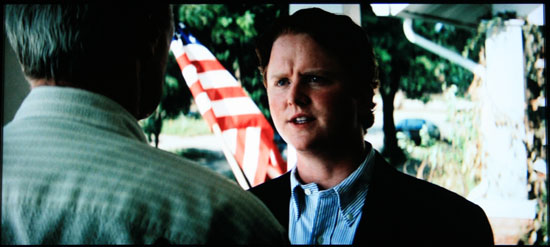
Here are a few examples of what I mean by no detail...
Mark
"Not you again Padre" Notice how the padre's hair and jacket are featureless...
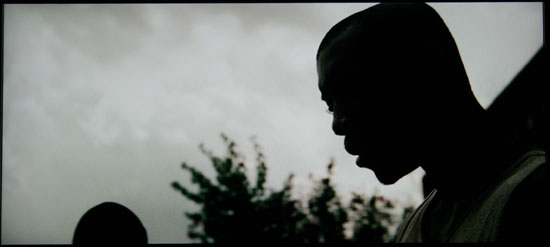
"you goin a let him call you Bro? I don't remember NOT seeing his face in the theater...
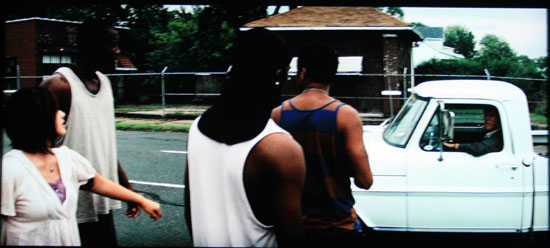
"What are you shines up to?" Note the lack of any face on the guy in the upper left and the guy in the center has absolutely NO detail...
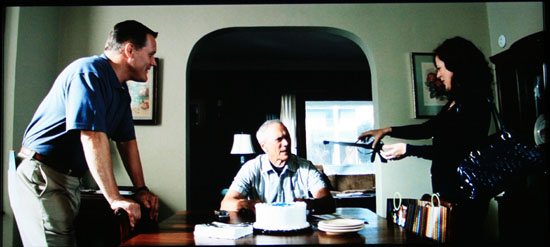
"You should look at the brochures" Note the gal on the left's hair or lack there of... It's just a black glob. Clint's face on the other hand is brightly lit as it is in almost every scene.
Posted by Claude S. Ayakawa (Member # 1401) on 06-12-2009, 03:39 PM:
Mark,
If my GRAN TORINO BD looked like the examples you had posted, I would have promptly taken the disc back to Costco where I bought it and asked for a refund. Is the GRAN TORINO BD the only one looking bad on you display? If the others in your collection look normal and GT look terrible, I do not know what to say because all of the Blu-Ray discs in my collection look great including GRAN TORINO. It might not be a bad idea to take the disc back to where you bought it and if they have a Bly-Ray set up, why not play it on their machine and see how it looks. If it look the same as on your screen, the disc is bad. The disc you have might not have been pressed correctly and need to be replaced by the store.
-Claude
Posted by Bobby Henderson (Member # 840) on 06-12-2009, 06:41 PM:
Why would bleach bypass techniques need to be used at all when the movie imagery was ultimately put through a 2K resolution digital intermediate?
When DI is used there is no need at all for any photo-chemical colorizing steps. Just scan the original camera negative properly and then apply the contrast and desaturation effects attained through bleach bypass in the digital realm.
Bleach bypass, use of color filters and other old school color timing effects have two fundamental weaknesses. First, the effects can only be applied on a "global" basis across the entire image. Second, generational loss is a cost. It would be extremely risky to apply such effects on the original camera negative.
Depending on time/budget constraints a digital intermediate can be made as precise as the filmmaker and producer will allow. Think of Photoshop in motion. You can mask and protect certain areas while applying destructive effects to other areas of the image. Don't like how a certain applied idea looks now that you can see it on the monitor? Hit the undo button. You can't undo bleach bypass being applied to film.
The more I think about it the more I suspect overuse of DNR and other file-size conserving techniques are why Gran Torino doesn't possibly look as good as it should.
Posted by Ian Parfrey (Member # 5122) on 06-12-2009, 08:31 PM:
Cant wait to see the end of 2K intermediates. ![[thumbsdown]](graemlins/thumbsdown.gif)
Posted by Mark Gulbrandsen (Member # 72) on 06-12-2009, 08:46 PM:
Claude,
Yes, All the other disks I own look great!! The way this disk looks is why I made the original post. I'd appreciate it if you could post a few pics off GT off your screen. I may have to print out the pictures and show them to the store when I return it.
As for bleach bypass and other effects... Clint is way more likely to deal with effects of this nature at the camera or negative stage than anywhere else in the chain... Don't forget he is old school.
Thanks!
Mark
Posted by Bobby Henderson (Member # 840) on 06-13-2009, 01:53 AM:
I finally watched Gran Torino on Blu-ray earlier this evening. One of my close friends bought a copy of it and we watched it on his Samsung Series 750 52" HDTV, played from a Playstation 3.
I really liked the movie. The ending was different from what I had expected, but it seemed very realistic and even clever.
The video quality on this BD seemed better than I had expected based on previous complaints, but it's still not "reference quality." Small object detail such as fine fabric weave on clothing was well defined. The biggest issue in video quality I noticed was a good amount of crush and noise in the shadows during some of the darker scenes.
The style choice of overly drained color, to me at least, seems like a very common occurrence of many recently released movies. Kill the color or even throw a green cast across it so the show can look more like The Matrix.
And speaking of The Matrix HBO is now showing Speed Racer, directed by the Wachowski brothers. Damn, that movie has some GARISH color in it. Too bad the movie looks sort of crap-tastic when compressed within the bounds of satellite TV. The Blu-ray version may look a bit better, but then it is only a single layer 25GB disc.
Posted by Brad Miller (Member # 2) on 06-13-2009, 02:09 AM:
quote: Mark Gulbrandsen
I'd appreciate it if you could post a few pics off GT off your screen. I may have to print out the pictures and show them to the store when I return it.
Wait a minute. Are you suggesting that there are TWO different transfers released on blu-ray? Or are you suggesting that your particular blu-ray disc somehow is defective in the picture quality...yet it plays, thus proving that the disc is defective? (Remember, its digital and every copy is identical.)
I'm not buying either of those.
Posted by Bobby Henderson (Member # 840) on 06-13-2009, 12:05 PM:
Maybe there is some sort of image post processing stuff at work somewhere in the playback chain. The Playstation 3 console and many Blu-ray players have filters to sharpen the image, reduce noise and other stuff. The same thing goes for a lot of HDTV sets. I turn off all that crap. Seeing film grain in the image does not bother me the least little bit.
Gran Torino had a very slightly visible layer of film grain in the image. But I still suspect a good amount of DNR was used to reduce the appearance of grain and more importantly allow the video bit rate to be reduced to a more manageable level.
Posted by Claude S. Ayakawa (Member # 1401) on 06-13-2009, 01:36 PM:
Mark,
Instead of the screen captures you want me to send, here are two links to reviews of the Blu-Ray edition of GRAN TORINO with screen captures.
http://www.blu-ray.com/movies/movies.php?id=4910&show=review
http://www.collider.com/2009/0527/gran-torino-blu-ray-review
Brad is right about every digital copy should be exactly alike but we are not talking about the possibility of two seperate pressings of GRAN TORINO. There was only one pressing and it appears you purchased a copy that was not pressed correctly. This kind of thing has happened many times such as American postage stamps and currency to the delight of rare stamp & coin collectors that were printed/pressed in error and went into circulation. You have a legitimate reason to return the disc for another copy and you should not have any problem.
-Claude
Posted by Brad Miller (Member # 2) on 06-13-2009, 03:08 PM:
Ummmmm NO. We are talking about a digital optical disc. Either it plays or it doesn't. There is no way they can "press it wrong".
I'll just dumb this down for everyone. There is something about Mark's setup that is making this particular movie look bad. His disc would look identical to Claude's disc if it was played in Claude's player.
![[Roll Eyes]](rolleyes.gif)
Posted by Joe Tommassello (Member # 4632) on 06-13-2009, 04:18 PM:
Here's a link to another BR review with screen caps:
DVD Beaver GRAN TORINO
It looks like it's a very dark and low contrast movie. I only saw it on a bootleg DVD from a screener and it had the washed out look of Mark Gulbrandsen's screen caps. The caps on the reviews seem to have much lower contrast and/or gamma levels. No blooming in the bright areas but it almost looks like day-for-night shooting.
Posted by Mike Blakesley (Member # 26) on 06-13-2009, 04:41 PM:
Well...I can say for sure that the picture looked a lot brighter on our screen at the theatre than those screen caps!
Posted by Mark Gulbrandsen (Member # 72) on 06-13-2009, 04:45 PM:
quote: Bobby Henderson
Maybe there is some sort of image post processing stuff at work somewhere in the playback chain. The Playstation 3 console and many Blu-ray players have filters to sharpen the image, reduce noise and other stuff. The same thing goes for a lot of HDTV sets. I turn off all that crap. Seeing film grain in the image does not bother me the least little bit.
Ditto here...
quote: Bobby Henderson
I noticed was a good amount of crush and noise in the shadows during some of the darker scenes.
I agree it looks like the blacks are crushed but I don't see noise... I do see grain at times but not in dark areas. My image doesn't look anything like those screen shots from those web sites as you've seen but I suppose those reviewers have 5000 dollar sets and mine was a mere 1800 bucks. I tend to agree with Brad that every copy SHOULD be the same but they are obviously not. Also, no adjustment of any control on my set clears up the excessive contrast you see in my images. I think I'll rent a copy and see what that looks like. If it looks better I'll go to the store and show them the differences get my money back and buy the disk some place else. Also, as I mentioned the regular DVD that I bought to send to my dad doesn't look as contrasty as the BR does.
Mark
Posted by Brad Miller (Member # 2) on 06-13-2009, 05:36 PM:
Mark - why not just take your blu-ray to a local video store and ask them to compare it against one of their rental copies on their store player?
Looking at your screenshots, I can definitely see why you would complain, but there is no possible way you have a defective disc. All of the blu-rays would've been pressed from the same master unless if by some chance there were 2 manufacturing plants pressing them and somehow the master video file that went to one of them was completely fucked.
Regardless, if the blu-ray review sites grabbed shots direct from the discs (which I am sure they did as opposed to Mark photographing his tv image), there is no way I will purchase that on blu-ray. I do remember the annoying green tint to the movie on 35mm that Warner seems to like so much, but that is one of the worst looking transfers I've ever seen. I'll bet the pirated bootlegs looked better! ![[puke]](graemlins/puke.gif)
Posted by Mark Gulbrandsen (Member # 72) on 06-13-2009, 06:02 PM:
Geez, Even the regular DVD looks better!!!
Posted by Brad Miller (Member # 2) on 06-13-2009, 06:22 PM:
You see, this just proves we don't need 4K. If a lower resolution DVD can look better than a blu-ray, the 2K can look better than 4K. ![[Razz]](tongue.gif)
![[Wink]](wink.gif)
Posted by Bobby Henderson (Member # 840) on 06-13-2009, 06:53 PM:
quote: Joe Tommassello
It looks like it's a very dark and low contrast movie. I only saw it on a bootleg DVD from a screener and it had the washed out look of Mark Gulbrandsen's screen caps. The caps on the reviews seem to have much lower contrast and/or gamma levels. No blooming in the bright areas but it almost looks like day-for-night shooting.
Few problems:
The DVD format doesn't have the color fidelity and level of contrast that HD video on Blu-ray can show. So it's hardly valid as any sort of measuring tool.
There is no very good way to rip accurate screen shots from a Blu-ray disc due to the copy protection measures built into the format. Even the best attempts still have flaws. And there is the issue of inter-frame compression in both VC1 and AVC formats which also degrades the quality of any frame grab.
It's very difficult to take a decent photograph of a HDTV screen showing the movie paused. Most photos look pretty terrible, even if the movie on Blu-ray has great video quality.
Posted by Joe Redifer (Member # 3) on 06-13-2009, 08:01 PM:
quote: Bobby Henderson
I still suspect a good amount of DNR was used to reduce the appearance of grain and more importantly allow the video bit rate to be reduced to a more manageable level.
Why, is the movie on a single layer BD with craploads of extras? If not, then the bitrate shouldn't be much of an issue. DNR is more likely to be used because people bitch and moan about grain since they do not understand it. I've heard people say that old movies like Ghostbusters, etc weren't in high definition because of all that grain and therefore cannot benefit from watching in HD vs the DVD. When these people bitch, some studios apparently listen. Stupid is as stupid does.
quote: Mark Gulbrandsen
I tend to agree with Brad that every copy SHOULD be the same but they are obviously not.
And what evidence do you have to prove this? The only proof I will accept is if you can find another copy of Gran Turino on BD sold in the same region that looks different. So far you have not presented an example. If there was a bad master that some discs were pressed from, then that would mean that master would have to have been compressed and authored separately from the good master. Compression takes time and time is money (even though you can't pay your bills with time... I've tried). Also, you'd see a crapload of people bitching about the horrible image quality and so far there hasn't been much bitching other than to say that the picture quality ranges from good to mediocre, certainly nothing along the lines of what you are seeing.
quote: Bobby Henderson
And there is the issue of inter-frame compression in both VC1 and AVC formats which also degrades the quality of any frame grab.
Nope. If you grab an i-frame you'll be OK.
Posted by Bobby Henderson (Member # 840) on 06-13-2009, 09:14 PM:
quote: Joe Redifer
Why, is the movie on a single layer BD with craploads of extras? If not, then the bitrate shouldn't be much of an issue. DNR is more likely to be used because people bitch and moan about grain since they do not understand it. I've heard people say that old movies like Ghostbusters, etc weren't in high definition because of all that grain and therefore cannot benefit from watching in HD vs the DVD. When these people bitch, some studios apparently listen. Stupid is as stupid does.
Actually, Gran Torino is on a 50GB BD; however, the disc only has 33GB of data and the movie is only 29GB in size. I think Warner Home Video may have a philosophy in place to squeeze down file sizes whenever possible -even when there is ample space on the disc for the video stream to stretch its legs.
I agree a lot of people don't understand film grain and the idea that keeping the grain is a good thing. When the grain is smoothed out of the source image a lot of subtle details are thrown out as well. Most customers don't know this.
Most customers have only seen older movies like Ghostbusters on VHS or possibly on DVD. They're used to watching a low resolution video image with little if any visible grain in it. Ghostbusters will be released on Blu-ray in a few days and I'm sure a lot of the "unwashed" will be whining about all the grain just like they whined about Close Encounters or The Godfather.
Posted by Julio Roberto (Member # 4976) on 06-13-2009, 10:09 PM:
Ok, my 2 cents.
1) I don't see a difficulty obtaining a screen grab from a blu-ray disc that is not 100.00% representative of the EXACT information contained in that frame (i.e. not "degraded" in any form from what ANY non-defective blu-ray player, with any sort of "image enchancement turned off", would output to the TV). Protection can be stripped just about as easily as with DVD.
Be it an I-frame or any predictive or delta frame, they are all representative of 100.00% what any blu-ray compliant player (bug-free) would send to the TV over the HDMI (again, unless they are "enhancing" the picture additionally and colorspace convertions done right).
You of course could (and pbbly would) get "worse looking" non-I frames, but those are still the frames exactly pixel-by-pixel that are contained in the disc when you take a snapshot (screengrab) and not even necessarily worse than the I-frame (could actually be better looking if there is little motion, but usually not the case).
Not counting from gamma shifts from different monitors/TV's regulated to different "standards", and assuming both the person posting the screengrab and the blu-ray player in use performed the space color convertion correctly (to the final RGB result we are seeing), Mark should be seeing in his TV the exact same picture being seen in the screengrabs in that web page. Again, as long as his TV and monitor are both properly calibrated and actually capable of reproducing the range.
Note that blu-ray players do the 4:2:0-to-4:2:2 color space convertion themselves. Here is the first possibility for a blu-ray manufacturer to screw up, if I.E. they erroneously perform the convertion from 0 to 255 4:2:0 YCbCr to 601 4:2:2 instead of the 16-235 recorded in the disc to 601 4:2:2. It could crash blacks/whites when pushing an additional (and ficticious all-black and all white) 37 values into the space.
2) I don't agree with this.
quote: Bobby Henderson
The DVD format doesn't have the color fidelity and level of contrast that HD video on Blu-ray can show.
They both have the same color fidelity (8 bits YCrCb, 4:2:0) and level of contrast (again, 8 bits YCrCb ITU-R BT.601, or 219 levels per channel).
Actually, DVD offers slightly higher bandwidth-per-pixel ... but blu-ray offsets this by (normally) using more efficient codecs (than DVD's MPEG2-only choice).
Only real image advantage of blu-ray over DVD: much higher pixel count, possibility to use more efficient codecs at similar bit-rates (=less degrading due to compression).
But, of course, you can't use a DVD to compare it to a blu-ray because ... oh well, they may not even come from the same master or, at least, were authored (scaled, compressed, encrypted) separately.
3) I do agree it's hard to take a good photograph of a paused blu-ray frame from an HD TV ... and Mark did a fairly good job there(private plug off topic: I'm trying to buy a Canon 5D Mark II camera with the 24-105 lens official USA kit ... can't find it anywhere in stock for weeks, pls let me know if you see it)
4) Of course, no two blu-ray discs can possibly produce images that are any slightly different from each other (on the same equipment) due to "errors in pressing" or stuff like that. The only possibility is that they would come from two different masters, were each master took several hours/days to "build" (compress, encrypt) after any changes to the image "quality", even if only slight gamma changes, i.e. All discs MUST be 100.00% identical in the final result, or the encryption and compression wouldn't allow for (subtle) image changes at all. Either "massive" noticeable corruption (screen freezes, whole macroblocks shot to hell, etc) or 100.00% perfect. No in-between. Ever. For any reason.
The short answer: Mark, are you sure your TV is set to ITU-R BT.601 from the HDMI? Does your blu-ray player allow different color space convertions and, if so, have you chosen to respect the 601 convention and match it with the TV? (I.e. better no convertion at all than a double convertion before reaching RGB to the panel).
If so, and fiddling with the brightness/contrast in your TV doesn't reveal the near-black details that you can see on the screengrabs, then either your blu-ray player is screwing up somehow or your TV is just not capable of the full contrast range. Both things unlikely, but can't think of another reason. Certainly a "bad disc" can not be one of them. Unless, again, they came from different masters and WB is slipping the bad ones to unsuspecting customers or you actually purchased a badly re-authored chinese bootleg passing for the real thing or something like that.
Posted by Bobby Henderson (Member # 840) on 06-14-2009, 12:51 AM:
quote: Julio Roberto
I don't see a difficulty obtaining a screen grab from a blu-ray disc that is not 100.00% representative of the EXACT information contained in that frame (i.e. not "degraded" in any form from what ANY non-defective blu-ray player, with any sort of "image enchancement turned off", would output to the TV). Protection can be stripped just about as easily as with DVD.
If copy protection measures for Blu-ray were anywhere near as easy to defeat as that of DVD you would see torrents of every Blu-ray release available for download. That isn't the case.
Regarding the screen grabs, NO, there is NO way to get all of the information of a film frame in a frame grab from a movie on Blu-ray because each frame doesn't have all of the data there in the first place. If Blu-ray was based on a compression system like JPEG2000 for digital cinema then there would be a discrete, seperate picture file for each film frame. Blu-ray does not have that. There is a hell of a lot of shorthand going on to get video compression levels squeezed down to levels more severe than 100:1. The only way to truly see all the detail in a Blu-ray movie is by watching the movie playing in motion.
quote: Julio Roberto
They both have the same color fidelity (8 bits YCrCb, 4:2:0) and level of contrast (again, 8 bits YCrCb ITU-R BT.601, or 219 levels per channel).
Movies on DVD are muted down for NTSC color levels for display on standard definition television sets. I have rougly a dozen movies on both DVD and Blu-ray. The quality of color and contrast levels on the Blu-ray versions are clearly superior to their DVD counterparts. If the two formats were really operating at the same color and constrast depths the only difference I would see between the two formats is a sharper picture in the Blu-ray version. That's clearly not the case.
quote: Julio Roberto
I do agree it's hard to take a good photograph of a paused blu-ray frame from an HD TV ... and Mark did a fairly good job there(private plug off topic: I'm trying to buy a Canon 5D Mark II camera with the 24-105 lens official USA kit ... can't find it anywhere in stock for weeks, pls let me know if you see it
The only way I've been able to get a decent photograph of a TV set showing a still Blu-ray image is by closing down the aperture and taking a somewhat underexposed image -that way the highlights and such on the TV screen aren't all blown out to hell. You also have to experiment with different white balance levels because the photo of the TV screen will try to shift to blue.
The EOS 5D Mark II should be more readily available. I've been considering buying one of those camera bodies as well. Stores like B&H Photo have the camera body listed as back-ordered. Best Buy is actually selling it with a 18 months 0% interest financing deal -but I would probably buy it cash up front from B&H or Adorama.
More likely, I'm going to buy a 580EX II external flash in the short term. There's a $50 instant rebate for it valid until July. I want to put together a good remote lighting kit with two or three external flashes and umbrella setups and maybe even add a ring light eventually. But the 5D Mark II would be really nice. I bought my L-series lenses for a camera body like that.
Posted by Julio Roberto (Member # 4976) on 06-14-2009, 07:54 AM:
quote: Bobby Henderson
If copy protection measures for Blu-ray were anywhere near as easy to defeat as that of DVD you would see torrents of every Blu-ray release available for download. That isn't the case.
We are not going to encourage piracy, so I won't post any links to the utilities to decrypt them, but you must not be looking around too hard .... as blu-ray pirate downloads of plenty of movies abound ... They are not sooooo popular as they often require upwards of 22GB, which is a bit too much "bandwidth" for most people to spend on a single movie. But still, you easily find hundreds.
quote: Bobby Henderson
Regarding the screen grabs, NO, there is NO way to get all of the information of a film frame in a frame grab from a movie on Blu-ray because each frame doesn't have all of the data there in the first place.
I never said that. I said that a screengrab of a blu-ray disc is 100% representative of the information in said disc (i.e. it doesn't add any "distortions" or it's particularly hard to get a screengrab), other than colour space convertions and further compressions to the desired format (i.e. as a jpeg image to post on a web site).
What I said is that: A) It's easy to get a screengrab of a blu-ray movie B) This screengrab is easily perfectly representative of what the blu-ray disc MUST (on non buggy equipment and decent TV's) look like, no matter what frame it is ... it's what you should be seeing in the TV screen.
Of course, what was in the original film may have nothing to do with what was decided to put in the blu-disc ... as just about anything can be done to the image during mastering.
The fact that the image compression is of an inter-frame nature and not only intra-frame does NOT necessarily (although it often does) mean that the frames are going to be of inferior quality and, regardless, not to any "noticeable" extend.
What's more. Intra-frame only schemes can be (and always are) MUCH worse at the same bandwidth, so they ALWAYS require more ("wasted") bandwidth to produce THE SAME (not necessarily "superior") results. Only advantage is the ability to move on demand to a particular frame without potentially having to decode a whole group of them to get at it.
It is not correct that the information is "not there" in a delta frame. Given enough bandwith, it ****IS**** there 100.00% period, just it used fewer bits to encode since it saved from repeating the *EXACT SAME* INFORMATION that was in some previous (or forward) frame.
It all comes down to bandwidth. Say with M-JPEG and 100mbs you could get the SAME (approximate to say 99%) result than with a similar scheme (say MPEG2) but that makes use of inter-frame redundancies at, say, 75mbs. They would BOTH produce ALL frames, I-frames or any predictive delta frames, exactly the same (to say within 99.99%) while one of them use (say) 25% less bandwith (and more processing power) than the other.
If you give the same bandwidth X to two similar codecs, an intra frame only and a similar one but also inter-frame, like a M-jpeg codec vs a MPEG2 codec, the MPEG2 would look CLOSER to the original source ("better") in ALL frames, including predictive frames, than the M-jpeg version as a general rule (there could be a couple of frames here and there that the MPEG2 codec decided weren't so visually relevant and allocated a too-low amount of bandwidth for them and may look better in the M-JPEG version).
The "master" of a film is not its 12bits YXZ MJ2 Dcinema version, and this is not where the blu-ray and DVD masters come from. It's the original DI, pbbly as 10-bits log uncompressed (or losslessly compressed) DPX files.
The 5D Mark II body is available in most places, but the KIT that comes with the 24-105 lens is what has been out of stock forever ![[Frown]](frown.gif) Thankfully, just found a place that received them Friday, so hopefully I'll get one next week.
Thankfully, just found a place that received them Friday, so hopefully I'll get one next week.
Posted by Bobby Henderson (Member # 840) on 06-15-2009, 06:48 PM:
quote: Julio Roberto
We are not going to encourage piracy, so I won't post any links to the utilities to decrypt them, but you must not be looking around too hard .... as blu-ray pirate downloads of plenty of movies abound ... They are not sooooo popular as they often require upwards of 22GB, which is a bit too much "bandwidth" for most people to spend on a single movie. But still, you easily find hundreds.
Most movies on Blu-ray take up more than 22GB of disc space. I haven't seen any confirmed news of AACS actually being broken, so if anyone is ripping video out of Blu-ray discs they're probably using the "analog hole" to do so. AFAIK, Image Constraint Token hasn't been applied on any Blu-ray movie releases up to this point because of so many HDTV sets still in service lacking HDMI or HDCP compliant DVI ports. ICT would limit component output to only 480p.
Regarding the frame grabs, some of what I'm talking about with the weaknesses of relying on still frame grabs to judge video quality of Blu-ray movie discs comes from long drawn out discussions at Blu-ray.com on the very same subject.
A certain Internet forum that was once the bastion of hardcore HD-DVD fans has gone to ridiculous degrees with using mere frame grabs to trash Blu-ray movie releases that feature very good or great video quality. They cry "excessive DNR" or "edge enhancement" based on what they think they see in a frame grab. Industry people who know about disc authoring have talked in great specifics on why frame grabs are not reliable. You're not seeing everything. Some things that make the video quality look great are only visible when the video is in motion. Some people in the *science* forum have even cast insults at respected industry people like Robert Harris. It sort of sad and funny at the same time in how low that forum has gone. They're even still fighting the HD-DVD versus Blu-ray format war more than a year after HD-DVD died (the latest thing is the topic of AACS managed copy).
Posted by Julio Roberto (Member # 4976) on 06-15-2009, 07:46 PM:
quote: Bobby Henderson
Most movies on Blu-ray take up more than 22GB of disc space.
Perhaps I didn't use the correct expression. By "upwards of 22GB" I meant that most pirated blu-ray rips on torrent sites are 22GB and up, all the way to ~50GB. Just check your favourite torrent site, type blu-ray and sort by size. You'll see plenty of movies. Yes, I have downloaded one or two and some of the Imax transfers.
Bobby, why do you have such a hard time believing that blu-ray decryption is perfectly possible? Oh, well, since its a commercial product that has many legit uses in many countries to enable fair-use policies, here it is:
http://www.slysoft.com/en/anydvdhd.html
quote:
Features Blu-Ray
Same features as regular AnyDVD
Removes encryption (AACS) from Blu-ray Discs.
Removes BD+ copy protection from Blu-ray Discs.
Removes region codes from Blu-ray Discs.
Watch movies over digital display connection, without HDCP-compliant graphics card and without HDCP-compliant display.
The "must have" utility for the serious home theater enthusiast using a media center / home theater PC.
Provides its own Universal Disk Format (UDF) reader, no need to install 3rd party filesystem. Discs which cannot be read by Windows can be copied using the AnyDVD ripper.
If the use of such a thing is illegal in your country, then I encourage you to not buy it. You could donwload a trial copy a check it out yourself. Again, as long as laws in your country permit copy protection circunvention and fair use of copied derivatives of copyrighted material on different supports.
And yes, it's as easy and automatic as it is with DVD, thus plenty of REAL, not-from-HDTV transmission or reconverted analog-to-digital abound on the internet. Why would you do such a thing when there is available in the market an automatic, easy to use blu-ray disc decrypter that even works on (99.9% of) BD 2+ discs? Hardly a handful of discs can't currently be decrypted and that's only because some glitch in them or weird interaction with the current version of the decrypter triggers a bug somewhere that prevents it. All other 99.9% of the blu-ray discs that have ever been marketed have been able to be ripped to totally unprotected copies into a hard drive (and thus torrent sites) for about 2 years now, IIRC (not sure of the timeframe, but certainly well over a year).
I see now what you mean by a single screengrab not being totally representative of the overall blu-disc and I agree. I missunderstood you and thought that you meant that a screengrab was "distorted" and thus not the way it should've looked when playing back the disc. My argument was that THAT frame in the screengrab was basically 100% representative of what you would be seeing in your TV when THAT frame hit the screen. Obviously frames before and after that one could look something radically different, but this would be most unusual.
Thus, the screengrabs posted of Torino showed like it was mastered with the levels on a very shallow curve in highlights and shadows and steep in midtones, obviously on purpose for the look of the film. But it also showed that the shadow detail WAS there, while Mark didn't seem to be getting it on his screen.
Posted by Mark Gulbrandsen (Member # 72) on 06-16-2009, 11:45 AM:
quote: Julio Roberto
if I.E. they erroneously perform the convertion from 0 to 255 4:2:0 YCbCr to 601 4:2:2 instead of the 16-235 recorded in the disc to 601 4:2:2. It could crash blacks/whites when pushing an additional (and ficticious all-black and all white) 37 values into the space.
You may have hit the nail on the head there. My Blu Rae player allows one to select either 0 to 255 or 16 to 235 conversion. Far as I know it's set at the factory default which ever one that is... Will check it later on today....
Mark
Posted by David Stambaugh (Member # 1102) on 06-16-2009, 01:15 PM:
Well for what it's worth, a coworker here watched GT on Blu-ray over the weekend, and he commented that he thought something was wrong with his player or the disc because the picture quality sucked. He hadn't heard anything in advance about the image quality issues either.
Posted by Chris Slycord (Member # 4239) on 06-16-2009, 02:50 PM:
quote: Julio Roberto
Bobby, why do you have such a hard time believing that blu-ray decryption is perfectly possible?
No one is saying "blu-ray decryption is impossible." What he was saying is that it HAS NOT HAPPENED. And before you say "But some blu-rays were copied" that's because some software was breached because of having the memory dumped and finding out which part was the key. And once that happened, lo and behold, the software that was screwed up was added to a list that doesn't allow it to play on new disks and the company in question made a new version.
In short: Being able to get a copy of a blu-ray doesn't necessarily mean that the encryption scheme was cracked. This scheme is WAY more complicated than what was used with DVDs.
Posted by Brad Miller (Member # 2) on 06-16-2009, 02:57 PM:
The encryption scheme in D-cinema is more complicated as well, but just like everything, in time it WILL be cracked by some kid with nothing better to do. (It won't be a professional bootlegger...it will be someone who just wants to prove he could beat it.)
Posted by Chris Slycord (Member # 4239) on 06-16-2009, 03:02 PM:
Or someone (like with decss) who just wants blu-ray playing on something other than windows (like linux).
Posted by David Stambaugh (Member # 1102) on 06-16-2009, 04:51 PM:
I "know someone who knows someone" who claims the aforementioned BD decryption tool does work. ![[Smile]](smile.gif)
Posted by Mark Gulbrandsen (Member # 72) on 06-16-2009, 07:45 PM:
Ok, Here's the dope... My player was set to 0 to 255 instead of 16 to 235.... Changing it made quite a bit of difference and brought the black suit coats out of the dark. Now at least you can see the folds, etc on the jackets. Other previously dark areas exhibit more detail as well. So which of the two is the default setting?
Mark
Posted by Julio Roberto (Member # 4976) on 06-16-2009, 08:02 PM:
For blu-ray reproduction, it should've been 16-235. Also, if your TV happens to have a setting as well as to what to expect from HDMI, set it also to 601 16-235 (it should do it by itself, but WTF knows with some manufacturers or perhaps may have manual override settings for pro's who know what they are doing).
Doing that, which is what should've happened by default, you avoid a double color space convertion that can't bring but problems, like what you were experiencing.
quote: Chris Slycord
No one is saying "blu-ray decryption is impossible." What he was saying is that it HAS NOT HAPPENED
Errr ... you may want to rephrase that if we are talking about subtleties as blu-ray decryption happens every single time someone plays a disc (or a decryption utility recovers the plain unprotected video stream).
Chris: I'm not familiar with the crack (or just plain hack) of the AACS on blu-rays or the (I imagine virtual machine) for the BD+ copy protection circunvention. It definitevely works and there are definitevely tons of (real) pir*ated blu-ray movies floating around, just like DVD(R) ones.
Of course, many of the (serious) encryption system have NOT been "cracked" per se, but in many cases, like this one, their implementation has been rendered useless due to fully exploitable vulnerabilities.
Of course, if someone really wanted and had some resources (say around $200k), they could also obtain a 1:1 digital copy of a DCinema uncompressed video stream ... But much cheaper and good enough for the criminals just to stick an HD camera and tape the whole thing and then strip the watermarks, I'm sure.
Powered by Infopop Corporation
UBB.classicTM
6.3.1.2