This is topic Digital Projector in forum Digital Cinema Forum at Film-Tech Forum ARCHIVE.
To visit this topic, use this URL:
https://ft-forum.com/ft/cgi-bin/ubb/ultimatebb.cgi?ubb=get_topic;f=16;t=000008
Posted by Ron Davis (Member # 4124) on 02-06-2008, 02:53 PM:
Greetings all!
Once again, I have a VERY newbish question to ask. We're considering making the leap on one of our screens to go towards digital projection. Any thoughts on where to start? Price range we're looking at? Conversion issues or considerations?
As always, THANKS!
Posted by Mark Gulbrandsen (Member # 72) on 02-06-2008, 06:38 PM:
Projectors: Christie has them all beat hands down.. no questions asked... down under the sun... at the beach etc, etc, etc! Except for the Kinoton I've seem em all. I doubt there is any Kinoton advantage for D-Cinema unless you have screens in Europe. Christie light engine prisms have a patented optical coating that the other manufacturers don't have... gives the image seemingly higher contrast ratio, more snap to the image, and much higher light efficiency. The Christies are the most servicable of the bunch... the BARCO the least servicable of the bunch and so far the LEAST RESPONSIVE COMPANY of the bunch! Christie seems willing and ready to be the only real MAJOR supplier of D-Cinema projectors with NEC being the runner up. For NEC you don't have to go through Strong... there is NEC Direct... and NEC Leasing and NEC leasing will lease other manufacturers gear as well. I can't speak for NEC or BARCO but Christie can produce close to 600 ZX's a month and that many CP-2000's. They are only utilizing about 1/2 of the available space for factory assembly lines at this point... they can add more production lines qickly if production needs to be ramped up. They also assemble the light engine themselves which gives them total control over this very critical piece. On the Christies all boards EXCEPT the three Formatters(the ones with the DLP chips on them) and Interface boards come from T.I. so there is some dependency on T.I. for everyone involved in this. In fact Christie may be the only one assembling their own Formatters.
Servers: There is really only one to consider and thats Dolby. It's so well thought out that any three year old could operate one. Also extremely reliable and 15 year minimum support(I was told in Dolby training class).
Screens: Really needs to be 1.8 gain and properly curved for your room so you don't end up with nasty hot spots. Most D-Cinema projector specs are based on 1.8 gain screens.
Lenses: Only Konica/Minolta Zooms at this point. Schneider is on the brink of releasing theirs. Who knows what ISCO is up to... they're lucky to still be in buisness.
Sound: What ever you have its going to have to have alot of extra headroom!!! D-Cinema Audio is uncompressed. Whan I say headroom I;m not talking just in the power amps... in the entire "B" Chain! Many speakers cannot endure the full peak output of large power amps with out breaking.
Software Storage: If you have more than two screens a Dolby Show Library is a must, in fact to be able to easily network more than two servers you HAVE TO install a Show Library.
Remotes: Dolby Show Manager Client running on it's own computers in several locations offers complete control of your booth operations once the power is switched on and things are booted up.
Sound Processors: Dolby CP-650 and the newer CP-650DC are all prefered... the latter being only for D-Cinema, there's no A-Chain so no film playback. The USL JSD-80 is an excellent choice and almost too inexpensive for what it's capable of. Superb piece! Want to use your Panastereo, CP-65, or older USL JS series then a DMA-8 PLus or the equivelent USL decoder will allow that. I have only used the DMA-8 PLus at this point. The sound out of them is terriffic.
Price Range: Dolby Server Costs the most of all the servers but it has other great ways of paying you back the difference! Best support in the industry too!
Projectors... Daily operating expense of the Christie ZX is no more costly than a Simplex film projector. Of course they all cost WAY WAY more to purchase THAN MOST film projectors. Cost wise per projetor is based on and quoted by the job. Purchasing more machines say to equip a 12 plex gets you a lower per machine price. Per unit price is also somewhat dependent on the lensing you require. But expect a minimum of 85 grand for just a single basic system.
Hope This Helps!
Mark
Posted by Ron Funderburg (Member # 4561) on 02-06-2008, 07:54 PM:
Mark this is great information thanks for sharing it. I'm trying to research the 4K projector being pushed by the one guy in the other thread outside from his web site.
I am find information on this new 4K Sony SRX-R110 and am reading though what is there. They claim a lot both at Sony sights and review sites and of course the guys over the top greatest format ever site.
They are also pushing a particular distribution system with along with the Sony projector. It reads like a lot of Sales BS. Have you come across the new Sony yet and what is your opinion on it? Even at 4K it doesn't have the lines of resolution of 70MM film that the poster is claiming.
I can't find a price on it or even a ball park!
Posted by Mark Gulbrandsen (Member # 72) on 02-06-2008, 08:07 PM:
quote:
I can't find a price on it or even a ball park!
I can tell you that at Showeast we tried to peg the SOny guy down on price... he even called his higher up but they wouldn't state a definate price... my customer who was interested and who couold afford to buy several was in tow but that didn't matter. I did finally peg them down at about 130K for the 16,000 lumen projector. They wouldn't even open the doors to show us what was inside... We assumed at that point that the floor sample was empty anyway. This was rediclous to say the least and that customer ended up purchasing three other DLP Systems from us. The Sony imaging chips have lots of heat issues anyway. Having worked with Sony Broadcast in past years and knowing several folks in the rental biz we will ALL tell you that Sony's baloney is not worth the hassles. Pushihg theor own idea of distribution is even going to put them more in the negative field... all thats already been set up. If they keep up the present rate of BS the 4K system will go nowhere.
Mark
Posted by Ron Funderburg (Member # 4561) on 02-06-2008, 08:22 PM:
Sony has always been long on pride and a bit short on delivery. I think SDDS sounded great but everyone I talked to said they had a hard time getting Sony to stand behind them!
I have had several Sony hi-8's professional camera's and they were good, well actually great but the decks for the hi-8's pro's weren't as good.
Alright now back to the digital projection! I'm still reading on it for a friend! They claim you can blow the picture up to 75 feet wide that might work for a drive in if you can actually get a bright enough picture out of it. 18,000 lumens might be bright enough not sure! I guess that could depend on the surrounding area and how much light is around you!
With the uncompressed audio on the sound systems how do you ensure you set up amp and processor in a safe manner to keep from blowing speakers on movies like Cloverfield? We use to set the amps all the way up on gain and then set from the processor is that the best way still? Just a question of curiosity as I don't see this place going digital on picture for a long time - I do have a friend or two that might though!
Posted by Dave Macaulay (Member # 813) on 02-06-2008, 10:21 PM:
Setting amp gains all the way up and adjusting room SPL is not the "right" way to do it, but it's usually reasonably acceptable and makes changing out failed amps a lot easier.
The right way is to look at the gain and noise structure of the entire signal chain, optimizing the system for low noise and adequate headroom.
Posted by Ron Funderburg (Member # 4561) on 02-06-2008, 10:30 PM:
I recognize and agree with what you are saying, but at the top you generally have the most head room available by the amp my systems I have set seemed to all ways end up on the top end of amp output.
In addition I try to set all my amps in any one auditorium to the same level point just for the reason of if you have to change an amp. Even that doesn't ensure you might not have to tweak with a change! But you can get by then in an emergency!
Of course if the amp is peaked and you get a very hot sound track you run the risk of blowing a speaker! But then you didn't get a good enough speaker if you! Actually I haven't ever blown a speaker!
Posted by Ron Davis (Member # 4124) on 02-07-2008, 07:45 AM:
Excellent information! The reason for us looking into this is the growing concern that the digitial trend is obviously going to continue.... Does this signal the end of the 35mm age? Will there eventually be prints ONLY available on digital?
Thanks again!
Posted by Mark Gulbrandsen (Member # 72) on 02-07-2008, 08:22 AM:
Actually Dolby always reccomended that you run their gear at around 750mv if memory serves me correctly. Sam or Steve please correct this if I'm wrong... The you set the amp gains accordingly. This can also be done with the USL JS series and it masks the hiss these processors have. However optimizing the overall system gain structure is not where it ends for playing back uncompressed audio... aside from the rooms themselves the other problem is with the speakers... many of the inexpensive "Shallow" EV and JBL's that dealers are specing in today can't take the headroom or continous power the amps are going to be delivering to them... Appropriate stage speakers for a given room and extra subwoofers will be needed no matter what.
quote: Ron Davis
Does this signal the end of the 35mm age? Will there eventually be prints ONLY available on digital?
What several industry experts say will happen (and I more or less agree) is that once the "Big Three" chains have converted (Keep in mind that Carmike is already converted and makes up the "Big Forth" in the digital chain list))... this will be completed in more or less 4 years... film print orders will decline and the per print cost will escallate tremendously. This will ultimately result in small print orders... high print prices and many marginal locations may be denied a film prints all together. This will force the rest who have not to convert to digital.
Hence I give film in large quantity distribution about 4 to 5 years. There will always be some film here and there even after "Digital" knocks it out of the mainstream. But it will become more of a curiosity than anything else, especially to new generations that grow up "Digitally".
At CLACO when we quote a new theater or replacement of an existing booth the customer has for about the last 6 months also gotten a "Digital" quote from us as well. With banks as fussy as they are and mortgages running as many years as they sometimes do the banks that loan huge amounts to equip a new theater are going to be very pissed off when they see the 4 or 5 year old film gear get pulled out and replaced with a system that could have been installed to begin with. In the very near future there will be alot of like new film gear getting pulled out for a short trip to the scrap yard. Hence banks may also begin to insist on equipping new builds with the available technology thats still going to be in use 15 years down the road.
Mark
Posted by Paul Mayer (Member # 355) on 02-07-2008, 09:45 AM:
I wonder how much of the digital gear going in today will still be in service in 15 years? Sure, most booths will be digital but I doubt that any of today's specific units will still be there.
Posted by Ron Funderburg (Member # 4561) on 02-07-2008, 12:10 PM:
Mark, we were told that the more Digital units produced the less that each unit would cost. With Carmike going head first in to this they certainly are causing the more units to be installed but I don't see any drop in price from what I am reading.
The problem is all computer based technology makes significant changes in 18 month period so it is constant R&D and that will keep the price out of reach for the small operator.
NATO's buying group closing the group to new joins participating in the digital buying program before the technology is even on some kind of track for distribution, some kind of industry wide standard seems a bit premature to me. The fence sitters out in the real world just want some amount of assurance that they aren't buying outdated equipment the day it is installed.
Having been a computer tech and salesman I know that the promise that the technology isn't going to be outdated is important what assurance is there of this with those you are helping buy from for those they are getting the equipment? Do you see the cost factors coming down in the future?
Posted by Mike Blakesley (Member # 26) on 02-07-2008, 12:53 PM:
Ron - don't look for the price of digital projectors to drop all that much anytime soon. "Economy of scale" doesn't really kick in until you start producing something in the millions, or at least the hundreds of thousands. There are about 39,000 movie screens in the US and no giant demand for this technology in the home.
As for the CBG closing membershp to the fence sitters: They needed a definite number to give to the vendors as to how many units would be required. The reason for the timing is the "virtual print fees." Film companies have indicated that that's not going to last forever, so it's important for CBG to get a deal in place fast. There are some people who would never get on the bandwagon -- maybe your boss is one of them.
The fence sitters had ample time and warning that this was not an open-ended opportunity. It only cost $150 a year to join the group -- 50¢ a day. Any operator who is too cheap (or could not afford) to invest 50¢ a day in his business should get out of the business.
Posted by Ron Funderburg (Member # 4561) on 02-07-2008, 01:10 PM:
My bosses may in fact be those fence sitters that never move!
Had I stayed in the business as an owner I had it planned out to join the January 2007 but so sad it wasn't to be! We had actually been in talks with several different sources and were in contact with John during the time. I think Digital is the future and that it is a force to digital, at some point, or out of business. I don't see anything that can stem it from happening!
I'm not seeing the 4 year cycle myself I see a 6 or 7 year but it is going to happen sooner or later film is dead!
Posted by Martin McCaffery (Member # 37) on 02-07-2008, 01:27 PM:
quote:
film is dead!
I'll believe it when Brad changes the name of this place to Digital-Tech ![[Wink]](wink.gif)
Posted by Mike Blakesley (Member # 26) on 02-07-2008, 02:17 PM:
I think movies will always be called "films" the same way collections of music are properly referred to as "albums," even though the kiddies always refer to them as CDs.
Therefore the name "Film-Tech" will always be correct no matter which format we exhibit our films in.
Posted by Ron Funderburg (Member # 4561) on 02-07-2008, 04:49 PM:
In one sense film is already a dying bread. Most of the TV shows produced now that were on film only 4 or 5 years ago are shot on DV equipment. It was standard practice in the 1960 to film every program at broadcast with a 16mm camera off of a TV set as an emergency back-up archive now even shows shot on film are archived in a digital format.
Movies (at least a lion share of them) are shot on 35MM and then transfered to an intermediate 2k digital print for editing and the back out to film. I realize that digital is a lot easier to work with as an editor but I can see a lot of them bypassing the shooting on film in the near future.
According to the director, producer Steven Spielberg he will always shoot on film he doesn't actually say he will distribute that way but he has said when the last frame of film that is run though a projector will be his film! This a bit telling as well he says he thinks film will disappear in his lifetime.
Digital is the future and I think Mike is right for the theater it is never going to get inexpensive to buy the projection equipment. But at some point there needs to be a formula in place where smaller markets can afford it a lengthy lease and updates to the equipment as you go. Or very quickly it will a big boys game only and only larger Cities will have theaters for public consumption of feature films, movies, flicks, or whatever you chose to call it!
Posted by Mark Gulbrandsen (Member # 72) on 02-07-2008, 06:02 PM:
quote: Paul Mayer
I wonder how much of the digital gear going in today will still be in service in 15 years? Sure, most booths will be digital but I doubt that any of today's specific units will still be there.
Well, DTS 6D's are a good example as are CP-500's of how long a "Digital Piece" can exist. The Air Traffic Control radar system which is very early 60's digital technology is also still in use in some airports and may be the nest example, although its being phased out by new gear... finally. How long a piece of gear will be suported is purely up to the manufacturer of that gear.... You can still get most parts for the GE Light Valve projectors and they've been obsolete for at least 20 years now.
What will a server even look like in 15 years... no one really knows! I think it'll be built into the projector. DLP will have come and gone by then and something laser based or similar will replace it.
quote: Martin McCaffery
I'll believe it when Brad changes the name of this place to Digital-Tech
There is already a Digital Cinematics forum but not at this site... when's your's makin an appearance Brad? Mike is right... no need to cange the name... it would just be another forum on this site...
Christie still calls the Digital Projectors "Movie Projectors".
Austrailia is deleloping what is called "Electronic Cinema" or E-Cinema. Its based on less expensive 30K dollar 3 chip DLP Panasonic and other projectors and a server of their own development. Some are already in use and at this point in time it doesn't involve encrypted material being distributed although they eventually feel it will have to be encrypted for wide spread use. The film still shows up on a hard drive though... I see no reason why this less expensive system couldn't also be sold here in the States.
Mark
Posted by Ron Funderburg (Member # 4561) on 02-07-2008, 06:24 PM:
Well Mark it is still a movie no matter how it is presented! I guess they could call it electronic plays I guess but a rose by any other name is still a rose and movie is always going to be a movie!
Posted by Steve Guttag (Member # 268) on 02-07-2008, 08:52 PM:
First off...anyone that claims one brand is the defacto best is expressing an opinion...perhaps a well-founded opinion but an opinion, none-the-less. It is no different in this respect for DCinema than it is for Film-Cinema...what is the best projector?...we all have our likes and dislikes.
Christie does have a lot going for them...they have evolved their machines nicely and most techs speak well of them. Barco, in my opinion, slams the others for their software. In fact, their software (DCine Communicator for the older units...DP100 and before, and on-board for the current stuff), is the best for setting things up and doing special set ups with. I think the others are chasing Barco on this.
NEC has the rep of the best light per-watt for the 1st generation 2K machines. The NC1600 looks to try and continue that reputation though Barco's current line up is no slouch and the Christie CP2000ZX with a 3KSP lamp is a light cannon too.
As for image...you should get a great image off of any of the three. You are going to sell no more tickets for having one over the other unless you feel one is more reliable than the other.
If 3-D is in your plans...watch out on the smaller units...many can not take the Dolby form of 3-D since their filter disc must go between the lamphouse and the integrator. At present, the Christie CP2000ZX and the NC800C can not do Dolby 3-D. The Barco DP1500 and DP2000 can though they are more compact units. The NEC1600C can also accept Dolby 3-D though I'm not sure if all of the mounting is worked out yet or not. The plan, I hear, is for Dolby 3-D to be an option when you order a projector such that it will come pre-installed from the various manufacturers.
Christie is bringing up the rear on the .98 chip set machine and again, for 3D, the .98s have an advantage...the 1.2" machines can not run at this high bandwidths for 3D AND fill their whole imager...for 3D the image must be zoomed out (with the lens) so really less image is there. I hear that is not the case for the .98s so though they are all limited to about 4KW, they get to USE all of that light for putting the image on the screen...something to think about while planning.
As for servers/players...I have not heard one person not think that Dolby doesn't have the best planned out system. Mark was a little mistaken in that a complex can run without the Dolby Show Library (server) for up to Three (3) screens with one of the Show Stores functioning as a server for all three.
Once set up, the Dolby system should feel relatively intuitive...you build up shows kinda like you do with film...adding cues and such (without the sticky tape, of course) and just play the thing...stop it if need be and so on. One must plan out a bit in advance if they are going to play it on multiple screens or move the film down to another house...that can take time (depends on your network speed and how taxed it is). Since a Show Store can hold QUITE a number of shows, there is no reason to wait until the last minute either...you are really limited by the size of the Raid drives and they are getting larger by day, it seems. Most of this stuff can go one in the background and especially overnight when the various networks are not otherwise moving data.
As for screens...I don't agree that 1.8 is essential...it really does depend on the application. If you are going for a gain screen (anything above 1.3 or so), as Marks say, you need to curve it to keep the light uniform. This often will introduce geometric distortions that current DCinema machines can not accommodate (and more than film machines though there are lenses that can minimize it for film...like ISCO's Zoom Converters or their Curved field correctors). All a DCinema machine can do with a curved screen is "mask" the image which is almost identical to an aperture plate...you merely are blocking the light to those pixels (well, not turning them on). People's preferences for curved vs flat not withstanding.
With 3D...light is a big thing...regardless of whos 3D you go with, you need about 10x as much light for 3D as you do for 2D!!!!. And that is to achieve a whopping 3.5-5fL. Yep, that is all 3D can deliver (or should deliver to have the same color saturation as was planned for). If you are using a 1.2" machine, that almost always means a 6K lamp and under 40' widths and probably 4K for the new .98" chips.
As for sound...it really doesn't require more from your sound system than film's digital sound. The same limits and peaks are still there. They may be cleaner, clearer, crisper...whatever-er but as for level (and hence power requirements), the same maximums are still there. Digital is digital in that respect...when the registeres reach "1111111111...111"...that is all there is, data compression or no. Then again, most systems seem to under-amp, under speaker their systems in not only the subwoofer but surround departments.
You will need to deal with AES digital audio, in some respect. Doremi has an D/A card that I have been less than impressed with. As Mark said, both USL and Dolby offer products that add AES capability to any processor (and then some). What features your environments need will dictate which makes more business sense.
Note, Dolby does absolutely give benefits (controlability)if their stuff is used. Their stuff can be added to the auditorium network (via ethernet and switch) so that things like the DMA8+, and CP650 are controlled dirctly and can be part of a program.
As for obsolescence, boy that is anybody's guess but this is all "cutting edge" technology. The CP500 and DTS6D comparison that was given is not such a good comparison. Neither was cutting-edge technology. In fact, most built off of stale technology. The DTS system was so low-cost because it was based on a technology (PC) that used a much more massive industry to make the technology cheap. The cost in that unit was the custom boards that DTS made. But look at that unit...how many people had to pay for upgrade kits for those CD-ROM drives? In many cases, multiple times. Those drive kits often approched 10% of the value of the whole thing, if not more so. DTS also kept that technolgy mostly in tact from DTS6 to DTS-6D. This much the same as Dolby did with their sound processor evolution. The CP50 built off the CP100, the CP200 used the technology of the CP50...how long did it take before they stopped using the Cat 64? Of all the processors, the CP500 probably was the shortest lived, most flaky and desipte being only one generation away from DCinema...is no better supported than any other processor (from any manufacturer)for DCinema. What still makes the CP500 well supported as a purchase is the company that made it, Dolby. Not all companies are identical in that respect. Only Christie is born from a Cinema company that hopefully understands the need to support existing product for a very long time. I'm not sure that they have enough control over the industry that controls the technology to do that...remember Cinema is a TINY industry...under 40,000 screens in the USA. What has allowed film to last so long has been its established standards...35mm that can run ANYWHERE in the world and the fact that relatively low-tech has ever been required to make it work. The geneva movement and sprocket machining being the "fancy" part of our technology.
Discounting Sony for the moment, TI is the sole supplier of imagers for the world. Anyone that deals the least amount with semiconductors knows that having a sole supplier is the most risky thing engage in.
Take a closer look at TI and the DLP technology. It is a dwindling technology, not a growing one! Sure it is growing leaps and bounds for us in cinema but for the world...TI was banking on Rear-Screen Projection TVs and that is all but dead...their DLP sales have dropped the better part of 30% as a division and it is expected to drop at a progressively faster rate. Sooner or later, the bean counters are going to pull the plug on the DLP technology when it ceases to be profitable...which from what my sources tell me...is at about 1-million units ber annum. If every cinema in the USA switched to DLP tomorrow, we wouldn't do more than 140,000 chips for all those machines...once converted, that would turn into a 3,000-5,000 units to cover new-builds, upgrades, repairs. This industry has no means to support that technology. The rest would have to come from A/V type machines...there are not enough of those either to make up the short fall.
Fortunately, the post-prod side of things is not dependant on DLP for recording imaging...from what I can tell...things will probably move towards 4K rather briskly for post (and hopefully beyond)...so will DCinema move to 4K projectors to finally at least have about the same resolving power as film is resolving its worst 35mm format using typical cinema projectors? If so, then what about the 2K machines? The digital world has a very bad track record of looking back to its older kin...they will likely be obsolete very fast, DLP or no.
Note, One of the features of Dolby's system is that those items that are using fast-to-outdate technologies...like data storage...are in separate devicces from the things that run the movies. It makes them MUCH more obsolete proof. I can' speak to how the other systems will keep up with the changes in technology...perhaps you will just have to throw it away and buy some more.
So, in my opinion, I would not have complete faith in DCinema being able to support its technology for very long (in cinema terms) and it is entirely possible it could suffor some major set-back due to forces outside of its control. It is also true that for an exhibitor, film remains the least expensive system to own (by a pretty wide spread), and in 2008, still retains greater potential image resolution, contrast and color space. Proceed with your eyes open on either technology and DAMN it bring back 70mm! It still spanks them all!
Posted by Mark Gulbrandsen (Member # 72) on 02-07-2008, 10:15 PM:
quote: Steve Guttag
At present, the Christie CP2000ZX and the NC800C can not do Dolby 3-D.
Thats absolutely false about the ZX, in fact the 3kw SP lamp is intended to be installed in place of the regular 3kw lamp in a theater also running Dolby 3-D. Donno on the NEC... thats also a much smaller projector than the ZX and I believe the small NEC uses a CERMAX lamp module and that presents a serious limitation in itself.
quote: Steve Guttag
As for servers/players...I have not heard one person not think that Dolby doesn't have the best planned out system. Mark was a little mistaken in that a complex can run without the Dolby Show Library (server) for up to Three (3) screens with one of the Show Stores functioning as a server for all three.
That actually depends on what software the servers are running. However Dolby certainly reccomends that one be installed over two screens, thats stated right in the manual. In order to network several screens you have to use one of those screens servers solely as the server for Show Manager... this is the only way it'll work and if you happen to need to reboot that particuluar server it can create headaches beyond imagination on a busy night... oops.. Show Manager just disappeared! With the Show Library running it acts as the server for Show Manager and rebooting individual servers on other screens won't upset any thing else. You also have the huge advantage of being able to load in content 24/7 without having to wait for the show to be over... remember that for some USB formatted content the ingest time into the Show Store or Library can be hours. So with the Library at hand you can be ingesting content any time you wish. Then moving content to another screen's server only takes half the actual run time of the film... Say you open a film in the large autitorium on Friday and it doesn't fill the place but some other auditoriums film is doing better, that night you can schedule to swap those two films around while you're fast asleep... you can also load content to other screens all day long since it can be scheduled to load content automatically to a given screen's server and it will do so when ever that screen's server is not running a show. Anyway, once you see what its capable of and the amount of flexibility it affords not to place a Show Library even in a small plex is a very foolish mistake. Running an all digital booth takes a bit more thought and weelky planning than an all film booth because of the need to plan for enough time for ingest and moving prints around. Actual build up takes 10 minutes or less and really isn't much of a factor. If a location has many features to ingest in just a day or two and the convenience it affors it could literally pay for itself over the course of the life of the installation.
quote: Steve Guttag
NEC has the rep of the best light per-watt for the 1st generation 2K machines. The NC1600 looks to try and continue that reputation though Barco's current line up is no slouch and the Christie CP2000ZX with a 3KSP lamp is a light cannon too.
Actually Christie has patented coatings on the light engine prisms that none of the other manufacturers have. This is a fairly recent development which I believe was first deployed with the ZX projector. I have had both the DP-100 and Christie ZX in our shop running side by side and the ZX trounced the BARCO in contrast and image snap. Both had similar Konica/Minolta zoom lenses on them. Hence this now also places them in the efficiency trophy department. These coatings are one of the main reasons why the ZX can do a 46 foot screen with a small lamp while other manufacturers have resorted to the .98" chips and a whole new optical design and still are not close. There is also a new 6KW SP lamp just becomming available for the CP-2000S... Again they've just left everyone else in the dust as far as lumens go. Christie does have the huge advantage of having USHIO behind them but that "force" also greatly benefits the end user. Replacement parts are also far more reasonable for Christie gear and this has to be taken into account but rarely is and many times purchasing parts for some European manufactured gear can place you in the heart attack catagory! For instance, replacing a $9,000.00 lamp module in a BARCO DP-100 will ruin some small theaters profitabilities for the year!
As for the DLP chip itself... should TI abandon it which some day they more than likely will its certainly something that a smaller semiconductor company can pick up... this has happened many times in the past with semiconductors. Also, keep in mind that its not JUST the DLP chips involved here... there is the whole range of boards from formatters all the way back to the interface board that all DLP projectors(not just D-Cinema) require and these are supplied by T.I. and on those boards are hundreds of other T.I. semis...
I am curious about the Kinoton DLP projector... what if any advantage is there going for it. Doesn't it just use the BARCO light engine? It costs nearly twice as much for a DP-100 light engine as it does for the one Christie produces.
Posted by David Stambaugh (Member # 1102) on 02-07-2008, 10:35 PM:
quote: Mark Gulbrandsen
As for the DLP chip itself... should TI abandon it which some day they more than likely will its certainly something that a smaller semiconductor company can pick up... this has happened many times in the past with semiconductors.
Hmm, I'm a little skeptical about that. DLP chips are not just another IC that any semiconductor plant can make. It's pretty specialized. I suppose TI might sell off that manufacturing line though if they get tired of it, and assuming someone else can continue making DLP and make some money at it. That seems doubtful too though, with such low production and flat panels taking over the consumer market.
Posted by Steve Guttag (Member # 268) on 02-07-2008, 11:06 PM:
quote: Mark Gulbrandsen
Thats absolutely false about the ZX, in fact the 3kw SP lamp is intended to be installed in place of the regular 3kw lamp in a theater also running Dolby 3-D.
I would double check your sources on that. My information comes from Dolby and it is as recent as TODAY from those responsible for the Dolby 3-D program. Believe me I hope the ZX can handle Dolby 3D...it would be of a great benefit in an upcoming installation.
With respect to light, Mark, I think I pretty well qualified my statements and nothing you have said here can dispute it. The ZX is not a 1st generation 2K machine and I put it in the "light cannon" category in my description. Why do you feel the need to promote Christie in this fashion? Your need to make a non-relevent correction denotes a bias, for whatever reason.
As to contrast improvements in the ZX and other projectors...please show us your measurements. I mean, if you had both in your office, take advantage of having such an opportunity to make actual critical measurements. What are the contrast ratios of each...both sequential and with a suitable checkerboard (real contrast). I know that Barco is boasting above 2000:1 sequential on their new machines as is NEC, I think...but that is normally a bogus number since simultaneous (checkerboard type) patterns tell the actual contrast ratio of a system. Note, this isn't a bait for you...I'm genuinely curious about the differences.
As to TI and DLP...if TI folds the DLP division...it is highly unlikely that anyone will continue the technology. It is a VERY expensive technology to produce with (relatively as compared to other semi-conductor productions) poor yields. There are very few semi manufacturers that can handle such a technology and they would have the same costs/market issue. Furthermore, confidence in the technology would plumet if no further development were to be done to increase resolution and other factors.
As to Kinoton's digital projectors...they will suffer from the very poor dollar/Euro trade. At the moment, it really does price them outside of other alternatives.
What they bring to the table are a born-cinema company that thinks like a cinema company. They are probably the easiest to service of the group as they have made access to damn near everything real easy. If you like DCine Communicator like me, then you are in luck as it runs on the Kinoton too. Kinoton has their lens be the furthest thing sticking out to ensure that one can get it very close to the port...which should minimize depth as well as the need for larger ports. There are other cinema things like using a Kinoton power supply and the backing of Kinoton...which is not the worst name in the industry.
What I think it will not have as compared to their film projectors is that Kinoton normally represents the best presentation quality and features. If one looks at what they get get on a Kinoton film projector and the quality of the image/sound, it really does vastly out-do all others (mechanical or electronic). I don't think they will have that going for them in the DCinema world, at least not from what I can see at this point in time.
Oh and as to Barco support...while I have heard numerous complaints about service/support from them (so I don't doubt it)...they have treated me/us better than the others...even on the now obsolete 1.3K machines.
Lastly, as a follow up to 3D. Digital 3D is undefined in the DCinema spec (DCI). There is no such thing as a DCI compliant 3D system. As such, they are all as risky as the 1.3K DCinema projectors. Most of the movies coming out in 3D require different PCF files from other 3D movies...as such, it is a moving target. I hear that DC28 with SMPTE is working on a 3D "standard" which would hopefully put an end to that nonsense of changing as the wind blows. I still think that 3D remains in the fad category and will cease to be the draw it is now when the fascination goes away.
Steve
Posted by Mark Gulbrandsen (Member # 72) on 02-08-2008, 08:35 AM:
Yes, I will make contrast measurements on one the next batch of ZX's. But there is/was an obvious clear difference. Keep in mind that the Christie light engine in the ZX and in the latest CP2000s has undergone many small improvements over time... the coatings being the major improvement. There are also differences in formatter boards and in the memory on those formatter boards. I would in fact place the present light engine around generation 2. Just because it uses the same 1.2" chips doesn't mean they've been standing still on the technology around the chips! The new forthcomming smallish Christie DLP projector meant for screens up to 26 feet in width will however utilize the new .98" chips. Which will be Christie's first foray with these chips. They are hoping for around a July release.
Instead of talking to Dolby why not talk to the guys at Christie up in Canada about weather or not the Dolby 3-D works on the ZX. When I attended the first US Christie DLP class last November they firmly said that it had been worked out and that one had been converted. Although I'm also taking the 3-D thing with a grain of salt myself. Its always been a come and go fad... this time a VERY expensive one!
Although I do appreciate some of the easy functionality built into the BARCO software I actually do prefer the web based Christie idea. Sure the software is a bit clumsy right now but they've promised that by the time version 2 hits it'll be much more refined. and the ZX just went to version 1.1, however being able to use my I-Phone whilst sitting in the theater to do a minor touch up on a machine is a very nice advantage, in fact I couold use it to do the whole setup if needed say if my laptop died... you can't load Cinecommunicator on the I-Phone. For the overall DLP setup however I much prefer to use the T.I. software. It not only offers much finer adjustability of almost all aspects involved but it is also much more comprehensive in what it can do, especially with masking and curved screens.
I'd be interested in seeing the Kinoton but to me it sounds like just a BARCO in another box.. along the lines of what MIT is doing. The fact that it runs on Cinecommunicator tells me there is at least a collaboration there. The ZX and CP-2000 lens's also stick out considerably allowing you to get very close to the port. We in fact use the smallish 12X18 Kelmar port for them. I also love Christies magnifier lens for doing scope and its MALM motorized lens mount. You only see a 6% light loss though the magnifier and its sharp as a tack with almost zero distortion. It seems a cleaner way of doing scope than zooming to the extreme other end of a zoom lens that is already questionable in quality. But beware on the ZX... be ready with more of a hold down bar than the cheesy hold down strap and plastic buckle they give you. I doubt that the hold down strap would stand up to an earthquake or decent earth tremor... or explosion... the ZX with the magnifier and motorized lens mount are extremely front heavy! We added our own hold down bar and threw the cheap straps away.
Mark
Posted by Scott Norwood (Member # 30) on 02-08-2008, 08:40 AM:
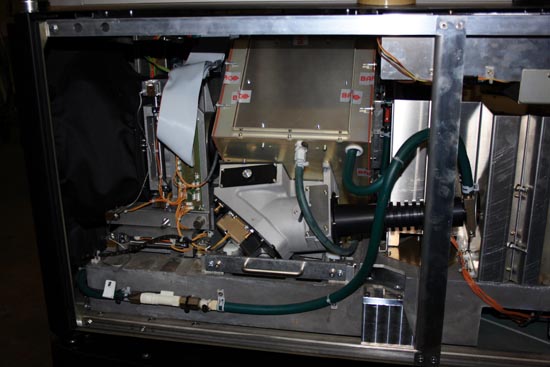
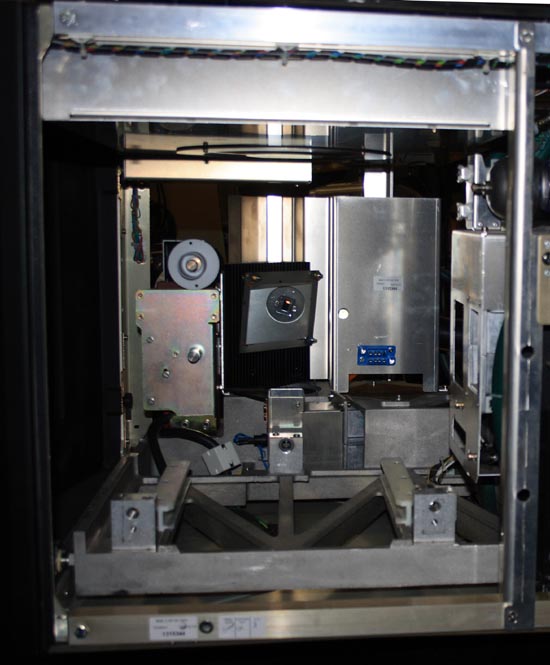
Assuming that there are no license agreements that prohibit it, would someone be willing to post pictures of the insides of the current DLP units? I am curious about how the lamphouse optics work, as well as the 3D attachments.
Posted by Mark Gulbrandsen (Member # 72) on 02-08-2008, 10:00 AM:
Here's a cople of pics of the optical path of the DP-100... I don't remember if I took pics of the ZX's or not but I will look. I do have pics of the insides of the NEC 2500 at home and I can post them tonight.
Buisness side of the optical path showing integrator rod, fold mirror and light engine box... The water cooling block for the aperature plate is at the right with the green hoses going to it.
Lamp module pulled... You can see the right angle mirror and aperatire plate. Neither model Christie projector utilizes the angled mirror on the input end which to me is a clear advantage. The Christie's light path places the light directly on the aperature plate first.
Posted by Brad Allen (Member # 470) on 02-08-2008, 03:29 PM:
Just a few tidbits I'll throw out there, Sony, although not using DLP's, have already stopped making rear projection TV's. They were selling very poorly.
From what I read from this years CES, it appears that only Samsung and Mitsubishi will be the only ones left making rear proj Tv's for the next model year. And Mitsubishi has already announced a laser based RP to be released this summer.
So, DLP's are already fading fast into the history books.
I would like to thank everyone contributing information/views/opinions on this subject. Makes for some great info for all to know that otherwise we may not have access to. ![[beer]](graemlins/beer.gif)
Posted by Scott Norwood (Member # 30) on 02-08-2008, 05:35 PM:
Thanks, Mark. Nice pictures.
Posted by Ron Curran (Member # 3631) on 02-08-2008, 09:50 PM:
Mark, your note about Australian cinema adopting an e-cinema model is correct for the independent scene. There is no model in place for dci roll-out to the majors and the minors are not under consideration.
Major distributors are still issuing prints. Mid-range and independent distributors are pushing e-cinema.
E-cinema has many advantages for independents. With the right set-up it looks pretty good – often better than 35mm for sub-run because the image has not been degraded by first-run cinemas and the digital track hasn’t worn off. Smaller releases can get to your screen earlier via hard drive. Successful films can be re-booked via e-mail (no need to check print availability). There are some worthwhile titles that are available ONLY in the digital format. Newer generation servers can be modified for encryption.
A major disadvantage is that distributors have no standard for Scope films, so it is essential to check the aspect ratio before committing to an e-cinema file, and risking a letterbox file. There is also a large variation in the quality of presentation but that is true for 35 as well.
E-cinema continues to develop in the absence of a dci model. Servers and projectors are upgradeable at reasonable cost.
Posted by Steve Guttag (Member # 268) on 02-09-2008, 10:33 PM:
quote: Mark Gulbrandsen
Instead of talking to Dolby why not talk to the guys at Christie up in Canada about weather or not the Dolby 3-D works on the ZX. When I attended the first US Christie DLP class last November they firmly said that it had been worked out and that one had been converted.
A fair question. The answer...I was standing in Dolby's SF office.
I will ask Chrisite BUT Christie is more than infamous for their boasting of having something working LONG before they actually do. Take the P-35xxx. How many attempts did they make before getting their basement reader to actually work? I remember the P-35 (original) being boasted as having the most wow-free/flutter free soundhead...despite HEARING wow and flutter in the thing and its absolute inability to handle a splice in the soundead. Then the "Central Pivot" was supposed to fix it all....and so forth and so on. A manufacturer (any) that feels the need to boast a capability to avoid losing sales is probably the worst source to ask about something.
Regarding software on the DCinema units...I guess we can use the versions we prefer. As to Barco's on the "web based"...hook a wireless router to the projector and adjust all you want from in the theatre if you don't want to string an ethernet cable. I can't think of much easier to resize/mask, color set...etc than the DCine Communicator.
I don't doubt that Christie has improved their products and I know that Barco has made changes to theirs as well.
Note, Kinoton boasts (though I have not verified) that their projector is notably brighter than others of like technology. As I said...manufacturers will say they can do anything that will get the sale. The Kinoton absolutely uses the Barco light engine...there is no attempt to conceal that. I do prefer that Barco seals their light engine over Christie's open approach. Anything that blows air, blows dirt...not matter how hard one tries to filter it.
Steve
Posted by Mark Gulbrandsen (Member # 72) on 02-10-2008, 10:33 AM:
quote: Steve Guttag
Regarding software on the DCinema units...I guess we can use the versions we prefer. As to Barco's on the "web based"...hook a wireless router to the projector and adjust all you want from in the theatre if you don't want to string an ethernet cable. I can't think of much easier to resize/mask, color set...etc than the DCine Communicator.
Actually I do just that anyway... being at the end of a 100 foot ethernet cable is nasty. I merely mentioned the I-Phoone thing because its a nice feature to have if you notice a touch up you need to do and the laptop is already put away. Some pocket computers will also work but again only on the Christie because of its web based software. Personally, I think after you use the T.I. software you'll never use Cinecommunicator again for the DLP setup... except for making up macros and and saving the backup files. The T.I. offers alot more finesse and obviously it works universally with all DLP D-Cinema projectors. It does however take some getting used to!!!
I don't think you'll get to use "what ever" version of software on the Dolby Server gear... There are obviously going to be versions that are non-functional because of internal board upgrades and some are not as stable. Megaplex here in SLC has been one of the beta test sites for many versions of the software and it's been interesting seeing Mike deal with this. The present version of both the Show Store and Show Player software are extremely stable and artifact free so I personally would stick with them on upcomming installs if at all possible. Dolby also simplified the networking part of the software on this later version. And I think the version number may to some extent dictate how many servers can be safely networked without a Show Library running as the central server. As you mentioned the present allows three but the manual(based on an older version) only allows two. I think after two screens a location is actually going to need the Show Library anyway to allow it the fliexbility in programming if need be... especially if they do much on 2nd run, matinees or hold over... or if they just plain want to move stuff around quickly.
Regarding the sealed vs. non sealed... Its basically an irrelevant thing since the imaging chips are in such close contact with the face of the prisms. Dirt is very unlikely to get in there. Its at the light input and output side that you will ultimately end up with a layer of dust and weather you have the face of the prism or the face of a piece of optical glass covering a seled light engine you still will have to clean eith3er down the road. I only see the sealed light engine as something thats really un-necessary, that will make the projector yet more expensive. Just be darn sure you know what you're doing when you clean the prism faces!!!! The Laminar Air Flow devices in the Christie are there to aid in cooling more than for dust and yes, the air is double filtered.
BTW: Forgive me if I'm so biased towards both Dolby and Christie D-Cinema gear... I've been fortunate to witness all the brands operate over a long period of time and on a fairly large scale here in SLC, I think we are at around 70 D-Cinema screens out here. I only stay biased with these brands because they have given those involved the best results, provided the best technical support, phone support, and parts availability or next day unit exchange. They are also very good at returning your phone calls on weekends and odd times in a dire emergency. FWIW: NEC would be choice #2 for projector and Doremi Choice #2 for the server. After these... in my book there is nothing else worth sticking my neck out for at the moment to sell at the very high price this gear sells for.
Mark
[ 02-10-2008, 11:50 AM: Message edited by: Mark Gulbrandsen ]
Posted by Mark Gulbrandsen (Member # 72) on 02-10-2008, 01:37 PM:
Another interesting point to ponder is the info in this article.
July 18th, 2007
Why RAID 5 stops working in 2009
Posted by Robin Harris @ 6:18 am
Categories: RAID, Disk drives
The storage version of Y2k? No, it’s a function of capacity growth and RAID 5’s limitations. If you are thinking about SATA RAID for home or business use, or using RAID today, you need to know why.
RAID 5 protects against a single disk failure. You can recover all your data if a single disk breaks. The problem: once a disk breaks, there is another increasingly common failure lurking. And in 2009 it is highly certain it will find you.
Disks fail
While disks are incredibly reliable devices, they do fail. Our best data - from CMU and Google - finds that over 3% of drives fail each year in the first three years of drive life, and then failure rates start rising fast.
With 7 brand new disks, you have ~20% chance of seeing a disk failure each year. Factor in the rising failure rate with age and over 4 years you are almost certain to see a disk failure during the life of those disks.
But you’re protected by RAID 5, right? Not in 2009.
Reads fail
SATA drives are commonly specified with an unrecoverable read error rate (URE) of 10^14. Which means that once every 100,000,000,000,000 bits, the disk will very politely tell you that, so sorry, but I really, truly can’t read that sector back to you.
One hundred trillion bits is about 12 terabytes. Sound like a lot? Not in 2009.
Disk capacities double
Disk drive capacities double every 18-24 months. We have 1 TB drives now, and in 2009 we’ll have 2 TB drives.
With a 7 drive RAID 5 disk failure, you’ll have 6 remaining 2 TB drives. As the RAID controller is busily reading through those 6 disks to reconstruct the data from the failed drive, it is almost certain it will see an URE.
So the read fails. And when that happens, you are one unhappy camper. The message “we can’t read this RAID volume” travels up the chain of command until an error message is presented on the screen. 12 TB of your carefully protected - you thought! - data is gone. Oh, you didn’t back it up to tape? Bummer!
So now what?
The obvious answer, and the one that storage marketers have begun trumpeting, is RAID 6, which protects your data against 2 failures. Which is all well and good, until you consider this: as drives increase in size, any drive failure will always be accompanied by a read error. So RAID 6 will give you no more protection than RAID 5 does now, but you’ll pay more anyway for extra disk capacity and slower write performance.
Gee, paying more for less! I can hardly wait!
The Storage Bits take
Users of enterprise storage arrays have less to worry about: your tiny costly disks have less capacity and thus a smaller chance of encountering an URE. And your spec’d URE rate of 10^15 also helps.
There are some other fixes out there as well, some fairly obvious and some, I’m certain, waiting for someone much brighter than me to invent. But even today a 7 drive RAID 5 with 1 TB disks has a 50% chance of a rebuild failure. RAID 5 is reaching the end of its useful life.
Update: I’ve clearly tapped into a rich vein of RAID folklore. Just to be clear I’m talking about a failed drive (i.e. all sectors are gone) plus an URE on another sector during a rebuild. With 12 TB of capacity in the remaining RAID 5 stripe and an URE rate of 10^14, you are highly likely to encounter a URE. Almost certain, if the drive vendors are right.
As well-informed commenter Liam Newcombe notes:
The key point that seems to be missed in many of the comments is that when a disk fails in a RAID 5 array and it has to rebuild there is a significant chance of a non-recoverable read error during the rebuild (BER / UER). As there is no longer any redundancy the RAID array cannot rebuild, this is not dependent on whether you are running Windows or Linux, hardware or software RAID 5, it is simple mathematics. An honest RAID controller will log this and generally abort, allowing you to restore undamaged data from backup onto a fresh array.
Thus my comment about hoping you have a backup.
Mr. Newcombe, just as I was beginning to like him, then took me to task for stating that “RAID 6 will give you no more protection than RAID 5 does now”. What I had hoped to communicate is this: in a few years - if not 2009 then not long after - all SATA RAID failures will consist of a disk failure + URE.
RAID 6 will protect you against this quite nicely, just as RAID 5 protects against a single disk failure today. In the future, though, you will require RAID 6 to protect against single disk failures + the inevitable URE and so, effectively, RAID 6 in a few years will give you no more protection than RAID 5 does today. This isn’t RAID 6’s fault. Instead it is due to the increasing capacity of disks and their steady URE rate. RAID 5 won’t work at all, and, instead, RAID 6 will replace RAID 5.
Originally the developers of RAID suggested RAID 6 as a means of protecting against 2 disk failures. As we now know, a single disk failure means a second disk failure is much more likely - see the CMU pdf Disk Failures in the Real World: What Does an MTTF of 1,000,000 Hours Mean to You? for details - or check out my synopsis in Everything You Know About Disks Is Wrong. RAID 5 protection is a little dodgy today due to this effect and RAID 6 - in a few years - won’t be able to help.
Finally, I recalculated the AFR for 7 drives using the 3.1% AFR from the CMU paper, using the formula suggested by a couple of readers - 1-96.9 ^# of disks - and got 19.8%. So I changed the ~23% number to ~20%.
Posted by Tristan Lane (Member # 1169) on 02-11-2008, 05:28 PM:
Interesting Article.
I wonder how long before RAID and Platter drives are replaced entirely by solid-state memory.
SSD flash memory "disks" are getting larger by the week. They do have their drawbacks, but it is only a matter of time before spinning platters and read/write heads are a thing of the past.
Flash memory seems to be getting old as well. It seems that there are a couple of new technologies on the horizon offering much better performance in terms of memory.
*
quote: Steve Guttag
Doremi has an D/A card that I have been less than impressed with.
AGREED - This card was a common failure item when I was servicing for Christie. In addition to failure, the analog sound card seemed to have grounding issues (it may have been somewhere else in the Doremi Chassis, but 50% of the Doremi's installed in the field needed to have additional grounding provided to eliminate hum.
Posted by Steve Guttag (Member # 268) on 02-12-2008, 09:15 PM:
quote: Mark Gulbrandsen
Instead of talking to Dolby why not talk to the guys at Christie
As I am working on a quote for one (CP2000ZX)...I did indeed talk with the Christie guys today...Nope...the CP2000-ZX is not Dolby 3D capable at this time. Christie is working on it but it will likely require a smaller version of the filter disc. As of today, there is no ETA on a Dolby 3D capable version of this projector.
As to RAID drives...a problem arises for the Cinema industry at the moment...the drives may be getting too big. By nature, cinemas are going to change out the content on those drives relatively often...once the keys go bad on the contenet...there is no need to keep the files. At some point you can always delete to make room for the current stuff.
If you don't and keep getting bigger and bigger drives...it now takes progressively longer to rebuild one or even move all of the content.
Now as DCinema moves beyond 2K...the need for larger drives will be there...but for 2K content...I think they currently can hold something like 12 or 15 typical features plus trailers and such...
Steve
Posted by Mark Gulbrandsen (Member # 72) on 02-12-2008, 10:08 PM:
Steve,
Thanks for the Update on the ZX... I too have two to do for Dolby 3-d but its going to be later in the year. The thing thats funny about that was the guy that taught our training class and told us it had been done is also the guy in Canada that qualifies all the parts that go into the projectors. It'll happen eventually though.
Tristian,
Don't think that solid state memory won't also fail, or need re-formatting at some point in its life...
If we can keep the raid disks to under 500gb each I think we will all only experience the once in a blue moon array failure... kinda like loosing an ignitor or doide... its going to happen to everyone sooner or later. Thing is that rebuilding the array isn't ALWAYS going to work either... drives will fail completely or intermittantlly and this is where attempts at rebuilding will get one into bigger trouble. Keeping one extra spare drive in the booth is hence very important! Dual drive failures are pretty rare as long as the array is rebuilt immediately and the drives are physically ok, but intermittant problems on drives can lead to corrupting the entire data structure of the RAID Array. Complete drive replacement every so many years or hours will more than likely be in the forcast to maintian the reliability of the RAID. Several IT friends of mine say that it seems like when drives get to be more than 4 to 5 years old they can no longer be trusted so they are for the most part automatically replaced at 3 to 4 year intervals. We will probably find ourselves doing the same thing
Mark
Posted by Steve Guttag (Member # 268) on 02-13-2008, 07:09 AM:
Remember too...unlike most users of Raid arrays...cinemas have the originals (movies) on site so long as they are playing the picture...even if one had to completely start from scratch, they could get back up using the content in the cinema at the time and only need to put on (immediately) what is needed for that week/day.
With a system like Dolby's...where you have individual show stores as well as the show library...you also have several redundant systems as the library can load to any theatre and any theatre can send to any theatre. In short...if you have a complete dump and were starting from a complete rebuild, in a cinema, you are likely to have what you need in the cinema as either an original or on one of the other (many) drives throughout the cinema. I agree however...it could become like belts or oil changes...you simply change out drives after a period of time just to better your odds at not having a failure that would take the theatre down for a period of time (potentially hours if the cinema HAS a spare drive).
Because of the whole KDM thing...you will also see cinemas keeping complete spare SYSTEMS on site to ensure if a piece of equipment fails they are not waiting on the keys to get them back up.
Steve
Posted by Scott Norwood (Member # 30) on 02-13-2008, 08:03 AM:
How would the key situation work for a spare server?
Suppose you have a single screen theatre and want complete redundancy. You buy two projectors and two servers. Then, what? Do you get two sets of keys, one per server/projector, for each feature? Or do you only get one key, with the promise that a second one can be generated quickly in the event of a server/projector failure? How long does it actually take to get new keys in these situations?
Where, exactly, is the hostid (on which each key is based) stored? Is it in the server or the projector? Is the hostid module removable and/or easily swappable in the event of a system swap/replacement?
Posted by Mark Gulbrandsen (Member # 72) on 02-13-2008, 08:15 AM:
quote: Steve Guttag
Because of the whole KDM thing...you will also see cinemas keeping complete spare SYSTEMS on site to ensure if a piece of equipment fails they are not waiting on the keys to get them back up.
Actually, if a server was swapped out not counting a hard drive you would need to have new KDM's issued for that screen. The servers have a HASH line in them to prevent the wrong KDM from being loaded in the wrong server. The Server serial number is also loaded into a line of the KDM in the form of HEX code. Now I suppose you could have KDM's issued for the spare server as well but if this whole dial up KDM placement fiasco does take hold that would make the new KDM mandatory...
quote: Steve Guttag
With a system like Dolby's...where you have individual show stores as well as the show library...you also have several redundant systems as the library can load to any theatre and any theatre can send to any theatre.
Another problem with using the Show Library is if you loose it then you loose Show Manager Client for the entire complex and hence you loose all your remote stations. It won't shut down a booth with a smart operator though as he can go around when the shows that are playing have stopped and take them off the network one by one and make them free standing players. Also note that a smart tech will store all the config files for servers and projectors on a memory dongle and keep it on himself. This allows instant re-activation of a piece of gear if a board or unit has to be replaced. The files are relatively small so its possible to store many screens on a single memory stick. Another set of backup config files stored in the managers office key box is also a good idea!!
quote: Scott Norwood
Suppose you have a single screen theatre and want complete redundancy. You buy two projectors and two servers. Then, what? Do you get two sets of keys, one per server/projector, for each feature? Or do you only get one key, with the promise that a second one can be generated quickly in the event of a server/projector failure? How long does it actually take to get new keys in these situations?
Its possible some studios would oblige on that... it only takes a matter of minutes to get a key via internet anyway and the KDM people are generally available 24/7/365. BTW: Important screenings and Premieres do use redundant systems.
Mark
Posted by Steve Guttag (Member # 268) on 02-13-2008, 09:13 AM:
At this point, there is no prohibition on having more units than you have screens and getting KDMs for the spare unit. Mind you, the picture is watermarked on all of the DCinema systems...you can't use the spare to go and do nasty things...it will STILL be traced back to the theatre.
The problem arises that IF you have a player go down and you don't have spare on site with the KDM for it...you can get a replacement unit sent in but you will then be having to get the various distribution networks on board with the new box so that proper KDMs will work with it. However, if you have spare player on site and are already receiving KDMs for it...all one must do is put it in and configure it for that particular screen/projector.
One of the nifty things about Dolby's system is that only the Show Player is tied to the KDM...not the server or store...thus, that is the only box that one would want a complete spare, server wise.
Steve
Posted by Mark Gulbrandsen (Member # 72) on 02-13-2008, 10:44 AM:
Thats only partly true... a problem in the Show Store could also prevent the kdm from loading in since thats the only ingest point for it... via either usb or cd rom. Changing out either of them takes but minutes...akin to swapping out an X-L movement in the film world. As long as you have records of network addresses and such its a cinch. By the time you're ready your new kdm would already be there.
Mark
Posted by David Zylstra (Member # 4230) on 02-13-2008, 01:29 PM:
I can gaurantee you that the studios won't be authorizing KDMs for any spare units (most have stated this publicly).
So far the distributors have been extremely quick in sending KDMs for replacement servers - just a quick call to the right number, tell them the new server serial number and within 5-10 minutes you have a KDM (the AccessIT weekly bulletins include a list of what distributors to call for each film).
Powered by Infopop Corporation
UBB.classicTM
6.3.1.2