This is topic Pre-Show Projector Bulb Life in forum Digital Cinema Forum at Film-Tech Forum ARCHIVE.
To visit this topic, use this URL:
https://ft-forum.com/ft/cgi-bin/ubb/ultimatebb.cgi?ubb=get_topic;f=16;t=000093
Posted by Josh Rosen (Member # 4291) on 08-23-2007, 10:43 AM:
Lately I have been noticing that many of the bulbs in our pre-show projectors (Christie LW-25's) are getting dark and need replacement well before they reach the 1000 hour mark at which point they are supposed to be replaced. The other day i had to replace one that only had 387 hours on it (the others had about 800 hours) because the image was so dark, it was barley visible and yet on other projectors I have bulbs that are over the 1000 hours and still look as good as the day I installed them.
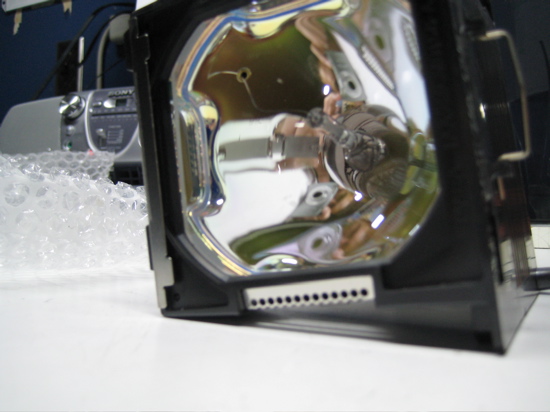
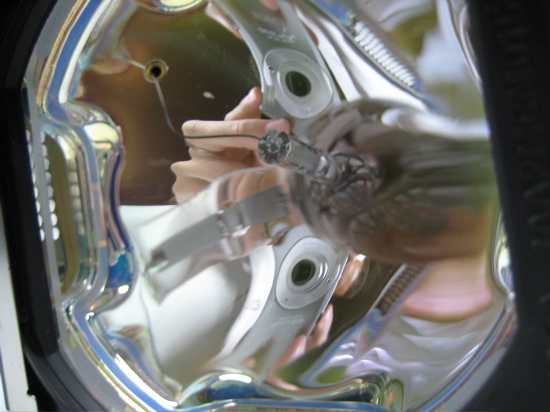
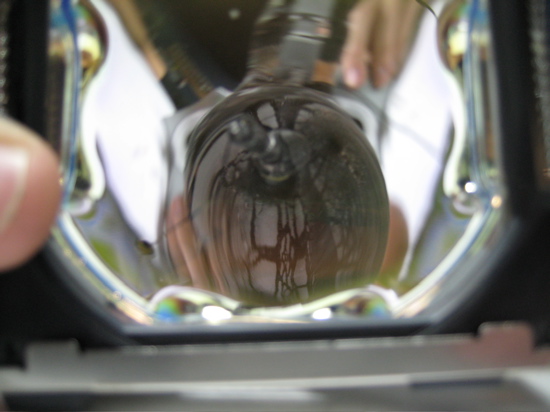
Every time I pull out one of these bulbs that go dark early I notice the same thing. The actual bulb inside of the reflector, is no longer straight, it is bent on an angle so it is no longer properly aligned with the reflector. I also notice that there is usually a large wad of what looks like glue inside of the reflector at the base of the bulb where it meets the reflector. It looks almost like this glue has "bubbled up" and pushed the bulb off on an angle.
Does anyone know what could be causing all these early bulb failures? Any suggestions on how to fix this problem?
Here are some pics I shot of the most recent defective bulb, I know they are a little hard to make out.
Posted by Stephen Furley (Member # 1277) on 08-23-2007, 10:50 AM:
Could it be overheating; clogged air filters?
Posted by David Zylstra (Member # 4230) on 08-23-2007, 10:52 AM:
Just a thought - are you being sent recycled lamps? (there are a few companies that will replace the lamp portion of video projector lamp assemblies at a slightly lower cost than a new assembly).
I recently had some Infocus lamps that seemed to be dimmer than previous replacements and it looked like the ones received were off brand replacements and not actual Infocus brand (I didn't do the replacements myself so I don't know if they showed the same issue as yours).
Just some thoughts to help track down the cause . . . . . .
Posted by Gordon McLeod (Member # 33) on 08-23-2007, 11:01 AM:
I have yet to have any Metal Halide type video lamp get close to its rated life before it either starts to flicker or gets odd colour shadows in the image
Posted by Josh Rosen (Member # 4291) on 08-23-2007, 11:14 AM:
quote: Stephen Furley
Could it be overheating; clogged air filters?
I regularly clean the air filters and replace them every time I change a bulb so I don't think this is the cause although this thought occurred to me as well. Also we have never had the "temp warning" light go on on the projectors. They are only on for around 25 minute intervals before each show.
quote: David Zylstra
Just a thought - are you being sent recycled lamps? (there are a few companies that will replace the lamp portion of video projector lamp assemblies at a slightly lower cost than a new assembly).
Interesting thought, but nothing has ever led me to believe that these are refurbished lamps. We order from Christie and I always receive the proper documentation from Christie with each lamp i.e. warranty claim forms (which I have been making great use of ![[Smile]](smile.gif) ), safety docs... Is there any way I can check to make sure that they are not refurbished?
), safety docs... Is there any way I can check to make sure that they are not refurbished?
Posted by Stephen Furley (Member # 1277) on 08-23-2007, 11:39 AM:
It's difficult to be sure from those pictures, but those lamps look more like UHP mercury rather than metal halide. If that is the case then the reflectors will have been designed for the very small arcs in these lamps. and alignment of the arc tube with the reflector will be critical.
Posted by Josh Rosen (Member # 4291) on 08-23-2007, 11:44 AM:
Yes I believe they are UHP Mercury. I inspect each one before the install and they are always properly aligned initially. when they darken prematurely I always notice the bulb is misaligned with the reflector when I pull it out.
Posted by Cody Martin (Member # 2523) on 08-23-2007, 11:49 AM:
I'm not familiar with that digital projector, but we had a similar proplem with one. Check to make sure the cooling fan is staying on after the projector kicks off.
Posted by David Zylstra (Member # 4230) on 08-23-2007, 12:21 PM:
quote: Josh Rosen
Interesting thought, but nothing has ever led me to believe that these are refurbished lamps. We order from Christie and I always receive the proper documentation from Christie with each lamp i.e. warranty claim forms (which I have been making great use of ), safety docs... Is there any way I can check to make sure that they are not refurbished?
If they are coming directly from Christie then I'd be confident they are new, a third party off-brand compatible replacement would be suspect - recycled lamps should be marked somehow . . . . . . maybe Christie had a run of bad lamps . . . . . make sure you alert the dealer you order through so they can follow up with other clients who may have the same issue and prove if this is a lamp issue . . . . .
Have any subsequent lamps lasted longer than these "bad" lamps? i.e. after you change them out did the replacement last longer.
Posted by Josh Rosen (Member # 4291) on 08-23-2007, 12:37 PM:
Sometimes the replacements last longer (although nothing has come near that 800 hour mark really since we only use them about 2 hours per day). I haven't had any of the new ones fail yet but the replacements have been from multiple shipments and orders.
Posted by Darryl Spicer (Member # 711) on 08-23-2007, 12:44 PM:
Supposedly the Christie warranty life on these bulbs is 500 hours. It's gotten to the point where our company is using a bulb refurbishing company to replace the lamps to help save on costs. All we have to do is send the spent bulbs back to them. One thing that I think is a problem with these projectors is that I do not think they get the proper cool down process when the projector is turned off at the start of the feature. I think that is causing the bulbs to weaken over time and that is why the bulb element starts to droop.
Posted by David Zylstra (Member # 4230) on 08-23-2007, 12:54 PM:
Good point, if the projector gets the power cut to turn it off then that is definitely a factor . . . . . hopefully they are set up with a controller that turns the projector off properly with the right cool down.
Posted by Thomas Pitt (Member # 4322) on 08-23-2007, 01:41 PM:
Most digital video projectors have an in-built circuit that keeps the fan going for a while after you press the power button, only turning it off after a time delay or when a temperature sensor triggers it. Would it be possible to somehow set up the automation so that it presses the 'standby' button on the projector, instead of just cutting power?
Perhaps it would just be better to wire up the fan to a separate power supply, and have it running all the time (even during the show when the projector is off)?
Alternatively, use old-fashioned 35mm slide projectors - most cinemas in the UK still do that! At least the bulbs for those aren't as expensive ![[Wink]](wink.gif)
Posted by David Zylstra (Member # 4230) on 08-23-2007, 03:13 PM:
I think most professional installs of video preshow projectors do have a controller that puts it into standby when the show starts, anyone not using one is asking for trouble.
Posted by Bruce Hansen (Member # 281) on 08-23-2007, 06:16 PM:
Make sure that the contacts on the lamp and the socket are clean, and tight. Dirty or lose contacts will cause extra heat.
Posted by Mark Gulbrandsen (Member # 72) on 08-23-2007, 06:34 PM:
Most of the theaters I service get pretty good lamp life but most of the projectors are Sanyo or Panasonic, the latter has always had the best lamp life. Two things to lead to longer lamp life are...
1. Make sure the fan is on high.
2. Make sure the fan stays on after the lamp is switched off. This is not possible on all projectors via automation so it may have to be switched off manually.
Mark
Posted by Andy Muirhead (Member # 712) on 08-23-2007, 06:47 PM:
quote: Mark Gulbrandsen
1. Make sure the fan is on high.
I always wondered if setting the fan on my home DLP to the high altitude/fastest/noisest setting would help the lamp life longevity.
Posted by Jon Miller (Member # 163) on 08-23-2007, 08:30 PM:
The kind of failure shown in Josh's pictures happens to OEM lamps, too. I am responsible for the lamps in about 100 Epson and Sanyo projectors installed in classrooms and lecture halls at a local university and, while I've found most of the time the lamps go dim from a white deposit on the bulb envelope (devitrification, perhaps?) as the lamp nears the end of its life, once in a while a lamp will suffer from abnormal swelling of the envelope.
My gripe with these lamps is that they are not marked with serial numbers -- like xenons -- or, AFAIK, production date codes. A number of years ago we had several lamps from different sources for the same projector model explode with low hours; there was no way to determine whether it was a bad run or just bad luck. Something as simple as a production code stamped on the back of the reflector would make it easy to determine whether repeated failures are projector-related or lamp-related.
Posted by Gordon McLeod (Member # 33) on 08-23-2007, 08:58 PM:
The NEC factory rep told us that the lamps have a finite shelf life after manufacture and that they tend to degas or leak and get contamination in them over time
Posted by Darryl Spicer (Member # 711) on 08-24-2007, 04:08 AM:
quote: Thomas Pitt
Most digital video projectors have an in-built circuit that keeps the fan going for a while after you press the power button, only turning it off after a time delay or when a temperature sensor triggers it. Would it be possible to somehow set up the automation so that it presses the 'standby' button on the projector, instead of just cutting power?
Our Pre-show projectors do have the circuitry but I have found that the fan blows for only two minutes after the bulb shuts off. I think the fans should blow longer than that to adequately cool the lamp.
We also use the Christie LW25's.
Posted by Josh Rosen (Member # 4291) on 08-24-2007, 10:34 AM:
I have noticed the same thing Daryl. The fans don't blow for very long, and considering the say to wait 45 minutes before changing a bulb for adequate cooling to have occurred, I think the fan should be on longer.
Is there any way to tweak this?
Posted by Steve Guttag (Member # 268) on 08-24-2007, 10:46 AM:
On the Christie LW25 which is the Sanyo PLV-70, one has to enter the service menu to alter the fan duration or speed.
The fan duration is in Group 40, Item 3
The duration ranges from 0 = Always run the fan to "15" which runs the fan for 7-1/2 minutes for cool down. The factory default is "3" which is 90-seconds.
How do you get into the Service Menu? Hit the "MENU" and "IMAGE" buttons together for more than 3 seconds. Once in, the Menu button will get you to the group number, the Item number is selected via the Up/Down buttons and the values (data) is selected with the volume's up/down buttons.
To get out of the service menu, hit the power button (once to keep the projector on).
Now in the service menu you have the great opportunity to screw the projector up so enter at your own risk and only if you are so authorized.
As to the fan speed...Group 40, Item 4 sets that..."0" is supposed to be normal with "1" being hi-speed.
Steve
Posted by Bastiaan Fleerkate (Member # 3826) on 08-24-2007, 12:48 PM:
I had this same problem with our Panasonic PT-D7600 projector. In my case the bulb would explode when reaching the end of his life at 400(!) hours...
The reason was simple... We always turned the the projector off when we started the movie (with the controls on the projector and sufficient cooling time) and turned it on when the intermission started... this caused the lamps to explode in 400 hours.
The lamps are weakened by turning them on and off, just like your xenon bulb in your 35mm projector. Now we just use the shutter when we don't need the projector and now we have an avarage lamp-life of 1500(!) hours... Just remember that every time you turn your projector on, you're shortening the life-span of your bulb (in my case bulbs)...
Bastiaan
Posted by Josh Rosen (Member # 4291) on 08-24-2007, 02:51 PM:
I think the fan might be the best option for us. We use the Kodak digital Cinema pre-show system so the lamp shuts down automatically when the 35mm projector lamp ignites. We don't have much control over the system to change settings like that, but I will definitely look into keeping the fan on longer, thanks for the tip.
Posted by Thomas Pitt (Member # 4322) on 08-24-2007, 03:34 PM:
This probably isn't possible with digital projectors, but I might as well ask - how about dimming the projector lamp (but not switching it off) when it's not in use? This would allow it to cool down a bit, and it wouldn't have to re-strike when you need it again. Of course, you'd probably need some shutter to block the dimmed light, but it might help the overall bulb life!
Speaking of dimming, I used to use digital data projectors for presentations. Most of those required at least 30 seconds for the lamp to 'warm up' before the picture was bright enough, but modern projectors tend to come on instantly. Different bulb type, perhaps?
With the 35mm slide projectors I mentioned earlier, I've seen a system where the lamp is connected to a separate power supply than the main projector. The lamp dims slowly to off, the slide carousel advances, then the lamp fades up slowly again. I'm not sure, but I think the carousel keeps going round after bulb power has been cut (during the movie). Would this extend or reduce bulb life?
Posted by Bastiaan Fleerkate (Member # 3826) on 08-24-2007, 03:42 PM:
When using the shutter on the digital projector, the lamp automaticaly dims (I thought this is the case with our Panasonic projector). Else you would burn and damage your shutter within minutes...
Posted by Josh Rosen (Member # 4291) on 08-24-2007, 05:53 PM:
quote: Thomas Pitt
Speaking of dimming, I used to use digital data projectors for presentations. Most of those required at least 30 seconds for the lamp to 'warm up' before the picture was bright enough, but modern projectors tend to come on instantly. Different bulb type, perhaps?
Even though the lamp strikes right away, it does usually take 20 - 30 seconds for the picture on-screen to reach its full brightness. Our digital projectors strike the bulbs about a minute before the content is scheduled to start showing, in order to let the bulb read its full brightness.
Posted by Phil Blake (Member # 2012) on 08-25-2007, 12:32 AM:
We have our automation set the same Josh, it strikes the lamp 60 seconds prior to start. I changed the first lamp in my Panasonic 3000 at 250hrs , the lamp was working fine then it just exploded . The replacement has now done 380hours so I am not sure what to expect.
We recently added a Panasonic 5000 to the collection , I have experienced very bad lamp flicker on both lamps (dual lamp set up) both lamps had less than 40 hours on them. The flicker was intermittent for about a week then I stopped.
Posted by Tim Lewis (Member # 4110) on 09-11-2007, 09:04 AM:
i've recently had the same problem with my Mitsubishi WD2000's. a possible reason for my problems was that the exhaust fan on that unit is on the front, and the hot air leaving the projector was basically escaping towards the port glass and just sitting there, keeping the front of the projector pretty warm nearly all the time. so we came up with the idea of running a 4" hose (kinda like the exhaust hose on a clothes dryer) from the 35mm projector's exhaust over to the digital. we've just done this, so i can't testify to it's effectiveness in extending lamp life, but it's definately sucking away all the hot air from around the projector.
if your digital exhaust vent is within 6-12 inches of the port glass or any other surface, that could be affecting it.
Posted by Tony Ratcliff (Member # 1196) on 09-11-2007, 04:27 PM:
My Sanyo's first bulb only lasted a few months.
Near the end the unit kept overheating and shutting down.
The main cooling/exhaust fan is on the bottom.
So I put it up on blocks to get it 3-4 inches in the air, and also if I need to run it for an extended period of time, I set a small desktop size fan blowing on it to help keep it cool.
This second bulb has lasted a lot longer by doing this.
I read the newer models of Sanyo's have better cooling, but I can't afford to upgrade right now. So I do what I gotta do.
Powered by Infopop Corporation
UBB.classicTM
6.3.1.2