
After the SMPTE presentations, I went to the 9:45pm Digital Cinema showing of "Ice Age" in Auditorium 13 of the AMC Empire Theatre on 42nd Street. I ended up seeing a 35mm film print!
Right from the start of the digital presentation of the trailers, every 15 seconds or so, the image would turn wierd saturated colors, similar to photographic "posterization". Sometimes the image would "freeze" for a second or so this way, then the screen would go blank for another second, before the trailer resumed. This repeated itself several dozen times during the trailers, as the audience started to murmer and get upset. Finally they stopped the digital presentation, brought up the lights, and announced that they would show a film print instead. They completed the show using a film print, which looked and sounded fine.
Is this posterization effect, image lock-up, and blank screen cycle typical of a server "hiccup" problem, or is it something in the DLP-Cinema projector? I recall the AMC Empire has used both the QuVis and Avica servers. Is one more prone to this problem than the other? Do most Digital Cinema theatres still get a film print as back-up for when the Digital system fails, or is the AMC Empire unique?
None of the floor staff I was able to talk to after the show could tell me exactly what happened, other than hinting it's not unusual.
------------------
John P. Pytlak, Senior Technical Specialist
Worldwide Technical Services, Entertainment Imaging
Research Labs, Building 69, Room 7525A
Rochester, New York, 14650-1922 USA
Tel: +1 585 477 5325 Cell: +1 585 781 4036 Fax: +1 585 722 7243
E-Mail: john.pytlak@kodak.com
Web site: http://www.kodak.com/go/motion
Future digital cinema installations will no doubt have to install RAID arrays in a redundant mirror configuration in order to achieve better reliability.
...and all was once again right with the world... 
------------------
"It's not the years honey, it's the mileage". - Indiana Jones.
Now if I do the same with a hard drive array wonder what would happen. 
Yes, we still get film backup prints to have just in case, but I don't bother building them up anymore (knock on wood).
The only problem I had was with the screen going black but that was due to the noise in the signal coming off of the QuBit. They also may have a grounding problem with the Miranda and is picking up extra noise.
Paul.
Although the audience started to murmer and grumble when the obvious problems with the digital presentation continued, they were happy to stay for the film presentation. IMHO, most moviegoers come to see a good film well presented, and don't care what technology is used. Give me a choice between "Film Done Right" and today's digital, you know which I would choose. But I try to see digital presentations whenever they are available just so I can be aware of the technology and its potential advantages and problems.
------------------
John P. Pytlak, Senior Technical Specialist
Worldwide Technical Services, Entertainment Imaging
Research Labs, Building 69, Room 7525A
Rochester, New York, 14650-1922 USA
Tel: +1 585 477 5325 Cell: +1 585 781 4036 Fax: +1 585 722 7243
E-Mail: john.pytlak@kodak.com
Web site: http://www.kodak.com/go/motion
Yep, what you saw was not only a hiccup in Digital Cinema, but a hiccup in Digital Cinema communication as well. What happened was a simple case of bad cable. Something that if communicated correctly, can be handled in 24 hours. In this case, the problems started on Monday, March 18th. I believe they switched over to the 35mm back-up print on the 20th. A new cable, Miranda unit and power supply were sent from QuVis immediately upon notification. The system was back up and running in Digital by Friday's shows on the 22nd.
Not the way we want the D-Cinema process to work.
If we can't talk a technician through the hiccups over the phone, we like to have any equipment replaced within 24 hours. One of the ways we hope to fix this is with a 24 hour hotline. We hope to have this in place for that little "art film" that George is releasing in May. The problem that happens is that when there is a issue, the lines of communication are not often direct ones. If a call is made, it may go to Technicolor, when the film is a THX-assisted release, as Ice Age is/was. Technicolor owns many of the QuBits out there, so they get called. THX may not get the word that there is a problem until a few days have gone by, and those are days we are helpless and can do nothing to fix the problem.
Anyway, Digital Cinema is an evolving technology. It is getting better to look at, and it is getting easier to use. Of course we'd all love to have it perfected, standards complete, and a roll out worthy of a release like Episode 2... but that is unfortunately not the case. We are probably a few years away from that (that is my personal opinion, and not that of THX or Lucasfilm), and hopefully by then, we'll have all those hiccups, belches, and other random bodily functions worked out. Heck, that's why we're involved. If it was perfect, you wouldn't need us.
Yours, Ted Costas
Senior Manager
THX Theatre Alignment Program
How did the cable get damaged? The AMC Empire's projectionist Steven Romano wrote about several similar incidents in his article "DLP: A Report from the Trenches" in the February 2002 Boxoffice Magazine, so it's not the first time they had problems.
------------------
John P. Pytlak, Senior Technical Specialist
Worldwide Technical Services, Entertainment Imaging
Research Labs, Building 69, Room 7525A
Rochester, New York, 14650-1922 USA
Tel: +1 585 477 5325 Cell: +1 585 781 4036 Fax: +1 585 722 7243
E-Mail: john.pytlak@kodak.com
Web site: http://www.kodak.com/go/motion
John, how did the film look? Has anyone had the opportunity to see the digital version of ICE AGE and compare it to the film version? There's a post on the site saying the film looks soft -- I was wondering if that's the case compared to digital.
Pat
One of the noticeable differences between DLP and film is the color temperature of "white" (clear film). With DLP it looks _really_ white...just like running a film projector with xenon lamp without film in the gate. I've never seen safety-base film look that transparent (nitrate comes closer, though). This isn't necessarily a "good" or "bad" thing, but it is something that I've noticed. Also, the Ice Age show had the same drifting sound-sync issues that the other DLP presentations that I have seen have. What causes this? Is it a decompression issue or a mastering issue or something else entirely?
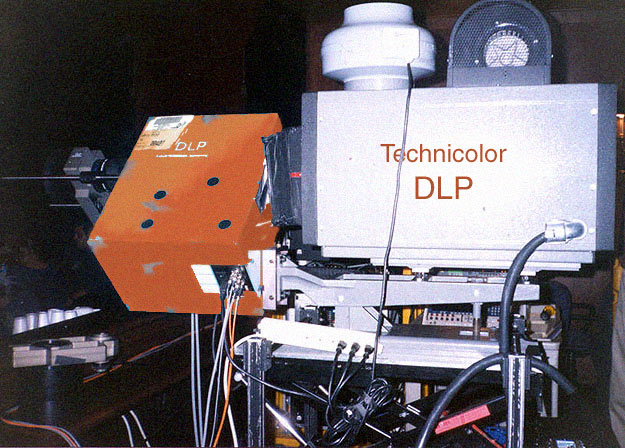
Ted -- does Technicolor paint their Qubits orange?

------------------
John P. Pytlak, Senior Technical Specialist
Worldwide Technical Services, Entertainment Imaging
Research Labs, Building 69, Room 7525A
Rochester, New York, 14650-1922 USA
Tel: +1 585 477 5325 Cell: +1 585 781 4036 Fax: +1 585 722 7243
E-Mail: john.pytlak@kodak.com
Web site: http://www.kodak.com/go/motion
Are you positive that you were EXACTLY two screen heights away from the screen? You could have been off by a millimeter or two, which I think you would agree will destroy the entire presentation. The only way to do this properly would bring your tape measure to the show and measure the screen height, masking to masking making sure that your tape measure is perfectly vertical. Then you must double that and sit that far back from the screen ignoring stadium rising or slope of the auditorium. In other words, you can't just start the tape measure where the floor meets the screen wall and go back two screen heights. You must be able to sit and hold the tape measure perfectly horizontal from your eyeballs to the screen.
Actually, estimating viewing distance is not that difficult.
------------------
John P. Pytlak, Senior Technical Specialist
Worldwide Technical Services, Entertainment Imaging
Research Labs, Building 69, Room 7525A
Rochester, New York, 14650-1922 USA
Tel: +1 585 477 5325 Cell: +1 585 781 4036 Fax: +1 585 722 7243
E-Mail: john.pytlak@kodak.com
Web site: http://www.kodak.com/go/motion
quote:
Actually, estimating viewing distance is not that difficult.
Architectural features called ceiling tiles help a lot! They're typically 2x2 or 2x4.
------------------
Evans A Criswell
Huntsville-Decatur Movie Theatre Information Site
I politely ask them to move.
Actually, I always try to arrive early enough to have a choice of seats.
------------------
John P. Pytlak, Senior Technical Specialist
Worldwide Technical Services, Entertainment Imaging
Research Labs, Building 69, Room 7525A
Rochester, New York, 14650-1922 USA
Tel: +1 585 477 5325 Cell: +1 585 781 4036 Fax: +1 585 722 7243
E-Mail: john.pytlak@kodak.com
Web site: http://www.kodak.com/go/motion