This is topic Video Lamp defect in forum Digital Cinema Forum at Film-Tech Forum ARCHIVE.
To visit this topic, use this URL:
https://ft-forum.com/ft/cgi-bin/ubb/ultimatebb.cgi?ubb=get_topic;f=16;t=000309
Posted by Martin McCaffery (Member # 37) on 02-09-2009, 11:45 AM:
This is not concerning DLP lamps
We have a Sanyo PLC-XF40. Uses 4 200w lamps. I replaced all 4 in Nov 06 with OEM lamps.
After several months of problems I thought were something else (which involved shipping it to Sanyo for repairs), I looked at the lamps this morning. 2 of the 4 developed bubbles at the base of the lamp filament. It looks like an old flashbulb. Although the lamps are over 2 years old, they probably only averaged less then 10 hours a week.
Just curious if anyone has run across this problem? What is the expected hourly lifespan of these lamps?
Posted by Scott Norwood (Member # 30) on 02-09-2009, 12:45 PM:
If the bulbs have "bubbles" on them, it usually indicates a lack of cooling. Check to make sure that the vents are unobstructed and that the air filter is clean.
It could also be a defective bulb, but that is unlikely if you are seeing the problem on multiple bulbs.
I don't know the expected life for your bulbs, but the ones for the Panasonic 7700 always seem to flicker or go dim well before their "advertised" lifespan ends.
Posted by Martin McCaffery (Member # 37) on 02-09-2009, 02:13 PM:
Sanyo and the dealer both say it is Manufacturer's Defect. All fans are working and no obstructions. Guess I'll just have to check them more frequently.
Posted by Steve Guttag (Member # 268) on 02-10-2009, 05:35 AM:
Most LCD projector lamps have a rated life of 1000-hours. 10-hours * 104-weeks (2-years) comes to 1040 hours. Some of the newer designs are supposed to get to 1500-hours but not necessarily with great light output.
I have a Sanyo PLV-HD100 that went 1600-hours on its lamps (They were rated for 1500-hours)...the lamps were pulled due to diminished light output and age. Putting the new lamps in brought about a very noticable brightness increase.
Steve
Posted by Marco Giustini (Member # 4544) on 02-10-2009, 06:28 AM:
Almost all of my Sanyo developed "bubbles" on lamp. On the original stock and on the new, replacement, lamps, from Sanyo.
The lamps usually last for 100/200h, then start to blacken and "baloons"! Filters are cleaned, room temperature is kept stable by air conditioning system, and the air conditioning system has a particle filter on it.
The only one that it's lasting more than others is the PLC-XF42, the other smaller Sanyo are eating lamps continuously.
Posted by Martin McCaffery (Member # 37) on 02-10-2009, 08:56 AM:
Steve: Good to know. Both the dealer and the Sanyo tech said they should last longer and that the bubble was almost unheard of. Got a feeling a little bs'ing is happening.
A question I forgot to ask Sanyo tech: How do you track the light counter on the lamps. The manual says how to reset it, but there doesn't seem to be a way to check it. Also, does the projector turn on the warning light when the bulbs reach a certain hour limit, or is does it have some other detection? I ask because as I've now got two different sets of lamps in and the warning light is on, I'm not sure if there is any point in resetting the counter
Posted by Mark Gulbrandsen (Member # 72) on 02-10-2009, 09:58 AM:
Note that not all projectors have this feature but most of the larger ones do... be sure that in the Setup Menu that your blower is set to "High" instead of "Normal". The booth contains the added blower noise... the normal mode is if you're using it in a meeting room type atmosphere and you need to keep it quieter. High should also always be used at high altitudes since the air is much thinner it takes more blower speed and higher air velocity to keep things cool.
Mark
Posted by Steve Guttag (Member # 268) on 02-11-2009, 12:26 AM:
Martin...
For some reason...the lamp counter thing has traditionally been a "secret." I have a sheet from Sanyo on the button sequence to get the projector to show its lamp status (via service menu). On larger projectors...it is almost always that you press AND HOLD the power button...but don't dare double press or you will shut off the projector and waste a power cycle. After about 20-seconds of holding the power button...you should see a display in the upper-left corner...the "data" box(es) will indicate the lamp hours.
On the smaller projectors...pressing and holding the "up" button would do the same thing. Note these buttons do not apply to all but I've found that they work on most.
Using a serial connection, one can ask the projector for the lamp hours too.
As to resetting the lamp counters....Sanyo normally has it such that each counter (representing each lamp) is reset independantly. So it should keep track properly.
Steve
Posted by Steve Guttag (Member # 268) on 02-11-2009, 12:30 PM:
Martin...update...my secret decoder ring says...for the XF40...press the UP arrow on the projector for 20-seconds or so. My sheet also shows that the "change Lamp" should come on at 1000-hours.
Posted by Marco Giustini (Member # 4544) on 02-16-2009, 05:14 AM:
No blower speed in my menus. But lamps are continuing to blow up ![[Frown]](frown.gif)
Posted by John Hawkinson (Member # 1135) on 02-16-2009, 12:06 PM:
I wonder if you've tried cleaning the lamps? Could particulate matter be causing this condition?
--jhawk
Posted by Marco Giustini (Member # 4544) on 02-16-2009, 03:13 PM:
No, never tried. Filters are clean and the air in my booth isnt' particularly dirty, we have polles filters on the air intake. Temperature is controlled and kept around 20/22 °C.
The only issue could be the fact that projectors are turning on and off many times a day, but the *minimum* on-time is 35 minutes. The projectors are turned on 4-5 times a day.
Posted by Marco Giustini (Member # 4544) on 02-24-2009, 07:10 PM:
Just 150/300 hours, then 95% of lamps develop this white spot, than the lamp "baloon" and eventually explode.
I noted that all lamps has the white/black/baloon on the opposite side of the air flow. I suppose it's just a heat issue, but as told I don't have any temperature issue in my booth and filters are clean.

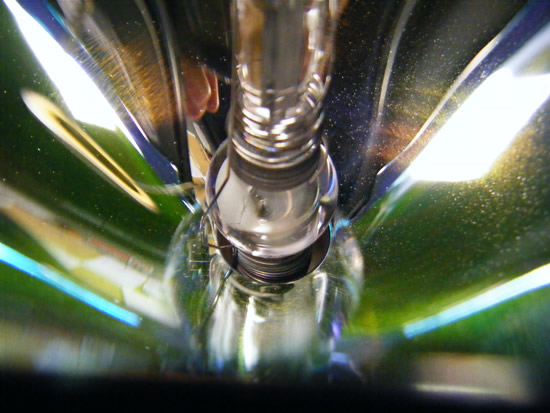
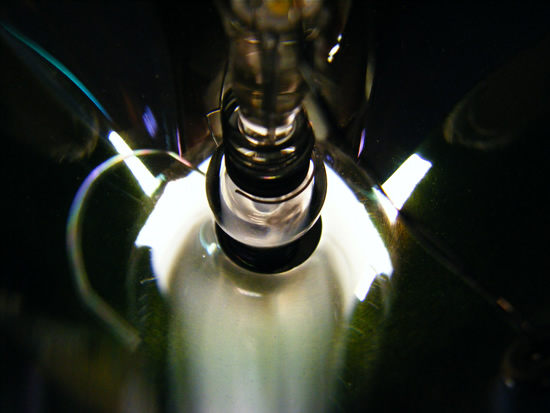
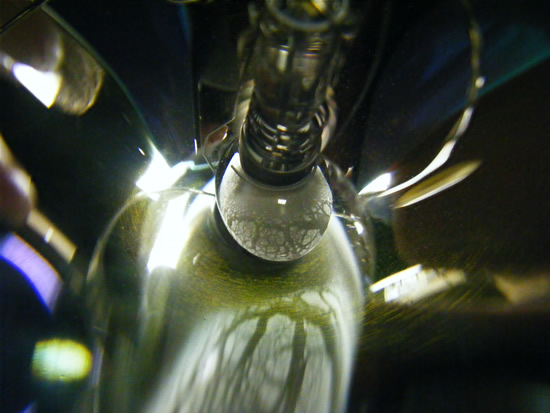
Projectors are Sanyo PLV-80 All of them are acting same way.
Fan is working at low speed (I can understand because when I turn off the projector the lamp is running faster) and I haven't any settings in the menu that allow me to set fan speed...
Posted by Tony Bandiera Jr (Member # 2365) on 02-24-2009, 09:25 PM:
Marco (and Martin if you're turning those projectors on and off multiple times a day)
Quit turning them on and off!! The start cycle on those mini arc lamps is brute force and it kills the bulb!! Absolute minimum on time should be at least 1.5 hours. Each restrike of the lamp is akin to running it for 2-3 hours!!
UC Irvine had the same lamp life issues as they were turning off the vproj's at the end of each class, then turning them back on for the next class. They now turn them on in the morning at first class time and they stay on all day. They now get rated lamp life and more.
Use the "NO Show" or black screen feature to "mute" the video when it's not needed. And if you need a total blackout, it is very easy to adapt a standard "zipper" dowser assembly to move a blade or the lens cap in front of the lens.
john, those lamps are more touchy than a standard Xenon, and must NEVER be touched at all!!
Also be aware of your projection angle, some video projectors aren't designed to handle anything more than a few degrees of tilt..that's what lens shift is for.
Posted by Marco Giustini (Member # 4544) on 02-25-2009, 02:27 AM:
They're used for digital preshow. The mechanical zipper is the only way to do it, the residual light would wash the contrast out. However, when the projector is turned off, it's not turned on for two hours. Do you think that this could cause all of this? 30 minutes doesn't seem a very short time to me. I mean, I'm not turning on and off 10 times a day with 10 minutes rest. However, thanks for your opinion, I'll try to test one of the projector this way.
Marco
Posted by Steve Guttag (Member # 268) on 02-25-2009, 06:59 AM:
We sell those projectors and don't have the lamp life issues with them. However...better than a black screen between clases...use blue screen. Why? Because if you run black too long, you'll kill the blue LCD panel...let the heat through. It also lets the person know that the projector is actually already on.
I believe it is also possible to have the PLV-80 told to run at full fan speed all of the time for improved cooling. Depending on where it is mounted, this could be a noise issue...in a booth, run it at full speed, period and clean the filters WEEKLY.
[Update]. Via RS232, it IS possible to tell the fan to run at full-speed all of the time. It is also possible to, via the service menus, to also tell the fan speed to run at full, though I would have to research that more.
Another thing to try is to put the lamp mode into automatic...this should ratchet downt the lamp power when the image isn't calling for anything bright.
Steve
[ 02-25-2009, 08:50 AM: Message edited by: Steve Guttag ]
Posted by Tony Bandiera Jr (Member # 2365) on 02-25-2009, 02:34 PM:
Hi Marco, please take note of this in my last post:
quote: ME
Absolute minimum on time should be at least 1.5 hours.
It is an issue of the repeated on/off cycles AND the short run time that's killing your lamps. ![[Smile]](smile.gif)
Steve:
I agree with you that blue screen would be the better option, but in the case of most rooms at UCI the screen is HUGE, center stage, and the professors would have problems working in the blast of blue light. ![[Big Grin]](biggrin.gif) As a matter of interest though, I will compare the output of a "white" image on both projectors in my facility to see if the classroom machine is lacking in blue or has other color balance issues. (And yes I'll set all the parameters to the same settings including intensity and color temp.)
As a matter of interest though, I will compare the output of a "white" image on both projectors in my facility to see if the classroom machine is lacking in blue or has other color balance issues. (And yes I'll set all the parameters to the same settings including intensity and color temp.)
I lucked out in the remodel of that room, after a lot of badgering I got them to install a separate video projector for our video programs, as before then we had to use the classroom projector which usually had bad lamps or other issues. Now I have a machine that is over four years old and has barely 120 hours on it. So it always looks great!! (Sanyo multi-verse LCD, the model number escapes me at the moment.)
Posted by Marco Giustini (Member # 4544) on 02-25-2009, 05:36 PM:
Thanks Steve and Tony
Tony
I see. But I can't - at the moment - keep the projector and lamp on during the film projection. It would need both advertising system modifications and the installation of a mechanical dowser to keep the light off the screen.
Steve
As you pointed the fan speed is not an issue in a projection booth! But it cannot be set by the user menu. Can you point me how to enter the service menu? I'll check immediately for the RS232 software.
Thanks!!
Marco
Posted by Steve Guttag (Member # 268) on 02-25-2009, 07:55 PM:
It'll take more digging on the Service menu side and that is a dangerous place to be as many truly Service things are in there and identified only by Group number and data.
For the RS232... issue the following command: CF FANSPEED MAX<cr>
[edited to change the RS232 command to an issued command rather than a "read" command.]
Steve
[ 02-26-2009, 09:17 AM: Message edited by: Steve Guttag ]
Posted by Marco Giustini (Member # 4544) on 02-26-2009, 03:56 AM:
Thanks you Steve.
How can I connect to the PLV? I mean how can I send this command? Something like telnet?
Posted by Steve Guttag (Member # 268) on 02-26-2009, 09:27 AM:
So long as you have the supplied RS232 cables (mini-din to DB9) then most any device will work. The speed is 19,200 N,8,1.
Telnet should work so long as you know how to send the carrage return command as well. I use a program that Ray Derrick of Panalogic wrote called "Serial Talk." I really like it since one can develop command sets to test various processors and such...it also has a decent visual aspect for looking at the send/receive commands.
I'll ask Ray if I can post it here.
Steve
Posted by Marco Giustini (Member # 4544) on 02-26-2009, 01:09 PM:
Hi Steve
Yes, I have the RS232 - Control Port cable.
Is this command permanent? I mean, does it change the fan speed all the time, even after a power cycle?
I will test asap, thanks again for your great help.
Marco
Posted by Steve Guttag (Member # 268) on 02-26-2009, 01:28 PM:
To be honest...I'm not sure...whenever I've used the command it was with a controller so the command was issued each time it was turned on (not necessarily on the PLV-80)...however, if you need to put it back, I believe the command is CF FANSPEED NOR
Steve
Posted by Marco Giustini (Member # 4544) on 02-26-2009, 01:30 PM:
Thanks I'll let you know
Marco
Update: I've succesfully connected to the PLV by Hyperterminal and sent the command you gave me. It's permanent, meaning that I can power cycle or remove power cord but on the next time the fan will be at maximum speed again.
Just for information, with my USB RS232 adapter I had to set to "none" the "flux control" option.
I fitted a brand new lamp. I'll let you know in 100/150 hours!
Is there a way to have the complete RS232 list of commands for future reference?
Thank you Steve.
Marco
[ 03-01-2009, 07:15 PM: Message edited by: Marco Giustini ]
Posted by Marco Giustini (Member # 4544) on 04-20-2009, 06:46 AM:
Hi Steve and everybody
The lamp is now 75 hours old, no signs on it. Usually at least a white spot would have appeared after this time. Another projector I've modified with an almost new (20 hours) lamp already fitted, with already a white spot on it, has now at 105 hours the same white spot, nothing more.
Seems that it works. What about the full list of RS232 commands?
Is there a way to extend the time of cooling after the projector has turned off?
Updates will follow.
Thanks
Marco
Posted by Tarvi Tihhanov (Member # 5345) on 07-09-2009, 01:24 AM:
Hello everyone,
I am new to the forums and the movie business, but i have the same problem here in Estonia. Sanyo plv-80 projectors burn lamps trough every 120-180 work hours.
I have a USB to RS232 cable. Can anyone teach me HOW to turn up the fan speed via telnet or a program? I would really appreciate it.
many thanks in advance
Posted by Steve Guttag (Member # 268) on 07-09-2009, 06:56 AM:
Sanyo is now publishing the RS232 commands.
On the US web site us.sanyo.com...navigate to the commercial/projectors page then select the projector in question, go to resources and there you will find the RS232 command sheets in PDF form.
Note, they also have discontinued models but their resources may be limited.
Here is the PLV-80s expanded command sheet:
http://www.us.sanyo.com/dynamic/product/Downloads/RS232C_Expand-19411916.pdf
Steve
Posted by Marco Giustini (Member # 4544) on 07-09-2009, 06:49 PM:
Thank you Steve.
Too late I'm afraid, I do not work anymore for that company! However, the two projectors I modified before leaving were perfect at 100/120 hours of working.
I read on Christie's web that that kind of lamp is designed to work at very high temperature... I don't know what to think. However, I found that we didn't use original spare lamp. Maybe this was the main cause
Thanks
Marco
Powered by Infopop Corporation
UBB.classicTM
6.3.1.2